Your email CTA is the single point where strategy meets revenue. It does not matter how strong your subject line is or how polished your email copy looks: if the call to action fails to land, the campaign fails. Yet most marketers treat CTAs as an afterthought rather than the deliberate conversion lever they are.
This guide covers the email marketing call to action best practices that actually move click-through rates, backed by current data and real testing results.
Key Takeaways
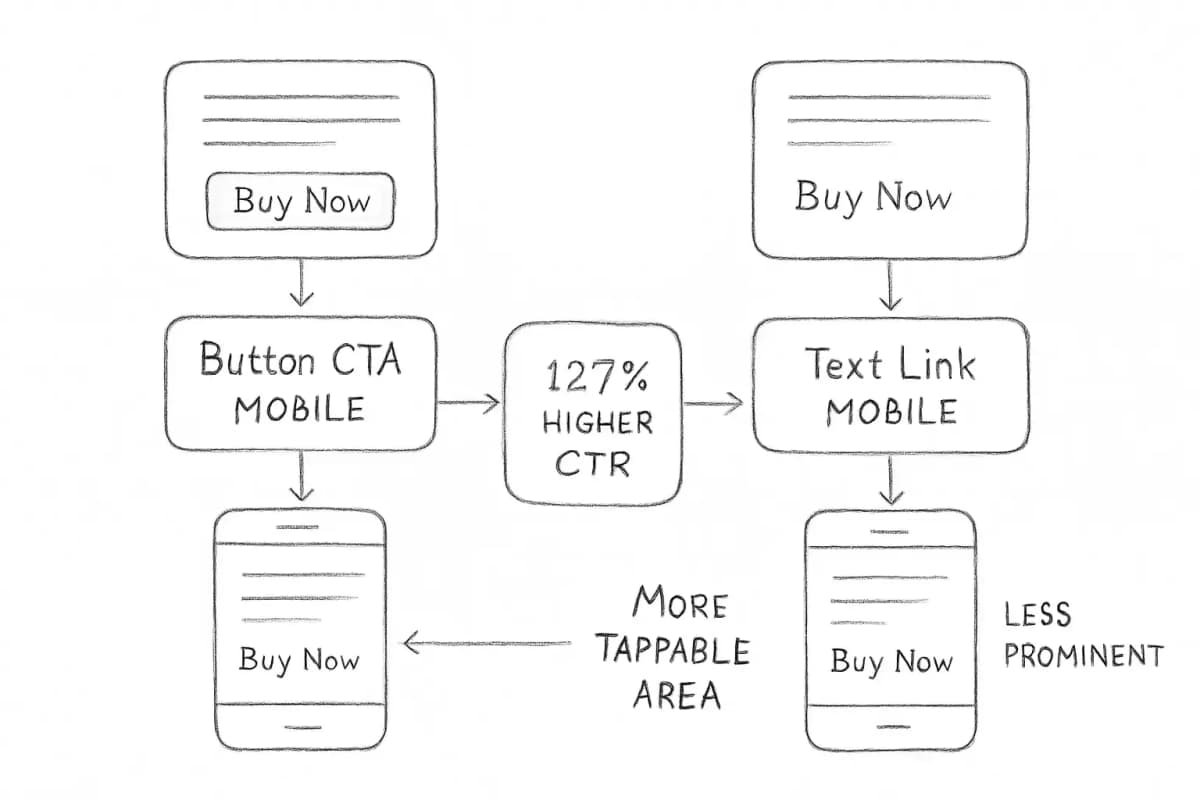
Button-based CTAs improve click-through rates by 127% compared to text links, according to Campaign Monitor research.
Emails with a single CTA receive 371% more clicks compared to those with multiple calls to action.
Personalized CTAs convert 202% better than basic CTAs, based on HubSpot's analysis of over 330,000 CTAs over six months.
Changing CTA button text from second-person to first-person viewpoint improves clicks by 90%.
Adding urgency to CTAs, such as limited-time offers, can increase conversion rates by up to 332%.
Why Your Email CTA Determines Campaign Success
A call to action in email marketing is a directive or prompt placed within an email to encourage recipients to take a specific action. It is typically a concise and compelling phrase accompanied by a clickable button or link that guides the recipient toward a desired goal.
The three most common actions users take after reading a marketing email are making an online purchase (27.1%), visiting a company's website (26.2%), and making a purchase at a retail store (21.6%). Every one of those actions begins with a click. Your CTA is what triggers it.
A well-crafted CTA prompts readers to engage with your content and provides clear direction, guiding recipients on what action to take next, reducing ambiguity and increasing the likelihood of conversion.
Poor CTAs do not just reduce clicks. They waste the goodwill you built with your subject line, your offer, and your copy.
1. Use One Primary CTA Per Email
The most consistent finding across CTA research is that fewer options produce more action. Your goal should be to take your reader down a very specific path. If you give them several options and paths to take, they are typically less likely to end up in the destination that you want. In most cases, it is best to stick to a single CTA.
Your email CTA is the single point where strategy meets revenue. It does not matter how strong your subject line is or how polished your email copy looks: if the call to action fails to land, the campaign fails. Yet most marketers treat CTAs as an afterthought rather than the deliberate conversion lever they are.
This guide covers the email marketing call to action best practices that actually move click-through rates, backed by current data and real testing results.
Key Takeaways
Button-based CTAs improve click-through rates by 127% compared to text links, according to Campaign Monitor research.
Emails with a single CTA receive 371% more clicks compared to those with multiple calls to action.
Personalized CTAs convert 202% better than basic CTAs, based on HubSpot's analysis of over 330,000 CTAs over six months.
Changing CTA button text from second-person to first-person viewpoint improves clicks by 90%.
Adding urgency to CTAs, such as limited-time offers, can increase conversion rates by up to 332%.
Why Your Email CTA Determines Campaign Success
A call to action in email marketing is a directive or prompt placed within an email to encourage recipients to take a specific action. It is typically a concise and compelling phrase accompanied by a clickable button or link that guides the recipient toward a desired goal.
The three most common actions users take after reading a marketing email are making an online purchase (27.1%), visiting a company's website (26.2%), and making a purchase at a retail store (21.6%). Every one of those actions begins with a click. Your CTA is what triggers it.
A well-crafted CTA prompts readers to engage with your content and provides clear direction, guiding recipients on what action to take next, reducing ambiguity and increasing the likelihood of conversion.
Poor CTAs do not just reduce clicks. They waste the goodwill you built with your subject line, your offer, and your copy.
1. Use One Primary CTA Per Email
The most consistent finding across CTA research is that fewer options produce more action. Your goal should be to take your reader down a very specific path. If you give them several options and paths to take, they are typically less likely to end up in the destination that you want. In most cases, it is best to stick to a single CTA.
Giving users too many options can cause decision paralysis, leading to inaction. Stick to one primary CTA per email. If necessary, use a secondary CTA with less emphasis, such as "Learn More" vs. "Buy Now."
The ideal CTA setup is one above the fold for eager customers and a duplicate at the end for hesitant shoppers. In longer emails, duplicate buttons ensure everyone has a chance to take action.
If you run a longer content email (a newsletter, for example), a secondary text link is acceptable. Use secondary CTAs sparingly, ideally below the fold and in text link format, to minimize clutter.
2. Choose Button CTAs Over Text Links
Both styles of CTAs will work to give your readers something to click, but buttons generally perform better than in-line links. Your readers will generally be scanning your copy, so you need to catch their attention quickly. While they might miss a hyperlinked section of text, buttons are more noticeable and can improve your click rates.
Why do buttons outperform links so consistently? Buttons often have design elements that links do not, such as shadows, gradients, and other effects. This can make them pop off the page and stand out to skimmers. Color draws the eye and makes the reader notice them more. When a button is set away from other elements in the email, the whitespace around it creates an area free from distraction, leading the reader right to it.
When you include a call-to-action button in your emails as opposed to a text link, conversion rates can increase by up to 28%.
One technical note: use live text by coding bulletproof buttons instead of making CTA graphics. This retains functionality in every email client and takes dark mode into consideration. Image-based buttons can break or go invisible when images are blocked.
3. Write CTA Copy That Earns the Click
Generic copy is the fastest way to kill CTA performance. The biggest mistake marketers make is using weak, passive language in their CTA. A classic example is "click here." While it may seem like a great CTA in that it tells a subscriber exactly what to do, it does not give a reader any incentive for taking action. It does not describe the value or what will happen if they click the link. You should use language that describes why a user should follow a link.
Effective CTA copy follows a few clear principles:
Use action verbs. Action-oriented language prompts an immediate response. Words like "buy," "subscribe," or "download" move users into action.
Write in first person. Test "Get My" vs. "Get Your" language. First-person CTAs such as "Start My Trial" often outperform second-person ("Start Your Trial") by creating ownership and commitment.
Be specific and brief. First-person verbs like "Secure My Spot" beat vague copy like "Learn More." Tease value ("Get 3 Free Templates" beats "Download") and keep it to two to five words.
Add urgency when it is genuine. CTAs should convey urgent messages that encourage quick, decisive action. Add restrictions, action phrases, and items of exclusivity, such as "Half off for today only" or "Free trial for a limited time."
Giving users too many options can cause decision paralysis, leading to inaction. Stick to one primary CTA per email. If necessary, use a secondary CTA with less emphasis, such as "Learn More" vs. "Buy Now."
The ideal CTA setup is one above the fold for eager customers and a duplicate at the end for hesitant shoppers. In longer emails, duplicate buttons ensure everyone has a chance to take action.
If you run a longer content email (a newsletter, for example), a secondary text link is acceptable. Use secondary CTAs sparingly, ideally below the fold and in text link format, to minimize clutter.
2. Choose Button CTAs Over Text Links
Both styles of CTAs will work to give your readers something to click, but buttons generally perform better than in-line links. Your readers will generally be scanning your copy, so you need to catch their attention quickly. While they might miss a hyperlinked section of text, buttons are more noticeable and can improve your click rates.
Why do buttons outperform links so consistently? Buttons often have design elements that links do not, such as shadows, gradients, and other effects. This can make them pop off the page and stand out to skimmers. Color draws the eye and makes the reader notice them more. When a button is set away from other elements in the email, the whitespace around it creates an area free from distraction, leading the reader right to it.
When you include a call-to-action button in your emails as opposed to a text link, conversion rates can increase by up to 28%.
One technical note: use live text by coding bulletproof buttons instead of making CTA graphics. This retains functionality in every email client and takes dark mode into consideration. Image-based buttons can break or go invisible when images are blocked.
3. Write CTA Copy That Earns the Click
Generic copy is the fastest way to kill CTA performance. The biggest mistake marketers make is using weak, passive language in their CTA. A classic example is "click here." While it may seem like a great CTA in that it tells a subscriber exactly what to do, it does not give a reader any incentive for taking action. It does not describe the value or what will happen if they click the link. You should use language that describes why a user should follow a link.
Effective CTA copy follows a few clear principles:
Use action verbs. Action-oriented language prompts an immediate response. Words like "buy," "subscribe," or "download" move users into action.
Write in first person. Test "Get My" vs. "Get Your" language. First-person CTAs such as "Start My Trial" often outperform second-person ("Start Your Trial") by creating ownership and commitment.
Be specific and brief. First-person verbs like "Secure My Spot" beat vague copy like "Learn More." Tease value ("Get 3 Free Templates" beats "Download") and keep it to two to five words.
Add urgency when it is genuine. CTAs should convey urgent messages that encourage quick, decisive action. Add restrictions, action phrases, and items of exclusivity, such as "Half off for today only" or "Free trial for a limited time."
4. Design for Visibility and Mobile First
CTA design is not decoration. It directly determines whether subscribers see and click your button.
Color is a great way to add contrast. Vibrant colors are generally best at drawing the eye to the CTA. Even if you use muted colors for your CTAs, they need to contrast with any background colors, images beneath the CTA, or surrounding text.
Your CTA font size should be large enough to stand out without overpowering the rest of the email. Typically, 16 to 20 pixels is a good range, but it can vary depending on your email's overall design.
Mobile optimization is non-negotiable. 53% of email is opened on a mobile device, and if an email is not designed for mobile, it is likely to be deleted in under three seconds, with as many as 15% of users unsubscribing.
Make buttons large enough for a thumb to tap without zooming. Tiny buttons frustrate users. As a guideline, ensure the tappable area is at least 44x44 pixels (Apple's recommendation for touch targets). Also give it some padding space from other elements, as no one likes trying to tap a link and accidentally hitting something else.
Use larger, tappable buttons that are easy to click on small screens, and test how they render on different devices. Avoid placing CTAs too close to other elements to prevent accidental clicks.
5. Personalize Your CTAs to the Subscriber
This is where the biggest gains live. After analyzing and comparing more than 330,000 CTAs over a six-month timeframe, HubSpot discovered that personalized CTAs convert 202% better than basic CTAs. That is because when it comes to personalized CTAs, you are putting content in front of your audience that aligns with their buyer's journey and resonates with their interests.
Personalized CTAs often occupy the exact same spot on a page as the default ones. The only difference is the messaging and offer matched to the user's profile or stage. This suggests that much of the friction in a conversion funnel is about relevance. When the CTA feels hand-picked for the user, they are far more likely to click.
Practically, personalization at the CTA level means matching the button copy and offer to:
The subscriber's lifecycle stage (new subscriber vs. returning customer)
Segment's 2025 report shows AI-powered dynamic CTAs tailored to individual users can improve conversion rates by up to 44%. Tools like Klaviyo, ActiveCampaign, and HubSpot support dynamic CTA blocks out of the box.
6. Place Your CTA Strategically Within the Email
4. Design for Visibility and Mobile First
CTA design is not decoration. It directly determines whether subscribers see and click your button.
Color is a great way to add contrast. Vibrant colors are generally best at drawing the eye to the CTA. Even if you use muted colors for your CTAs, they need to contrast with any background colors, images beneath the CTA, or surrounding text.
Your CTA font size should be large enough to stand out without overpowering the rest of the email. Typically, 16 to 20 pixels is a good range, but it can vary depending on your email's overall design.
Mobile optimization is non-negotiable. 53% of email is opened on a mobile device, and if an email is not designed for mobile, it is likely to be deleted in under three seconds, with as many as 15% of users unsubscribing.
Make buttons large enough for a thumb to tap without zooming. Tiny buttons frustrate users. As a guideline, ensure the tappable area is at least 44x44 pixels (Apple's recommendation for touch targets). Also give it some padding space from other elements, as no one likes trying to tap a link and accidentally hitting something else.
Use larger, tappable buttons that are easy to click on small screens, and test how they render on different devices. Avoid placing CTAs too close to other elements to prevent accidental clicks.
5. Personalize Your CTAs to the Subscriber
This is where the biggest gains live. After analyzing and comparing more than 330,000 CTAs over a six-month timeframe, HubSpot discovered that personalized CTAs convert 202% better than basic CTAs. That is because when it comes to personalized CTAs, you are putting content in front of your audience that aligns with their buyer's journey and resonates with their interests.
Personalized CTAs often occupy the exact same spot on a page as the default ones. The only difference is the messaging and offer matched to the user's profile or stage. This suggests that much of the friction in a conversion funnel is about relevance. When the CTA feels hand-picked for the user, they are far more likely to click.
Practically, personalization at the CTA level means matching the button copy and offer to:
The subscriber's lifecycle stage (new subscriber vs. returning customer)
Segment's 2025 report shows AI-powered dynamic CTAs tailored to individual users can improve conversion rates by up to 44%. Tools like Klaviyo, ActiveCampaign, and HubSpot support dynamic CTA blocks out of the box.
6. Place Your CTA Strategically Within the Email
Placement affects whether a subscriber ever sees your CTA, not just whether they click it.
Where you place links within your email dramatically affects click probability. Not all positions are created equal. The highest click probability goes to the hero image area (the first visual element that captures peak attention), followed by above the fold (visible without scrolling on most devices), then inline text links within compelling, benefit-focused copy.
For most promotional emails, lead with your core offer and place the primary CTA high in the layout. A primary CTA is the main action you want the recipient to take. It is usually placed above the fold, bold, and stands out in the body to ensure that the recipient notices it.
Your CTA button or link directs recipients to a destination after they click. It is crucial that the destination aligns with the CTA's intent, whether it leads to a landing page, sign-up form, blog post, or other targeted destination.
One alignment issue that kills conversions: subject lines set expectations. When they accurately promise what content delivers, CTR increases. Misleading subjects damage trust and suppress clicks. Your CTA and its landing page need to continue the same conversation your subject line started.
7. A/B Test Every CTA Variable Systematically
No amount of best-practice reading replaces actual data from your own audience. A/B testing is an invaluable tool in optimizing CTAs for maximum impact. It involves comparing two variations of a CTA to determine which performs better. When conducting A/B tests for CTAs, start by isolating a single variable, such as the text, color, size, or placement.
HubSpot reports that marketers who consistently test their CTAs see about a 28% lift in conversion performance on average.
Test these elements one at a time:
Button copy (first-person vs. second-person, specific vs. generic)
Button color against your email background
CTA placement (above the fold vs. end of email vs. both)
Button size and surrounding whitespace
Urgency language vs. benefit-focused language
The insights from A/B testing enable marketers to refine CTAs, identify the most effective elements, and make data-driven decisions to enhance overall campaign success.
Track click-through rate as your primary CTA metric, but always tie results back to the conversion or revenue outcome. A high CTR that produces no conversions means your CTA is attracting the wrong click or your landing page is the problem. For a complete framework on reading these numbers, see Email Marketing Analytics Best Practices.
8. Match CTAs to Audience Intent and Funnel Stage
A subscriber who just signed up has different intent than someone who has purchased twice. Sending both the same "Buy Now" CTA is a missed opportunity at best and an off-putting push at worst.
Placement affects whether a subscriber ever sees your CTA, not just whether they click it.
Where you place links within your email dramatically affects click probability. Not all positions are created equal. The highest click probability goes to the hero image area (the first visual element that captures peak attention), followed by above the fold (visible without scrolling on most devices), then inline text links within compelling, benefit-focused copy.
For most promotional emails, lead with your core offer and place the primary CTA high in the layout. A primary CTA is the main action you want the recipient to take. It is usually placed above the fold, bold, and stands out in the body to ensure that the recipient notices it.
Your CTA button or link directs recipients to a destination after they click. It is crucial that the destination aligns with the CTA's intent, whether it leads to a landing page, sign-up form, blog post, or other targeted destination.
One alignment issue that kills conversions: subject lines set expectations. When they accurately promise what content delivers, CTR increases. Misleading subjects damage trust and suppress clicks. Your CTA and its landing page need to continue the same conversation your subject line started.
7. A/B Test Every CTA Variable Systematically
No amount of best-practice reading replaces actual data from your own audience. A/B testing is an invaluable tool in optimizing CTAs for maximum impact. It involves comparing two variations of a CTA to determine which performs better. When conducting A/B tests for CTAs, start by isolating a single variable, such as the text, color, size, or placement.
HubSpot reports that marketers who consistently test their CTAs see about a 28% lift in conversion performance on average.
Test these elements one at a time:
Button copy (first-person vs. second-person, specific vs. generic)
Button color against your email background
CTA placement (above the fold vs. end of email vs. both)
Button size and surrounding whitespace
Urgency language vs. benefit-focused language
The insights from A/B testing enable marketers to refine CTAs, identify the most effective elements, and make data-driven decisions to enhance overall campaign success.
Track click-through rate as your primary CTA metric, but always tie results back to the conversion or revenue outcome. A high CTR that produces no conversions means your CTA is attracting the wrong click or your landing page is the problem. For a complete framework on reading these numbers, see Email Marketing Analytics Best Practices.
8. Match CTAs to Audience Intent and Funnel Stage
A subscriber who just signed up has different intent than someone who has purchased twice. Sending both the same "Buy Now" CTA is a missed opportunity at best and an off-putting push at worst.
A secondary CTA offers an alternative or supporting action for users who may not yet be ready to complete the primary action. It is usually less prominent but still encourages engagement, providing a backup option that often nurtures leads such as learning more, exploring products, or completing profiles.
Instead of a direct "Buy Now" button, leading with a clear "See Details" CTA invites users to explore the offer without feeling pressured. While some may be ready to purchase immediately, most need time to understand the value proposition before committing.
Map your CTAs to where the subscriber sits:
Top of funnel: "Read the Guide," "See How It Works," "Watch the Demo"
Mid funnel: "Start Your Free Trial," "Get a Custom Quote," "Compare Plans"
Bottom of funnel: "Buy Now," "Claim Your Discount," "Complete Your Order"
For campaigns built around a specific audience journey, Welcome Email Sequence Best Practices: 7 Proven Strategies shows how to align CTAs at each stage of onboarding.
Frequently Asked Questions
How many CTAs should an email have?
Most experts agree that you should use at most two CTAs in one email. Usually, one CTA is enough to serve the needs of the email, even though you can add a secondary CTA. That way, you strengthen the message of the email and help funnel the recipient to the action. For transactional or promotional emails, one focused CTA consistently outperforms multiple competing options.
What is the best CTA button color for email?
There is no single magic color for all CTAs. Context and contrast are key. The best practice is to choose a color that contrasts strongly with your email or webpage background and fits your brand palette. High contrast makes the button pop. Colors evoke emotions. Red creates urgency, green suggests trust, and blue conveys reliability. Test options within your brand palette rather than chasing a universal winner.
Should CTA button text use first person or second person?
First-person phrasing consistently outperforms second-person in testing. When text in a call-to-action button is changed from second-person viewpoint to first-person viewpoint, clicks improve by 90%. "Get My Free Guide" tends to outperform "Get Your Free Guide" because it creates a sense of personal ownership over the offer.
How do I know if my email CTA is performing well?
A secondary CTA offers an alternative or supporting action for users who may not yet be ready to complete the primary action. It is usually less prominent but still encourages engagement, providing a backup option that often nurtures leads such as learning more, exploring products, or completing profiles.
Instead of a direct "Buy Now" button, leading with a clear "See Details" CTA invites users to explore the offer without feeling pressured. While some may be ready to purchase immediately, most need time to understand the value proposition before committing.
Map your CTAs to where the subscriber sits:
Top of funnel: "Read the Guide," "See How It Works," "Watch the Demo"
Mid funnel: "Start Your Free Trial," "Get a Custom Quote," "Compare Plans"
Bottom of funnel: "Buy Now," "Claim Your Discount," "Complete Your Order"
For campaigns built around a specific audience journey, Welcome Email Sequence Best Practices: 7 Proven Strategies shows how to align CTAs at each stage of onboarding.
Frequently Asked Questions
How many CTAs should an email have?
Most experts agree that you should use at most two CTAs in one email. Usually, one CTA is enough to serve the needs of the email, even though you can add a secondary CTA. That way, you strengthen the message of the email and help funnel the recipient to the action. For transactional or promotional emails, one focused CTA consistently outperforms multiple competing options.
What is the best CTA button color for email?
There is no single magic color for all CTAs. Context and contrast are key. The best practice is to choose a color that contrasts strongly with your email or webpage background and fits your brand palette. High contrast makes the button pop. Colors evoke emotions. Red creates urgency, green suggests trust, and blue conveys reliability. Test options within your brand palette rather than chasing a universal winner.
Should CTA button text use first person or second person?
First-person phrasing consistently outperforms second-person in testing. When text in a call-to-action button is changed from second-person viewpoint to first-person viewpoint, clicks improve by 90%. "Get My Free Guide" tends to outperform "Get Your Free Guide" because it creates a sense of personal ownership over the offer.
How do I know if my email CTA is performing well?
Click-through rate (CTR) is the percentage of people who clicked on your CTA and is your primary indicator of how well your CTA is performing. A high CTR means your content is compelling and your button is attractive. Conversion rate is the percentage of people who clicked the CTA and then completed the desired action on your landing page, whether that is making a purchase, signing up, or downloading a resource. Track both to get a complete picture, and benchmark against your own historical campaigns rather than industry averages alone.
No comments yet. Be the first!
Click-through rate (CTR) is the percentage of people who clicked on your CTA and is your primary indicator of how well your CTA is performing. A high CTR means your content is compelling and your button is attractive. Conversion rate is the percentage of people who clicked the CTA and then completed the desired action on your landing page, whether that is making a purchase, signing up, or downloading a resource. Track both to get a complete picture, and benchmark against your own historical campaigns rather than industry averages alone.