Every email campaign that misses a step before sending costs money. A broken link, a missing unsubscribe option, or an email that renders as a wall of text on mobile can erase the revenue an otherwise solid campaign would have generated. Email delivers an average ROI of $36 for every $1 spent, but only when campaigns are executed with discipline. A thorough email marketing campaign checklist is how you protect that return, every single send.
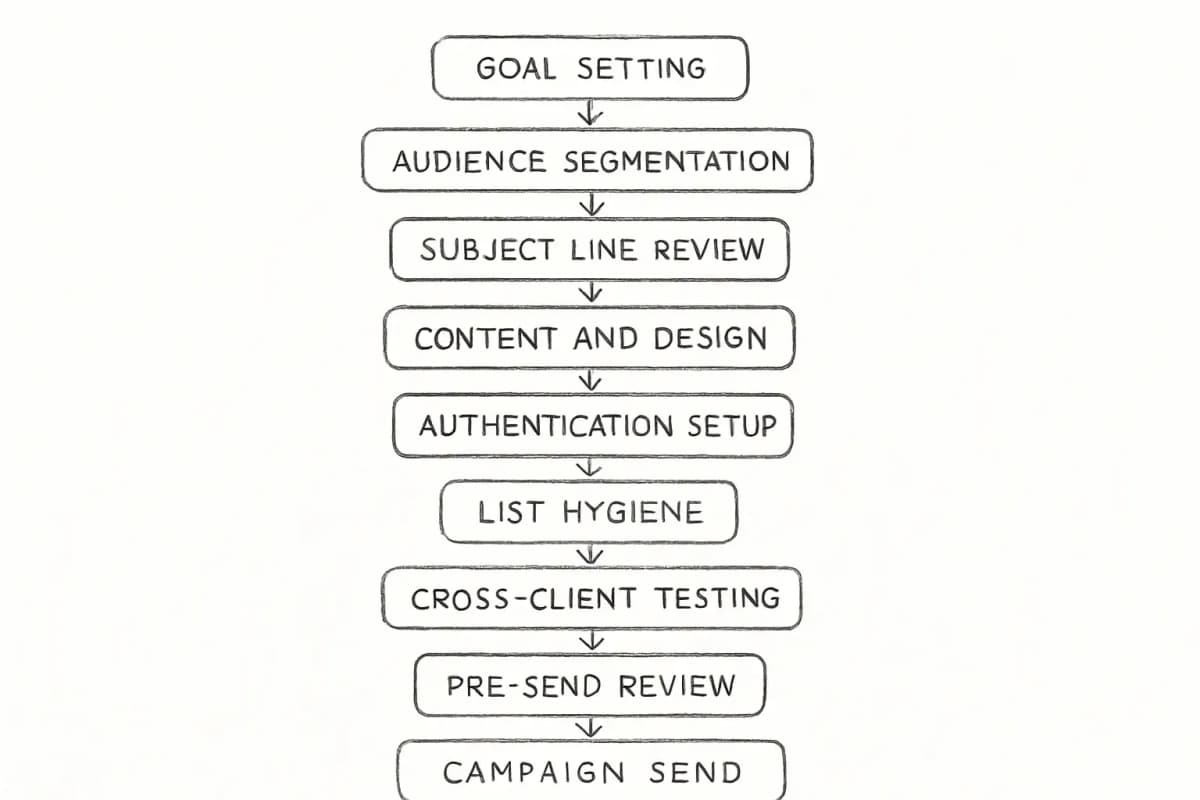
This guide breaks down 12 concrete steps to complete before, during, and after every campaign. Work through them in order and you will not miss anything that matters.
Key Takeaways
Marketers who A/B test their emails often increase email ROI by 86% compared to those who never do.
With over 55% of emails opened on mobile, and 75% of users deleting non-optimized messages, mobile-first email design is now a non-negotiable driver of engagement, clicks, and ROI.
According to Validity's 2025 Email Deliverability Benchmark Report, one in six legitimate marketing emails now fails to reach the inbox, and global inbox placement rates declined to 83.5% in 2024.
Marketers have witnessed a 760% increase in revenue from segmented email campaigns, according to Campaign Monitor.
Automated emails drive 320% more revenue than non-automated emails.
Step 1: Define a Clear Campaign Goal and KPI
The first and most important step when planning your email marketing campaigns is setting up clear goals and sticking to them. If your goal is to sell a product, the campaign should be focused on it and avoid adding additional info that can divert user attention.
Vague goals produce vague results. Before writing a single word of copy, answer:
What action do you want recipients to take?
How will you measure success?
What is the target metric (open rate, click-through rate, revenue, conversions)?
If the email campaign is to sell a product, your primary KPIs should be click-through rate and conversion rate. If you want to use email marketing for informational content such as newsletters, your KPIs should be based on open rate and engagement.
One campaign. One primary goal. One primary KPI.
Every email campaign that misses a step before sending costs money. A broken link, a missing unsubscribe option, or an email that renders as a wall of text on mobile can erase the revenue an otherwise solid campaign would have generated. Email delivers an average ROI of $36 for every $1 spent, but only when campaigns are executed with discipline. A thorough email marketing campaign checklist is how you protect that return, every single send.
This guide breaks down 12 concrete steps to complete before, during, and after every campaign. Work through them in order and you will not miss anything that matters.
Key Takeaways
Marketers who A/B test their emails often increase email ROI by 86% compared to those who never do.
With over 55% of emails opened on mobile, and 75% of users deleting non-optimized messages, mobile-first email design is now a non-negotiable driver of engagement, clicks, and ROI.
According to Validity's 2025 Email Deliverability Benchmark Report, one in six legitimate marketing emails now fails to reach the inbox, and global inbox placement rates declined to 83.5% in 2024.
Marketers have witnessed a 760% increase in revenue from segmented email campaigns, according to Campaign Monitor.
Automated emails drive 320% more revenue than non-automated emails.
Step 1: Define a Clear Campaign Goal and KPI
The first and most important step when planning your email marketing campaigns is setting up clear goals and sticking to them. If your goal is to sell a product, the campaign should be focused on it and avoid adding additional info that can divert user attention.
Vague goals produce vague results. Before writing a single word of copy, answer:
What action do you want recipients to take?
How will you measure success?
What is the target metric (open rate, click-through rate, revenue, conversions)?
If the email campaign is to sell a product, your primary KPIs should be click-through rate and conversion rate. If you want to use email marketing for informational content such as newsletters, your KPIs should be based on open rate and engagement.
One campaign. One primary goal. One primary KPI.
Step 2: Segment Your Audience
Sending the same email to your entire list is one of the most common ways teams leave revenue on the table. Marketers have witnessed a 760% increase in revenue from segmented email campaigns, according to Campaign Monitor.
According to a HubSpot survey, 65% of marketers say their segmented emails have better open rates.
Segment by what you know: purchase history, geographic location, engagement level, job role, or stage in the customer lifecycle. The more relevant the message, the more likely it is to convert. For a deeper look at how to build segments that move the needle, read our guide on email list segmentation strategies that boost ROI by 760%.
Step 3: Write and Refine the Subject Line
Your subject line is generally where your recipients decide whether they'll open your email or continue scrolling through their overcrowded inbox.
47% of recipients open emails based solely on the subject line, while 69% report emails as spam for the same reason. That means the same five to seven words either earn the open or earn the spam report.
Before you lock in your subject line, check it against these criteria:
Is it under 50 characters for reliable mobile display?
Does it set an accurate expectation for the email content?
Does it avoid spam trigger words (free, winner, guaranteed, !!!)?
Is there a clear reason to open now?
For proven frameworks backed by open rate data, see our article on email subject line best practices that boost open rates by 27%.
Step 4: Optimize the Preheader and From Name
Most marketers spend time on the subject line and overlook the preheader, which is the short preview text that appears beside the subject line in most inboxes. Together, the from name, subject line, and preheader determine whether the email gets opened.
A shocking 68% of Americans decide whether to open an email based on how distinctive the "From" name appears.
Use a real person's name or a recognizable brand name. Avoid "noreply@" addresses. Write preheader text that adds context to the subject line rather than repeating it.
Step 5: Personalize the Content
71% of consumers expect personalized interactions from brands, and 76% get frustrated when their brand interactions aren't personalized to their interests.
Emails with personalization reach 29% open rates compared to the industry average of 21.33%, and click-through rates hit 41% for personalized messages.
Personalization extends far beyond inserting a first name. Effective personalization includes:
Step 2: Segment Your Audience
Sending the same email to your entire list is one of the most common ways teams leave revenue on the table. Marketers have witnessed a 760% increase in revenue from segmented email campaigns, according to Campaign Monitor.
According to a HubSpot survey, 65% of marketers say their segmented emails have better open rates.
Segment by what you know: purchase history, geographic location, engagement level, job role, or stage in the customer lifecycle. The more relevant the message, the more likely it is to convert. For a deeper look at how to build segments that move the needle, read our guide on email list segmentation strategies that boost ROI by 760%.
Step 3: Write and Refine the Subject Line
Your subject line is generally where your recipients decide whether they'll open your email or continue scrolling through their overcrowded inbox.
47% of recipients open emails based solely on the subject line, while 69% report emails as spam for the same reason. That means the same five to seven words either earn the open or earn the spam report.
Before you lock in your subject line, check it against these criteria:
Is it under 50 characters for reliable mobile display?
Does it set an accurate expectation for the email content?
Does it avoid spam trigger words (free, winner, guaranteed, !!!)?
Is there a clear reason to open now?
For proven frameworks backed by open rate data, see our article on email subject line best practices that boost open rates by 27%.
Step 4: Optimize the Preheader and From Name
Most marketers spend time on the subject line and overlook the preheader, which is the short preview text that appears beside the subject line in most inboxes. Together, the from name, subject line, and preheader determine whether the email gets opened.
A shocking 68% of Americans decide whether to open an email based on how distinctive the "From" name appears.
Use a real person's name or a recognizable brand name. Avoid "noreply@" addresses. Write preheader text that adds context to the subject line rather than repeating it.
Step 5: Personalize the Content
71% of consumers expect personalized interactions from brands, and 76% get frustrated when their brand interactions aren't personalized to their interests.
Emails with personalization reach 29% open rates compared to the industry average of 21.33%, and click-through rates hit 41% for personalized messages.
Personalization extends far beyond inserting a first name. Effective personalization includes:
Product recommendations based on past purchases
Lifecycle stage content (new subscriber vs. repeat buyer)
Dynamic content blocks that change based on segment data
Behavioral triggers such as browse abandonment or re-engagement
For techniques beyond basic name insertion, read our resource on email personalization techniques that boost conversions 47%.
Step 6: Check the Email Copy and Design
Before sending, conduct a structured content and design review. Move through this section systematically.
Content checklist:
Does the opening sentence deliver the value proposition immediately?
Is the copy free of typos and grammatical errors?
Is there one primary call-to-action (CTA), clearly visible?
Does the copy match the tone and promise of the subject line?
Design checklist:
Most people check email on mobile devices, so your email designs must be responsive across all mobile devices. Use larger CTA buttons with enough spacing to prevent accidental clicks.
Do images have descriptive alt text for recipients with images turned off?
Is the email free of large image files that cause slow load times?
Your email design will decide if your audience stays and reads or ignores the email altogether, as readability and visual elements are crucial for the user experience.
Step 7: Verify Technical Setup and Deliverability
Before February 2024, email authentication was a best practice. After it, authentication became a prerequisite for delivery to the world's largest mailbox providers: Gmail's bulk senders must implement SPF, DKIM, and DMARC.
SPF is an email authentication method that allows the domain owner to specify which mail servers are authorized to send emails on behalf of their domain, working by publishing a DNS record that lists the authorized mail servers.
DKIM adds a digital signature to the email message's header, generated using a private key held by the sender and verified by recipients using a public key published in the sender's DNS records, helping verify the integrity and authenticity of the email.
Gmail and Yahoo now enforce a spam complaint rate threshold of 0.3% and require one-click unsubscribe for bulk senders.
Before every send, confirm:
SPF, DKIM, and DMARC records are in place and passing
Your spam complaint rate is below 0.1% (the recommended safe threshold)
A one-click unsubscribe link is visible and functional
Hard bounces from previous campaigns have been removed from your list
Step 8: Clean and Verify Your List
Product recommendations based on past purchases
Lifecycle stage content (new subscriber vs. repeat buyer)
Dynamic content blocks that change based on segment data
Behavioral triggers such as browse abandonment or re-engagement
For techniques beyond basic name insertion, read our resource on email personalization techniques that boost conversions 47%.
Step 6: Check the Email Copy and Design
Before sending, conduct a structured content and design review. Move through this section systematically.
Content checklist:
Does the opening sentence deliver the value proposition immediately?
Is the copy free of typos and grammatical errors?
Is there one primary call-to-action (CTA), clearly visible?
Does the copy match the tone and promise of the subject line?
Design checklist:
Most people check email on mobile devices, so your email designs must be responsive across all mobile devices. Use larger CTA buttons with enough spacing to prevent accidental clicks.
Do images have descriptive alt text for recipients with images turned off?
Is the email free of large image files that cause slow load times?
Your email design will decide if your audience stays and reads or ignores the email altogether, as readability and visual elements are crucial for the user experience.
Step 7: Verify Technical Setup and Deliverability
Before February 2024, email authentication was a best practice. After it, authentication became a prerequisite for delivery to the world's largest mailbox providers: Gmail's bulk senders must implement SPF, DKIM, and DMARC.
SPF is an email authentication method that allows the domain owner to specify which mail servers are authorized to send emails on behalf of their domain, working by publishing a DNS record that lists the authorized mail servers.
DKIM adds a digital signature to the email message's header, generated using a private key held by the sender and verified by recipients using a public key published in the sender's DNS records, helping verify the integrity and authenticity of the email.
Gmail and Yahoo now enforce a spam complaint rate threshold of 0.3% and require one-click unsubscribe for bulk senders.
Before every send, confirm:
SPF, DKIM, and DMARC records are in place and passing
Your spam complaint rate is below 0.1% (the recommended safe threshold)
A one-click unsubscribe link is visible and functional
Hard bounces from previous campaigns have been removed from your list
Step 8: Clean and Verify Your List
List quality directly determines deliverability. Only 25% of senders maintain spam complaint rates below the 0.1% best-practice threshold, and 38.7% of senders rarely or never practice email list hygiene.
Subscribers' preferences may change; they might unsubscribe or stop engaging. Sending emails to them will affect your deliverability as it signals to ISPs that you might be sending irrelevant and unwanted emails.
A clean list sends the right signals to mailbox providers. Before each campaign:
Remove hard bounce addresses immediately from your previous send
Suppress subscribers who have not engaged in 90 to 180 days (run a re-engagement campaign first)
Use double opt-in for new sign-ups to prevent invalid addresses from entering your list
Step 9: Test Before Sending
One of the most important steps is to test your email before sending. This gives you a chance to identify any rendering issues, typos, broken links, and potentially spammy elements. If your recipients can't see or read your email, they can't engage, which can have lasting consequences on your sender reputation.
Your pre-send test should cover:
Send a test to at least three major email clients (Gmail, Outlook, Apple Mail)
Check rendering on both mobile and desktop
Click every link to confirm each one works and tracks correctly
Confirm the unsubscribe link works and processes within 10 business days
Verify personalization tokens (e.g., {{first_name}}) pull the correct data and have a fallback for missing values
Run the email through a spam score tool such as Mail-Tester before the final send
Step 10: Set Your Send Time
Timing affects open rates, but the right time varies by audience and industry.
Tuesday sees the highest open rates, with 11 AM being the best time for opens and clicks, according to OptinMonster and Statista data. These are averages across industries, not guarantees for your specific list.
Sending emails once a month had the highest open rate at 28%, with 2 to 4 emails a month following closely behind.
The most reliable approach is to A/B test send times with your own audience data. Most modern email service providers offer send-time optimization tools that use recipient behavior history to time each send individually. That one adjustment tends to produce consistent engagement lifts without any changes to the email itself.
Step 11: Run an A/B Test
Marketers who A/B test their emails often increase email ROI by 86% compared to those who never test.
Every campaign is an opportunity to learn something about your audience. Effective A/B testing requires discipline:
List quality directly determines deliverability. Only 25% of senders maintain spam complaint rates below the 0.1% best-practice threshold, and 38.7% of senders rarely or never practice email list hygiene.
Subscribers' preferences may change; they might unsubscribe or stop engaging. Sending emails to them will affect your deliverability as it signals to ISPs that you might be sending irrelevant and unwanted emails.
A clean list sends the right signals to mailbox providers. Before each campaign:
Remove hard bounce addresses immediately from your previous send
Suppress subscribers who have not engaged in 90 to 180 days (run a re-engagement campaign first)
Use double opt-in for new sign-ups to prevent invalid addresses from entering your list
Step 9: Test Before Sending
One of the most important steps is to test your email before sending. This gives you a chance to identify any rendering issues, typos, broken links, and potentially spammy elements. If your recipients can't see or read your email, they can't engage, which can have lasting consequences on your sender reputation.
Your pre-send test should cover:
Send a test to at least three major email clients (Gmail, Outlook, Apple Mail)
Check rendering on both mobile and desktop
Click every link to confirm each one works and tracks correctly
Confirm the unsubscribe link works and processes within 10 business days
Verify personalization tokens (e.g., {{first_name}}) pull the correct data and have a fallback for missing values
Run the email through a spam score tool such as Mail-Tester before the final send
Step 10: Set Your Send Time
Timing affects open rates, but the right time varies by audience and industry.
Tuesday sees the highest open rates, with 11 AM being the best time for opens and clicks, according to OptinMonster and Statista data. These are averages across industries, not guarantees for your specific list.
Sending emails once a month had the highest open rate at 28%, with 2 to 4 emails a month following closely behind.
The most reliable approach is to A/B test send times with your own audience data. Most modern email service providers offer send-time optimization tools that use recipient behavior history to time each send individually. That one adjustment tends to produce consistent engagement lifts without any changes to the email itself.
Step 11: Run an A/B Test
Marketers who A/B test their emails often increase email ROI by 86% compared to those who never test.
Every campaign is an opportunity to learn something about your audience. Effective A/B testing requires discipline:
Test one variable at a time. Change the subject line or the CTA, not both.
Ensure sufficient subscribers receive each test variant so results are statistically significant, meaning the winner is truly the better performer and not a random fluctuation.
Apply the winning version to future campaigns and build your knowledge base over time.
Common variables worth testing: subject line, from name, CTA copy, CTA button color, send time, email length, and personalization in the subject line.
Step 12: Measure, Report, and Iterate
According to Litmus' State of Email Analytics Report, less than a fifth of brands measure their email marketing ROI. That gap is where competitive advantage lives.
After each campaign, measure:
Open rate (benchmark: industry average is 32.55% across all sectors, per Constant Contact)
Click-through rate (average is 2.03% across industries)
Conversion rate
Unsubscribe rate (keep below 0.5%)
Revenue per email or revenue per recipient
Bot-driven phantom engagement has made open rates unreliable, pushing high-performing teams toward revenue per email, list churn, and lifetime value as the metrics that matter.
Document what you learned, update your email marketing checklist with any new steps specific to your setup, and carry your findings into the next campaign.
Test one variable at a time. Change the subject line or the CTA, not both.
Ensure sufficient subscribers receive each test variant so results are statistically significant, meaning the winner is truly the better performer and not a random fluctuation.
Apply the winning version to future campaigns and build your knowledge base over time.
Common variables worth testing: subject line, from name, CTA copy, CTA button color, send time, email length, and personalization in the subject line.
Step 12: Measure, Report, and Iterate
According to Litmus' State of Email Analytics Report, less than a fifth of brands measure their email marketing ROI. That gap is where competitive advantage lives.
After each campaign, measure:
Open rate (benchmark: industry average is 32.55% across all sectors, per Constant Contact)
Click-through rate (average is 2.03% across industries)
Conversion rate
Unsubscribe rate (keep below 0.5%)
Revenue per email or revenue per recipient
Bot-driven phantom engagement has made open rates unreliable, pushing high-performing teams toward revenue per email, list churn, and lifetime value as the metrics that matter.
Document what you learned, update your email marketing checklist with any new steps specific to your setup, and carry your findings into the next campaign.
What should be on an email marketing campaign checklist?
A complete email marketing checklist covers goal setting, audience segmentation, subject line review, content and design checks, technical authentication (SPF, DKIM, DMARC), list hygiene, cross-client testing, send time optimization, A/B testing setup, and post-send analytics review. Working through all 12 steps above before each send reduces errors and protects deliverability.
How often should I clean my email list?
Do regular email list cleaning by removing inactive subscribers at least once or twice a year. In practice, high-volume senders benefit from a more active suppression process: remove hard bounces after every send, and run re-engagement campaigns for subscribers who have not opened or clicked in 90 to 180 days before removing them permanently.
Why is my email going to spam even though I have SPF and DKIM?
SPF and DKIM are a baseline requirement, not a guarantee of inbox placement. Even with them you can still be filtered if you hit bad lists, send too fast, or generate complaints. Mailbox providers look at engagement and reputation signals including opens, clicks, replies, bounces, and spam complaints on top of authentication. Check your spam complaint rate in Google Postmaster Tools. If it exceeds 0.1%, treat it as a priority issue and suppress unengaged contacts before your next send.
What is the best time to send a marketing email?
Tuesday sees the highest open rates on average, with 11 AM being the best time for opens and clicks, according to OptinMonster and Statista data. However, the best time for your list depends on your specific audience. A/B test send times and use your email service provider's send-time optimization feature if available. Results from your own data will always outperform industry averages.
How many emails should I send per month?
Segmented email campaigns generate 30% more opens and 50% more click-throughs than non-segmented campaigns. Frequency matters less than relevance. Sending 5 to 8 emails per month shows the highest ROI at about $48 per $1 spent. For B2B audiences, most companies find emailing twice a month optimal, as increasing frequency to more than once a week significantly boosts the unsubscribe rate. Start conservative, monitor unsubscribe rates, and increase frequency only when you have enough relevant content to justify it.
No comments yet. Be the first!
Frequently Asked Questions
What should be on an email marketing campaign checklist?
A complete email marketing checklist covers goal setting, audience segmentation, subject line review, content and design checks, technical authentication (SPF, DKIM, DMARC), list hygiene, cross-client testing, send time optimization, A/B testing setup, and post-send analytics review. Working through all 12 steps above before each send reduces errors and protects deliverability.
How often should I clean my email list?
Do regular email list cleaning by removing inactive subscribers at least once or twice a year. In practice, high-volume senders benefit from a more active suppression process: remove hard bounces after every send, and run re-engagement campaigns for subscribers who have not opened or clicked in 90 to 180 days before removing them permanently.
Why is my email going to spam even though I have SPF and DKIM?
SPF and DKIM are a baseline requirement, not a guarantee of inbox placement. Even with them you can still be filtered if you hit bad lists, send too fast, or generate complaints. Mailbox providers look at engagement and reputation signals including opens, clicks, replies, bounces, and spam complaints on top of authentication. Check your spam complaint rate in Google Postmaster Tools. If it exceeds 0.1%, treat it as a priority issue and suppress unengaged contacts before your next send.
What is the best time to send a marketing email?
Tuesday sees the highest open rates on average, with 11 AM being the best time for opens and clicks, according to OptinMonster and Statista data. However, the best time for your list depends on your specific audience. A/B test send times and use your email service provider's send-time optimization feature if available. Results from your own data will always outperform industry averages.
How many emails should I send per month?
Segmented email campaigns generate 30% more opens and 50% more click-throughs than non-segmented campaigns. Frequency matters less than relevance. Sending 5 to 8 emails per month shows the highest ROI at about $48 per $1 spent. For B2B audiences, most companies find emailing twice a month optimal, as increasing frequency to more than once a week significantly boosts the unsubscribe rate. Start conservative, monitor unsubscribe rates, and increase frequency only when you have enough relevant content to justify it.