Email personalization is one of the highest-return tactics in digital marketing, yet only about 13% of teams currently use advanced personalization techniques. That gap is a significant opportunity. Ninety-three percent of marketers report that personalization improves leads or purchases, which means the case for investing in it is clear. What is less clear for many teams is exactly how to personalize email marketing campaigns in ways that drive real results, not just cosmetic changes.
This guide walks through every layer of email personalization, from the data you need to collect, to dynamic content, behavioral triggers, segmentation, and the mistakes that undermine even well-intentioned campaigns.
Key Takeaways
Personalized emails are opened 82% more than generic emails.
Brands that use personalization increase email ROI by nearly 260% (43:1) compared to those who never or rarely do (12:1).
You can personalize campaigns based on subscriber data, behavioral data, list segments, and real-time triggers like cart abandonment or signups.
Only about 13% of teams use advanced personalization, which highlights a major opportunity for marketers willing to go beyond basic name insertion.
Personalization without clean, accurate data backfires. Bad data produces bad experiences and erodes subscriber trust.
What Email Personalization Actually Means
Personalization in email marketing is the act of targeting a campaign to a specific subscriber by using the data you have about them, whether that is their first name, the last product they bought, where they live, how often they log into your app, or many other data points.
Personalization is a broad term and varies in sophistication. Basic email personalization includes using a subscriber's name in the subject line, while more advanced tactics involve changing email content based on gender, location, purchase history, or behavioral signals.
The goal is relevance. When a message sounds like it was written for a single targeted customer, it builds trust and engagement. Personalization helps ensure your messages are relevant and helpful.
Start with the Right Data
Knowing how to personalize email marketing campaigns starts before you write a single word. You need subscriber data that is accurate, consented, and structured.
Email personalization is one of the highest-return tactics in digital marketing, yet only about 13% of teams currently use advanced personalization techniques. That gap is a significant opportunity. Ninety-three percent of marketers report that personalization improves leads or purchases, which means the case for investing in it is clear. What is less clear for many teams is exactly how to personalize email marketing campaigns in ways that drive real results, not just cosmetic changes.
This guide walks through every layer of email personalization, from the data you need to collect, to dynamic content, behavioral triggers, segmentation, and the mistakes that undermine even well-intentioned campaigns.
Key Takeaways
Personalized emails are opened 82% more than generic emails.
Brands that use personalization increase email ROI by nearly 260% (43:1) compared to those who never or rarely do (12:1).
You can personalize campaigns based on subscriber data, behavioral data, list segments, and real-time triggers like cart abandonment or signups.
Only about 13% of teams use advanced personalization, which highlights a major opportunity for marketers willing to go beyond basic name insertion.
Personalization without clean, accurate data backfires. Bad data produces bad experiences and erodes subscriber trust.
What Email Personalization Actually Means
Personalization in email marketing is the act of targeting a campaign to a specific subscriber by using the data you have about them, whether that is their first name, the last product they bought, where they live, how often they log into your app, or many other data points.
Personalization is a broad term and varies in sophistication. Basic email personalization includes using a subscriber's name in the subject line, while more advanced tactics involve changing email content based on gender, location, purchase history, or behavioral signals.
The goal is relevance. When a message sounds like it was written for a single targeted customer, it builds trust and engagement. Personalization helps ensure your messages are relevant and helpful.
Start with the Right Data
Knowing how to personalize email marketing campaigns starts before you write a single word. You need subscriber data that is accurate, consented, and structured.
Start by segmenting your email list based on behavior, demographics, and purchase history. This allows for tailored communications that resonate more deeply with each specific group. Adopt best practices in data management by collecting information transparently, maintaining privacy compliance, and keeping data accurate.
Data sources to integrate include:
Signup forms: Collect name, location, interests, and preferences at the point of entry. Keep forms short to avoid abandonment.
CRM and purchase history: Integrating your marketing tool with your CRM or ecommerce platform gives you valuable data on your existing customers, including their preferences, average spending, and purchase history.
Behavioral tracking: Installing a tracking pixel on your site, generated by your ESP or marketing automation software, lets you track which pages subscribers visited, how long they stayed, and how you obtained their email address.
Email surveys: Asking customers directly what kind of content they want gives you genuine insights into their preferences, interests, and expectations, helping you tailor marketing efforts more effectively.
Regulations like the EU's GDPR, California's CCPA, and Canada's CPPA define consumers' data privacy rights and how businesses must act. Ignoring other sector-specific rules like PCI DSS in finance or HIPAA in healthcare puts your business at legal risk. Collect only what you will use, and be transparent about how you use it.
Segment Your List Before You Personalize
Segmentation is the structural foundation under all personalization. Without it, you are personalizing at the wrong level of granularity.
Segmented campaigns can boost open rates by 14% and click rates by 28% compared to non-segmented sends. For a deeper look at how to build effective segments, see our guide on email list segmentation strategies that boost ROI by 760%.
Creating highly targeted customer segments means dividing your subscribers into groups based on their data. The goal is to group subscribers with shared characteristics using geographic, demographic, and behavioral data to effectively market to each group.
Common segment types:
Start by segmenting your email list based on behavior, demographics, and purchase history. This allows for tailored communications that resonate more deeply with each specific group. Adopt best practices in data management by collecting information transparently, maintaining privacy compliance, and keeping data accurate.
Data sources to integrate include:
Signup forms: Collect name, location, interests, and preferences at the point of entry. Keep forms short to avoid abandonment.
CRM and purchase history: Integrating your marketing tool with your CRM or ecommerce platform gives you valuable data on your existing customers, including their preferences, average spending, and purchase history.
Behavioral tracking: Installing a tracking pixel on your site, generated by your ESP or marketing automation software, lets you track which pages subscribers visited, how long they stayed, and how you obtained their email address.
Email surveys: Asking customers directly what kind of content they want gives you genuine insights into their preferences, interests, and expectations, helping you tailor marketing efforts more effectively.
Regulations like the EU's GDPR, California's CCPA, and Canada's CPPA define consumers' data privacy rights and how businesses must act. Ignoring other sector-specific rules like PCI DSS in finance or HIPAA in healthcare puts your business at legal risk. Collect only what you will use, and be transparent about how you use it.
Segment Your List Before You Personalize
Segmentation is the structural foundation under all personalization. Without it, you are personalizing at the wrong level of granularity.
Segmented campaigns can boost open rates by 14% and click rates by 28% compared to non-segmented sends. For a deeper look at how to build effective segments, see our guide on email list segmentation strategies that boost ROI by 760%.
Creating highly targeted customer segments means dividing your subscribers into groups based on their data. The goal is to group subscribers with shared characteristics using geographic, demographic, and behavioral data to effectively market to each group.
Common segment types:
Demographic: Age, gender, job role, industry
Geographic: City, region, country (useful for local offers and event-based campaigns)
Lifecycle stage: New subscriber, active customer, at-risk, lapsed
Segmentation involves dividing your audience into distinct groups based on shared characteristics or behaviors. By segmenting your email list, you can tailor your messaging to resonate with specific audiences. Segments can be based on demographics, purchase history, or engagement levels, allowing you to send targeted content that speaks directly to each group's interests and needs.
Personalize the Subject Line and Preheader
Personalized subject lines can increase open rates by 20 to 26%. The subject line is the first decision point your subscriber makes, and personalization here has an outsized effect on whether your email gets opened at all.
Using the subscriber's name in a subject line can boost open rates by 26%. The reason is rooted in social cognitive neuroscience: seeing your name activates brain areas linked to better perception and engagement.
But name insertion alone is a starting point, not a strategy. Reference recent actions, mention relevant products, or highlight timely offers. "Your cart is waiting" outperforms "Check out our products" every time.
Preheader text is equally underused. Emails with preheader text have an average open rate of 44.67%, while those without preheader text average 39.28%. Use this space to extend the subject line's personalization, not repeat it.
For more on crafting subject lines that convert, see our article on email subject line best practices that boost open rates by 27%.
Use Dynamic Content to Personalize at Scale
Dynamic content is the mechanism that lets you personalize email marketing campaigns for thousands of subscribers without building a separate email for each person.
Dynamic, or conditional, content is any personalized element in an email that changes based on subscriber behavior or customer data. You can draw on data like age, gender, past purchases, or geolocation and use variable mapping to generate relevant email messages for each recipient.
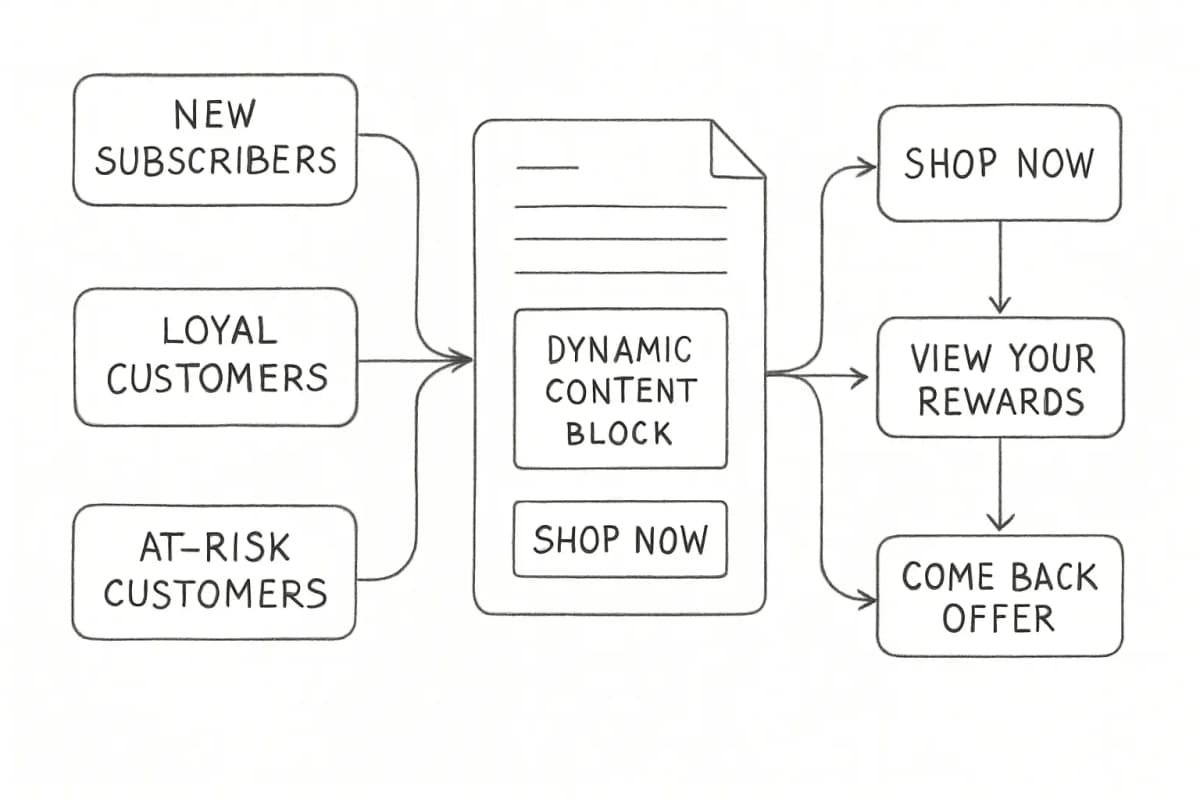
One email template can serve multiple audiences through dynamic content blocks. These sections automatically change based on subscriber data, showing different products, images, or offers to different segments. This approach saves time while delivering personalized experiences at scale.
Real-world applications include:
Product recommendations based on past purchases or browsing history
Location-based content showing regional offers, local store details, or weather-triggered promotions
Lifecycle-based CTAs: Your call-to-action can change based on where subscribers are in the customer journey. New subscribers might see "Shop Now" while loyal customers see "View Your Rewards."
Countdown timers: Featuring a real-time countdown timer in your emails can drive urgency, particularly for limited-time sales or early-bird pricing.
Demographic: Age, gender, job role, industry
Geographic: City, region, country (useful for local offers and event-based campaigns)
Lifecycle stage: New subscriber, active customer, at-risk, lapsed
Segmentation involves dividing your audience into distinct groups based on shared characteristics or behaviors. By segmenting your email list, you can tailor your messaging to resonate with specific audiences. Segments can be based on demographics, purchase history, or engagement levels, allowing you to send targeted content that speaks directly to each group's interests and needs.
Personalize the Subject Line and Preheader
Personalized subject lines can increase open rates by 20 to 26%. The subject line is the first decision point your subscriber makes, and personalization here has an outsized effect on whether your email gets opened at all.
Using the subscriber's name in a subject line can boost open rates by 26%. The reason is rooted in social cognitive neuroscience: seeing your name activates brain areas linked to better perception and engagement.
But name insertion alone is a starting point, not a strategy. Reference recent actions, mention relevant products, or highlight timely offers. "Your cart is waiting" outperforms "Check out our products" every time.
Preheader text is equally underused. Emails with preheader text have an average open rate of 44.67%, while those without preheader text average 39.28%. Use this space to extend the subject line's personalization, not repeat it.
For more on crafting subject lines that convert, see our article on email subject line best practices that boost open rates by 27%.
Use Dynamic Content to Personalize at Scale
Dynamic content is the mechanism that lets you personalize email marketing campaigns for thousands of subscribers without building a separate email for each person.
Dynamic, or conditional, content is any personalized element in an email that changes based on subscriber behavior or customer data. You can draw on data like age, gender, past purchases, or geolocation and use variable mapping to generate relevant email messages for each recipient.
One email template can serve multiple audiences through dynamic content blocks. These sections automatically change based on subscriber data, showing different products, images, or offers to different segments. This approach saves time while delivering personalized experiences at scale.
Real-world applications include:
Product recommendations based on past purchases or browsing history
Location-based content showing regional offers, local store details, or weather-triggered promotions
Lifecycle-based CTAs: Your call-to-action can change based on where subscribers are in the customer journey. New subscribers might see "Shop Now" while loyal customers see "View Your Rewards."
Countdown timers: Featuring a real-time countdown timer in your emails can drive urgency, particularly for limited-time sales or early-bird pricing.
Brands using dynamic content in emails report a 22% increase in ROI.
Trigger Emails Based on Behavior
Behavioral triggers are the most powerful layer of email personalization because they respond to what a subscriber actually does, not what you assume about them.
Automated emails drive 37% of all email-generated sales, despite making up only 2% of email volume. The math is striking. A small portion of sends carries a disproportionate share of revenue, precisely because triggered messages arrive at moments of active intent.
Key behavioral triggers to build:
Brands using dynamic content in emails report a 22% increase in ROI.
Trigger Emails Based on Behavior
Behavioral triggers are the most powerful layer of email personalization because they respond to what a subscriber actually does, not what you assume about them.
Automated emails drive 37% of all email-generated sales, despite making up only 2% of email volume. The math is striking. A small portion of sends carries a disproportionate share of revenue, precisely because triggered messages arrive at moments of active intent.
Key behavioral triggers to build:
Welcome series: Welcome email personalization sets the foundation for your customer relationship. These campaigns should incorporate the subscriber's signup source, preferences indicated during registration, and initial browsing behavior to create a tailored introduction to your brand. See our welcome email sequence best practices for a complete framework.
Abandoned cart: Abandoned cart emails are among the highest-performing personalized campaigns, with open rates typically 15 to 25% higher than standard promotional emails. Include specific product images, names, and prices from the cart, and consider adding complementary product recommendations. Implement urgency elements like limited-time discounts or low-stock alerts based on real inventory data.
Post-purchase: Use purchase history to recommend complementary products or send usage tips relevant to what the subscriber just bought.
Re-engagement: Re-engagement refers to any tactic that revitalizes the interest of a past customer. A prime candidate is a customer who has not purchased recently. They may have enjoyed your product but lost sight of your brand, and an email could remind them of their last purchase and encourage another.
Welcome series: Welcome email personalization sets the foundation for your customer relationship. These campaigns should incorporate the subscriber's signup source, preferences indicated during registration, and initial browsing behavior to create a tailored introduction to your brand. See our welcome email sequence best practices for a complete framework.
Abandoned cart: Abandoned cart emails are among the highest-performing personalized campaigns, with open rates typically 15 to 25% higher than standard promotional emails. Include specific product images, names, and prices from the cart, and consider adding complementary product recommendations. Implement urgency elements like limited-time discounts or low-stock alerts based on real inventory data.
Post-purchase: Use purchase history to recommend complementary products or send usage tips relevant to what the subscriber just bought.
Re-engagement: Re-engagement refers to any tactic that revitalizes the interest of a past customer. A prime candidate is a customer who has not purchased recently. They may have enjoyed your product but lost sight of your brand, and an email could remind them of their last purchase and encourage another.
60% of shoppers returned to complete a purchase after receiving a personalized abandoned cart email.
Use AI to Scale Personalization
Top AI use cases in email marketing include retargeting (55%), content personalization (53%), and subject line optimization (44%).
AI implementation delivers measurable returns, including 13% higher click-through rates, 41% revenue increases from personalization, and 5 to 10% open rate improvements from optimized send times.
AI analyzes individual subscriber behavior to optimize subject lines, selecting words that resonate, personalizing based on past opens, and timing sends for when recipients are most active.
Beyond subject lines, AI can automate product recommendation engines, predict churn risk, and adjust send frequency per subscriber. A customer data platform helps centralize customer information, while AI-powered tools can optimize send times, content selection, and recommendation algorithms for individual subscribers.
Learning how to personalize email marketing campaigns also means knowing where teams consistently go wrong.
1. Broken merge tags. A related mistake is forgetting to include fallback text in case your email platform encounters an error, resulting in emails showing a generic "Hi {First-Name}" greeting. Always set fallback values such as "Hi there" or "Hi friend" for every personalization tag you use.
2. Drawing wrong conclusions from single data points. The problem is drawing incorrect conclusions about interests using a single data point. Rather than making assumptions based on a first interaction, come up with common personas for your buyers or choose a data point that is especially important for personalizing your content and offers.
3. Ignoring privacy boundaries. A BCG study found that 66% of consumers had at least one personalization experience go wrong, and it prompted them to stop interacting with the brand entirely. Personalization that feels intrusive does more damage than no personalization at all.
4. Skipping segmentation. List segmentation plays a crucial role in personalized email marketing. Not every email is relevant to every customer, and segmenting your list allows you to deliver emails to the people most likely to engage with the message.
5. Over-personalizing too fast. Start with basic personalization like using the recipient's name in subject lines, then progress to behavioral triggers like welcome series and abandoned cart emails. Implement customer segmentation based on purchase history or engagement levels, and gradually add dynamic content blocks. Focus on one campaign type at a time to ensure proper implementation.
60% of shoppers returned to complete a purchase after receiving a personalized abandoned cart email.
Use AI to Scale Personalization
Top AI use cases in email marketing include retargeting (55%), content personalization (53%), and subject line optimization (44%).
AI implementation delivers measurable returns, including 13% higher click-through rates, 41% revenue increases from personalization, and 5 to 10% open rate improvements from optimized send times.
AI analyzes individual subscriber behavior to optimize subject lines, selecting words that resonate, personalizing based on past opens, and timing sends for when recipients are most active.
Beyond subject lines, AI can automate product recommendation engines, predict churn risk, and adjust send frequency per subscriber. A customer data platform helps centralize customer information, while AI-powered tools can optimize send times, content selection, and recommendation algorithms for individual subscribers.
Learning how to personalize email marketing campaigns also means knowing where teams consistently go wrong.
1. Broken merge tags. A related mistake is forgetting to include fallback text in case your email platform encounters an error, resulting in emails showing a generic "Hi {First-Name}" greeting. Always set fallback values such as "Hi there" or "Hi friend" for every personalization tag you use.
2. Drawing wrong conclusions from single data points. The problem is drawing incorrect conclusions about interests using a single data point. Rather than making assumptions based on a first interaction, come up with common personas for your buyers or choose a data point that is especially important for personalizing your content and offers.
3. Ignoring privacy boundaries. A BCG study found that 66% of consumers had at least one personalization experience go wrong, and it prompted them to stop interacting with the brand entirely. Personalization that feels intrusive does more damage than no personalization at all.
4. Skipping segmentation. List segmentation plays a crucial role in personalized email marketing. Not every email is relevant to every customer, and segmenting your list allows you to deliver emails to the people most likely to engage with the message.
5. Over-personalizing too fast. Start with basic personalization like using the recipient's name in subject lines, then progress to behavioral triggers like welcome series and abandoned cart emails. Implement customer segmentation based on purchase history or engagement levels, and gradually add dynamic content blocks. Focus on one campaign type at a time to ensure proper implementation.
Measure What Matters
Personalization only improves if you track the right signals and iterate based on them.
Track standard email metrics (open rates, click-through rates, conversions) and compare personalized campaigns against non-personalized ones. Look for improvements in engagement and revenue. Pay attention to unsubscribe rates. If personalization is working, people should stick around longer.
Organizations using advanced analytics report up to 43% higher ROI.
Specific metrics to watch:
Click-to-open rate (CTOR): Measures how relevant your content is to those who opened
Revenue per email: Especially important for triggered campaigns
Unsubscribe rate by segment: A spike here signals misaligned personalization
Conversion rate by dynamic content variant: Tells you which personalization rules drive action
What data do I need to start personalizing email marketing campaigns?
Start with the basics: first name, email address, signup source, and any preferences collected at signup. From there, layer in behavioral data like website visits, product views, and purchase history as you integrate your email platform with your CRM or ecommerce store. The first step is gathering sufficient data to be able to appeal to customer needs, preferences, and desires. You do not need a complete data set to begin. Start with what you have and expand over time.
How is email segmentation different from email personalization?
Email segmentation groups subscribers by shared characteristics, while personalization customizes content for each individual. Both work together but serve different purposes. Segmentation defines who receives a message. Personalization shapes what that message says or shows.
Does personalization in email subject lines actually improve open rates?
Yes. Personalized emails achieve an average open rate of 29%, compared to significantly lower rates for generic sends. Using the subscriber's name in the subject line can boost open rates by 26%. That said, name-based personalization is the floor, not the ceiling. Referencing recent behavior or relevant offers drives stronger results.
How do I personalize at scale without a large technical team?
Measure What Matters
Personalization only improves if you track the right signals and iterate based on them.
Track standard email metrics (open rates, click-through rates, conversions) and compare personalized campaigns against non-personalized ones. Look for improvements in engagement and revenue. Pay attention to unsubscribe rates. If personalization is working, people should stick around longer.
Organizations using advanced analytics report up to 43% higher ROI.
Specific metrics to watch:
Click-to-open rate (CTOR): Measures how relevant your content is to those who opened
Revenue per email: Especially important for triggered campaigns
Unsubscribe rate by segment: A spike here signals misaligned personalization
Conversion rate by dynamic content variant: Tells you which personalization rules drive action
What data do I need to start personalizing email marketing campaigns?
Start with the basics: first name, email address, signup source, and any preferences collected at signup. From there, layer in behavioral data like website visits, product views, and purchase history as you integrate your email platform with your CRM or ecommerce store. The first step is gathering sufficient data to be able to appeal to customer needs, preferences, and desires. You do not need a complete data set to begin. Start with what you have and expand over time.
How is email segmentation different from email personalization?
Email segmentation groups subscribers by shared characteristics, while personalization customizes content for each individual. Both work together but serve different purposes. Segmentation defines who receives a message. Personalization shapes what that message says or shows.
Does personalization in email subject lines actually improve open rates?
Yes. Personalized emails achieve an average open rate of 29%, compared to significantly lower rates for generic sends. Using the subscriber's name in the subject line can boost open rates by 26%. That said, name-based personalization is the floor, not the ceiling. Referencing recent behavior or relevant offers drives stronger results.
How do I personalize at scale without a large technical team?
Dynamic content blocks let one email template serve multiple audiences. These sections automatically change based on subscriber data, showing different products, images, or offers to different segments, saving time while delivering personalized experiences at scale. Most major email service providers (including Klaviyo, Mailchimp, ActiveCampaign, and HubSpot) offer dynamic content features that require no custom code to set up. Start with two or three variants, measure the results, and add complexity gradually.
No comments yet. Be the first!
Dynamic content blocks let one email template serve multiple audiences. These sections automatically change based on subscriber data, showing different products, images, or offers to different segments, saving time while delivering personalized experiences at scale. Most major email service providers (including Klaviyo, Mailchimp, ActiveCampaign, and HubSpot) offer dynamic content features that require no custom code to set up. Start with two or three variants, measure the results, and add complexity gradually.