Email marketing automation is one of the highest-leverage activities a marketing team can do. The setup takes time upfront, but once live, automated workflows run continuously, reaching the right subscriber at the right moment without manual effort for every send.
Automated emails generate 320% more revenue than non-automated emails. That's not a marginal improvement. It's the difference between a channel that sustains itself and one that consumes your team's time for incremental returns.
This guide covers exactly how to use email marketing automation, from understanding the mechanics to building your first workflow, choosing the right triggers, and measuring what's actually working.
Key Takeaways
In 2024, automated emails drove 37% of all email-generated sales despite accounting for just 2% of email volume.
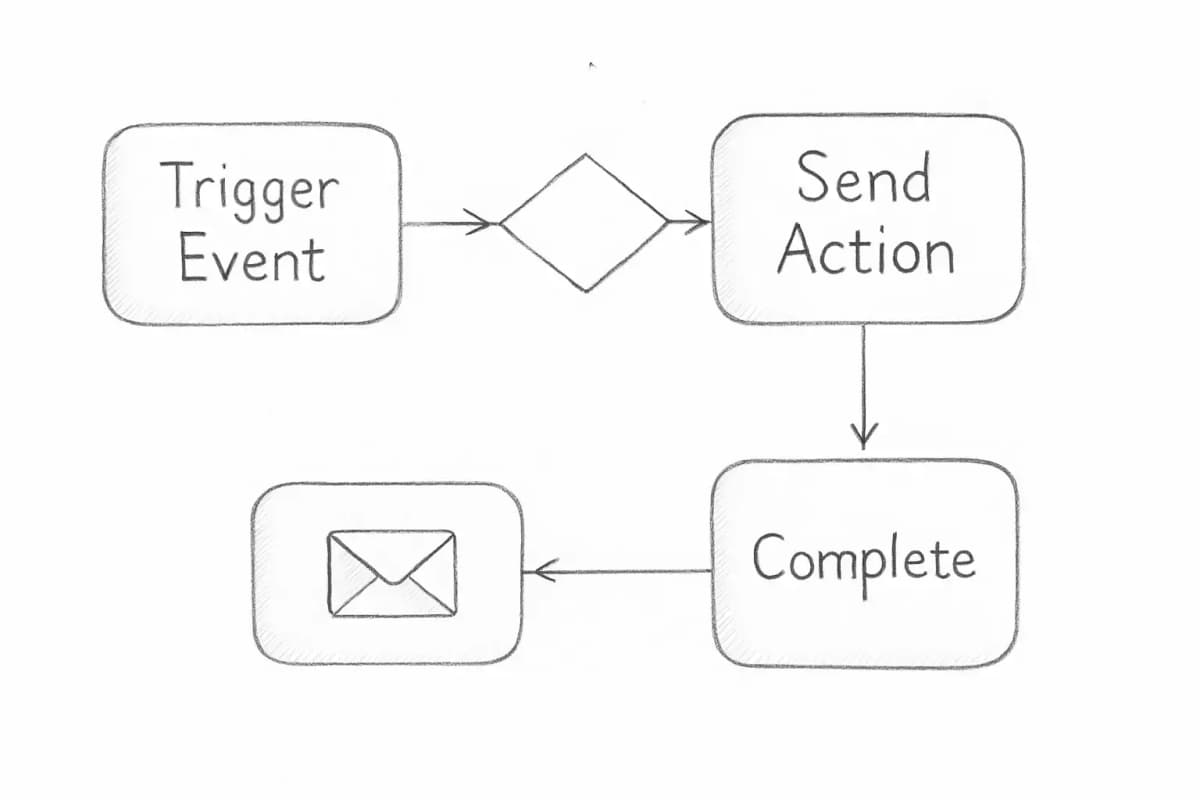
Email marketing automation works as a system of workflows based on conditional logic, starting with a trigger such as filling out a form, viewing a product, or abandoning a shopping cart.
Segmented campaigns generate 760% more revenue than non-segmented ones, and personalized emails deliver 6x higher transaction rates than generic emails.
Automated campaigns achieve 52% higher open rates and 332% higher click rates compared to regular campaigns.
Automation is not "set and forget." Workflows need regular review, A/B testing, and content updates to stay effective.
What Email Marketing Automation Actually Is
Email automation is the process of sending emails triggered by customer behavior, data signals, or predefined logic rather than manually scheduling each send. It allows brands to deliver relevant, timely messages at scale, responding to what individual customers actually do rather than when a marketing calendar says to reach out.
The core difference between a regular broadcast campaign and automation is timing and context. Campaigns are one-time sends to a group of people: you write the email, pick your audience, and hit send, and everyone receives the same message at the same time. Automations run continuously in the background and respond to individual behavior, delivering personalized messages based on what each subscriber does.
Most email automation programs involve three components working together: the data that captures what a customer does, the logic that decides what should happen next, and the delivery mechanism that sends the right message at the right time.
Email marketing automation is one of the highest-leverage activities a marketing team can do. The setup takes time upfront, but once live, automated workflows run continuously, reaching the right subscriber at the right moment without manual effort for every send.
Automated emails generate 320% more revenue than non-automated emails. That's not a marginal improvement. It's the difference between a channel that sustains itself and one that consumes your team's time for incremental returns.
This guide covers exactly how to use email marketing automation, from understanding the mechanics to building your first workflow, choosing the right triggers, and measuring what's actually working.
Key Takeaways
In 2024, automated emails drove 37% of all email-generated sales despite accounting for just 2% of email volume.
Email marketing automation works as a system of workflows based on conditional logic, starting with a trigger such as filling out a form, viewing a product, or abandoning a shopping cart.
Segmented campaigns generate 760% more revenue than non-segmented ones, and personalized emails deliver 6x higher transaction rates than generic emails.
Automated campaigns achieve 52% higher open rates and 332% higher click rates compared to regular campaigns.
Automation is not "set and forget." Workflows need regular review, A/B testing, and content updates to stay effective.
What Email Marketing Automation Actually Is
Email automation is the process of sending emails triggered by customer behavior, data signals, or predefined logic rather than manually scheduling each send. It allows brands to deliver relevant, timely messages at scale, responding to what individual customers actually do rather than when a marketing calendar says to reach out.
The core difference between a regular broadcast campaign and automation is timing and context. Campaigns are one-time sends to a group of people: you write the email, pick your audience, and hit send, and everyone receives the same message at the same time. Automations run continuously in the background and respond to individual behavior, delivering personalized messages based on what each subscriber does.
Most email automation programs involve three components working together: the data that captures what a customer does, the logic that decides what should happen next, and the delivery mechanism that sends the right message at the right time.
Understanding this structure is essential before you build anything. Your automation is only as good as the data feeding it and the logic governing it.
The 6 Most Effective Automated Email Workflows
Not all automation types deliver equal returns. These six workflows are where most businesses should start.
1. Welcome Series
Welcome emails achieve exceptional 83.63% open rates. Automated welcome emails dramatically outperform standard campaigns with an 83.63% open rate and 16.60% click-through rate. No other workflow in your stack will consistently reach that level of engagement.
Welcome email automation introduces new subscribers to your brand over several touchpoints. Set triggers for immediate delivery after signup, followed by educational content at 3-day intervals. Track open rates and engagement to optimize timing and content.
For a deeper look at structuring this sequence, see our guide on welcome email sequence best practices.
2. Abandoned Cart Emails
Abandoned cart emails achieve 40-45% open rates and 3.33% conversion rates, making them the highest-performing automated email flow.
Configure triggers for 1 hour, 24 hours, and 1 week after abandonment. Include product images, customer reviews, and time-sensitive incentives to drive completion. The first send recovers intent while it's still hot. The second, usually with an incentive, gives hesitant buyers the nudge they need.
3. Post-Purchase Sequences
Revenue optimization automation promotes complementary products after purchases. Set triggers 7-30 days post-purchase with related product recommendations and bundle offers based on buying patterns. This is where customer lifetime value gets built.
4. Lead Nurturing Drip Campaigns
Drip campaigns gradually deliver useful content about a company, product, or industry. These types of campaigns have to be relevant to work, and with email automation, drip campaign messages only go out to prospects who have demonstrated interest.
Automation takes a new lead at the top of the funnel and uses a series of timely, relevant emails to guide them toward a purchase at the bottom of the funnel. For example, after a visitor downloads a whitepaper, an automation sequence can deliver follow-up content that introduces your solution and addresses their pain points, pushing them toward a consultation or purchase. This strategic, automated drip ensures no lead falls through the cracks.
5. Re-Engagement Campaigns
Re-engagement email campaigns target inactive subscribers using behavioral trigger setup based on email opens and website visits. Inactive subscribers hurt deliverability, and removing them from your list or re-engaging them before they go cold is far better than waiting for them to mark you as spam.
6. Transactional and Date-Based Emails
These include order confirmations, shipping updates, birthday emails, and subscription renewal reminders. Automated birthday emails achieve a 43.3% open rate. Date-based triggers are among the easiest automations to set up and consistently deliver above-average engagement because they're personally relevant.
How to Build Your First Email Automation Workflow
Understanding this structure is essential before you build anything. Your automation is only as good as the data feeding it and the logic governing it.
The 6 Most Effective Automated Email Workflows
Not all automation types deliver equal returns. These six workflows are where most businesses should start.
1. Welcome Series
Welcome emails achieve exceptional 83.63% open rates. Automated welcome emails dramatically outperform standard campaigns with an 83.63% open rate and 16.60% click-through rate. No other workflow in your stack will consistently reach that level of engagement.
Welcome email automation introduces new subscribers to your brand over several touchpoints. Set triggers for immediate delivery after signup, followed by educational content at 3-day intervals. Track open rates and engagement to optimize timing and content.
For a deeper look at structuring this sequence, see our guide on welcome email sequence best practices.
2. Abandoned Cart Emails
Abandoned cart emails achieve 40-45% open rates and 3.33% conversion rates, making them the highest-performing automated email flow.
Configure triggers for 1 hour, 24 hours, and 1 week after abandonment. Include product images, customer reviews, and time-sensitive incentives to drive completion. The first send recovers intent while it's still hot. The second, usually with an incentive, gives hesitant buyers the nudge they need.
3. Post-Purchase Sequences
Revenue optimization automation promotes complementary products after purchases. Set triggers 7-30 days post-purchase with related product recommendations and bundle offers based on buying patterns. This is where customer lifetime value gets built.
4. Lead Nurturing Drip Campaigns
Drip campaigns gradually deliver useful content about a company, product, or industry. These types of campaigns have to be relevant to work, and with email automation, drip campaign messages only go out to prospects who have demonstrated interest.
Automation takes a new lead at the top of the funnel and uses a series of timely, relevant emails to guide them toward a purchase at the bottom of the funnel. For example, after a visitor downloads a whitepaper, an automation sequence can deliver follow-up content that introduces your solution and addresses their pain points, pushing them toward a consultation or purchase. This strategic, automated drip ensures no lead falls through the cracks.
5. Re-Engagement Campaigns
Re-engagement email campaigns target inactive subscribers using behavioral trigger setup based on email opens and website visits. Inactive subscribers hurt deliverability, and removing them from your list or re-engaging them before they go cold is far better than waiting for them to mark you as spam.
6. Transactional and Date-Based Emails
These include order confirmations, shipping updates, birthday emails, and subscription renewal reminders. Automated birthday emails achieve a 43.3% open rate. Date-based triggers are among the easiest automations to set up and consistently deliver above-average engagement because they're personally relevant.
How to Build Your First Email Automation Workflow
Building a workflow is straightforward when you break it into clear steps. Here's a practical process you can follow regardless of platform.
Building a workflow is straightforward when you break it into clear steps. Here's a practical process you can follow regardless of platform.
Define your goal. Start by identifying what you want the workflow to achieve. Clear, measurable goals help shape every element of your email automation strategy. Are you reducing churn, recovering abandoned carts, or onboarding new customers?
Choose your trigger. Common triggers include form submissions, specific tags, birthdays, or inactivity. Your trigger is the event that starts the entire sequence.
Map your workflow before you build. To automate your email campaign workflows, you need to map out your ideal customer journey. It's an essential step that helps you understand all the touchpoints your subscribers have with your brand. A simple flowchart on paper or a whiteboard before opening your platform saves a lot of rework.
Segment your audience. Effective automation depends on delivering relevant content to the right people. Not everyone on your list is at the same stage of the buyer's journey, so sending the same content to everyone dilutes its impact. Use segmentation to break your audience into smaller groups. The more personalized your segments, the more engaging and relevant your content will feel.
Write your emails with timing in mind. Timing is everything in email automation. Send messages too soon and you might annoy subscribers; wait too long and you risk losing momentum. Spacing your emails strategically builds trust and keeps your audience engaged.
Test before going live. Always test your workflow with sample subscribers. Check that triggers fire correctly, links work, and personalization tokens pull the right data.
Activate and monitor. Once live, watch open rates, click rates, and conversions. As your email program grows more sophisticated with automation, closely monitoring your metrics becomes even more crucial. For example, if you notice that your open rates are starting to decline with automation, it might be a good time to review your sending frequency.
Define your goal. Start by identifying what you want the workflow to achieve. Clear, measurable goals help shape every element of your email automation strategy. Are you reducing churn, recovering abandoned carts, or onboarding new customers?
Choose your trigger. Common triggers include form submissions, specific tags, birthdays, or inactivity. Your trigger is the event that starts the entire sequence.
Map your workflow before you build. To automate your email campaign workflows, you need to map out your ideal customer journey. It's an essential step that helps you understand all the touchpoints your subscribers have with your brand. A simple flowchart on paper or a whiteboard before opening your platform saves a lot of rework.
Segment your audience. Effective automation depends on delivering relevant content to the right people. Not everyone on your list is at the same stage of the buyer's journey, so sending the same content to everyone dilutes its impact. Use segmentation to break your audience into smaller groups. The more personalized your segments, the more engaging and relevant your content will feel.
Write your emails with timing in mind. Timing is everything in email automation. Send messages too soon and you might annoy subscribers; wait too long and you risk losing momentum. Spacing your emails strategically builds trust and keeps your audience engaged.
Test before going live. Always test your workflow with sample subscribers. Check that triggers fire correctly, links work, and personalization tokens pull the right data.
Activate and monitor. Once live, watch open rates, click rates, and conversions. As your email program grows more sophisticated with automation, closely monitoring your metrics becomes even more crucial. For example, if you notice that your open rates are starting to decline with automation, it might be a good time to review your sending frequency.
Segmentation and Personalization: The Multipliers
Automation without segmentation is just scheduled bulk email. Segmentation is what turns a decent automation into a high-performing revenue engine.
Segmented email campaigns generate 760% more revenue. This dramatic increase highlights the importance of targeted messaging.
Instead of blasting emails to an entire list, automation allows businesses to personalize messaging based on user behavior, demographics, or purchase history. For example, an ecommerce store can send an automated email to shoppers who added items to their cart but didn't complete checkout, whereas a SaaS company could trigger onboarding emails for new customers, guiding them through product setup.
Personalization compounds on top of segmentation. Personalized emails see a 29% higher rate of opens compared to non-personalized emails, and personalized calls to action result in 42% higher conversion rates than regular CTAs.
Segmentation and Personalization: The Multipliers
Automation without segmentation is just scheduled bulk email. Segmentation is what turns a decent automation into a high-performing revenue engine.
Segmented email campaigns generate 760% more revenue. This dramatic increase highlights the importance of targeted messaging.
Instead of blasting emails to an entire list, automation allows businesses to personalize messaging based on user behavior, demographics, or purchase history. For example, an ecommerce store can send an automated email to shoppers who added items to their cart but didn't complete checkout, whereas a SaaS company could trigger onboarding emails for new customers, guiding them through product setup.
Personalization compounds on top of segmentation. Personalized emails see a 29% higher rate of opens compared to non-personalized emails, and personalized calls to action result in 42% higher conversion rates than regular CTAs.
For a full breakdown of how to execute this at scale, our guide on email list segmentation strategies walks through the specific tactics that move the needle most.
For a full breakdown of how to execute this at scale, our guide on email list segmentation strategies walks through the specific tactics that move the needle most.
Choosing the Right Email Automation Platform
Your platform needs to match your business model, list size, and the complexity of workflows you want to build. A simple welcome series works on almost any tool. A multi-branch behavioral workflow with CRM data integration requires more.
Key criteria to evaluate:
Trigger variety: Can it trigger on behavior, purchase events, date fields, and custom events?
Segmentation depth: Does it support real-time segment updates, behavioral data, and purchase history?
Integration with your stack: CRM, ecommerce platform, and analytics tools need to talk to your ESP.
Scalability: Choose a tool that can grow with your business. What are the limits on contacts or email sends? Can it handle increasing complexity in your automation workflows as your marketing strategy evolves? Investing in a tool that scales well now can save you the headache of migrating platforms later.
Popular options include ActiveCampaign, Klaviyo, Mailchimp, and Omnisend, each with different strengths depending on whether you're B2B, ecommerce, or a service business. If you're building a broader strategy around your tool selection, our email marketing strategy template covers how to align platform choice with your overall goals.
Common Mistakes to Avoid
The top challenges with email automation include ensuring deliverability and avoiding spam filters (48%), maintaining subscriber engagement over time (45%), and creating engaging content for automation (45%).
Beyond those, watch out for these specific errors.
Setting it and forgetting it. Even with email marketing automation tools, no email is truly "set it and forget it." Customer behavior changes, products evolve, and copy goes stale. Audit your active workflows at least quarterly.
Over-automating from day one. Start by automating one portion of your program. You can always add more automated email recipes as you gain more experience and feel more comfortable.
Ignoring list hygiene. Keep your subscriber lists clean and updated. Remove or suppress bounced emails and users who have unsubscribed. Segment actively by engagement level so you target workflows only to interested people. Cleaning your list regularly improves deliverability and engagement.
Sending content with no value. If your content isn't valuable, no matter how well timed it is, the user won't act upon it. Automation gets your email delivered at the right moment, but the content still has to earn the click.
How to Measure Automation Performance
Choosing the Right Email Automation Platform
Your platform needs to match your business model, list size, and the complexity of workflows you want to build. A simple welcome series works on almost any tool. A multi-branch behavioral workflow with CRM data integration requires more.
Key criteria to evaluate:
Trigger variety: Can it trigger on behavior, purchase events, date fields, and custom events?
Segmentation depth: Does it support real-time segment updates, behavioral data, and purchase history?
Integration with your stack: CRM, ecommerce platform, and analytics tools need to talk to your ESP.
Scalability: Choose a tool that can grow with your business. What are the limits on contacts or email sends? Can it handle increasing complexity in your automation workflows as your marketing strategy evolves? Investing in a tool that scales well now can save you the headache of migrating platforms later.
Popular options include ActiveCampaign, Klaviyo, Mailchimp, and Omnisend, each with different strengths depending on whether you're B2B, ecommerce, or a service business. If you're building a broader strategy around your tool selection, our email marketing strategy template covers how to align platform choice with your overall goals.
Common Mistakes to Avoid
The top challenges with email automation include ensuring deliverability and avoiding spam filters (48%), maintaining subscriber engagement over time (45%), and creating engaging content for automation (45%).
Beyond those, watch out for these specific errors.
Setting it and forgetting it. Even with email marketing automation tools, no email is truly "set it and forget it." Customer behavior changes, products evolve, and copy goes stale. Audit your active workflows at least quarterly.
Over-automating from day one. Start by automating one portion of your program. You can always add more automated email recipes as you gain more experience and feel more comfortable.
Ignoring list hygiene. Keep your subscriber lists clean and updated. Remove or suppress bounced emails and users who have unsubscribed. Segment actively by engagement level so you target workflows only to interested people. Cleaning your list regularly improves deliverability and engagement.
Sending content with no value. If your content isn't valuable, no matter how well timed it is, the user won't act upon it. Automation gets your email delivered at the right moment, but the content still has to earn the click.
How to Measure Automation Performance
Revenue generated, return on investment, and engagement metrics are the most effective ways to measure the success of automated campaigns. Analyzing revenue generated provides a tangible metric of campaign effectiveness, directly linking email marketing efforts to business outcomes. Tracking ROI and engagement metrics offers insights into the efficiency of resource allocation and the depth of audience interaction.
Track these metrics for each active workflow:
Open rate: Signals whether your subject line and sender name are working.
Click-through rate (CTR): Measures whether the body content is compelling enough to act on.
Conversion rate: The direct measure of whether the workflow is achieving its goal.
Revenue per recipient: Especially useful for ecommerce workflows. Automated flows generate up to 30x more revenue per recipient than campaigns. Abandoned cart flows average $3.07 revenue per recipient compared to $0.10 for standard campaigns.
Unsubscribe rate: A rising unsubscribe rate on a specific workflow usually means frequency, content relevance, or list quality needs attention.
A/B tested emails achieve 49% higher open rates and 135% higher click rates. Build testing into your workflow optimization process from the start. Test subject lines, send timing, CTA copy, and email length systematically rather than all at once.
Frequently Asked Questions
What is the difference between email marketing and email marketing automation?
Email marketing is the broader practice of using email to communicate with your audience, including newsletters, promotional sends, and one-off campaigns. Email marketing is the umbrella term and broad strategy for email activities, so it includes email automation as well as campaigns. Email automation specifically refers to messages triggered by subscriber behavior or predefined conditions, running continuously without manual intervention for each send.
How many emails should be in an automated sequence?
It depends on the workflow goal. Abandoned cart email automation typically uses triggers at 1 hour, 24 hours, and 1 week after abandonment, including product images, customer reviews, and time-sensitive incentives to drive completion. Welcome sequences typically run 3 to 5 emails over 1 to 2 weeks. Lead nurturing flows may span 8 to 12 emails over several weeks. Let the goal and your data guide the length, not a predetermined number.
Do I need a large list to start with email automation?
Revenue generated, return on investment, and engagement metrics are the most effective ways to measure the success of automated campaigns. Analyzing revenue generated provides a tangible metric of campaign effectiveness, directly linking email marketing efforts to business outcomes. Tracking ROI and engagement metrics offers insights into the efficiency of resource allocation and the depth of audience interaction.
Track these metrics for each active workflow:
Open rate: Signals whether your subject line and sender name are working.
Click-through rate (CTR): Measures whether the body content is compelling enough to act on.
Conversion rate: The direct measure of whether the workflow is achieving its goal.
Revenue per recipient: Especially useful for ecommerce workflows. Automated flows generate up to 30x more revenue per recipient than campaigns. Abandoned cart flows average $3.07 revenue per recipient compared to $0.10 for standard campaigns.
Unsubscribe rate: A rising unsubscribe rate on a specific workflow usually means frequency, content relevance, or list quality needs attention.
A/B tested emails achieve 49% higher open rates and 135% higher click rates. Build testing into your workflow optimization process from the start. Test subject lines, send timing, CTA copy, and email length systematically rather than all at once.
Frequently Asked Questions
What is the difference between email marketing and email marketing automation?
Email marketing is the broader practice of using email to communicate with your audience, including newsletters, promotional sends, and one-off campaigns. Email marketing is the umbrella term and broad strategy for email activities, so it includes email automation as well as campaigns. Email automation specifically refers to messages triggered by subscriber behavior or predefined conditions, running continuously without manual intervention for each send.
How many emails should be in an automated sequence?
It depends on the workflow goal. Abandoned cart email automation typically uses triggers at 1 hour, 24 hours, and 1 week after abandonment, including product images, customer reviews, and time-sensitive incentives to drive completion. Welcome sequences typically run 3 to 5 emails over 1 to 2 weeks. Lead nurturing flows may span 8 to 12 emails over several weeks. Let the goal and your data guide the length, not a predetermined number.
Do I need a large list to start with email automation?
No. Automated workflows work the same for 100 subscribers or 100,000. You don't need to hire more people just because your list grows. Starting with a small, engaged list and one well-built workflow will teach you more than a large list with poorly configured sequences. Build the welcome series and one behavioral trigger first.
How long does it take to see results from email marketing automation?
76% of marketers see positive ROI within one year of automation implementation. Long-term analysis reveals marketing automation generates $5.44 return on every dollar spent over the first three years, with 44% of companies seeing returns within six months. High-intent workflows like abandoned cart and welcome series typically show results within days of going live. Nurture sequences and re-engagement flows take longer because they target subscribers at different stages of the decision cycle.
No comments yet. Be the first!
No. Automated workflows work the same for 100 subscribers or 100,000. You don't need to hire more people just because your list grows. Starting with a small, engaged list and one well-built workflow will teach you more than a large list with poorly configured sequences. Build the welcome series and one behavioral trigger first.
How long does it take to see results from email marketing automation?
76% of marketers see positive ROI within one year of automation implementation. Long-term analysis reveals marketing automation generates $5.44 return on every dollar spent over the first three years, with 44% of companies seeing returns within six months. High-intent workflows like abandoned cart and welcome series typically show results within days of going live. Nurture sequences and re-engagement flows take longer because they target subscribers at different stages of the decision cycle.