HomeBlogEmail Marketing Tools and StrategiesEmail Marketing Automation Service: Setup and ROI
Email Marketing Tools and Strategies

Email Marketing Automation Service: Setup and ROI

Learn how email marketing automation services save time and boost conversions. Compare features, pricing, and implementation strategies for your business.

S

Sarah Mitchell

July 16, 2026

HomeBlogEmail Marketing Tools and StrategiesEmail Marketing Automation Service: Setup and ROI
Email Marketing Tools and Strategies

Email Marketing Automation Service: Setup and ROI

Learn how email marketing automation services save time and boost conversions. Compare features, pricing, and implementation strategies for your business.

S

Sarah Mitchell

July 16, 2026

16 min read
16 min read
Share:
Share:
#Email Automation#marketing automation#Email Service Providers#Marketing Technology
Illustration for email marketing automation service

Stay in the loop

Get the latest posts delivered straight to your inbox. No spam, unsubscribe anytime.

Most businesses treat email as a broadcast channel. The ones seeing the highest returns treat it as a system, specifically a system built on automation. Email marketing remains the most reliable high-ROI digital channel, and the biggest gains come from automation, personalization, deliverability discipline, and realistic attribution, not from sending more emails.

If you are still sending one-off campaigns to your entire list, you are leaving measurable revenue on the table. This guide covers how to choose, set up, and measure an email marketing automation service so you can close that gap.

Key Takeaways

  • Automated emails drove 37% of all email-generated sales in 2024, despite accounting for just 2% of email volume.
  • Email automations deliver 30 times more revenue per recipient than one-off promotional campaigns. The average return per recipient for campaigns sits at $0.11, while automated flows earn $1.94 per recipient.
  • Automated workflows generate 320% more revenue than standard promotional campaigns.
  • According to Validity's 2025 Email Deliverability Benchmark Report, one in six legitimate marketing emails fails to reach the inbox, and global inbox placement rates declined to 83.5% in 2024.
  • Brands that regularly A/B test their emails achieve 83% higher ROI than those that never test. Companies that never test report average ROI of 2,300%, while those that often test achieve 4,200%.

What an Email Marketing Automation Service Actually Does

Automated email, at its core, is any marketing or transactional email that is sent based on predefined rules or triggers the sender defines and that does not require anyone to actually hit a send button. It is best viewed as a strategy that sits on top of both your marketing and transactional emails.

Email marketing automation is the practice of sending triggered, behavior-based emails to subscribers based on specific actions they take or do not take. Unlike broadcast emails that go to everyone at once, automation emails are triggered (sent in response to a specific action or inaction), behavioral (based on what the subscriber actually does), personalized (tailored to the individual's context and journey), and scalable (running continuously without manual intervention).

The practical result: your subscribers receive the right message at the right moment in their journey, regardless of whether you are actively working on a campaign. Automated workflows work the same for 100 subscribers or 100,000. You do not need to hire more people just because your list grows. A single workflow template can serve an unlimited audience.

Stay in the loop

Get the latest posts delivered straight to your inbox. No spam, unsubscribe anytime.

Most businesses treat email as a broadcast channel. The ones seeing the highest returns treat it as a system, specifically a system built on automation. Email marketing remains the most reliable high-ROI digital channel, and the biggest gains come from automation, personalization, deliverability discipline, and realistic attribution, not from sending more emails.

If you are still sending one-off campaigns to your entire list, you are leaving measurable revenue on the table. This guide covers how to choose, set up, and measure an email marketing automation service so you can close that gap.

Key Takeaways

  • Automated emails drove 37% of all email-generated sales in 2024, despite accounting for just 2% of email volume.
  • Email automations deliver 30 times more revenue per recipient than one-off promotional campaigns. The average return per recipient for campaigns sits at $0.11, while automated flows earn $1.94 per recipient.
  • Automated workflows generate 320% more revenue than standard promotional campaigns.
  • According to Validity's 2025 Email Deliverability Benchmark Report, one in six legitimate marketing emails fails to reach the inbox, and global inbox placement rates declined to 83.5% in 2024.
  • Brands that regularly A/B test their emails achieve 83% higher ROI than those that never test. Companies that never test report average ROI of 2,300%, while those that often test achieve 4,200%.

What an Email Marketing Automation Service Actually Does

Automated email, at its core, is any marketing or transactional email that is sent based on predefined rules or triggers the sender defines and that does not require anyone to actually hit a send button. It is best viewed as a strategy that sits on top of both your marketing and transactional emails.

Email marketing automation is the practice of sending triggered, behavior-based emails to subscribers based on specific actions they take or do not take. Unlike broadcast emails that go to everyone at once, automation emails are triggered (sent in response to a specific action or inaction), behavioral (based on what the subscriber actually does), personalized (tailored to the individual's context and journey), and scalable (running continuously without manual intervention).

The practical result: your subscribers receive the right message at the right moment in their journey, regardless of whether you are actively working on a campaign. Automated workflows work the same for 100 subscribers or 100,000. You do not need to hire more people just because your list grows. A single workflow template can serve an unlimited audience.


The ROI Case: Why Automation Changes the Numbers

On average, email marketing delivers a return of between $36 and $42 for every $1 spent, the highest ROI of any digital marketing channel. For context, paid search returns $2 per $1, social advertising $2.80, and display ads $1.35.

Automation multiplies that advantage significantly. Compared to regular campaigns, automated messages see 52% better open rates and 332% higher clicks. Conversion rates for automated emails exceed campaigns by 2,361%. These improvements stem from better timing and relevance.

The gap between average and top-performing programs is driven by a small number of variables. Brands using AI-driven personalization report up to 42% higher revenue, with click-through rates exceeding 13%. This alone can lift ROI by nearly 20%.

For ecommerce specifically, the average email marketing ROI is $45 per dollar spent for retail and consumer goods, rising to $72 per dollar for US ecommerce merchants with optimized programs.

These numbers are achievable, but only with a properly configured service and a clear workflow strategy. Sending volume alone does not drive results.


How to Set Up Your Email Marketing Automation Service

A strong setup follows a predictable sequence. Shortcuts in any of these steps compound into problems later.

Step 1: Define a goal for each workflow

The most common mistake businesses make is jumping into automation before defining what they are trying to achieve. They see a feature in their email platform and turn it on without a clear purpose. Every automation should have a clearly defined goal.

Map the goal to the outcome: increasing first-time purchases, reducing churn, recovering abandoned revenue, or re-engaging dormant subscribers. Each goal dictates a different workflow structure.

Step 2: Map the customer journey before building

Mapping out the customer journey involves understanding the path your target audience takes from initial brand awareness to making a purchase and beyond, into the post-purchase and loyalty phases. This is an important best practice because the subscriber needs, interests, and pain points you learn from mapping the buyer's journey serve as a goldmine of information for email personalization.

A visual map, built in a tool like Lucidchart or directly inside your platform's workflow editor, prevents you from creating disconnected email sequences that confuse instead of convert.

Step 3: Choose your automation platform

The right email marketing automation service depends on your business model, list size, and required depth of automation.

ActiveCampaign is the best email marketing software for anyone serious about automation. Its visual workflow builder remains the most capable in the industry, and with Active Intelligence, its AI feature that learns from your campaigns, it has become genuinely difficult to justify choosing anything else if automation matters to your business.

Brevo (formerly Sendinblue) is the best stepping-stone email marketing tool, the right choice for businesses that have outgrown basic email but are not ready for ActiveCampaign or HubSpot. It is simple, affordable, and prices by email volume rather than contacts, which makes it uniquely cost-effective for large lists with low send frequency.


The ROI Case: Why Automation Changes the Numbers

On average, email marketing delivers a return of between $36 and $42 for every $1 spent, the highest ROI of any digital marketing channel. For context, paid search returns $2 per $1, social advertising $2.80, and display ads $1.35.

Automation multiplies that advantage significantly. Compared to regular campaigns, automated messages see 52% better open rates and 332% higher clicks. Conversion rates for automated emails exceed campaigns by 2,361%. These improvements stem from better timing and relevance.

The gap between average and top-performing programs is driven by a small number of variables. Brands using AI-driven personalization report up to 42% higher revenue, with click-through rates exceeding 13%. This alone can lift ROI by nearly 20%.

For ecommerce specifically, the average email marketing ROI is $45 per dollar spent for retail and consumer goods, rising to $72 per dollar for US ecommerce merchants with optimized programs.

These numbers are achievable, but only with a properly configured service and a clear workflow strategy. Sending volume alone does not drive results.


How to Set Up Your Email Marketing Automation Service

A strong setup follows a predictable sequence. Shortcuts in any of these steps compound into problems later.

Step 1: Define a goal for each workflow

The most common mistake businesses make is jumping into automation before defining what they are trying to achieve. They see a feature in their email platform and turn it on without a clear purpose. Every automation should have a clearly defined goal.

Map the goal to the outcome: increasing first-time purchases, reducing churn, recovering abandoned revenue, or re-engaging dormant subscribers. Each goal dictates a different workflow structure.

Step 2: Map the customer journey before building

Mapping out the customer journey involves understanding the path your target audience takes from initial brand awareness to making a purchase and beyond, into the post-purchase and loyalty phases. This is an important best practice because the subscriber needs, interests, and pain points you learn from mapping the buyer's journey serve as a goldmine of information for email personalization.

A visual map, built in a tool like Lucidchart or directly inside your platform's workflow editor, prevents you from creating disconnected email sequences that confuse instead of convert.

Step 3: Choose your automation platform

The right email marketing automation service depends on your business model, list size, and required depth of automation.

ActiveCampaign is the best email marketing software for anyone serious about automation. Its visual workflow builder remains the most capable in the industry, and with Active Intelligence, its AI feature that learns from your campaigns, it has become genuinely difficult to justify choosing anything else if automation matters to your business.

Brevo (formerly Sendinblue) is the best stepping-stone email marketing tool, the right choice for businesses that have outgrown basic email but are not ready for ActiveCampaign or HubSpot. It is simple, affordable, and prices by email volume rather than contacts, which makes it uniquely cost-effective for large lists with low send frequency.

Klaviyo is a top pick for ecommerce businesses looking to send personalized emails and texts, and it is great for companies using Shopify or other ecommerce platforms.

For B2B companies, HubSpot is the best email marketing platform for B2B service companies that need to connect email campaigns directly to revenue attribution. The CRM, email, and website tools are tied together in a way that genuinely lets you attribute revenue to specific emails or blog posts, and no other platform does this as well.

When evaluating platforms, look for: a visual workflow builder, behavioral trigger options, list segmentation tools, native CRM integration, and reliable deliverability infrastructure.

Step 4: Build your core workflows first

Just automating every piece of your email program will not solve all your email marketing problems. Start by automating one portion of your program. You can always add more automated email workflows as you gain more experience and feel more comfortable.

Start with these high-impact workflows:

  • Welcome sequence: A welcome series is triggered when someone first subscribes to your email list or creates an account. Its goal is to introduce your brand and start building a relationship. The average open rate for welcome emails is as high as 50%, since the subscriber just opted in. For deeper guidance, see our welcome email sequence best practices.
  • Abandoned cart: Abandoned cart emails achieve an average CTR of 23.33%, the single highest-performing email type by click engagement across all automation types.
  • Post-purchase follow-up: The moment a customer clicks "buy" is not the end of the transaction; it is the start of their post-purchase experience. Confirmation flows are your first chance to prove the trust they have placed in you was worth it.
  • Re-engagement: Triggered after 90 days of inactivity, meaning the absence of email interactions such as no opens or clicks.

Segmentation and Personalization Inside Automation

Automation without segmentation produces irrelevant email at scale, which is worse than no automation at all.

According to the Data and Marketing Association (DMA), segmented email campaigns result in a 760% increase in revenue. That number reflects the difference between sending a single message to your whole list and delivering a relevant message to a specific subscriber segment based on their behavior, lifecycle stage, or preferences.

For a practical breakdown of segmentation approaches that drive measurable returns, see our guide on email list segmentation strategies that boost ROI by 760%.

On the personalization side, AI-driven personalization of email copy results in a 13%+ increase in CTR, while behavior-based personalization using purchase history data boosts CTR by up to 39%.

While automation is essential for scaling your email marketing efforts, it is important to balance automation with personalization. Avoid sending generic, one-size-fits-all emails to your subscribers. Instead, use your collected data to personalize your email content, subject lines, and sender name. This level of personalization makes your emails feel more relevant and tailored to each recipient.

Klaviyo is a top pick for ecommerce businesses looking to send personalized emails and texts, and it is great for companies using Shopify or other ecommerce platforms.

For B2B companies, HubSpot is the best email marketing platform for B2B service companies that need to connect email campaigns directly to revenue attribution. The CRM, email, and website tools are tied together in a way that genuinely lets you attribute revenue to specific emails or blog posts, and no other platform does this as well.

When evaluating platforms, look for: a visual workflow builder, behavioral trigger options, list segmentation tools, native CRM integration, and reliable deliverability infrastructure.

Step 4: Build your core workflows first

Just automating every piece of your email program will not solve all your email marketing problems. Start by automating one portion of your program. You can always add more automated email workflows as you gain more experience and feel more comfortable.

Start with these high-impact workflows:

  • Welcome sequence: A welcome series is triggered when someone first subscribes to your email list or creates an account. Its goal is to introduce your brand and start building a relationship. The average open rate for welcome emails is as high as 50%, since the subscriber just opted in. For deeper guidance, see our welcome email sequence best practices.
  • Abandoned cart: Abandoned cart emails achieve an average CTR of 23.33%, the single highest-performing email type by click engagement across all automation types.
  • Post-purchase follow-up: The moment a customer clicks "buy" is not the end of the transaction; it is the start of their post-purchase experience. Confirmation flows are your first chance to prove the trust they have placed in you was worth it.
  • Re-engagement: Triggered after 90 days of inactivity, meaning the absence of email interactions such as no opens or clicks.

Segmentation and Personalization Inside Automation

Automation without segmentation produces irrelevant email at scale, which is worse than no automation at all.

According to the Data and Marketing Association (DMA), segmented email campaigns result in a 760% increase in revenue. That number reflects the difference between sending a single message to your whole list and delivering a relevant message to a specific subscriber segment based on their behavior, lifecycle stage, or preferences.

For a practical breakdown of segmentation approaches that drive measurable returns, see our guide on email list segmentation strategies that boost ROI by 760%.

On the personalization side, AI-driven personalization of email copy results in a 13%+ increase in CTR, while behavior-based personalization using purchase history data boosts CTR by up to 39%.

While automation is essential for scaling your email marketing efforts, it is important to balance automation with personalization. Avoid sending generic, one-size-fits-all emails to your subscribers. Instead, use your collected data to personalize your email content, subject lines, and sender name. This level of personalization makes your emails feel more relevant and tailored to each recipient.

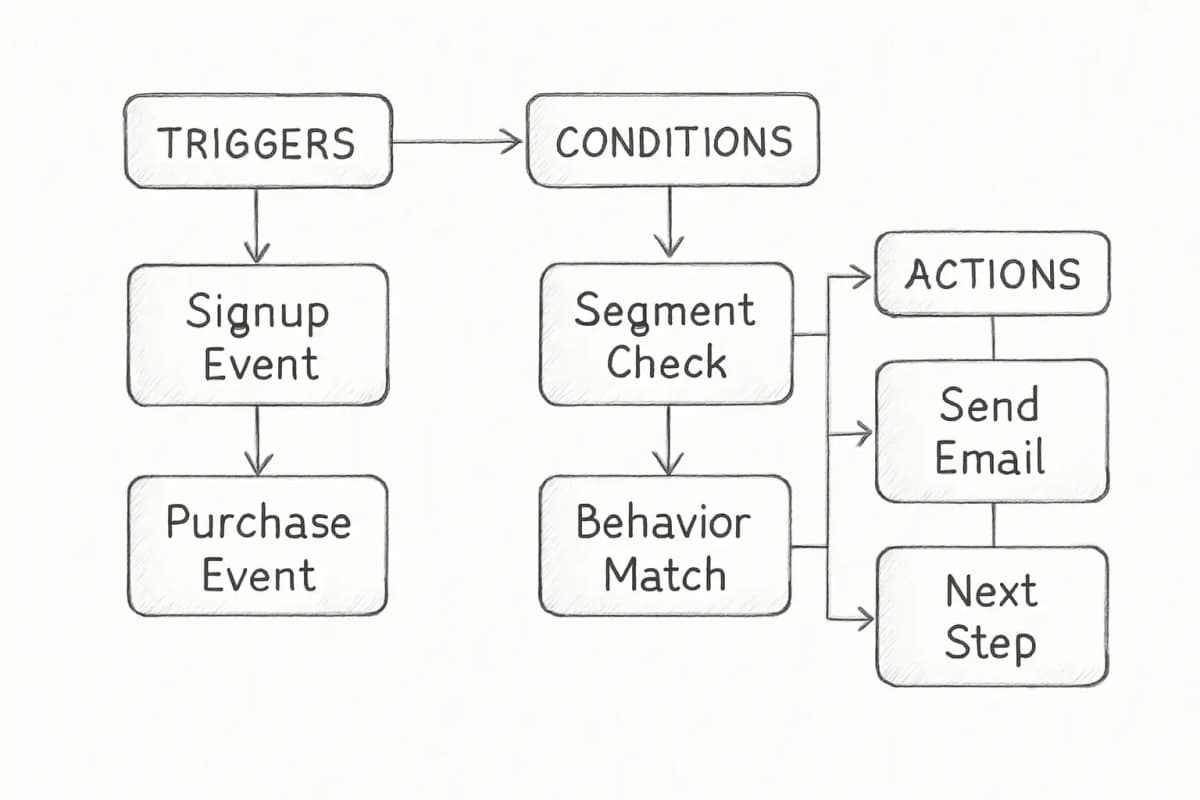
For actionable techniques, our article on email personalization techniques that boost conversions 47% covers the specific methods worth implementing in your automation workflows. Email automation workflow diagram showing three main components: triggers (events that start the workflow such as subscriber signup or purchase), conditions (decision points that segment subscribers based on behavior or attributes), and actions (emails sent or other automated responses). Flow should move left to right with triggers on the left feeding into conditions in the middle, which then branch to multiple actions on the right. Use boxes for each component type with arrows showing the flow direction.

Deliverability: The Foundation Your Automation Depends On

An automation workflow that lands in spam is worthless. Deliverability is not a secondary consideration; it is the prerequisite for everything else.

Before February 2024, email authentication was a best practice. After it, authentication became a prerequisite for delivery to the world's largest mailbox providers. Gmail, with 2.5 billion users, now requires bulk senders to implement SPF, DKIM, and DMARC.

Implementing DKIM and DMARC is more important now than ever. Gmail and Yahoo began enforcing stricter sender requirements in early 2024, and Microsoft is following suit with similar policies for Outlook in 2025. These updates make email authentication checks, specifically passing SPF, DKIM, and DMARC authentication, mandatory for bulk senders.

The practical consequence of skipping authentication: without DMARC, your marketing emails, transactional notifications, and customer communications may be rejected by Gmail, Yahoo, and Outlook. For businesses that depend on email for revenue, this is an existential threat to communication.

Beyond authentication, list hygiene directly impacts your sender reputation. Only 25% of senders maintained spam complaint rates below the 0.1% best-practice threshold, and 38.7% of senders rarely or never practice email list hygiene. Keep your complaint rate below 0.1%, remove hard bounces immediately, and suppress inactive subscribers after a defined period.

The average deliverability rate sits at 85% in 2024, heavily influenced by authentication protocols like DMARC, SPF, and DKIM. Brands that implement proper authentication see deliverability rates above 90%, while those without proper setup struggle with inbox placement and may see their messages relegated to spam folders.


Measuring ROI from Your Email Automation Service

You cannot improve what you do not measure. ROI from automation is calculated the same way as any other email program.

Calculate email marketing ROI with a simple formula: subtract the cost of the program from the revenue it generated, divide by the cost, then multiply by 100. If email drove $50,000 in revenue and cost $5,000 to run, your ROI is 900%.

The harder part is attribution. Suppose a subscriber visits your landing page through an email campaign but does not immediately take action. If they have a change of heart later and visit your site directly to buy, a conventional email marketing tool will not record this as a conversion. But if your CRM tracks every user engagement, it will tie the conversion to the relevant subscriber, allowing you to measure the real impact of your campaigns.

For actionable techniques, our article on email personalization techniques that boost conversions 47% covers the specific methods worth implementing in your automation workflows. Email automation workflow diagram showing three main components: triggers (events that start the workflow such as subscriber signup or purchase), conditions (decision points that segment subscribers based on behavior or attributes), and actions (emails sent or other automated responses). Flow should move left to right with triggers on the left feeding into conditions in the middle, which then branch to multiple actions on the right. Use boxes for each component type with arrows showing the flow direction.


Deliverability: The Foundation Your Automation Depends On

An automation workflow that lands in spam is worthless. Deliverability is not a secondary consideration; it is the prerequisite for everything else.

Before February 2024, email authentication was a best practice. After it, authentication became a prerequisite for delivery to the world's largest mailbox providers. Gmail, with 2.5 billion users, now requires bulk senders to implement SPF, DKIM, and DMARC.

Implementing DKIM and DMARC is more important now than ever. Gmail and Yahoo began enforcing stricter sender requirements in early 2024, and Microsoft is following suit with similar policies for Outlook in 2025. These updates make email authentication checks, specifically passing SPF, DKIM, and DMARC authentication, mandatory for bulk senders.

The practical consequence of skipping authentication: without DMARC, your marketing emails, transactional notifications, and customer communications may be rejected by Gmail, Yahoo, and Outlook. For businesses that depend on email for revenue, this is an existential threat to communication.

Beyond authentication, list hygiene directly impacts your sender reputation. Only 25% of senders maintained spam complaint rates below the 0.1% best-practice threshold, and 38.7% of senders rarely or never practice email list hygiene. Keep your complaint rate below 0.1%, remove hard bounces immediately, and suppress inactive subscribers after a defined period.

The average deliverability rate sits at 85% in 2024, heavily influenced by authentication protocols like DMARC, SPF, and DKIM. Brands that implement proper authentication see deliverability rates above 90%, while those without proper setup struggle with inbox placement and may see their messages relegated to spam folders.


Measuring ROI from Your Email Automation Service

You cannot improve what you do not measure. ROI from automation is calculated the same way as any other email program.

Calculate email marketing ROI with a simple formula: subtract the cost of the program from the revenue it generated, divide by the cost, then multiply by 100. If email drove $50,000 in revenue and cost $5,000 to run, your ROI is 900%.

The harder part is attribution. Suppose a subscriber visits your landing page through an email campaign but does not immediately take action. If they have a change of heart later and visit your site directly to buy, a conventional email marketing tool will not record this as a conversion. But if your CRM tracks every user engagement, it will tie the conversion to the relevant subscriber, allowing you to measure the real impact of your campaigns.

Core KPIs to track for automation programs:

Core KPIs to track for automation programs:

  • Click-through rate (CTR): The most reliable engagement signal, especially given that Apple Mail Privacy Protection now inflates open rate data. A click takes a deliberate human action, so CTR and click-to-open rate read genuine interest far better than open rate.
  • Revenue per recipient: Automated flows earn $1.94 per recipient on average, compared to $0.11 for standard campaigns.
  • Conversion rate by workflow: The 2025 benchmark is 1%+ conversion rate for newsletters, 3-5%+ for triggered emails, up to 15%+ for highly targeted campaigns like abandoned cart flows.
  • Workflow completion rate: The percentage of subscribers who complete each automation from start to finish. Drop-off points signal where copy, timing, or relevance needs adjustment.
  • A/B test results: Run tests continuously. Behavior-triggered emails that use automation to send based on specific actions, combined with A/B testing, allow email marketers to make data-driven decisions and optimize emails for better performance.
  • Click-through rate (CTR): The most reliable engagement signal, especially given that Apple Mail Privacy Protection now inflates open rate data. A click takes a deliberate human action, so CTR and click-to-open rate read genuine interest far better than open rate.
  • Revenue per recipient: Automated flows earn $1.94 per recipient on average, compared to $0.11 for standard campaigns.
  • Conversion rate by workflow: The 2025 benchmark is 1%+ conversion rate for newsletters, 3-5%+ for triggered emails, up to 15%+ for highly targeted campaigns like abandoned cart flows.
  • Workflow completion rate: The percentage of subscribers who complete each automation from start to finish. Drop-off points signal where copy, timing, or relevance needs adjustment.
  • A/B test results: Run tests continuously. Behavior-triggered emails that use automation to send based on specific actions, combined with A/B testing, allow email marketers to make data-driven decisions and optimize emails for better performance.

For a deeper framework on interpreting these signals, our guide to email marketing analytics best practices walks through how to build a reporting structure that connects campaign data to revenue outcomes.


Common Setup Mistakes to Avoid

Launching too many workflows at once. Start with two or three high-impact sequences (welcome, cart abandonment, re-engagement), measure their performance for at least 30 days, then expand.

Ignoring frequency caps. When multiple workflows overlap, a subscriber can receive too many emails in a short window. Set a rule inside your platform that limits how many automated emails a single contact receives within a given timeframe.

Writing in a robotic tone. Automated emails should not sound automated. Write in a conversational tone. Use natural language. Avoid corporate jargon and robotic phrasing.

Purchasing lists. Purchasing data is a surprisingly common practice that can severely damage your email deliverability efforts. While many third-party data sources claim to only sell opted-in emails, the opt-in is usually manufactured through misrepresentation or hidden terms. In some cases, the data has actually been scraped for resale. Purchasing data and sending to these addresses is more trouble than it is worth and should be avoided at all costs.

Skipping mobile optimization. In 2025, 55% of email opens occurred on mobile devices, reinforcing the critical importance of mobile-first email design and rendering.


Frequently Asked Questions

What is an email marketing automation service?

An email marketing automation service uses software or tools to automate and streamline sending targeted and personalized emails to subscribers based on predefined triggers or actions. This allows businesses to deliver relevant and timely emails to their subscribers without manual intervention, resulting in increased efficiency, improved customer engagement, and higher ROI.

Which email workflows should I build first?

Start with the three workflows that generate the fastest revenue impact: a welcome sequence (triggered immediately after signup), an abandoned cart sequence (triggered 1 to 3 hours after abandonment), and a re-engagement campaign (triggered after 60 to 90 days of inactivity). Abandoned cart and post-purchase flows remain the strongest revenue drivers. Once these are live and performing, add post-purchase follow-ups and lead nurturing sequences.

How much does an email marketing automation service cost?

Pricing varies significantly by platform and list size. Brevo offers unlimited contacts on every plan including free, charging only for what you send. For example, 25,000 contacts emailing weekly costs approximately $69/month, versus $189 to $300/month on per-contact pricing tools. ActiveCampaign starts at around $15/month for small lists and scales with contact count. HubSpot's automation features sit within its Marketing Hub, which includes substantial mandatory onboarding fees at the enterprise level. Evaluate based on the automation depth you need, not just monthly price.

How do I improve deliverability for automated emails?

For a deeper framework on interpreting these signals, our guide to email marketing analytics best practices walks through how to build a reporting structure that connects campaign data to revenue outcomes.


Common Setup Mistakes to Avoid

Launching too many workflows at once. Start with two or three high-impact sequences (welcome, cart abandonment, re-engagement), measure their performance for at least 30 days, then expand.

Ignoring frequency caps. When multiple workflows overlap, a subscriber can receive too many emails in a short window. Set a rule inside your platform that limits how many automated emails a single contact receives within a given timeframe.

Writing in a robotic tone. Automated emails should not sound automated. Write in a conversational tone. Use natural language. Avoid corporate jargon and robotic phrasing.

Purchasing lists. Purchasing data is a surprisingly common practice that can severely damage your email deliverability efforts. While many third-party data sources claim to only sell opted-in emails, the opt-in is usually manufactured through misrepresentation or hidden terms. In some cases, the data has actually been scraped for resale. Purchasing data and sending to these addresses is more trouble than it is worth and should be avoided at all costs.

Skipping mobile optimization. In 2025, 55% of email opens occurred on mobile devices, reinforcing the critical importance of mobile-first email design and rendering.


Frequently Asked Questions

What is an email marketing automation service?

An email marketing automation service uses software or tools to automate and streamline sending targeted and personalized emails to subscribers based on predefined triggers or actions. This allows businesses to deliver relevant and timely emails to their subscribers without manual intervention, resulting in increased efficiency, improved customer engagement, and higher ROI.

Which email workflows should I build first?

Start with the three workflows that generate the fastest revenue impact: a welcome sequence (triggered immediately after signup), an abandoned cart sequence (triggered 1 to 3 hours after abandonment), and a re-engagement campaign (triggered after 60 to 90 days of inactivity). Abandoned cart and post-purchase flows remain the strongest revenue drivers. Once these are live and performing, add post-purchase follow-ups and lead nurturing sequences.

How much does an email marketing automation service cost?

Pricing varies significantly by platform and list size. Brevo offers unlimited contacts on every plan including free, charging only for what you send. For example, 25,000 contacts emailing weekly costs approximately $69/month, versus $189 to $300/month on per-contact pricing tools. ActiveCampaign starts at around $15/month for small lists and scales with contact count. HubSpot's automation features sit within its Marketing Hub, which includes substantial mandatory onboarding fees at the enterprise level. Evaluate based on the automation depth you need, not just monthly price.

How do I improve deliverability for automated emails?

A sender who follows best practices, such as sending high-quality personalized emails to an opt-in list and performing regular list hygiene, will typically see higher deliverability when using email authentication. Their domain will build a reputation as a good sender with recipients who want to engage with their emails. Specifically: set up SPF, DKIM, and DMARC on your sending domain, keep spam complaint rates below 0.1%, remove hard bounces immediately, suppress contacts who have not engaged in 90 to 180 days, and avoid purchased lists entirely.

How long does it take to see ROI from email automation?

Most businesses see measurable results within 30 to 60 days of launching core automation workflows, particularly welcome sequences and abandoned cart flows. Half of all companies use some form of email automation, and the average ROI for email marketing is nearly 4,000%. However, ROI compounds over time as you build a cleaner list, refine your sequences through A/B testing, and expand segmentation. Treat it as an ongoing system, not a one-time setup.


A sender who follows best practices, such as sending high-quality personalized emails to an opt-in list and performing regular list hygiene, will typically see higher deliverability when using email authentication. Their domain will build a reputation as a good sender with recipients who want to engage with their emails. Specifically: set up SPF, DKIM, and DMARC on your sending domain, keep spam complaint rates below 0.1%, remove hard bounces immediately, suppress contacts who have not engaged in 90 to 180 days, and avoid purchased lists entirely.

How long does it take to see ROI from email automation?

Most businesses see measurable results within 30 to 60 days of launching core automation workflows, particularly welcome sequences and abandoned cart flows. Half of all companies use some form of email automation, and the average ROI for email marketing is nearly 4,000%. However, ROI compounds over time as you build a cleaner list, refine your sequences through A/B testing, and expand segmentation. Treat it as an ongoing system, not a one-time setup.

No comments yet. Be the first!

Leave a comment

Comments are reviewed before publishing.

No comments yet. Be the first!

Leave a comment

Comments are reviewed before publishing.