Ecommerce is the single highest-returning sector for email marketing. Retail, ecommerce, and consumer goods have the highest email ROI of any sector, at 4,500%. That number only holds if your template structure, copy, and automation are working together. A poorly built template drains every campaign that flows through it. This guide breaks down the email marketing templates for ecommerce that actually drive revenue, what each one needs to contain, and how to build them so they perform at every stage of the customer journey.
Key Takeaways
Ecommerce senders in the US see an average of $72 per $1 spent on email marketing, a 7,200% return.
Despite making up just 2% of email volume, automated emails drove 37% of all email-generated sales in 2024.
Abandoned cart email campaigns have an open rate of 50.50% and businesses earn an average of $3.45 in revenue per abandoned cart email recipient.
Order follow-up emails had a 49.75% open rate and a 22.64% click-to-conversion rate.
Segmented campaigns generate up to 760% more revenue than non-segmented sends for ecommerce brands.
Why Template Quality Determines Campaign ROI
Most ecommerce teams treat templates as a design problem. They are not. A template is a conversion architecture. Every structural decision you make, from where you place the call to action to how you handle product images, either adds friction or removes it.
62% of email marketing professionals say it takes their team at least two weeks to create a marketing email. That production timeline is unsustainable if you are starting from scratch every campaign. A library of well-built, modular email marketing templates for ecommerce cuts that time dramatically and keeps your brand consistent across every touchpoint.
Automated emails boost email sends by 99.2% and email open rates by 91.5% and account for 46.9% of all purchase-followed email clicks. None of that automation value is accessible without templates that support it.
The 6 Core Email Templates Every Ecommerce Store Needs
Not every campaign type performs equally. Your template library should be built around the flows that move revenue, not vanity sends.
1. Welcome Email Template
Ecommerce is the single highest-returning sector for email marketing. Retail, ecommerce, and consumer goods have the highest email ROI of any sector, at 4,500%. That number only holds if your template structure, copy, and automation are working together. A poorly built template drains every campaign that flows through it. This guide breaks down the email marketing templates for ecommerce that actually drive revenue, what each one needs to contain, and how to build them so they perform at every stage of the customer journey.
Key Takeaways
Ecommerce senders in the US see an average of $72 per $1 spent on email marketing, a 7,200% return.
Despite making up just 2% of email volume, automated emails drove 37% of all email-generated sales in 2024.
Abandoned cart email campaigns have an open rate of 50.50% and businesses earn an average of $3.45 in revenue per abandoned cart email recipient.
Order follow-up emails had a 49.75% open rate and a 22.64% click-to-conversion rate.
Segmented campaigns generate up to 760% more revenue than non-segmented sends for ecommerce brands.
Why Template Quality Determines Campaign ROI
Most ecommerce teams treat templates as a design problem. They are not. A template is a conversion architecture. Every structural decision you make, from where you place the call to action to how you handle product images, either adds friction or removes it.
62% of email marketing professionals say it takes their team at least two weeks to create a marketing email. That production timeline is unsustainable if you are starting from scratch every campaign. A library of well-built, modular email marketing templates for ecommerce cuts that time dramatically and keeps your brand consistent across every touchpoint.
Automated emails boost email sends by 99.2% and email open rates by 91.5% and account for 46.9% of all purchase-followed email clicks. None of that automation value is accessible without templates that support it.
The 6 Core Email Templates Every Ecommerce Store Needs
Not every campaign type performs equally. Your template library should be built around the flows that move revenue, not vanity sends.
1. Welcome Email Template
The welcome email is your highest-engagement opportunity. Welcome emails achieve an average open rate of 83.63% and a click-through rate of 16.60%, with a click-to-open rate of 19.85%.
A strong welcome email template should include:
A clear headline that states what the subscriber gets from being on your list
Your brand's core value proposition in two to three sentences
A single primary CTA (shop now, browse bestsellers, redeem discount)
A discount code if you promised one at signup; 48% of consumers surveyed gave their email address to receive a discount
Mobile-responsive layout with a single-column structure
Keep the copy brief and direct. The welcome email sets the tone for your entire relationship. For more on building this sequence effectively, see our guide on welcome email sequence best practices.
2. Abandoned Cart Template
About 70% of customers abandoned their shopping carts online in 2024. An abandoned cart flow is the most direct revenue-recovery tool in ecommerce email.
Merchants who sent just one cart abandonment email got 14.76 orders on average, while those who used the three-email strategy achieved 24.94 orders in total.
Structure your abandoned cart template sequence as:
Email 1: Send within one to two hours. Show the exact product left behind. Keep the copy simple: remind, don't pressure.
Email 2: Send 24 hours later. Add social proof, such as reviews for the specific product.
Email 3: Send 48 to 72 hours after Email 2. This is where you can include a discount or free shipping if your margins allow.
Personalized and limited-time discounts create a sense of urgency in an abandoned cart flow. Economic conditions have led 37% of consumers to seek out discounts from retail and ecommerce brands.
Your template must pull in dynamic product images, the cart total, and a direct link back to the customer's cart. Generic product blocks kill conversion rates on this email type.
3. Post-Purchase Email Template
The transaction is not the end of the customer relationship. It is the beginning of retention.
Analysis of 24 billion emails sent through Omnisend in 2024 found that recipients opened 52% more automated messages than manual campaigns. Order follow-up emails had a 49.75% open rate and a 22.64% click-to-conversion rate.
A post-purchase template sequence typically covers:
The welcome email is your highest-engagement opportunity. Welcome emails achieve an average open rate of 83.63% and a click-through rate of 16.60%, with a click-to-open rate of 19.85%.
A strong welcome email template should include:
A clear headline that states what the subscriber gets from being on your list
Your brand's core value proposition in two to three sentences
A single primary CTA (shop now, browse bestsellers, redeem discount)
A discount code if you promised one at signup; 48% of consumers surveyed gave their email address to receive a discount
Mobile-responsive layout with a single-column structure
Keep the copy brief and direct. The welcome email sets the tone for your entire relationship. For more on building this sequence effectively, see our guide on welcome email sequence best practices.
2. Abandoned Cart Template
About 70% of customers abandoned their shopping carts online in 2024. An abandoned cart flow is the most direct revenue-recovery tool in ecommerce email.
Merchants who sent just one cart abandonment email got 14.76 orders on average, while those who used the three-email strategy achieved 24.94 orders in total.
Structure your abandoned cart template sequence as:
Email 1: Send within one to two hours. Show the exact product left behind. Keep the copy simple: remind, don't pressure.
Email 2: Send 24 hours later. Add social proof, such as reviews for the specific product.
Email 3: Send 48 to 72 hours after Email 2. This is where you can include a discount or free shipping if your margins allow.
Personalized and limited-time discounts create a sense of urgency in an abandoned cart flow. Economic conditions have led 37% of consumers to seek out discounts from retail and ecommerce brands.
Your template must pull in dynamic product images, the cart total, and a direct link back to the customer's cart. Generic product blocks kill conversion rates on this email type.
3. Post-Purchase Email Template
The transaction is not the end of the customer relationship. It is the beginning of retention.
Analysis of 24 billion emails sent through Omnisend in 2024 found that recipients opened 52% more automated messages than manual campaigns. Order follow-up emails had a 49.75% open rate and a 22.64% click-to-conversion rate.
A post-purchase template sequence typically covers:
Order confirmation: Immediate. Include order details, expected delivery window, and a customer support link.
Shipping notification: Triggered by fulfillment. Include tracking link.
Delivery confirmation: Triggered on delivery. Thank the customer and invite a product review.
Cross-sell or upsell: 5 to 10 days post-delivery. Recommend products related to the purchase.
Cross-sells are proven post-purchase emails that win returning customers. A simple discount code on the next purchase is often enough.
Attracting new customers typically costs five times more than retaining existing ones, which is why post-purchase emails should be a core part of every ecommerce email strategy.
4. Promotional and Seasonal Sale Templates
Promotional emails drive a large share of single-campaign revenue, but they are easy to do poorly. A cluttered template with multiple CTAs and no clear hierarchy dilutes every click.
When you give customers five different choices, they end up choosing none. To drive clicks and conversions, use a single CTA that tells customers exactly what step to take.
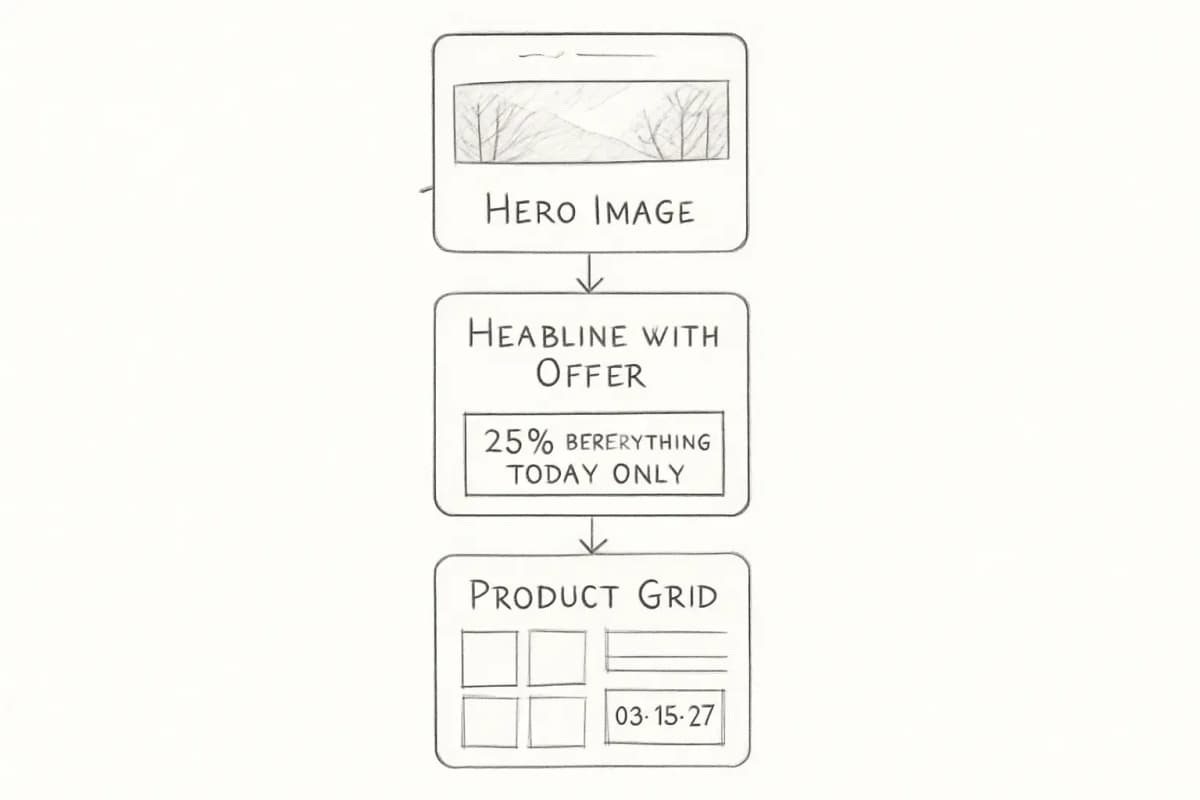
For seasonal campaigns, build templates with:
A single, prominent headline that states the offer (25% off everything, today only)
A hero image that reflects the seasonal context
One primary CTA button above the fold
A product grid section for bestsellers or featured items
A deadline or urgency element if the offer is time-limited
5. Win-Back and Re-Engagement Template
The average email list decay rate is between 22% and 30% per year. A win-back template reactivates dormant subscribers before they permanently disengage.
A re-engagement template should:
Use a subject line that acknowledges the gap ("We miss you" or "Has something changed?")
Offer a concrete reason to return: a discount, a new product announcement, or relevant content
Include a secondary option to update preferences or unsubscribe (this protects deliverability)
In ecommerce, the classic way to win back inactive customers is to send a discount coupon. Research suggests dollar-off discounts activate more subscribers than percentage-off offers.
If a subscriber does not re-engage after two to three win-back emails, remove them from your active list. Sending to an unresponsive segment harms your sender reputation and long-term deliverability.
6. Browse Abandonment and Product Recommendation Template
Order confirmation: Immediate. Include order details, expected delivery window, and a customer support link.
Shipping notification: Triggered by fulfillment. Include tracking link.
Delivery confirmation: Triggered on delivery. Thank the customer and invite a product review.
Cross-sell or upsell: 5 to 10 days post-delivery. Recommend products related to the purchase.
Cross-sells are proven post-purchase emails that win returning customers. A simple discount code on the next purchase is often enough.
Attracting new customers typically costs five times more than retaining existing ones, which is why post-purchase emails should be a core part of every ecommerce email strategy.
4. Promotional and Seasonal Sale Templates
Promotional emails drive a large share of single-campaign revenue, but they are easy to do poorly. A cluttered template with multiple CTAs and no clear hierarchy dilutes every click.
When you give customers five different choices, they end up choosing none. To drive clicks and conversions, use a single CTA that tells customers exactly what step to take.
For seasonal campaigns, build templates with:
A single, prominent headline that states the offer (25% off everything, today only)
A hero image that reflects the seasonal context
One primary CTA button above the fold
A product grid section for bestsellers or featured items
A deadline or urgency element if the offer is time-limited
5. Win-Back and Re-Engagement Template
The average email list decay rate is between 22% and 30% per year. A win-back template reactivates dormant subscribers before they permanently disengage.
A re-engagement template should:
Use a subject line that acknowledges the gap ("We miss you" or "Has something changed?")
Offer a concrete reason to return: a discount, a new product announcement, or relevant content
Include a secondary option to update preferences or unsubscribe (this protects deliverability)
In ecommerce, the classic way to win back inactive customers is to send a discount coupon. Research suggests dollar-off discounts activate more subscribers than percentage-off offers.
If a subscriber does not re-engage after two to three win-back emails, remove them from your active list. Sending to an unresponsive segment harms your sender reputation and long-term deliverability.
6. Browse Abandonment and Product Recommendation Template
Browse abandonment emails target visitors who viewed products but did not add anything to their cart. They are lower-urgency than cart abandonment but still valuable.
Marketing emails sent in response to behavioral triggers generate 10 times greater revenue than other marketing email types.
These templates work best when they surface the exact product viewed, include similar or complementary items, and keep the copy light. The goal is helpful, not pushy.
Template Design: What Actually Affects Performance
The most common template design mistakes are not cosmetic, they are structural.
Mobile responsiveness is not optional. 41% of customers open emails on their phones, making readability and fast loading essential for engagement. Launching a mobile-responsive email design can increase unique mobile clicks by 15%.
Practically, this means:
Single-column layouts for the main content
Font sizes of 16px or larger for body text
CTA buttons at least 44x44px, buttons are 25% more likely to be clicked than a text link alone
Compressed images that load quickly on slower mobile connections
Limit CTAs per email. 73% of marketers stick to just one or two CTAs per email. Limiting your CTAs encourages subscribers to take the desired action.
Use alt text on every image. Use alt text for all images, maintain sufficient color contrast, and structure your HTML properly so screen readers can parse the content. Accessible emails also display better when images are blocked.
Keep a master template for each email type. Keeping a master email template means each of your emails will have the same font and size for the header, subheader, and text. You can maintain several master templates at once, one for each type of email you send.
Personalization and Segmentation Inside Your Templates
Template design and personalization are inseparable for ecommerce. A template built without dynamic content blocks cannot be effectively personalized, and personalization is where the real revenue difference lives.
Personalized emails achieve 29% higher open rates and 41% higher click-through rates than generic messages. For ecommerce brands, segmented campaigns generate up to 760% more revenue than non-segmented sends.
65% of marketers identify dynamic content blocks as their most effective personalization tactic, requiring templates designed for modular, audience-specific content insertion.
Build your templates so they support:
First-name personalization in the subject line and opening line
Dynamic product blocks that pull from browse or purchase history
Segment-specific content sections (VIP customers, first-time buyers, lapsed customers)
Behavioral triggers that change the template content based on the action that fired the email
Browse abandonment emails target visitors who viewed products but did not add anything to their cart. They are lower-urgency than cart abandonment but still valuable.
Marketing emails sent in response to behavioral triggers generate 10 times greater revenue than other marketing email types.
These templates work best when they surface the exact product viewed, include similar or complementary items, and keep the copy light. The goal is helpful, not pushy.
Template Design: What Actually Affects Performance
The most common template design mistakes are not cosmetic, they are structural.
Mobile responsiveness is not optional. 41% of customers open emails on their phones, making readability and fast loading essential for engagement. Launching a mobile-responsive email design can increase unique mobile clicks by 15%.
Practically, this means:
Single-column layouts for the main content
Font sizes of 16px or larger for body text
CTA buttons at least 44x44px, buttons are 25% more likely to be clicked than a text link alone
Compressed images that load quickly on slower mobile connections
Limit CTAs per email. 73% of marketers stick to just one or two CTAs per email. Limiting your CTAs encourages subscribers to take the desired action.
Use alt text on every image. Use alt text for all images, maintain sufficient color contrast, and structure your HTML properly so screen readers can parse the content. Accessible emails also display better when images are blocked.
Keep a master template for each email type. Keeping a master email template means each of your emails will have the same font and size for the header, subheader, and text. You can maintain several master templates at once, one for each type of email you send.
Personalization and Segmentation Inside Your Templates
Template design and personalization are inseparable for ecommerce. A template built without dynamic content blocks cannot be effectively personalized, and personalization is where the real revenue difference lives.
Personalized emails achieve 29% higher open rates and 41% higher click-through rates than generic messages. For ecommerce brands, segmented campaigns generate up to 760% more revenue than non-segmented sends.
65% of marketers identify dynamic content blocks as their most effective personalization tactic, requiring templates designed for modular, audience-specific content insertion.
Build your templates so they support:
First-name personalization in the subject line and opening line
Dynamic product blocks that pull from browse or purchase history
Segment-specific content sections (VIP customers, first-time buyers, lapsed customers)
Behavioral triggers that change the template content based on the action that fired the email
Kate Spade used this approach to segment customers by product interest and automate personalized product feeds. The result was a 50% increase in conversion rates, a 36% jump in CTR, and a 174% increase in revenue.
Subject Lines and Preview Text: The Gateway to Your Template
A perfectly built template means nothing if it does not get opened. Your subject line and preview text are the first conversion elements in every email you send.
Personalized subject lines increase open rates by 26% compared to generic alternatives.
Emails with preheader text have higher average open rates of 44.67%, while those without have 39.28%.
Keep subject lines specific to the email's single purpose. Every ecommerce email template should include a subject line and preview text field as standard elements in your build process, not an afterthought at send time. For a full breakdown of what moves open rates, see email subject line best practices that boost open rates by 27%.
Testing and Iteration: How Templates Improve Over Time
No template is final at launch. The data from real sends is what tells you what to fix.
Marketers who A/B test their emails increase email ROI by 86% (42:1) compared to those who never do (23:1).
For ecommerce templates, test one variable at a time:
Subject line vs. subject line
Hero image vs. no hero image
Single product CTA vs. product grid
Discount in Email 3 of the cart flow vs. no discount
A/B testing abandoned cart emails can reveal surprising insights. Sometimes free shipping beats percentage discounts, or emotional appeals outperform logical ones.
Track revenue per email sent, not just open rates. Bot-driven phantom engagement has made open rates unreliable, pushing high-performing teams toward revenue per email, list churn, and lifetime value as the metrics that matter.
Frequently Asked Questions
What should every ecommerce email template include?
At a minimum, every ecommerce email template needs a clear header with your logo, a single primary CTA button (not a text link), mobile-responsive layout, dynamic content blocks for product personalization, alt text on all images, and a visible unsubscribe option. For automated flows like cart abandonment, the template must also support dynamic product image and price injection from your ecommerce platform.
How many email templates does an ecommerce store need to get started?
Kate Spade used this approach to segment customers by product interest and automate personalized product feeds. The result was a 50% increase in conversion rates, a 36% jump in CTR, and a 174% increase in revenue.
Subject Lines and Preview Text: The Gateway to Your Template
A perfectly built template means nothing if it does not get opened. Your subject line and preview text are the first conversion elements in every email you send.
Personalized subject lines increase open rates by 26% compared to generic alternatives.
Emails with preheader text have higher average open rates of 44.67%, while those without have 39.28%.
Keep subject lines specific to the email's single purpose. Every ecommerce email template should include a subject line and preview text field as standard elements in your build process, not an afterthought at send time. For a full breakdown of what moves open rates, see email subject line best practices that boost open rates by 27%.
Testing and Iteration: How Templates Improve Over Time
No template is final at launch. The data from real sends is what tells you what to fix.
Marketers who A/B test their emails increase email ROI by 86% (42:1) compared to those who never do (23:1).
For ecommerce templates, test one variable at a time:
Subject line vs. subject line
Hero image vs. no hero image
Single product CTA vs. product grid
Discount in Email 3 of the cart flow vs. no discount
A/B testing abandoned cart emails can reveal surprising insights. Sometimes free shipping beats percentage discounts, or emotional appeals outperform logical ones.
Track revenue per email sent, not just open rates. Bot-driven phantom engagement has made open rates unreliable, pushing high-performing teams toward revenue per email, list churn, and lifetime value as the metrics that matter.
Frequently Asked Questions
What should every ecommerce email template include?
At a minimum, every ecommerce email template needs a clear header with your logo, a single primary CTA button (not a text link), mobile-responsive layout, dynamic content blocks for product personalization, alt text on all images, and a visible unsubscribe option. For automated flows like cart abandonment, the template must also support dynamic product image and price injection from your ecommerce platform.
How many email templates does an ecommerce store need to get started?
Start with six core templates: welcome, abandoned cart (three-email sequence), post-purchase (order confirmation, shipping, delivery, cross-sell), promotional/seasonal, win-back, and browse abandonment. These cover the highest-ROI touchpoints in the customer lifecycle and can be expanded once you have performance data on the basics.
How often should I update my ecommerce email templates?
Review your templates at least once per quarter. Redesign when your click-to-open rate drops significantly below your previous baseline, when your brand identity changes, or when platform updates (like new email client rendering rules) affect how your templates display. Always test your emails on different devices and email clients to ensure consistent responsiveness, and fix any issues before sending.
What is the best email template format for ecommerce: HTML or plain text?
HTML templates with responsive design consistently outperform plain text for ecommerce because they support product images, branded CTAs, and dynamic content blocks. Image-based emails receive a 4.84% CTR while text-based emails receive a CTR of 1.64%. However, plain text has a role in win-back and high-trust sequences where a personal tone matters more than visual presentation. The most effective programs use both formats strategically.
No comments yet. Be the first!
Start with six core templates: welcome, abandoned cart (three-email sequence), post-purchase (order confirmation, shipping, delivery, cross-sell), promotional/seasonal, win-back, and browse abandonment. These cover the highest-ROI touchpoints in the customer lifecycle and can be expanded once you have performance data on the basics.
How often should I update my ecommerce email templates?
Review your templates at least once per quarter. Redesign when your click-to-open rate drops significantly below your previous baseline, when your brand identity changes, or when platform updates (like new email client rendering rules) affect how your templates display. Always test your emails on different devices and email clients to ensure consistent responsiveness, and fix any issues before sending.
What is the best email template format for ecommerce: HTML or plain text?
HTML templates with responsive design consistently outperform plain text for ecommerce because they support product images, branded CTAs, and dynamic content blocks. Image-based emails receive a 4.84% CTR while text-based emails receive a CTR of 1.64%. However, plain text has a role in win-back and high-trust sequences where a personal tone matters more than visual presentation. The most effective programs use both formats strategically.