Shopify stores have a direct path to one of the highest-ROI marketing channels available, and most merchants are not using it to its full potential. Email marketing delivers an ROI of $36 for every dollar spent. For an ecommerce business with existing customer data, a product catalog, and a subscriber base, that math gets even better. This guide walks you through exactly how to send marketing emails on Shopify, from the native tools built into your admin to third-party platforms that scale with your growth.
Key Takeaways
Shopify has a built-in email marketing solution called Shopify Messaging, which lets you create, send, and track email campaigns directly from your Shopify admin panel.
All stores on paid plans get 10,000 free emails at the start of every month. After that, additional emails cost $1 USD per 1,000 up to 300,000.
Abandoned cart emails achieve open rates above 40%, well above the 21% retail benchmark. One in two recipients who click the email will make a purchase.
Segmented campaigns generate 760% more revenue than non-segmented sends.
As of February 1, 2024, Gmail and Yahoo require domain authentication and a DMARC record to send emails from a branded address.
Why Email Marketing Matters for Shopify Stores
Before getting into setup and execution, it helps to understand why email is worth prioritizing over other channels.
As of 2024, there are 4.5 billion estimated email users worldwide, and this number is forecasted to grow to 4.8 billion by 2027. Ecommerce buyers prefer email to connect with brands at a rate of up to 60%, and 88% of email users check their inboxes daily.
Automated emails alone drive 30% of revenue from just 2% of total sends. That is the core case for email: a small amount of well-timed output generates a disproportionate share of revenue.
For Shopify merchants specifically, Shopify Email understands your business because it is part of your business. It automatically taps into your existing customer data and product data, meaning you can use customer lists, sales history, and product details to craft emails that speak directly to shoppers.
Method 1: Send Marketing Emails Using Shopify Messaging (Built-In)
The simplest way to send marketing emails on Shopify is through , the native email and SMS marketing tool built into your admin.
Shopify stores have a direct path to one of the highest-ROI marketing channels available, and most merchants are not using it to its full potential. Email marketing delivers an ROI of $36 for every dollar spent. For an ecommerce business with existing customer data, a product catalog, and a subscriber base, that math gets even better. This guide walks you through exactly how to send marketing emails on Shopify, from the native tools built into your admin to third-party platforms that scale with your growth.
Key Takeaways
Shopify has a built-in email marketing solution called Shopify Messaging, which lets you create, send, and track email campaigns directly from your Shopify admin panel.
All stores on paid plans get 10,000 free emails at the start of every month. After that, additional emails cost $1 USD per 1,000 up to 300,000.
Abandoned cart emails achieve open rates above 40%, well above the 21% retail benchmark. One in two recipients who click the email will make a purchase.
Segmented campaigns generate 760% more revenue than non-segmented sends.
As of February 1, 2024, Gmail and Yahoo require domain authentication and a DMARC record to send emails from a branded address.
Why Email Marketing Matters for Shopify Stores
Before getting into setup and execution, it helps to understand why email is worth prioritizing over other channels.
As of 2024, there are 4.5 billion estimated email users worldwide, and this number is forecasted to grow to 4.8 billion by 2027. Ecommerce buyers prefer email to connect with brands at a rate of up to 60%, and 88% of email users check their inboxes daily.
Automated emails alone drive 30% of revenue from just 2% of total sends. That is the core case for email: a small amount of well-timed output generates a disproportionate share of revenue.
For Shopify merchants specifically, Shopify Email understands your business because it is part of your business. It automatically taps into your existing customer data and product data, meaning you can use customer lists, sales history, and product details to craft emails that speak directly to shoppers.
Method 1: Send Marketing Emails Using Shopify Messaging (Built-In)
The simplest way to send marketing emails on Shopify is through , the native email and SMS marketing tool built into your admin.
Shopify Messaging
Step 1: Install and Set Up Shopify Messaging
Shopify Messaging is installed on your Shopify store by default. If it does not appear in your admin, you can install it from the Shopify App Store by navigating to the Shopify Messaging app page, clicking Add App, logging in if prompted, and clicking Install App.
After installation, you need to set up your sender email by confirming or changing the email address that you send email marketing from.
Step 2: Authenticate Your Sending Domain
This step is non-negotiable for deliverability. As of February 1, 2024, Gmail and Yahoo require you to authenticate your domain and have a DMARC record to send emails from a branded email address. Without proper setup, your Shopify emails will struggle with deliverability, landing in spam folders and getting rejected. When authentication fails, Shopify automatically rewrites your sender address to something generic like store+123@shopifyemail.com.
To authenticate your domain:
Go to Settings > Notifications in your Shopify admin
In the Sender email section, click Authenticate your domain
Follow the instructions to create four new domain records with your domain provider, entering the host names and values in the order they display
Wait up to 48 hours for domain verification to complete
If you purchased your domain through Shopify, your email authentication is fully configured automatically, including DKIM, SPF, and DMARC records. No action is required.
Step 3: Create and Send a Campaign
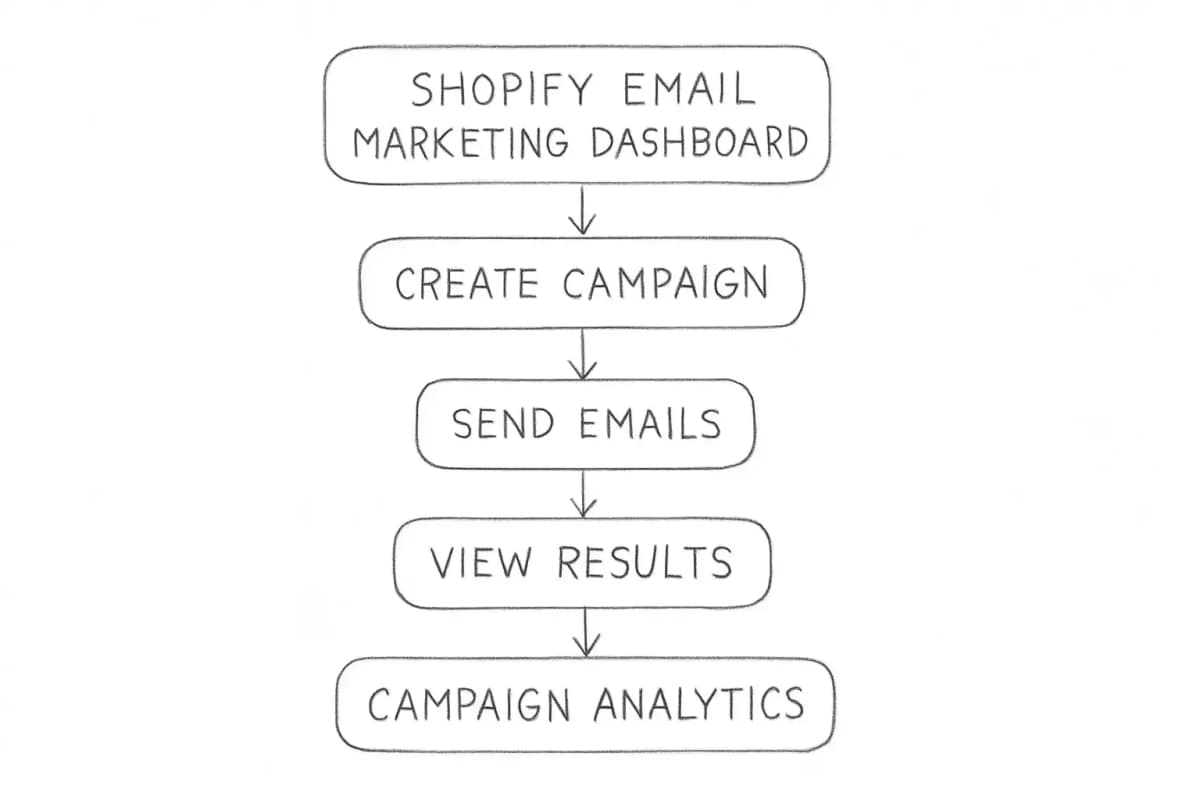
You can email customers using Shopify Email by going to Marketing in your admin dashboard, selecting Create Campaign, and choosing Shopify Email. From there, design your message, select recipients from your customer list, and send or schedule.
Within the campaign builder, you can:
Choose from pre-built templates
Insert products directly from your catalog
Segment your recipient list by customer behavior or purchase history
Schedule the campaign for a future send time
Track opens, clicks, and conversions
Method 2: Set Up Marketing Automations
One-off campaigns drive revenue, but automation is where the long-term gains accumulate. You can use marketing automations in Shopify Messaging to automatically send emails when customers take actions in your store, such as abandoning a checkout or browsing a product.
To create an automation:
Shopify Messaging
Step 1: Install and Set Up Shopify Messaging
Shopify Messaging is installed on your Shopify store by default. If it does not appear in your admin, you can install it from the Shopify App Store by navigating to the Shopify Messaging app page, clicking Add App, logging in if prompted, and clicking Install App.
After installation, you need to set up your sender email by confirming or changing the email address that you send email marketing from.
Step 2: Authenticate Your Sending Domain
This step is non-negotiable for deliverability. As of February 1, 2024, Gmail and Yahoo require you to authenticate your domain and have a DMARC record to send emails from a branded email address. Without proper setup, your Shopify emails will struggle with deliverability, landing in spam folders and getting rejected. When authentication fails, Shopify automatically rewrites your sender address to something generic like store+123@shopifyemail.com.
To authenticate your domain:
Go to Settings > Notifications in your Shopify admin
In the Sender email section, click Authenticate your domain
Follow the instructions to create four new domain records with your domain provider, entering the host names and values in the order they display
Wait up to 48 hours for domain verification to complete
If you purchased your domain through Shopify, your email authentication is fully configured automatically, including DKIM, SPF, and DMARC records. No action is required.
Step 3: Create and Send a Campaign
You can email customers using Shopify Email by going to Marketing in your admin dashboard, selecting Create Campaign, and choosing Shopify Email. From there, design your message, select recipients from your customer list, and send or schedule.
Within the campaign builder, you can:
Choose from pre-built templates
Insert products directly from your catalog
Segment your recipient list by customer behavior or purchase history
Schedule the campaign for a future send time
Track opens, clicks, and conversions
Method 2: Set Up Marketing Automations
One-off campaigns drive revenue, but automation is where the long-term gains accumulate. You can use marketing automations in Shopify Messaging to automatically send emails when customers take actions in your store, such as abandoning a checkout or browsing a product.
To create an automation:
From your Shopify admin, go to Apps > Messaging
Click Automations, then click View Templates
Select the automation you want, such as abandoned cart, abandoned checkout, or browse abandonment
Customize the email design, subject line, and timing
Activate the automation
For abandoned cart sequences specifically, the recommended timing is a first email at 1 hour, a second at 24 hours, and a third at 72 hours after abandonment.
The revenue case for cart recovery emails is strong. According to the Baymard Institute, 70.19% of online shopping carts are abandoned. A well-timed three-email sequence generates 6.5x more revenue than a single reminder, and stores that send the first email within 60 minutes recover 3x more carts than those who wait a day.
For your welcome series, welcome emails generate up to 320% more revenue per email than promotional messages, making your welcome series the single most valuable email automation you can build for your Shopify store. See our guide on welcome email sequence best practices for a full breakdown of how to structure yours.
Shopify Messaging Pricing: What It Costs
All stores on paid Shopify plans have 10,000 free emails to send at the beginning of every month. After that, charges apply.
The pricing tiers from Shopify are:
$1 USD per 1,000 additional emails up to 300,000
$0.65 USD per 1,000 after 300,000 emails
$0.55 USD per 1,000 after 750,000 emails
Shopify Messaging email marketing automations count toward your 10,000 free emails per calendar month.
For context on cost at scale, a store sending 30,000 emails per month would pay just $20 USD. Even a store sending 600,000 emails monthly would only pay $485 USD.
Method 3: Use a Third-Party Email Marketing App
Shopify Messaging is excellent when you are just starting out. You will want to upgrade to a dedicated platform when you start needing advanced automation workflows, multi-channel marketing, deeper customer segmentation, and better revenue reporting.
The most widely used third-party platforms for Shopify email marketing are:
Klaviyo: Merchants value this app for boosting customer engagement and sales through seamless Shopify integration. It offers robust features like segmentation, automation, and a user-friendly email editor. Klaviyo syncs with more than 350 different platforms.
Omnisend: A multi-channel platform that lets you manage your ecommerce business marketing communications from one place.
Mailchimp: A good option for those with fewer than 2,000 subscribers or for those who benefit from landing pages, automations, or advanced analytics.
For stores where email drives significant revenue, Klaviyo is the standard choice for ecommerce stores doing $50,000 or more per month where email drives 20 to 40% of revenue.
Segmentation: The Biggest Lever on Your List
From your Shopify admin, go to Apps > Messaging
Click Automations, then click View Templates
Select the automation you want, such as abandoned cart, abandoned checkout, or browse abandonment
Customize the email design, subject line, and timing
Activate the automation
For abandoned cart sequences specifically, the recommended timing is a first email at 1 hour, a second at 24 hours, and a third at 72 hours after abandonment.
The revenue case for cart recovery emails is strong. According to the Baymard Institute, 70.19% of online shopping carts are abandoned. A well-timed three-email sequence generates 6.5x more revenue than a single reminder, and stores that send the first email within 60 minutes recover 3x more carts than those who wait a day.
For your welcome series, welcome emails generate up to 320% more revenue per email than promotional messages, making your welcome series the single most valuable email automation you can build for your Shopify store. See our guide on welcome email sequence best practices for a full breakdown of how to structure yours.
Shopify Messaging Pricing: What It Costs
All stores on paid Shopify plans have 10,000 free emails to send at the beginning of every month. After that, charges apply.
The pricing tiers from Shopify are:
$1 USD per 1,000 additional emails up to 300,000
$0.65 USD per 1,000 after 300,000 emails
$0.55 USD per 1,000 after 750,000 emails
Shopify Messaging email marketing automations count toward your 10,000 free emails per calendar month.
For context on cost at scale, a store sending 30,000 emails per month would pay just $20 USD. Even a store sending 600,000 emails monthly would only pay $485 USD.
Method 3: Use a Third-Party Email Marketing App
Shopify Messaging is excellent when you are just starting out. You will want to upgrade to a dedicated platform when you start needing advanced automation workflows, multi-channel marketing, deeper customer segmentation, and better revenue reporting.
The most widely used third-party platforms for Shopify email marketing are:
Klaviyo: Merchants value this app for boosting customer engagement and sales through seamless Shopify integration. It offers robust features like segmentation, automation, and a user-friendly email editor. Klaviyo syncs with more than 350 different platforms.
Omnisend: A multi-channel platform that lets you manage your ecommerce business marketing communications from one place.
Mailchimp: A good option for those with fewer than 2,000 subscribers or for those who benefit from landing pages, automations, or advanced analytics.
For stores where email drives significant revenue, Klaviyo is the standard choice for ecommerce stores doing $50,000 or more per month where email drives 20 to 40% of revenue.
Segmentation: The Biggest Lever on Your List
Sending the same email to your entire list is a common and costly mistake. Segmented email campaigns generate 30% more opens and 50% more click-throughs than non-segmented campaigns, consistently across industries and ecommerce verticals.
Build and segment email lists with popups, lead magnets, and targeted opt-in forms. From there, effective Shopify segments to build include:
Technical setup and list hygiene determine whether your emails reach inboxes. As of February 1, 2024, Gmail and Yahoo enforce a complaint rate threshold of less than 0.3%. It is recommended that you maintain a complaint rate below 0.1% to prevent your emails from being filtered into spam folders.
Key deliverability practices for Shopify merchants:
Authenticate your domain. One of the easiest ways to build your sender reputation is by authenticating your sender email address. Authentication methods compare emails against a list of specific IP addresses (SPF), use encryption keys and digital signatures to validate email content (DKIM), and align domain information (DMARC, CNAME).
Warm up new domains gradually. Start with a small group of your most engaged contacts who frequently open and interact with your emails. Increase the number of recipients gradually over time.
Keep your list clean. You can increase your open rate by deleting inactive addresses from your list and only contacting recipients who engage. Build your email list organically and never purchase or rent email addresses, as doing so can diminish your sender reputation.
Sending the same email to your entire list is a common and costly mistake. Segmented email campaigns generate 30% more opens and 50% more click-throughs than non-segmented campaigns, consistently across industries and ecommerce verticals.
Build and segment email lists with popups, lead magnets, and targeted opt-in forms. From there, effective Shopify segments to build include:
Technical setup and list hygiene determine whether your emails reach inboxes. As of February 1, 2024, Gmail and Yahoo enforce a complaint rate threshold of less than 0.3%. It is recommended that you maintain a complaint rate below 0.1% to prevent your emails from being filtered into spam folders.
Key deliverability practices for Shopify merchants:
Authenticate your domain. One of the easiest ways to build your sender reputation is by authenticating your sender email address. Authentication methods compare emails against a list of specific IP addresses (SPF), use encryption keys and digital signatures to validate email content (DKIM), and align domain information (DMARC, CNAME).
Warm up new domains gradually. Start with a small group of your most engaged contacts who frequently open and interact with your emails. Increase the number of recipients gradually over time.
Keep your list clean. You can increase your open rate by deleting inactive addresses from your list and only contacting recipients who engage. Build your email list organically and never purchase or rent email addresses, as doing so can diminish your sender reputation.
How do I send marketing emails on Shopify for free?
All stores on paid Shopify plans receive 10,000 free emails at the beginning of every month. To use them, install Shopify Messaging from your admin, authenticate your sender domain, and create a campaign from the Marketing section. The free allowance covers both one-off campaigns and automated emails like abandoned cart and welcome sequences.
Does Shopify have a built-in email marketing tool?
Yes. Shopify has a built-in email marketing solution called Shopify Messaging. It allows you to create, send, and track email campaigns directly from your Shopify admin panel. While convenient and reasonably priced, it offers more basic functionality compared to dedicated email marketing apps.
Should I use Shopify Email or a third-party platform like Klaviyo?
The answer depends on your volume and complexity. Shopify Email uses shared infrastructure and is basic. For stores doing under $50,000 per month in revenue or sending under 10,000 emails per month, it is adequate. For stores where email drives significant revenue, platforms like Klaviyo or ActiveCampaign with proper domain authentication are the better choice.
What types of automated emails should Shopify merchants set up first?
For Shopify store owners, the core playbook is to build welcome, abandoned cart, and post-purchase flows first, then segment your list beyond basic demographics and make every email mobile-first. These three flows cover the highest-value moments in the customer journey and run with minimal ongoing maintenance once configured.
No comments yet. Be the first!
Frequently Asked Questions
How do I send marketing emails on Shopify for free?
All stores on paid Shopify plans receive 10,000 free emails at the beginning of every month. To use them, install Shopify Messaging from your admin, authenticate your sender domain, and create a campaign from the Marketing section. The free allowance covers both one-off campaigns and automated emails like abandoned cart and welcome sequences.
Does Shopify have a built-in email marketing tool?
Yes. Shopify has a built-in email marketing solution called Shopify Messaging. It allows you to create, send, and track email campaigns directly from your Shopify admin panel. While convenient and reasonably priced, it offers more basic functionality compared to dedicated email marketing apps.
Should I use Shopify Email or a third-party platform like Klaviyo?
The answer depends on your volume and complexity. Shopify Email uses shared infrastructure and is basic. For stores doing under $50,000 per month in revenue or sending under 10,000 emails per month, it is adequate. For stores where email drives significant revenue, platforms like Klaviyo or ActiveCampaign with proper domain authentication are the better choice.
What types of automated emails should Shopify merchants set up first?
For Shopify store owners, the core playbook is to build welcome, abandoned cart, and post-purchase flows first, then segment your list beyond basic demographics and make every email mobile-first. These three flows cover the highest-value moments in the customer journey and run with minimal ongoing maintenance once configured.