HomeBlogEmail Marketing StrategyEmail Marketing Automation Tips: 9 Ways to Save Time
Email Marketing Strategy

Email Marketing Automation Tips: 9 Ways to Save Time

Master email automation with 9 practical tips to boost ROI, save time, and improve deliverability. Learn segmentation, triggers, and testing strategies.

M

Marcus Webb

July 11, 2026

13 min read
HomeBlogEmail Marketing StrategyEmail Marketing Automation Tips: 9 Ways to Save Time
Email Marketing Strategy

Email Marketing Automation Tips: 9 Ways to Save Time

Master email automation with 9 practical tips to boost ROI, save time, and improve deliverability. Learn segmentation, triggers, and testing strategies.

M

Marcus Webb

July 11, 2026

13 min read
Share:
Share:
#Automation#workflow optimization#email campaigns#Marketing Efficiency
Illustration for email marketing automation tips

Stay in the loop

Get the latest posts delivered straight to your inbox. No spam, unsubscribe anytime.

Most of my data is now sufficient to write a comprehensive, well-cited article. Let me compose the final piece.

Most marketing teams spend hours each week writing, scheduling, and managing email campaigns manually, only to see mediocre results. The good news: the right email marketing automation tips can cut that workload by more than two-thirds while dramatically improving what you send. A Forrester Total Economic Impact study on GetResponse MAX customers found that marketing teams implementing automation can reduce campaign assembly effort by 73%. That is not a small efficiency gain. It is time your team can direct toward strategy, creative work, and growth.

This guide covers nine practical tips to help you automate smarter, not just faster.


Key Takeaways

  • In 2024, automated emails drove 37% of all email-generated sales despite accounting for just 2% of total email volume.
  • 74% of users say marketing automation helps them save time.
  • Marketers have found a 760% increase in email revenue from segmented campaigns, according to the DMA.
  • Implementing A/B testing on email campaigns can increase ROI by 83%, yet only 59% of companies test their emails systematically.
  • The average email list loses 22 to 30% of its subscribers each year through natural decay, including unsubscribes, bounces, and disengagement.

1. Start with a Triggered Welcome Sequence

The highest-value automation you can build is one most businesses still get wrong. Welcome emails achieve an average open rate of 68.6% and generate 3x more revenue per email than any other automated flow, yet 41% of brands send no welcome email at all.

A triggered welcome sequence fires the moment someone subscribes, when their interest is at its absolute peak. 74% of people expect to receive a welcome email immediately after they subscribe, and missing that window means losing momentum before the relationship begins.

A well-structured series typically runs three to six emails, each with a distinct purpose: confirm the subscription, share your brand story, provide value, build proof, and make a clear offer. A two-plus message series can increase revenue by up to 51% compared to a single-message approach.

Stay in the loop

Get the latest posts delivered straight to your inbox. No spam, unsubscribe anytime.

Most of my data is now sufficient to write a comprehensive, well-cited article. Let me compose the final piece.

Most marketing teams spend hours each week writing, scheduling, and managing email campaigns manually, only to see mediocre results. The good news: the right email marketing automation tips can cut that workload by more than two-thirds while dramatically improving what you send. A Forrester Total Economic Impact study on GetResponse MAX customers found that marketing teams implementing automation can reduce campaign assembly effort by 73%. That is not a small efficiency gain. It is time your team can direct toward strategy, creative work, and growth.

This guide covers nine practical tips to help you automate smarter, not just faster.


Key Takeaways

  • In 2024, automated emails drove 37% of all email-generated sales despite accounting for just 2% of total email volume.
  • 74% of users say marketing automation helps them save time.
  • Marketers have found a 760% increase in email revenue from segmented campaigns, according to the DMA.
  • Implementing A/B testing on email campaigns can increase ROI by 83%, yet only 59% of companies test their emails systematically.
  • The average email list loses 22 to 30% of its subscribers each year through natural decay, including unsubscribes, bounces, and disengagement.

1. Start with a Triggered Welcome Sequence

The highest-value automation you can build is one most businesses still get wrong. Welcome emails achieve an average open rate of 68.6% and generate 3x more revenue per email than any other automated flow, yet 41% of brands send no welcome email at all.

A triggered welcome sequence fires the moment someone subscribes, when their interest is at its absolute peak. 74% of people expect to receive a welcome email immediately after they subscribe, and missing that window means losing momentum before the relationship begins.

A well-structured series typically runs three to six emails, each with a distinct purpose: confirm the subscription, share your brand story, provide value, build proof, and make a clear offer. A two-plus message series can increase revenue by up to 51% compared to a single-message approach.

For a step-by-step framework, see the Welcome Email Sequence Best Practices: 7 Proven Strategies.


2. Automate Abandoned Cart Recovery

Cart abandonment is one of the clearest signals of purchase intent, and it is recoverable with automation. According to 2024 data from Klaviyo, abandoned cart email campaigns have an open rate of 50.50%, and businesses earn an average of $3.45 in revenue per abandoned cart email recipient.

The standard recommendation is a three-email sequence:

  1. Send within one hour of abandonment (reminder, no discount)
  2. Send 24 hours later (add a small incentive if appropriate)
  3. Send at 72 hours as a final nudge

Abandoned cart, welcome, and browse abandonment emails make up 87% of all orders generated from automations, which means these three flow types should be your first priority when building out an automated program.


3. Segment Your List and Automate the Tagging

Sending the same email to your entire list is one of the fastest ways to waste your automation investment. According to the DMA, marketers have found a 760% increase in email revenue from segmented campaigns. That figure reflects how much relevance matters to conversion.

The key is to let your platform do the segmentation work for you. Set up automated rules that tag or move subscribers based on:

  • Pages they visit on your website
  • Products they purchase or browse
  • Links they click in your emails
  • Their engagement frequency (active vs. dormant)

Setting up automated workflows that add subscribers to segments based on specific triggers like purchases, page visits, or email clicks eliminates manual list management and ensures segments stay current.

For a deeper look at how to structure this, see Email List Segmentation Strategies That Boost ROI by 760%.


4. Use Behavioral Triggers Instead of Fixed Send Schedules

Batch-and-blast sending treats every subscriber the same regardless of where they are in their journey. Behavioral triggers do the opposite. Automated email sequences generate 320% more revenue than non-automated emails, and triggered sequences deliver 152% higher click-through rates, proving that timing and context matter more than creative alone.

Common behavioral triggers worth automating:

For a step-by-step framework, see the Welcome Email Sequence Best Practices: 7 Proven Strategies.


2. Automate Abandoned Cart Recovery

Cart abandonment is one of the clearest signals of purchase intent, and it is recoverable with automation. According to 2024 data from Klaviyo, abandoned cart email campaigns have an open rate of 50.50%, and businesses earn an average of $3.45 in revenue per abandoned cart email recipient.

The standard recommendation is a three-email sequence:

  1. Send within one hour of abandonment (reminder, no discount)
  2. Send 24 hours later (add a small incentive if appropriate)
  3. Send at 72 hours as a final nudge

Abandoned cart, welcome, and browse abandonment emails make up 87% of all orders generated from automations, which means these three flow types should be your first priority when building out an automated program.


3. Segment Your List and Automate the Tagging

Sending the same email to your entire list is one of the fastest ways to waste your automation investment. According to the DMA, marketers have found a 760% increase in email revenue from segmented campaigns. That figure reflects how much relevance matters to conversion.

The key is to let your platform do the segmentation work for you. Set up automated rules that tag or move subscribers based on:

  • Pages they visit on your website
  • Products they purchase or browse
  • Links they click in your emails
  • Their engagement frequency (active vs. dormant)

Setting up automated workflows that add subscribers to segments based on specific triggers like purchases, page visits, or email clicks eliminates manual list management and ensures segments stay current.

For a deeper look at how to structure this, see Email List Segmentation Strategies That Boost ROI by 760%.


4. Use Behavioral Triggers Instead of Fixed Send Schedules

Batch-and-blast sending treats every subscriber the same regardless of where they are in their journey. Behavioral triggers do the opposite. Automated email sequences generate 320% more revenue than non-automated emails, and triggered sequences deliver 152% higher click-through rates, proving that timing and context matter more than creative alone.

Common behavioral triggers worth automating:

  • Browse abandonment: Someone views a product page but does not add to cart
  • Post-purchase: Triggered after a confirmed order to drive reviews, upsells, or education
  • Milestone emails: Triggered at 30, 60, or 90 days after signup based on engagement
  • Upgrade prompts: For SaaS products, triggered when a user hits a feature limit

Five automated flows generate roughly 80% of email revenue: welcome series, cart recovery, post-purchase, re-engagement, and browse abandonment sequences. Prioritize these before building anything else.


5. Automate Your A/B Testing Cadence

Most teams A/B test occasionally. The ones generating consistent gains test on a schedule. Implementing A/B testing on email campaigns can increase ROI by 83%. That improvement compounds over time as learnings stack up.

The problem is that manual A/B testing is time-consuming. Modern email platforms let you automate the testing process, including selecting a winner and deploying it to the remainder of your list without any manual input.

Set up automated tests for:

  • Subject line variants (test one variable at a time)
  • Send time (use platform send-time optimization where available)
  • CTA placement and copy
  • Plain text vs. HTML layouts

AI send-time optimization can lift open rates by 26% and click-through rates by 41% compared to fixed-schedule sends.

For more on subject line performance, see Email Subject Line Best Practices That Boost Open Rates by 27%.


6. Build an Automated Re-Engagement Flow

The average email list loses 22 to 30% of its subscribers each year through natural decay. Without a re-engagement flow, those subscribers quietly drag down your deliverability while your sending costs stay the same.

A re-engagement sequence automates the process of identifying dormant subscribers and giving them a reason to return before you remove them from your list. Research confirms that 45% of dormant subscribers can still be brought back with properly targeted messaging.

The typical threshold for defining "inactive" is 60 to 90 days without an open or click, though this varies by your sending frequency. A basic re-engagement flow includes:

  1. A "we miss you" email with a compelling reason to return
  2. A follow-up with a stronger offer or exclusive content
  3. A final "last chance to stay subscribed" message before removing them

Having a large number of inactive subscribers can reduce your sender reputation and deliverability. When email providers like Gmail and Outlook see that many people ignore your emails, their filters are more likely to send your messages to spam folders.


7. Personalize at Scale with Dynamic Content Blocks

Personalization does not have to mean writing a separate email for every segment. Dynamic content blocks let you automate the personalization, swapping out sections of an email based on subscriber data without creating multiple campaigns.

Brands using AI-driven personalization report up to 42% higher revenue with click-through rates exceeding 13%, which alone can lift ROI by nearly 20%.

Practical ways to use dynamic content in automated flows:

  • Browse abandonment: Someone views a product page but does not add to cart
  • Post-purchase: Triggered after a confirmed order to drive reviews, upsells, or education
  • Milestone emails: Triggered at 30, 60, or 90 days after signup based on engagement
  • Upgrade prompts: For SaaS products, triggered when a user hits a feature limit

Five automated flows generate roughly 80% of email revenue: welcome series, cart recovery, post-purchase, re-engagement, and browse abandonment sequences. Prioritize these before building anything else.


5. Automate Your A/B Testing Cadence

Most teams A/B test occasionally. The ones generating consistent gains test on a schedule. Implementing A/B testing on email campaigns can increase ROI by 83%. That improvement compounds over time as learnings stack up.

The problem is that manual A/B testing is time-consuming. Modern email platforms let you automate the testing process, including selecting a winner and deploying it to the remainder of your list without any manual input.

Set up automated tests for:

  • Subject line variants (test one variable at a time)
  • Send time (use platform send-time optimization where available)
  • CTA placement and copy
  • Plain text vs. HTML layouts

AI send-time optimization can lift open rates by 26% and click-through rates by 41% compared to fixed-schedule sends.

For more on subject line performance, see Email Subject Line Best Practices That Boost Open Rates by 27%.


6. Build an Automated Re-Engagement Flow

The average email list loses 22 to 30% of its subscribers each year through natural decay. Without a re-engagement flow, those subscribers quietly drag down your deliverability while your sending costs stay the same.

A re-engagement sequence automates the process of identifying dormant subscribers and giving them a reason to return before you remove them from your list. Research confirms that 45% of dormant subscribers can still be brought back with properly targeted messaging.

The typical threshold for defining "inactive" is 60 to 90 days without an open or click, though this varies by your sending frequency. A basic re-engagement flow includes:

  1. A "we miss you" email with a compelling reason to return
  2. A follow-up with a stronger offer or exclusive content
  3. A final "last chance to stay subscribed" message before removing them

Having a large number of inactive subscribers can reduce your sender reputation and deliverability. When email providers like Gmail and Outlook see that many people ignore your emails, their filters are more likely to send your messages to spam folders.


7. Personalize at Scale with Dynamic Content Blocks

Personalization does not have to mean writing a separate email for every segment. Dynamic content blocks let you automate the personalization, swapping out sections of an email based on subscriber data without creating multiple campaigns.

Brands using AI-driven personalization report up to 42% higher revenue with click-through rates exceeding 13%, which alone can lift ROI by nearly 20%.

Practical ways to use dynamic content in automated flows:

  • Show different product recommendations based on purchase history
  • Display location-specific offers or events
  • Vary the email copy based on customer lifecycle stage (new vs. returning vs. at-risk)
  • Adjust the CTA based on whether the subscriber has already purchased

Using dynamic content for personalized email marketing campaigns raises ROI by 258%. That makes it one of the most efficient automation investments available.

For specific techniques and examples, see 7 Email Personalization Techniques That Boost Conversions 47%.


8. Automate Your Email Analytics Reporting

Teams that review campaign performance manually tend to do it inconsistently, which means optimization happens in bursts rather than continuously. Automating your analytics reporting solves that.

Most platforms support automated weekly or monthly performance summaries sent directly to your inbox. For teams using a CRM or BI tool, you can connect your email platform via API or native integration to build dashboards that refresh automatically.

Teams that use marketing automation platforms and analytics tools execute campaigns more consistently and at lower operational cost, while manual processes increase variability and resource requirements.

At a minimum, automate the tracking and reporting of:

  • Open rate and click-to-open rate by campaign and flow
  • Revenue per email for automated sequences
  • Unsubscribe and complaint rates as deliverability health signals
  • List growth rate to catch decay early

About 21% of marketing leaders still do not measure email ROI, which limits their ability to improve performance. Automated reporting removes the friction that causes this gap.


9. Integrate Your Email Platform with Your CRM and Store Data

Automation is only as good as the data it runs on. Connecting your email platform to your CRM, ecommerce store, or customer data platform allows your automations to trigger on real customer behavior rather than guesses.

Organizations with connected CRM and marketing systems have a clearer view of how email contributes to revenue. More practically, connected data means your welcome sequence knows who signed up from which ad, your post-purchase flow knows exactly what someone bought, and your re-engagement campaign suppresses recent buyers automatically.

Key integrations to prioritize:

  • CRM to email platform: Sync contact properties, lifecycle stages, and deal data
  • Ecommerce platform to email: Trigger flows based on purchases, refunds, and product browsing
  • Website analytics to email: Use page-view data to trigger behavioral campaigns

Marketing automation has led to a 14.5% increase in sales productivity and a 12.2% decrease in marketing overhead, largely because connected systems remove manual hand-offs between tools.

  • Show different product recommendations based on purchase history
  • Display location-specific offers or events
  • Vary the email copy based on customer lifecycle stage (new vs. returning vs. at-risk)
  • Adjust the CTA based on whether the subscriber has already purchased

Using dynamic content for personalized email marketing campaigns raises ROI by 258%. That makes it one of the most efficient automation investments available.

For specific techniques and examples, see 7 Email Personalization Techniques That Boost Conversions 47%.


8. Automate Your Email Analytics Reporting

Teams that review campaign performance manually tend to do it inconsistently, which means optimization happens in bursts rather than continuously. Automating your analytics reporting solves that.

Most platforms support automated weekly or monthly performance summaries sent directly to your inbox. For teams using a CRM or BI tool, you can connect your email platform via API or native integration to build dashboards that refresh automatically.

Teams that use marketing automation platforms and analytics tools execute campaigns more consistently and at lower operational cost, while manual processes increase variability and resource requirements.

At a minimum, automate the tracking and reporting of:

  • Open rate and click-to-open rate by campaign and flow
  • Revenue per email for automated sequences
  • Unsubscribe and complaint rates as deliverability health signals
  • List growth rate to catch decay early

About 21% of marketing leaders still do not measure email ROI, which limits their ability to improve performance. Automated reporting removes the friction that causes this gap.


9. Integrate Your Email Platform with Your CRM and Store Data

Automation is only as good as the data it runs on. Connecting your email platform to your CRM, ecommerce store, or customer data platform allows your automations to trigger on real customer behavior rather than guesses.

Organizations with connected CRM and marketing systems have a clearer view of how email contributes to revenue. More practically, connected data means your welcome sequence knows who signed up from which ad, your post-purchase flow knows exactly what someone bought, and your re-engagement campaign suppresses recent buyers automatically.

Key integrations to prioritize:

  • CRM to email platform: Sync contact properties, lifecycle stages, and deal data
  • Ecommerce platform to email: Trigger flows based on purchases, refunds, and product browsing
  • Website analytics to email: Use page-view data to trigger behavioral campaigns

Marketing automation has led to a 14.5% increase in sales productivity and a 12.2% decrease in marketing overhead, largely because connected systems remove manual hand-offs between tools.


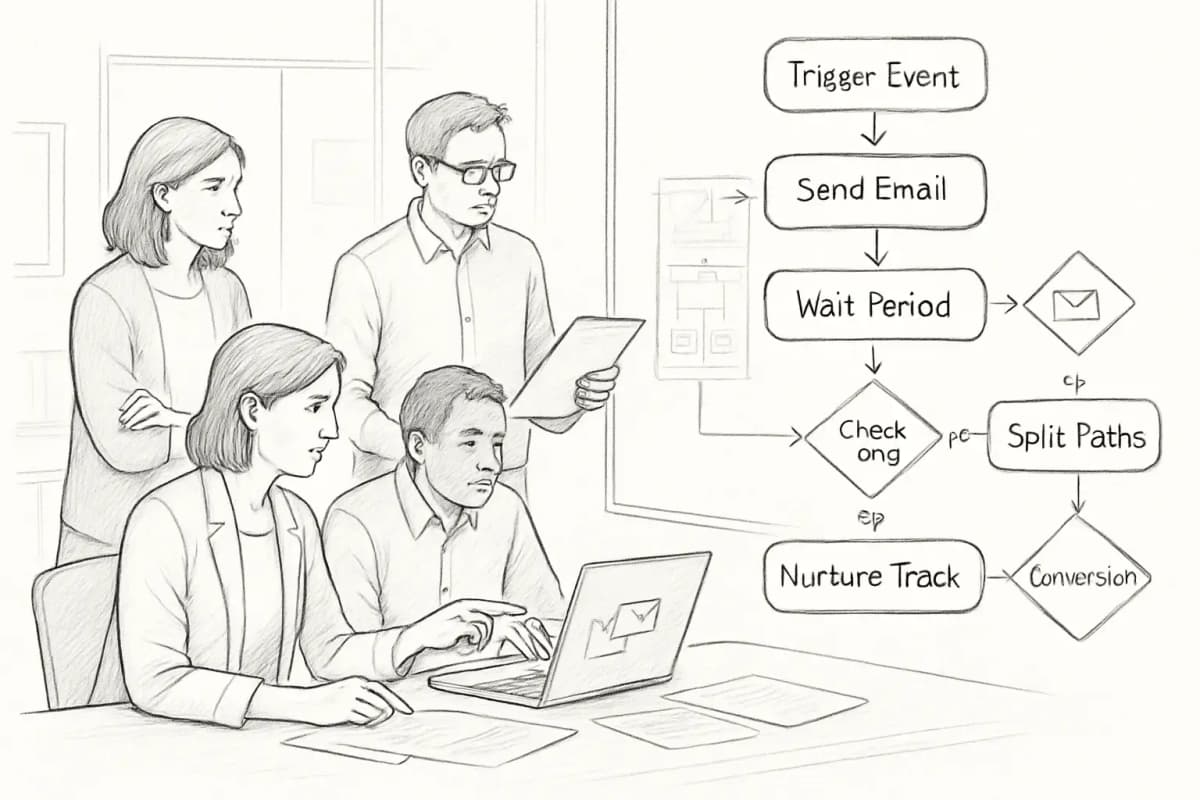
A marketing team collaborating around email automation workflows. Show 3-4 team members in an office setting: one person pointing at a laptop screen displaying an automation flowchart, another reviewing a wall monitor with workflow diagrams and connected boxes showing email triggers and actions, papers with process notes scattered on a desk. Include visual elements like workflow arrows, decision nodes (diamond shapes for yes/no branches), and email icons connected in a sequence. The overall mood should convey productive collaboration, focus, and strategic planning around automation setup.


Putting It Together: Build in Order of Impact

The most common mistake teams make is trying to automate everything at once. A better approach is sequential: start with the flows that generate the highest revenue relative to setup time, measure results, and expand from there.

A practical build order:

  1. Welcome sequence (highest open rates, immediate relationship impact)
  2. Abandoned cart recovery (direct revenue recovery)
  3. Post-purchase flow (retention and review generation)
  4. Re-engagement sequence (list health and deliverability protection)
  5. Browse abandonment (mid-funnel intent capture)

Time savings from automation might sound modest, but across dozens of campaigns the hours add up quickly. According to SAP Engagement Cloud research, marketers are reclaiming more than two hours every time they run a campaign, time teams can reinvest into higher-value work such as refining segmentation, testing creative, or experimenting with new channels.


Frequently Asked Questions

What is the most important email marketing automation to set up first?

The welcome sequence is the highest-priority automation for most businesses. Automated flows punch far above their send volume, with Klaviyo's February 2026 benchmarks reporting that email flows generated nearly 41% of email revenue from just 5.3% of sends. The welcome flow is consistently the top performer within that category. Set this up before any other automation.

How much time can email marketing automation actually save?

According to a Forrester Total Economic Impact study, marketing teams implementing automation can reduce campaign assembly effort by 73%. At the individual level, generative AI users save approximately 5.4% of weekly work hours, roughly 2.2 hours per 40-hour week, according to St. Louis Fed research. The total saved hours compound significantly across a full year of campaigns.

How many emails should be in an automated sequence?

It depends on the goal and audience. Research indicates that successful sequences typically contain 4 to 8 emails over 30 to 45 days, though welcome sequences often perform best with 4 to 6 emails, while complex B2B nurture campaigns may extend to 10 to 12 touches over several months. The guiding principle is that every email in the sequence should have a specific, distinct job.

Does email automation hurt deliverability?

A marketing team collaborating around email automation workflows. Show 3-4 team members in an office setting: one person pointing at a laptop screen displaying an automation flowchart, another reviewing a wall monitor with workflow diagrams and connected boxes showing email triggers and actions, papers with process notes scattered on a desk. Include visual elements like workflow arrows, decision nodes (diamond shapes for yes/no branches), and email icons connected in a sequence. The overall mood should convey productive collaboration, focus, and strategic planning around automation setup.


Putting It Together: Build in Order of Impact

The most common mistake teams make is trying to automate everything at once. A better approach is sequential: start with the flows that generate the highest revenue relative to setup time, measure results, and expand from there.

A practical build order:

  1. Welcome sequence (highest open rates, immediate relationship impact)
  2. Abandoned cart recovery (direct revenue recovery)
  3. Post-purchase flow (retention and review generation)
  4. Re-engagement sequence (list health and deliverability protection)
  5. Browse abandonment (mid-funnel intent capture)

Time savings from automation might sound modest, but across dozens of campaigns the hours add up quickly. According to SAP Engagement Cloud research, marketers are reclaiming more than two hours every time they run a campaign, time teams can reinvest into higher-value work such as refining segmentation, testing creative, or experimenting with new channels.


Frequently Asked Questions

What is the most important email marketing automation to set up first?

The welcome sequence is the highest-priority automation for most businesses. Automated flows punch far above their send volume, with Klaviyo's February 2026 benchmarks reporting that email flows generated nearly 41% of email revenue from just 5.3% of sends. The welcome flow is consistently the top performer within that category. Set this up before any other automation.

How much time can email marketing automation actually save?

According to a Forrester Total Economic Impact study, marketing teams implementing automation can reduce campaign assembly effort by 73%. At the individual level, generative AI users save approximately 5.4% of weekly work hours, roughly 2.2 hours per 40-hour week, according to St. Louis Fed research. The total saved hours compound significantly across a full year of campaigns.

How many emails should be in an automated sequence?

It depends on the goal and audience. Research indicates that successful sequences typically contain 4 to 8 emails over 30 to 45 days, though welcome sequences often perform best with 4 to 6 emails, while complex B2B nurture campaigns may extend to 10 to 12 touches over several months. The guiding principle is that every email in the sequence should have a specific, distinct job.

Does email automation hurt deliverability?

No, when implemented correctly, automation improves deliverability. Keeping engagement high with relevant content for each segment helps build a strong sender reputation and maintain strong deliverability. The DMA reports that segmented emails generate 64% fewer spam complaints than non-segmented campaigns on average. The risk to deliverability comes from sending irrelevant, untargeted emails at high volume, which is exactly what good automation prevents.

No comments yet. Be the first!

Leave a comment

Comments are reviewed before publishing.

No, when implemented correctly, automation improves deliverability. Keeping engagement high with relevant content for each segment helps build a strong sender reputation and maintain strong deliverability. The DMA reports that segmented emails generate 64% fewer spam complaints than non-segmented campaigns on average. The risk to deliverability comes from sending irrelevant, untargeted emails at high volume, which is exactly what good automation prevents.
No comments yet. Be the first!

Leave a comment

Comments are reviewed before publishing.

More from

Related posts

Illustration for how to leverage ai in your email marketing
Email Marketing StrategyJul 11, 2026 13 min

How to Leverage AI in Your Email Marketing

Use AI to personalize emails, predict behavior, and boost ROI. Learn practical tactics to implement AI in your email strategy today.

More from

Related posts

Illustration for how to leverage ai in your email marketing
Email Marketing StrategyJul 11, 2026 13 min

How to Leverage AI in Your Email Marketing

Use AI to personalize emails, predict behavior, and boost ROI. Learn practical tactics to implement AI in your email strategy today.

J
James Chen
J
James Chen
Illustration for ai email marketing personalization techniques
Email Marketing StrategyJul 11, 2026 15 min

AI Email Marketing Personalization Techniques

Learn 7 proven AI personalization techniques to increase open rates and conversions. Discover how leading marketers use machine learning to segment audiences.

PPriya Kapoor
Illustration for ai email marketing personalization techniques
Email Marketing StrategyJul 11, 2026 15 min

AI Email Marketing Personalization Techniques

Learn 7 proven AI personalization techniques to increase open rates and conversions. Discover how leading marketers use machine learning to segment audiences.

PPriya Kapoor
Illustration for email marketing brief template
Email Marketing StrategyMay 7, 2026 10 min

Email Marketing Brief Template: Plan Campaigns Fast

Download a free email marketing brief template to organize campaign goals, audience, messaging, and timelines. Save time and align your team.

PPriya Kapoor
Illustration for email marketing brief template
Email Marketing StrategyMay 7, 2026 10 min

Email Marketing Brief Template: Plan Campaigns Fast

Download a free email marketing brief template to organize campaign goals, audience, messaging, and timelines. Save time and align your team.

PPriya Kapoor