Email marketing automation is one of the highest-leverage investments a marketing team can make. Automated emails generate 320% more revenue than non-automated emails, and despite making up just 2% of email sends, automated messages drove 37% of all email-generated sales in 2024. That ratio, 2% of volume producing 37% of revenue, captures the essence of why automation matters.
If your team is still treating automation as a "set it and forget it" task or relying on manual broadcasts, you are leaving measurable revenue on the table. This guide covers the email marketing automation best practices that separate high-performing programs from average ones, with data to back every recommendation.
Key Takeaways
- Automated email flows, including abandoned cart and post-purchase messages, generate up to 30 times more revenue per recipient compared to standard email campaigns.
- In a test of 17 billion emails, automated emails scored 84% higher open rates, a 2,270% increase in conversion rates, and a 341% increase in click rate compared to broadcast campaigns.
- Companies using email marketing automation to nurture leads experience a 451% increase in qualified prospects.
- Segmented email campaigns generate 30% more opens and 50% more click-throughs, and 78% of marketers say segmentation is their most effective tactic.
- 80% of marketing automation users report an increase in leads, and 91% of marketers say automation helps them achieve their objectives.
1. Map Your Automation to the Customer Lifecycle First
The most common mistake teams make when implementing email marketing automation best practices is building workflows around their own promotional calendar rather than around how customers actually behave.
Email marketing automation is the use of rules, triggers, and behavioral data to send timely personalized emails at scale. As customer expectations for relevance increase and first-party data becomes the primary asset, automation is the mechanism that converts segmentation and event streaming into actual revenue. Without it, personalization stays theoretical and lifecycle communication stays inconsistent.
Map each workflow to a specific lifecycle stage before you build anything:
- New subscriber: Welcome sequence and onboarding
- Active prospect: Lead nurturing and education
- High intent: Abandoned cart, browse abandonment, pricing page visits
- Post-purchase: Cross-sell, review request, replenishment
- At risk: Re-engagement and win-back
Workflow design determines automation success more than individual email quality. Effective workflows map to customer psychology, not arbitrary business goals.
For a structured overview of how each lifecycle stage connects to specific campaign types, see our Email Marketing Strategy Template for 2025.
2. Use Behavioral Triggers, Not Just Time-Based Sequences
Time-based sequences (send email 3 days after signup, send email 7 days after that) are better than nothing. But behavioral triggers are what actually move revenue.
When customer behavior triggers email automation, these emails generate nearly 10 times more revenue than other emails. Over 60% of marketers now send more emails than ever before.
Behavioral triggers allow you to launch workflows at the right time. You can set up triggers based on user behavior, such as website activity, email interactions, or transaction history.
High-impact behavioral triggers to build first:
- Cart abandonment (trigger: item added to cart, checkout not completed)
- Browse abandonment (trigger: product page viewed, no purchase)
- Post-purchase (trigger: order confirmed)
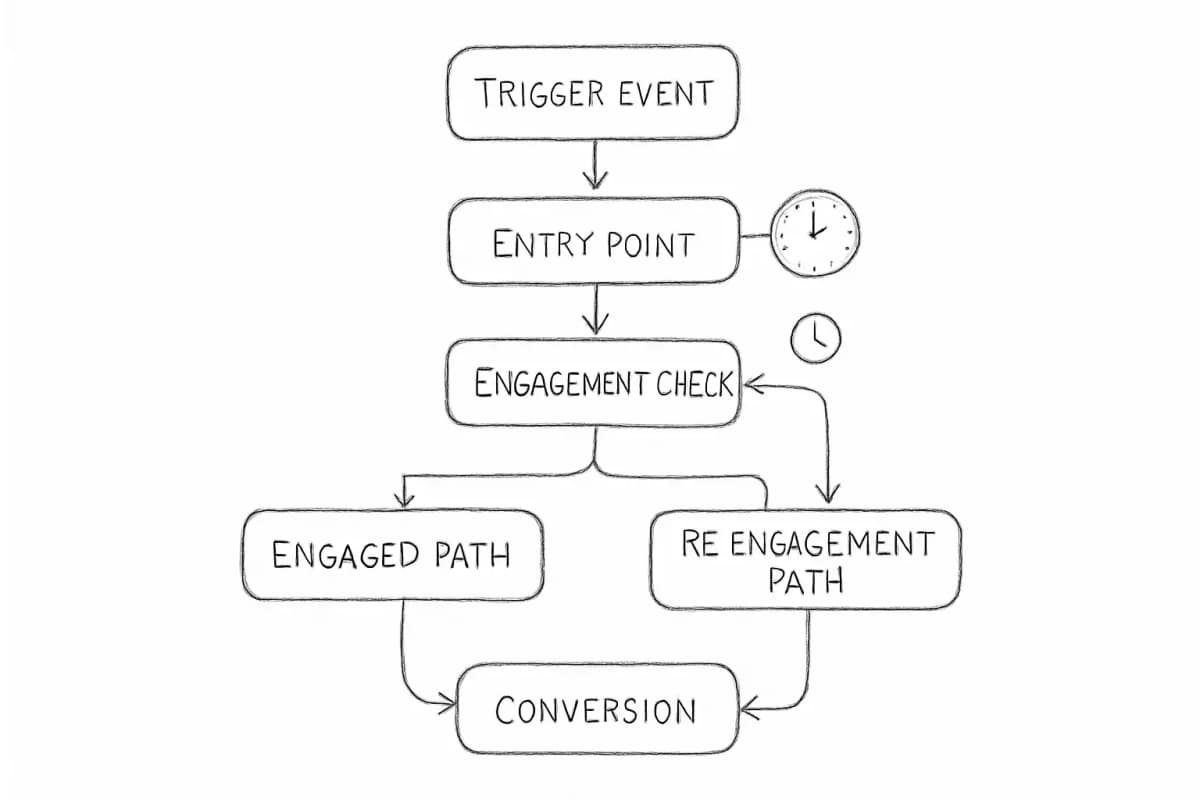
- Re-engagement (trigger: no email open or click in 60 to 90 days)
- Milestone (trigger: anniversary, birthday, loyalty tier reached)
Milestone triggers that celebrate customer achievements or relationship anniversaries foster emotional connections that drive 7x higher transaction rates than standard promotions. Birthday emails see 481% higher transaction rates, while membership anniversary messages achieve 52% open rates.
The key lies in starting simple and adding complexity based on performance data rather than over-engineering from the start.
3. Segment Your List Before You Automate
Automation amplifies whatever is already in your database. If your list is unsegmented, your automated emails will be only marginally better than bulk sends.
Automated email segmentation is the process of using dynamic rules and real-time data to organize your email contacts into targeted groups automatically. Unlike traditional static lists that require constant manual updates, automated segmentation continuously adjusts audience membership based on changing customer behaviors, preferences, and lifecycle stages.
Examine your email segments and ensure that they are accurate and up to date. The more granular your segments are, for example recipient behavior is an excellent segment to create on your list, the more relevant your content can be.
Useful segmentation dimensions for automation include:
- Engagement level: Active openers, occasional engagers, and inactive contacts
- Purchase behavior: First-time buyers, repeat customers, high-value customers
- Lifecycle stage: Trial users, free plan users, paid subscribers
- Intent signals: Pricing page visits, feature page views, demo requests
Use segment membership as workflow enrollment triggers, but implement proper guardrails to prevent conflicts and over-messaging. Set up suppression lists, exit conditions, and wait periods to coordinate multiple workflows.
For a deeper look at segmentation strategies and the revenue data behind them, read our guide on Email List Segmentation Strategies That Boost ROI by 760%.
4. Personalize at the Automation Layer, Not Just the Surface
Adding a first name to a subject line is not personalization. It is a formality. Meaningful personalization in email automation means the content, timing, and offer all reflect what a specific subscriber has done.
AI-driven personalization of email copy results in a 13%+ increase in CTR. Behavior-based personalization using purchase history data boosts CTR by up to 39%.
Companies using AI-driven email strategies see up to 41% more revenue than those using traditional batch-and-blast sends. Predictive recommendations increase revenue per email by an average of 41%.
Practical personalization tactics to layer into your automated workflows:
- Dynamic content blocks that change based on subscriber segment or past behavior
- Product recommendations pulled from purchase or browse history
- Send time optimization based on when an individual subscriber is most likely to open
- Conditional branching that routes subscribers through different paths based on engagement
83% of marketers use behavioral triggers, and 71% reported a 20%+ engagement lift from personalization.
For specific techniques and conversion data, see our article on 7 Email Personalization Techniques That Boost Conversions 47%.
5. Prioritize Your Welcome Sequence as the Foundation
Your welcome email sequence is the single most important automation in your program. It reaches subscribers at their peak engagement window and sets the tone for every interaction that follows.
Welcome emails achieve an 83.6% open rate in ecommerce, the highest of any automated email type.
Around one in two people who click on automated welcome emails end up making a purchase. These emails are highly effective at converting potential customers into buyers.
A strong welcome sequence should do these things in order:
- Deliver the promised incentive or content immediately
- Establish what subscribers can expect and how often
- Share the brand's point of view and core value proposition
- Offer a low-friction next step (not always a purchase)
- Set up a behavior-based branch: if they click, route them toward a faster purchase path; if they do not, continue nurturing
Subsequent emails in the sequence build interest through education, social proof, and gradual value escalation. Avoid sales pitches during this crucial trust-building phase.
For a complete breakdown of welcome sequence structure and timing, our Welcome Email Sequence Best Practices: 7 Proven Strategies guide covers the specifics.
6. Protect Deliverability as an Automation Asset
A technically perfect automation workflow means nothing if your emails land in spam. Deliverability is not a separate concern from automation strategy; it is embedded in it.
Average inbox deliverability sits at 83.1%, meaning roughly 1 in 6 marketing emails never reach inboxes, which is a material revenue leak. But 95%+ inbox placement is achievable with proper optimization.
The three areas that affect deliverability most directly are authentication, list hygiene, and engagement signals.
Authentication
In 2024, Gmail and Yahoo announced stricter standards for bulk senders, enforcing SPF, DKIM, and at least some form of DMARC authentication. Authenticated emails are not just safer; they are more likely to land in primary inboxes and win recipients' trust.
DMARC is essential if you send more than 5,000 emails at a time to Gmail or Yahoo inboxes. Even if you do not send at this volume, adding this record to your email domain helps build a deeper picture of trust.
List hygiene
U.S. businesses face an average email list decay rate of 25 to 30% annually, and even higher rates for B2B lists, which means proactive list management is essential.
B2B manufacturers who cleaned their lists and removed just 15% of inactive contacts saw overall deliverability improve by over 22%.
A practical hygiene framework for automated programs:
- Suppress hard bounces immediately after each send
- Flag contacts with no engagement in 60 to 90 days and route them to a re-engagement flow
- Remove contacts that do not respond to re-engagement within a defined window
- Validate new subscriber addresses at the point of sign-up
A smaller, engaged list outperforms a large, contaminated database every time.
Engagement signals
Maintaining a clean, engaged list is essential for building a good reputation with ISPs. This is not a one-and-done activity, but something you should check in on each quarter. Regularly clean your list to remove inactive or invalid addresses and avoid spam traps, which are hidden addresses that catch senders with poor list hygiene.
For a full breakdown of the metrics that matter most for automation performance, see our Email Marketing Analytics Best Practices guide.
7. Test, Measure, and Iterate Every Workflow
Automation workflows are not permanent. Customer behavior shifts, offers change, and messaging that converted well six months ago may perform differently today.
Brands that regularly A/B test their emails achieve 83% higher ROI than those that never test. Companies that never test report average ROI of 2,300%, while those that test often achieve 4,200%.
What to test inside your automated workflows:
- Subject lines and preview text
- Send timing (hours after trigger fires, not just time of day)
- Email sequence length and cadence
- Call-to-action copy and placement
- Personalization depth (minimal vs. behavior-based dynamic content)
Segmentation is not a one-time setup. Monitor performance by segment and compare results against non-segmented campaigns to quantify impact. Use A/B testing to refine messaging, offers, and timing within each segment.
Track metrics that connect to revenue, not just opens. Track conversion rate, revenue per email, revenue per subscriber, and list growth rate alongside your engagement metrics. These numbers connect directly to business outcomes and help you make better strategic decisions about where to invest your time.
8. Build Suppression Logic Into Every Workflow
One of the most overlooked email marketing automation best practices is suppression. Without it, subscribers can receive multiple overlapping automations at once, which causes fatigue, increased unsubscribes, and spam complaints.
Gmail and Yahoo both implemented stricter requirements in 2024 around SPF, DKIM, and DMARC authentication, easy-to-find unsubscribe options, and spam complaint thresholds below 0.3%.
Rules to build into your suppression logic:
- If a contact converts (purchases, books, signs up), exit them from any active nurture or cart-abandonment flow immediately
- Do not enroll a contact in more than one active promotional workflow at a time
- Set frequency caps so no single contact receives more than a defined number of automated emails per week
- Exclude recent buyers from re-engagement flows
Timing is not just about when you send an email but also how often. Bombarding subscribers with too many emails, even at the right time, leads to unsubscribes.
Frequently Asked Questions
What is the most important email marketing automation to set up first?
Start with your welcome sequence. Welcome emails achieve an 83.6% open rate in ecommerce, the highest of any automated email type. They reach subscribers at their most attentive moment and establish the relationship before any other automation touches them. Once your welcome flow is live, add abandoned cart automation, as that is where the revenue gap between automated and non-automated programs is largest.
How many emails should be in an automated workflow?
There is no universal answer, but the sequence length should match the complexity of the conversion you are asking for. A welcome sequence for a low-cost product might need 3 to 5 emails. A B2B nurture sequence working toward a demo might need 6 to 10. The 80/20 rule applies to automation content: 80% value-focused education and 20% promotional messaging for optimal performance. Prioritize value delivery over frequency.
How does email automation affect deliverability?
Automation can improve or damage deliverability depending on how it is executed. Well-targeted behavioral flows generate strong engagement signals, which tell inbox providers your emails are wanted. Engagement tagging and suppression logic built into automated flows reduce spam complaints and hard bounces by keeping fatigued or unresponsive contacts out of active send pools. Poor automation, particularly high-volume sends to unengaged segments, accelerates reputation decay.
How often should I audit my automated workflows?
Maintaining a clean, engaged list is not a one-and-done activity, but something you should check in on each quarter. Apply the same cadence to your workflow audit. Review conversion rates, revenue per recipient, unsubscribe rates, and sequence completion rates for each active automation at least quarterly. If a workflow has not been reviewed or updated in more than six months, treat it as a priority.