Most marketers spend hours scheduling batch emails that arrive when subscribers are not thinking about them. Behavioral triggers solve this directly: they deliver messages at peak engagement moments, achieving 74% higher open rates through relevance and timeliness based on actual user actions rather than assumptions. Traditional campaigns operate on marketer-defined schedules, sending messages when convenient for the business rather than optimal for the recipient.
Action triggered automated email marketing is the practice of sending pre-built, automated email sequences in direct response to a subscriber's specific behavior, such as signing up, browsing a product page, abandoning a cart, or going inactive. The message fires because the person did something, not because a broadcast schedule said so. That difference in logic produces dramatically different results.
Key Takeaways
- 77% of email marketing ROI originates from segmented, targeted, and triggered campaigns rather than broadcast emails, according to the Data and Marketing Association.
- Triggered email messages result in 8 times more opens and higher earnings than common bulk emails.
- According to Klaviyo, email flows deliver over 3x higher click rates (5.58% vs. 1.69%) and 13x higher placed order rates than broadcast campaigns.
- Automation in email marketing brings in 320% more revenue compared to regular emails, according to Campaign Monitor.
- Setup requires mapping your customer journey first, then connecting your email platform to behavioral data sources before configuring individual trigger conditions.
What Action Triggered Automated Email Marketing Actually Means
A triggered email is an automated, personalized message sent after a specific action or event takes place, such as making a purchase, abandoning a shopping cart, or signing up for a newsletter. Their main purpose is to provide relevant information or encourage further engagement. In simple terms, triggered email marketing is the practice of using email triggers to automatically send the right message at the right moment.
It is worth separating triggered emails from drip campaigns, because the two terms get confused constantly. A drip campaign sends a fixed sequence of emails on a predetermined schedule, regardless of what the subscriber does. Sign up on Monday, get email one. Wait seven days, get email two. The timing is the trigger. Trigger-based email campaigns fire when a specific behavior occurs: a page visit, a purchase, a form submission, an inactivity window. The subscriber's action determines what sends and when.
When a user performs a particular action on a website, app, or within an email, it signals intent or interest, which can activate a sequence of automated emails. These emails are designed to move the user further along the sales funnel, address specific needs, or re-engage them if they have lapsed.
The Business Case: Why Triggered Emails Outperform Broadcasts
The performance gap between triggered and broadcast emails is consistent across every major benchmarking dataset.
The average open rate for newsletters is 40.08%, while for triggered emails it is 45.38%, according to GetResponse. On click-through rate, the gap is even wider. The average click-through rate for newsletters was 3.84%, while for triggered emails it was 5.02%.
For ecommerce specifically, automated flows triggered by specific actions see much higher CTRs, averaging 5.31%. Conversion rates tell a similar story. Most industries see conversion rates between 2.3% and 2.9% for manual blasts, while automated flows often hit 3% to 5%. Triggered emails consistently drive a higher percentage of recipients to complete a purchase.
With a 37.04% open rate, 25.5% click-to-open rate, and 5.5% conversion rate, behavior-based emails have the greatest impact on email campaigns across the board. However, they can be a double-edged sword with the highest risk of unsubscription if emails are sent too frequently or sound intrusive.
The revenue concentration is the most compelling argument for prioritizing triggers over broadcast volume. 77% of email marketing ROI originates from segmented, targeted, and triggered campaigns. This concentration of returns in sophisticated campaigns underscores the diminishing effectiveness of one-size-fits-all messaging.
The Core Trigger Types Worth Building First
The stores seeing real results from email automation are not running one or two triggers. They are running a coordinated system of behavioral responses that meets customers at every stage of the buying journey. Here are the trigger types that consistently generate the highest return:
1. Welcome triggers
A welcome email sent within minutes of signup catches the subscriber at peak interest. The average open rate for newsletters is 40.08%, while for triggered emails it is 45.38%. Welcome emails, in particular, often see much higher results. This year, welcome emails saw an average open rate of 83.63%. For guidance on structuring a high-performing welcome sequence, see our welcome email sequence best practices guide.
2. Abandoned cart triggers
An abandoned cart email is an automated message triggered when an online shopper places an item in their cart and does not complete a purchase. It re-engages shoppers by reminding them about the products in their cart and enticing them to complete their purchase. Cart recovery emails have an average open rate of 45%, which is much higher than generic marketing campaigns. Out of that, 11% result in recovered carts. These email campaigns can recover 15 to 20% of lost revenue.
3. Browse abandonment triggers
Browse abandonment catches intent earlier in the funnel than cart abandonment. The customer is interested but has not committed. The email's job is to help, not push.
4. Post-purchase triggers
Post-purchase is when customer satisfaction and brand affinity are highest. Meeting that moment with useful content builds the relationship. Leading with another sales push squanders it. The best post-purchase sequence delivers product tips first, then cross-sell recommendations at the 14 to 21 day mark.
5. Re-engagement triggers
Three behavioral email triggers are worth building for re-engagement: no email open in 60 to 90 days, no link click in the same window, and no login or product activity if your platform tracks it. The third signal is the most reliable because it reflects real disengagement, not just a cluttered inbox. Once you have your signal, build a short sequence rather than a single "we miss you" message.
6. Milestone and lifecycle triggers
Behavioral triggers are specific actions that users take which indicate intent or engagement. Common triggers include website activity such as browsing specific product pages or visiting a pricing page, email interactions like clicking on links or ignoring emails, purchase behavior such as completing a purchase or making a repeat purchase, and account activity like creating an account or reaching a milestone within an app.
How to Set Up Action Triggered Automated Email Marketing: Step by Step
Setting up behavior-based email triggers requires systematic integration between your email platform, website analytics, and customer data systems to track user actions and deploy automated responses. The technical foundation determines whether your behavioral campaigns achieve their potential or fall short due to delayed deployment, missing data, or poor segmentation capabilities.
Follow these steps to build a working triggered email system:
- Map your customer journey first. Start by mapping your customer journey and identifying key touchpoints where users make decisions, show intent, or drop off. High-impact email triggers include registration, first purchase, cart abandonment, product browsing without purchase, and periods of inactivity.
- Connect your data sources. Behavioral trigger success depends on comprehensive data collection across all customer touchpoints. Email marketing platforms provide JavaScript tracking codes that monitor website behavior including page views, session duration, and specific element interactions. Ecommerce integrations capture cart additions, purchase completions, and product browsing patterns.
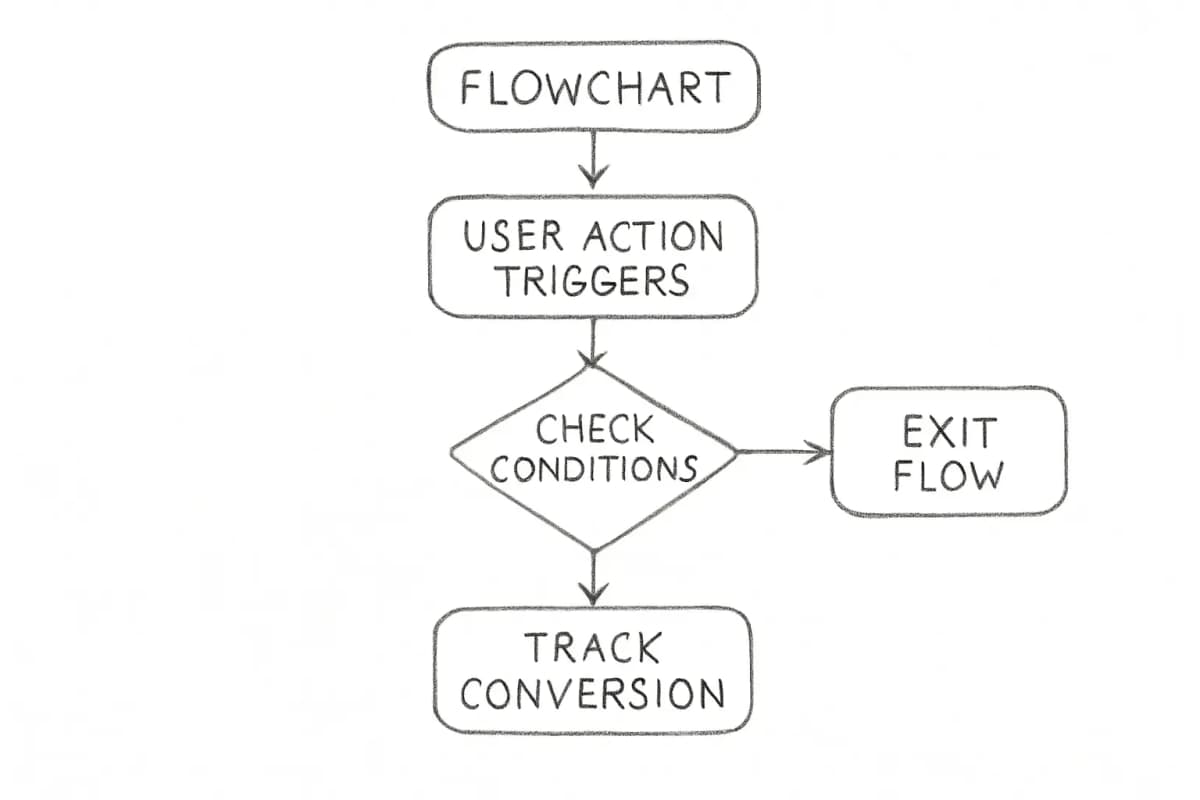
- Define trigger conditions with precision. Consider triggers as precision instruments that respond to specific customer actions with targeted, contextually relevant communications. Design trigger mechanisms using advanced if-then logic: cart abandonment triggers an automated email notification, incomplete registration prompts a streamlined completion sequence, and extended product browsing generates a personalized recommendation series.
- Build your email content for each trigger. Each email in a triggered sequence needs a single, clear purpose. Triggered emails should have a purpose that aligns with your marketing goals, otherwise they are unnecessary. To clarify that purpose, ask yourself what the purpose of each email is and implement it into a brief call-to-action.
- Configure timing rules. The timing and frequency of trigger-based emails play a crucial role in ensuring engagement without overwhelming recipients. Sending emails at the right moment increases the likelihood of a response. Welcome emails should be sent immediately after sign-up to engage users while interest is high. For abandoned cart triggers, send your first reminder 2 to 4 hours after abandonment and keep it simple. If customers do not engage with your first email, consider sending another reminder 24 to 48 hours after that.
- Test before going live. Use an actual email address, not preview mode. Click the trigger event yourself and watch what lands in the inbox. Check send time, subject line rendering, personalization tokens, and the unsubscribe link. Then check the exit condition by completing the conversion action and confirming the sequence stops.
- Monitor and refine. Optimizing trigger-based emails requires continuous testing and refinement. A/B testing allows businesses to experiment with different variables to identify what works best.
For a deeper look at connecting this system to your CRM, see our email marketing automation CRM setup guide.
Best Practices for Higher-Performing Triggered Campaigns
Set frequency caps to prevent overlap
While automation enables businesses to send timely emails, excessive messaging can lead to unsubscribes. Strategies to avoid over-messaging include setting frequency limits so users do not receive multiple emails within a short timeframe, giving users control over their email preferences, and prioritizing important triggers by focusing on high-impact sends that provide real value.
Personalize beyond the first name
Conversion rates saw the greatest uplift due to personalization, with a 60.7x increase for behavior-based personalization compared to broadcast emails. For triggered cart emails specifically, go further: go beyond inserting the recipient's first name. Use personalization to tailor every element of the email to their specific interests and browsing habits. Personalize product details including thumbnails, names, and color or size options, pricing showing current discounts or price drops since the user last viewed the item.
For more on this, read our guide on email personalization techniques that boost conversions.
Use multi-email sequences, not single sends
According to Omnisend, merchants who sent just one cart abandonment email got 14.76 orders, while those who used a three-email strategy achieved 24.94 orders in total. A well-structured abandoned cart sequence follows this pattern:
- Email 1 (within 1 hour): a gentle reminder about the items left behind that assumes the shopper just got distracted.
- Email 2 (24 hours later): additional product details, social proof such as customer reviews, and shipping and returns information to address potential concerns.
- Email 3 (48 to 72 hours later): a sense of urgency with a limited-time offer like free shipping or a discount, or a low-stock notice to nudge the shopper to complete the purchase.
Build exit conditions into every sequence
A triggered sequence without a clear exit condition will keep firing even after the subscriber converts. Always configure your automation so that completing the goal action (a purchase, a signup, a reply) removes the contact from that particular flow immediately.
Treat your subject lines as part of the trigger strategy
Automated emails tied to user behavior consistently outperform one-off broadcast campaigns. Their strength comes from timing and relevance, not volume, making them less sensitive to open-rate distortion and more resilient to privacy changes. But that timing advantage is wasted if the subject line does not match the triggering action. Pair each trigger with subject line copy that directly references the behavior. Our email subject line best practices guide covers how to write subject lines that lift open rates by 27%.
What to Measure in Triggered Email Campaigns
With increasing reliance on privacy-focused email clients that pre-load tracking pixels, open rate is now an unreliable signal of true human engagement. As a result, CTR, click-to-open rate, unsubscribe rate, and deliverability metrics are the most meaningful benchmarks for strategic decisions.
Track these metrics for each individual trigger sequence, not as a blended average:
- Click-through rate (CTR): Measures real engagement. Automated email flows produce 5.58% click rates versus 1.69% for manual campaigns, according to Klaviyo.
- Conversion rate per trigger: Separates which flows are driving revenue from which are generating opens only.
- Unsubscribe rate per trigger: The average spam and unsubscribe rates of triggered emails are only 0.58% and 0.06%, respectively. If a specific trigger is producing unsubscribes above this range, the timing or content needs adjustment.
- Revenue per recipient: The clearest signal of whether a triggered flow is pulling commercial weight.
Separate your broadcast campaigns from your automated flows when reviewing performance. They behave completely differently and blending them hides what is actually working.
Common Setup Mistakes That Kill Performance
Triggering too broadly. Not every page visit or email click warrants a triggered response. Not every user action requires an email. Focus on high-impact triggers that provide real value.
Ignoring data silos. Marketers need to ensure real-time, accurate data flows from their CRM system or ecommerce platforms to drive relevant, personalized emails. Data silos, where data is isolated in separate systems, can lead to missed opportunities and create compliance issues.
Skipping sequence logic. These triggers do not work in isolation. They form a system. A new subscriber who receives a welcome sequence and an abandoned cart email simultaneously will feel the seams. Map how your triggers interact before building.
Neglecting list health. List quality protects performance. Removing inactive subscribers, monitoring complaint rates, and setting clear expectations at signup help maintain a healthy sender reputation. Double opt-in remains one of the most effective ways to build an engaged list, especially at scale.
Frequently Asked Questions
What is the difference between a triggered email and a drip email?
All triggered emails are automated, but not all automated emails are triggered. In essence, triggered emails respond to what a user does, while automated emails are sent according to a schedule as part of a broader marketing strategy. A drip sequence fires regardless of subscriber behavior. A triggered email fires because a specific action occurred.
How quickly should a triggered email be sent after the action?
It depends on the trigger. Welcome emails should be sent immediately after sign-up to engage users while interest is high. For cart abandonment, sending an email reminder within an hour of cart abandonment is the most effective way to re-engage shoppers while they are still considering their purchase. Re-engagement triggers typically wait for a 60 to 90 day inactivity window before firing.
How many emails should be in a triggered sequence?
It depends on the trigger type, but a two to three email sequence covers most use cases. A well-timed series of usually two to three emails spaced over a few days gives customers multiple opportunities to come back. Each message should have a different focus, from reminder to benefit to incentive. Always include a clear exit condition so the sequence stops when the subscriber converts.
What metrics should I track for action triggered automated email marketing?
Focus on click-through rate, conversion rate per sequence, revenue per recipient, and unsubscribe rate per trigger. Your open rate matters less than what happens after the open. CTR, click-to-open rate, and conversion rates tell you whether your emails drive actual business outcomes. Track each triggered flow separately so underperforming sequences surface clearly.