Most of the data I need is now collected. Let me compile the article.
Most marketers treat automated email workflows as a "nice to have." The data says they should treat them as the foundation of every email program. Email automations deliver 30 times more revenue per recipient than one-off promotional campaigns, with average flows earning $1.94 per recipient compared to $0.11 for standard campaigns. The gap is not a minor performance lift. It is a structural advantage that compounds over time.
This guide breaks down the most effective workflow automation email marketing examples, explains the mechanics behind each one, and gives you the benchmarks to judge whether yours are performing.
Key Takeaways
- Automated workflows generate 30x more revenue per recipient than standard campaigns, and 31% of email orders come from targeted automation workflows despite those flows accounting for just 1.8% of emails sent.
- Abandoned cart, welcome, and browse abandonment emails make up 87% of all orders from automation workflows.
- Companies that excel at lead nurturing generate 50% more sales-ready leads at 33% lower cost, while nurtured leads make 47% larger purchases than non-nurtured prospects.
- Email lists lose 22.5% annually through disengagement, bounces, and opt-outs, making re-engagement workflows essential for maintaining list health.
- Post-purchase emails achieve 217% higher open rates than traditional emails and help build trust, encourage repeat purchases, and increase customer lifetime value.
What Is a Workflow Automation Email?
Email marketing automation is a system of event-triggered workflows that automatically send emails based on customer actions, using rules, segmentation, and behavioral data from your email service provider or customer data platform.
Workflows typically have three main parts: a trigger for launching the workflow (the simplest being a pre-set time, while more sophisticated automations use user actions and behaviors), conditions to control the automation, and actions that get executed.
The difference between a workflow and a regular campaign is intent-matching. Automated workflows respond to real user behavior, not your content calendar. That behavioral alignment is why they consistently outperform broadcast sends. Understanding these mechanics is the prerequisite for building the workflow automation email marketing examples below.
1. Welcome Email Series
The welcome series is the highest-leverage automation most businesses underuse. Welcome emails achieve an 83.6% open rate in ecommerce, the highest of any automated email type. That attention window closes fast, which makes the timing and content of your first few emails critical.
A high-performing welcome sequence typically runs three to five emails and covers:
- Immediate confirmation (sent within minutes of sign-up): confirms the subscription, delivers any promised lead magnet, and sets expectations for what the subscriber will receive.
- Brand story and value proposition (Day 2-3): not a sales pitch, but a clear explanation of what makes your product or brand worth following.
- Social proof and product introduction (Day 5): customer reviews, case studies, or a bestseller showcase to lower purchase hesitation.
- Incentive or first-purchase nudge (Day 7-10): a time-limited offer for subscribers who have not yet converted.
In 2024, automated welcome emails in ecommerce had an average conversion rate of nearly 3%. For context, that is dramatically higher than the average conversion rate on a cold promotional campaign. If you want deeper guidance on structuring this sequence, see our guide on welcome email sequence best practices.
2. Abandoned Cart Workflow
Cart abandonment is the most recoverable revenue loss in ecommerce. In 2025, the global shopping cart abandonment rate was 75.38%. An automated cart recovery series converts a meaningful portion of that lost revenue without any additional ad spend.
Abandoned cart flows drive the highest average revenue per recipient ($3.65) and the highest average placed order rate (3.33%) of all automated email flows. Top-performing programs push that RPR to $28.89, according to Klaviyo's benchmark analysis of over 143,000 abandoned cart flows.
Timing matters more than most marketers realize. Send the first email within one to three hours of cart abandonment to stay top-of-mind while intent is still high. Using a multi-cycle strategy by sending messages at one hour, 24 hours, and 72 hours after abandonment can increase campaign performance by up to 30%.
Structure each email differently:
- Email 1: Simple reminder with product image and a direct link back to checkout.
- Email 2: Address friction (shipping options, returns policy, security signals).
- Email 3: Conditional incentive for high-value carts, social proof for lower-value ones.
Abandoned cart emails achieve an average CTR of 23.33%, the single highest-performing email type by click engagement across all automation types.
For ecommerce-specific workflow strategies, the ecommerce email marketing tips guide covers this in more detail. 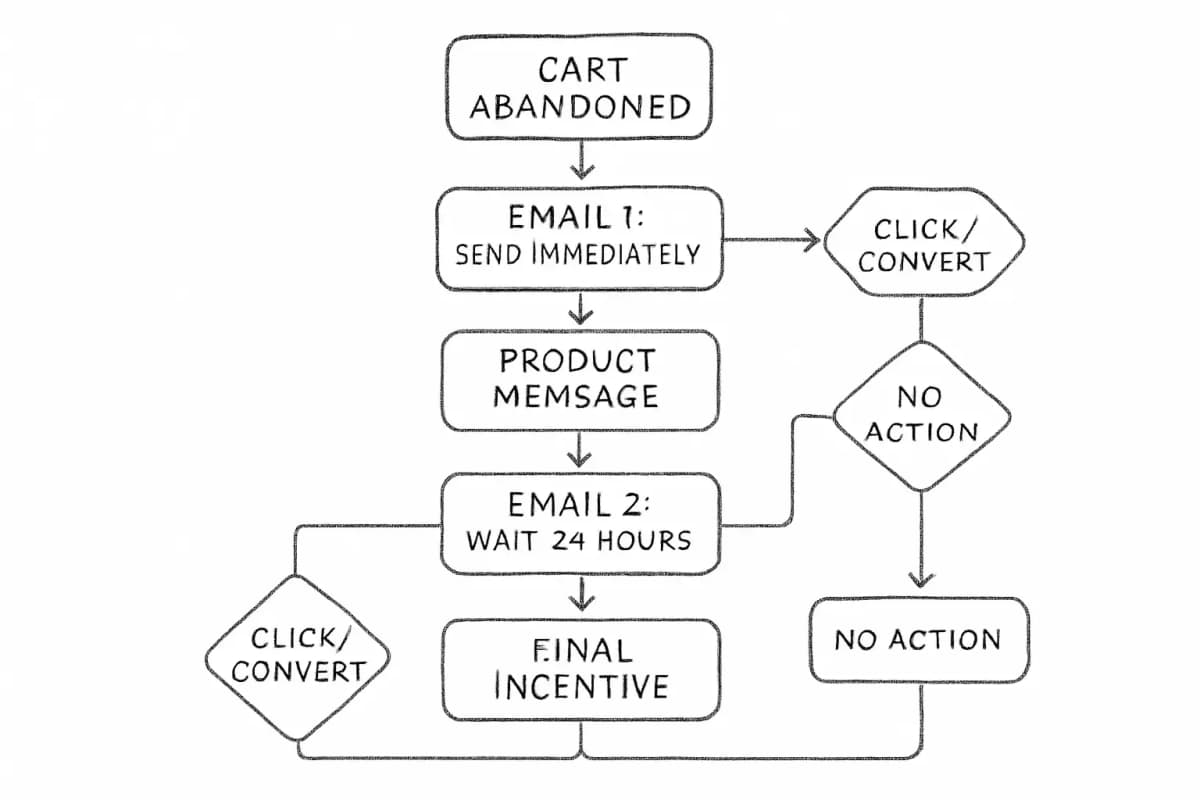
3. Lead Nurturing and Drip Workflows (B2B)
For B2B teams, lead nurturing sequences are the equivalent of the abandoned cart workflow for ecommerce. Lead nurturing emails get up to 10 times the response rate compared to standalone email blasts.
B2B firms using strategic email nurturing sequences report 451% increases in qualified leads. That is not a small optimization. It is a fundamentally different scale of pipeline output from the same contact list.
What separates a performing nurture sequence from an ignored one:
- Trigger-based, not time-based. The top-performing workflows are triggered by specific actions: a download, a page visit, a form registration.
- Content matched to buyer stage. Top-of-funnel leads need educational content; bottom-of-funnel leads need case studies, ROI data, or a demo prompt.
- Consistent cadence. Most experts recommend a frequency of one to two times per month for nurturing campaigns to stay top-of-mind without causing subscriber fatigue.
Automated emails generate 320% more revenue than non-automated emails, and this is not just about efficiency. It is about results.
Segmentation is the variable that separates average nurture programs from top performers. The data on this is consistent: segmented email campaigns generate 30% more opens and 50% more click-throughs, which compounds directly into pipeline volume. For a deeper look at how to divide your list to fuel better workflows, see our article on email list segmentation strategies.
4. Post-Purchase Workflow
Analysis of 24 billion emails sent through Omnisend in 2024 reveals that recipients opened 52% more automated messages than manual campaigns, with order follow-up emails achieving a 49.75% open rate and a 22.64% click-to-conversion rate.
The post-purchase workflow is where most businesses leave retention revenue untouched. Brands using post-purchase content retain 15 to 30% more customers.
A complete post-purchase sequence covers:
- Order confirmation (immediate): transactional reassurance, order details, expected shipping window.
- Shipping confirmation (when fulfilled): tracking link, delivery window, what to expect next.
- Product use or onboarding email (Day 3-5 after delivery): tips for getting value from the product, reducing buyer's remorse and support requests.
- Review request (Day 7-14 after delivery): timed after the customer has had meaningful product experience.
- Cross-sell or replenishment email (Day 30+): based on purchase history and product type.
A 5% increase in customer retention can increase company profits by 25 to 95%, and existing customers are more likely to test new products and spend 31% more than new customers. Post-purchase automation is the cleaner, lower-cost path to those gains.
5. Re-Engagement (Win-Back) Workflow
Research confirms that email lists lose 22.5% annually through disengagement, bounces, and opt-outs. A re-engagement workflow attempts to recover a portion of that erosion before those contacts leave permanently.
Research confirms that 45% of dormant subscribers can still be brought back with properly targeted messaging. Yet only 24% of marketers currently use inaction-triggered emails to win back dormant subscribers. That gap is a competitive advantage for teams who build this workflow.
How to structure a re-engagement sequence:
- Email 1 (triggered at 60-90 days of inactivity): "We miss you" message with a value reminder.
- Email 2 (Day 4-7): Social proof or new product/feature announcements since they last engaged.
- Email 3 (Day 10-14): A meaningful incentive, not your standard promotional discount.
- Final email: Clear opt-out option and a "last chance to stay subscribed" message.
Data shows that subscribers inactive for 90 days reactivate at 10 to 12%, while those inactive for 180 days reactivate at just 2 to 4%. Start your re-engagement workflow earlier rather than later.
For contacts who do not re-engage after the full sequence, suppressing them from future sends is the right call. List cleaning improves deliverability by 15 to 25% for remaining subscribers.
6. Browse Abandonment Workflow
A browse abandonment workflow fires when a subscriber views a product page but neither adds to cart nor purchases. It is lower-intent than cart abandonment, but the signal is still meaningful. Browse abandonment emails contribute to the 87% of automation orders that come from cart, welcome, and browse abandonment flows combined.
The key difference in how to approach this workflow:
- Softer tone. The subscriber has not committed to anything. Pressure-heavy copy is counterproductive.
- Curated product focus. Show the viewed product alongside complementary items to expand discovery.
- No discount in the first email. Reserve incentives for a second touch if the subscriber still does not engage.
Shipping confirmation email automations have the highest open rates at 62.47%, and back-in-stock workflows match this performance. Browse abandonment works because it captures intent at an earlier, higher-volume stage of the funnel.
7. Back-in-Stock and Replenishment Workflows
These two workflows target different moments but share the same underlying logic: they meet the customer precisely when purchase intent is highest.
Back-in-stock: Identify high-demand items and enable "Notify me" options, then build automations to fire when stock returns. Use urgency wisely to remind users the item will not be available for long. Back-in-stock emails convert at 5.34%.
Replenishment: Triggered by predicted product usage cycles (common in consumables like coffee, skincare, supplements, and pet food). The trigger is time-based from the last purchase date, adjusted by product type and quantity purchased. The top 10% of email workflows generate $16.96 in revenue per recipient, while average email flows generate $1.94. Replenishment workflows, when calibrated correctly to the actual usage cycle, consistently land in the top-performing tier.
Measuring Workflow Performance
Building the workflow is step one. Measuring it accurately is what separates teams that improve from those that stagnate.
Start with open rates, which tell you if your subject line made someone curious enough to click. Then move to click-through rates, your best indicator of whether the body copy connected and compelled action. Finally, focus on conversion rates to get a clear picture of the percentage of people who went from inbox to checkout or sign-up.
Tracking these metrics at the workflow level (not campaign level) is what enables meaningful optimization. Layer in A/B testing on subject lines, send times, and CTAs at each step. Brands that regularly A/B test their emails achieve 83% higher ROI than those that never test.
For a structured approach to what to measure and when, the email marketing analytics best practices guide covers the full measurement framework.
Frequently Asked Questions
What is the most important email automation workflow to set up first?
Focus on high-impact campaigns like welcome series, abandoned cart recovery, and re-engagement flows. For most businesses, the abandoned cart workflow delivers the fastest measurable return because it targets already-warm buyers with confirmed purchase intent. If you are starting from scratch, set up your welcome series first (because every new subscriber enters it) and add cart abandonment second.
How many emails should a workflow automation sequence include?
It depends on the workflow type. Based on statistics and practitioner experience, sending up to three cart recovery emails is recommended for maximum performance. For welcome sequences, three to five emails spread over seven to ten days is a common starting point. Re-engagement sequences typically run two to four emails before sunsetting unresponsive contacts. Lead nurturing sequences in B2B often run longer, sometimes eight to twelve emails, because of the extended buying cycle.
How do I know if my email automation workflows are underperforming?
Compare against published benchmarks for your workflow type. Automated flows achieve 48.57% open rates and 4.67% CTR on average, significantly higher than manual campaigns. If your automated open rates are below 30% or your click-through rates are below 2%, that usually signals a problem with either your trigger logic, your subject lines, or your audience segmentation. Deliverability issues can also suppress performance independently of content quality.
Does email segmentation improve workflow automation results?
Significantly. Automation is only as good as your data quality, and 52% of marketers say high-quality data has the biggest impact on the success of their marketing automation tools. Detailed email segmentation leads to 30% more opens and 50% more clicks than unsegmented email campaigns. Segmentation determines who enters each workflow, which conditions branch them into different paths, and what content they receive at each step. Without it, even technically correct workflows underperform because the messages are not matched to the recipient's actual situation.