
HomeBlogEmail Marketing StrategyEmail Marketing Automation CRM Setup Guide
Email Marketing Strategy

Email Marketing Automation CRM Setup Guide

Learn how to set up email marketing automation in your CRM. Step-by-step walkthrough for connecting platforms, segmenting contacts, and launching campaigns.

R

Rachel Torres

July 11, 2026

16 min read
HomeBlogEmail Marketing StrategyEmail Marketing Automation CRM Setup Guide
Email Marketing Strategy

Email Marketing Automation CRM Setup Guide

Learn how to set up email marketing automation in your CRM. Step-by-step walkthrough for connecting platforms, segmenting contacts, and launching campaigns.

R

Rachel Torres

July 11, 2026

16 min read
Share:
Share:
#CRM Integration#marketing automation#Email Workflows#Lead Management
Illustration for email marketing automation crm setup guide

Stay in the loop

Get the latest posts delivered straight to your inbox. No spam, unsubscribe anytime.

Most businesses running email marketing and CRM as separate systems are leaving revenue on the table. Automated email workflows built on clean CRM data generate $16.96 per recipient compared to $1.94 for standard sends. That dramatic difference comes from relevance and timing: when your systems work together, you can trigger messages based on actual customer behavior and lifecycle stage rather than sending generic broadcasts to everyone.

This email marketing automation CRM setup guide walks you through the exact steps to connect your tools, structure your data, build smart workflows, and measure what actually moves revenue.

Key Takeaways

  • Automated workflows generate up to 30x more revenue per recipient than standard campaigns. Although they account for just 1.8% of sends, automated emails generate 31% of all email orders.
  • Marketing automation programs return $5.44 per dollar spent on average across platform, content, and integration costs, per Forrester Wave benchmarking.
  • Before aligning strategy, establish clear rules around data ownership, field mapping, and quality standards. Many organizations rush to buy middleware or build integrations without first defining how data should flow. A solid governance foundation prevents duplicate records, sync failures, and misaligned expectations.
  • Automated emails achieve roughly 70% higher open rates than non-automated messages.
  • Organizations running nurture workflows with lead scoring and behavioral triggers see MQL-to-SQL conversion rates 30 to 50% higher than teams using batch-and-blast email. The median lift is 38%, per Marketo benchmark data.

Why CRM and Email Marketing Must Work Together

There are significant overlaps between CRM systems and automated email marketing. CRM is designed to collect, store, and analyze customer data so teams can create a personalized customer experience. Automated email marketing likewise depends on analysis of relevant customer data, so the right kinds of emails can be sent to the right people, at the right time.

When you run them as separate tools, you create the exact problems they are each designed to solve.

When customer data lives in disconnected systems, teams face several challenges: duplicate customer records develop as the same person gets entered differently in each system; missed contextual information leaves marketers unaware of sales interactions; redundant follow-ups occur when sales and marketing don't realize the customer has already been contacted; and inaccurate reporting results from metrics that can't be properly attributed across platforms.

Stay in the loop

Get the latest posts delivered straight to your inbox. No spam, unsubscribe anytime.

Most businesses running email marketing and CRM as separate systems are leaving revenue on the table. Automated email workflows built on clean CRM data generate $16.96 per recipient compared to $1.94 for standard sends. That dramatic difference comes from relevance and timing: when your systems work together, you can trigger messages based on actual customer behavior and lifecycle stage rather than sending generic broadcasts to everyone.

This email marketing automation CRM setup guide walks you through the exact steps to connect your tools, structure your data, build smart workflows, and measure what actually moves revenue.

Key Takeaways

  • Automated workflows generate up to 30x more revenue per recipient than standard campaigns. Although they account for just 1.8% of sends, automated emails generate 31% of all email orders.
  • Marketing automation programs return $5.44 per dollar spent on average across platform, content, and integration costs, per Forrester Wave benchmarking.
  • Before aligning strategy, establish clear rules around data ownership, field mapping, and quality standards. Many organizations rush to buy middleware or build integrations without first defining how data should flow. A solid governance foundation prevents duplicate records, sync failures, and misaligned expectations.
  • Automated emails achieve roughly 70% higher open rates than non-automated messages.
  • Organizations running nurture workflows with lead scoring and behavioral triggers see MQL-to-SQL conversion rates 30 to 50% higher than teams using batch-and-blast email. The median lift is 38%, per Marketo benchmark data.

Why CRM and Email Marketing Must Work Together

There are significant overlaps between CRM systems and automated email marketing. CRM is designed to collect, store, and analyze customer data so teams can create a personalized customer experience. Automated email marketing likewise depends on analysis of relevant customer data, so the right kinds of emails can be sent to the right people, at the right time.

When you run them as separate tools, you create the exact problems they are each designed to solve.

When customer data lives in disconnected systems, teams face several challenges: duplicate customer records develop as the same person gets entered differently in each system; missed contextual information leaves marketers unaware of sales interactions; redundant follow-ups occur when sales and marketing don't realize the customer has already been contacted; and inaccurate reporting results from metrics that can't be properly attributed across platforms.

When email lives inside your CRM, every open, click, and reply updates the deal record automatically. That means reps have full context before every conversation, and leaders can see which opportunities are heating up without chasing down updates.

The business case is clear. In 2026, marketing automation adoption climbed to 71% among B2B companies globally, with organizations using full-suite automation platforms reporting an average 28% reduction in cost-per-lead and a 33% increase in campaign throughput. If your competitors are already there, you need a concrete setup plan.


Step 1: Choose the Right CRM with Email Marketing Capability

Before connecting anything, pick the right foundation. Selecting a CRM that integrates email marketing tools is the foundation of an effective strategy. Look for platforms offering segmentation, automation, and detailed analytics.

The three features that separate functional setups from powerful ones are:

  • Segmentation: The ability to divide contacts into relevant lists based on behavior, preferences, or demographics.
  • Automation: Tools that allow triggered emails based on specific customer actions.
  • Analytics: Reporting capabilities for tracking opens, clicks, conversions, and other key metrics.

Whether the email integration is native or third-party matters enormously. A native integration built directly into the CRM is almost always more reliable. A third-party connection introduces more points of failure. Always ask vendors one simple question: does email engagement data automatically sync to contact records, or does someone have to do it manually?

Most SMBs benefit from starting with integrated email marketing and expanding into automation when their processes are ready for it. Popular starting points include HubSpot for marketing-led teams, ActiveCampaign for automation depth, and Zoho CRM for cost-conscious teams needing strong native email campaigns.


Step 2: Establish Data Governance Before You Integrate

This is the step most teams skip, and it is why their integrations break.

Defining the source of truth, which system is the primary record for customer contact information and how often it syncs to the other, is foundational. Establishing field mapping standards, for example when the CRM's "Customer Status" field needs to match the email platform's "Segment," prevents confusion from unclear mapping rules.

Your governance framework needs to cover four things:

When email lives inside your CRM, every open, click, and reply updates the deal record automatically. That means reps have full context before every conversation, and leaders can see which opportunities are heating up without chasing down updates.

The business case is clear. In 2026, marketing automation adoption climbed to 71% among B2B companies globally, with organizations using full-suite automation platforms reporting an average 28% reduction in cost-per-lead and a 33% increase in campaign throughput. If your competitors are already there, you need a concrete setup plan.


Step 1: Choose the Right CRM with Email Marketing Capability

Before connecting anything, pick the right foundation. Selecting a CRM that integrates email marketing tools is the foundation of an effective strategy. Look for platforms offering segmentation, automation, and detailed analytics.

The three features that separate functional setups from powerful ones are:

  • Segmentation: The ability to divide contacts into relevant lists based on behavior, preferences, or demographics.
  • Automation: Tools that allow triggered emails based on specific customer actions.
  • Analytics: Reporting capabilities for tracking opens, clicks, conversions, and other key metrics.

Whether the email integration is native or third-party matters enormously. A native integration built directly into the CRM is almost always more reliable. A third-party connection introduces more points of failure. Always ask vendors one simple question: does email engagement data automatically sync to contact records, or does someone have to do it manually?

Most SMBs benefit from starting with integrated email marketing and expanding into automation when their processes are ready for it. Popular starting points include HubSpot for marketing-led teams, ActiveCampaign for automation depth, and Zoho CRM for cost-conscious teams needing strong native email campaigns.


Step 2: Establish Data Governance Before You Integrate

This is the step most teams skip, and it is why their integrations break.

Defining the source of truth, which system is the primary record for customer contact information and how often it syncs to the other, is foundational. Establishing field mapping standards, for example when the CRM's "Customer Status" field needs to match the email platform's "Segment," prevents confusion from unclear mapping rules.

Your governance framework needs to cover four things:

  1. Access permissions: Who in each department can view, edit, or export customer data?
  2. Data retention policies: How long is customer information kept, and what happens when a customer unsubscribes?
  3. Sync direction: Two-way sync enables data to flow in both directions: email engagement returns to the CRM, and CRM activities are reflected in email histories. Two-way requires more careful data governance but delivers far better results and eliminates the need for manual data entry.
  4. Suppression handling: Unsubscribes or bounces that do not make it back to the CRM will cause bad reporting and, worse, re-messaging people who opted out. If unsubscribes, bounces, and engagement do not flow back to the CRM, you do not have a working integration.

Clean CRM data is the foundation of effective email marketing. Campaigns sent to outdated or duplicate contacts waste budget and hurt deliverability.


Step 3: Map and Sync Your Contact Data

With governance defined, you can build the actual integration. Focus on data mapping. For effective personalization and segmentation, match critical customer details including contact info, purchase history, and engagement metrics from your CRM to corresponding fields in your email platform.

Real-time synchronization is ideal for businesses with frequent customer interactions, while daily updates work better for companies with longer sales cycles.

Before going live, test thoroughly. Test field mappings with sample data before syncing your entire database. Create a test contact in your CRM with known values, run a manual sync, and verify the contact appears correctly in your email platform with all fields populated accurately.

For teams building dynamic segments on top of synced data, use dynamic lists that automatically update based on customer behavior. A CRM with dynamic segmentation automatically adjusts lists based on specific customer actions, making campaigns more responsive.

For a deeper look at how to structure your list logic, the guide on email list segmentation strategies that boost ROI walks through the segmentation frameworks that get the most from CRM-sourced data.


Step 4: Build Your Core Automation Workflows

Your CRM contains rich data you can use to build: welcome emails for all contacts entering your sales funnel, automated drip campaigns to nurture contacts into customers, targeted emails to groups of contacts with similar characteristics, and email funnels for prospective buyers at various stages of the buying cycle.

Start with the highest-impact triggers first. Seven core triggers cover the full lead lifecycle: welcome, behavioral, lead score threshold, inactivity, transactional, milestone, and abandonment. Start with welcome and behavioral triggers first. They require the least setup and deliver the fastest ROI.

Here is a practical priority order:

  1. Welcome series: Fires when someone subscribes or fills out a form for the first time. This is your highest-engagement window. Automated welcome emails generate nearly 70% higher open rates than standard batch sends. Send one within minutes, not hours.
  2. Behavioral triggers: These fire when a contact takes a specific action: visits a pricing page, clicks a feature link, or downloads a resource. Behavioral email triggers are the most direct signal of intent you have. Use them to send relevant follow-up rather than a generic nurture sequence.
  3. Re-engagement sequences: Re-engagement automation identifies dormant leads and initiates targeted campaigns to revive interest. The workflow monitors lead activity and automatically triggers re-engagement sequences when specific conditions are met: no email opens in 30 days, no website visits in 45 days, or no response to previous outreach.
  1. Access permissions: Who in each department can view, edit, or export customer data?
  2. Data retention policies: How long is customer information kept, and what happens when a customer unsubscribes?
  3. Sync direction: Two-way sync enables data to flow in both directions: email engagement returns to the CRM, and CRM activities are reflected in email histories. Two-way requires more careful data governance but delivers far better results and eliminates the need for manual data entry.
  4. Suppression handling: Unsubscribes or bounces that do not make it back to the CRM will cause bad reporting and, worse, re-messaging people who opted out. If unsubscribes, bounces, and engagement do not flow back to the CRM, you do not have a working integration.

Clean CRM data is the foundation of effective email marketing. Campaigns sent to outdated or duplicate contacts waste budget and hurt deliverability.


Step 3: Map and Sync Your Contact Data

With governance defined, you can build the actual integration. Focus on data mapping. For effective personalization and segmentation, match critical customer details including contact info, purchase history, and engagement metrics from your CRM to corresponding fields in your email platform.

Real-time synchronization is ideal for businesses with frequent customer interactions, while daily updates work better for companies with longer sales cycles.

Before going live, test thoroughly. Test field mappings with sample data before syncing your entire database. Create a test contact in your CRM with known values, run a manual sync, and verify the contact appears correctly in your email platform with all fields populated accurately.

For teams building dynamic segments on top of synced data, use dynamic lists that automatically update based on customer behavior. A CRM with dynamic segmentation automatically adjusts lists based on specific customer actions, making campaigns more responsive.

For a deeper look at how to structure your list logic, the guide on email list segmentation strategies that boost ROI walks through the segmentation frameworks that get the most from CRM-sourced data.


Step 4: Build Your Core Automation Workflows

Your CRM contains rich data you can use to build: welcome emails for all contacts entering your sales funnel, automated drip campaigns to nurture contacts into customers, targeted emails to groups of contacts with similar characteristics, and email funnels for prospective buyers at various stages of the buying cycle.

Start with the highest-impact triggers first. Seven core triggers cover the full lead lifecycle: welcome, behavioral, lead score threshold, inactivity, transactional, milestone, and abandonment. Start with welcome and behavioral triggers first. They require the least setup and deliver the fastest ROI.

Here is a practical priority order:

  1. Welcome series: Fires when someone subscribes or fills out a form for the first time. This is your highest-engagement window. Automated welcome emails generate nearly 70% higher open rates than standard batch sends. Send one within minutes, not hours.
  2. Behavioral triggers: These fire when a contact takes a specific action: visits a pricing page, clicks a feature link, or downloads a resource. Behavioral email triggers are the most direct signal of intent you have. Use them to send relevant follow-up rather than a generic nurture sequence.
  3. Re-engagement sequences: Re-engagement automation identifies dormant leads and initiates targeted campaigns to revive interest. The workflow monitors lead activity and automatically triggers re-engagement sequences when specific conditions are met: no email opens in 30 days, no website visits in 45 days, or no response to previous outreach.

For inspiration on proven workflow structures, the workflow automation email marketing examples collection shows how teams across industries apply these triggers in practice.


Step 5: Set Up Lead Scoring to Automate Sales Handoffs

Lead scoring is what transforms your CRM from a contact database into a revenue engine.

Companies using lead scoring see up to 77% higher lead-generation ROI by ensuring reps focus only on sales-ready prospects. Behavioral scoring based on page visits, email opens, and content downloads predicts intent; demographic scoring based on company size, title, and industry confirms fit. You need both.

Once your scoring model is in place, map out automated workflows that respond to it. Rather than treating every lead the same, the goal is to create distinct paths based on where someone falls in the scoring range. Cold leads get educational content and soft touches; warm leads get more specific case studies and product-oriented messaging; hot leads get routed to sales with context already attached.

When a lead's score crosses a defined threshold, that event can automatically kick off a new sequence, update the CRM, create a task for the sales team, or even send an internal alert.

One critical detail: a lead who hit MQL six months ago but has not engaged since is not sales-ready today. Implement automated score decay to reflect recency. Most platforms support this natively.

Define MQL-to-SQL criteria before you build. Agree on the exact score threshold and required attributes that qualify a lead for sales handoff. Misalignment here is the number one cause of marketing-sales friction.


Step 6: Personalize at Scale Using CRM Data

Dynamic email content refers to emails that change based on the recipient's preferences, behavior, or interactions. Instead of sending one generic email to all subscribers, businesses can create adaptive content that varies for each recipient. An e-commerce store, for example, can send personalized product recommendations based on previous purchases.

By mapping customer journey touchpoints within your CRM, you can create workflows that deliver the right message when it will resonate most. When a prospect downloads a whitepaper, the system can trigger a nurture sequence tailored to their industry. Or a personalized retention campaign can activate when a customer reaches a contract renewal date. Automated workflows keep communication consistent as your customer base grows.

CRM integration unlocks deeper segmentation possibilities. You can target based on deal stage, company size, industry, and past interactions with your sales team.

For concrete examples of personalization applied across different use cases, the guide on 7 email personalization techniques that boost conversions covers specific tactics that translate directly to CRM-powered campaigns.


Step 7: Measure the Metrics That Connect to Revenue

For inspiration on proven workflow structures, the workflow automation email marketing examples collection shows how teams across industries apply these triggers in practice.


Step 5: Set Up Lead Scoring to Automate Sales Handoffs

Lead scoring is what transforms your CRM from a contact database into a revenue engine.

Companies using lead scoring see up to 77% higher lead-generation ROI by ensuring reps focus only on sales-ready prospects. Behavioral scoring based on page visits, email opens, and content downloads predicts intent; demographic scoring based on company size, title, and industry confirms fit. You need both.

Once your scoring model is in place, map out automated workflows that respond to it. Rather than treating every lead the same, the goal is to create distinct paths based on where someone falls in the scoring range. Cold leads get educational content and soft touches; warm leads get more specific case studies and product-oriented messaging; hot leads get routed to sales with context already attached.

When a lead's score crosses a defined threshold, that event can automatically kick off a new sequence, update the CRM, create a task for the sales team, or even send an internal alert.

One critical detail: a lead who hit MQL six months ago but has not engaged since is not sales-ready today. Implement automated score decay to reflect recency. Most platforms support this natively.

Define MQL-to-SQL criteria before you build. Agree on the exact score threshold and required attributes that qualify a lead for sales handoff. Misalignment here is the number one cause of marketing-sales friction.


Step 6: Personalize at Scale Using CRM Data

Dynamic email content refers to emails that change based on the recipient's preferences, behavior, or interactions. Instead of sending one generic email to all subscribers, businesses can create adaptive content that varies for each recipient. An e-commerce store, for example, can send personalized product recommendations based on previous purchases.

By mapping customer journey touchpoints within your CRM, you can create workflows that deliver the right message when it will resonate most. When a prospect downloads a whitepaper, the system can trigger a nurture sequence tailored to their industry. Or a personalized retention campaign can activate when a customer reaches a contract renewal date. Automated workflows keep communication consistent as your customer base grows.

CRM integration unlocks deeper segmentation possibilities. You can target based on deal stage, company size, industry, and past interactions with your sales team.

For concrete examples of personalization applied across different use cases, the guide on 7 email personalization techniques that boost conversions covers specific tactics that translate directly to CRM-powered campaigns.


Step 7: Measure the Metrics That Connect to Revenue

Focus on the metrics that connect to the job of the email. Open rate is directionally useful, but click rate, clicks per unique open, bounce rate, unsubscribe rate, and conversion data are often more actionable. If ecommerce tracking or CRM outcomes are available, those business metrics should usually carry more weight than opens alone.

The key numbers to track at the CRM integration level:

  • Pipeline contribution: The dollar value of opportunities created directly by marketing automation workflows
  • MQL-to-SQL conversion rate: Are the leads you are scoring actually converting to sales-qualified status?
  • Revenue per recipient: Compare automated workflow performance against broadcast sends
  • Email engagement by lifecycle stage: Which segments are moving through the funnel?

Organizations with connected CRM and marketing systems have a clearer view of how email contributes to revenue. Without that connection, you are optimizing for opens and clicks rather than closed deals.

Most organizations complete CRM and email alignment within 4 to 12 weeks, depending on system complexity. Initial setup covering data auditing, integration requirements, and field mapping takes 4 to 6 weeks. Plan for testing and training time before going fully live.

For a full measurement framework, the email marketing analytics best practices guide covers the reporting structure that makes attribution reliable.
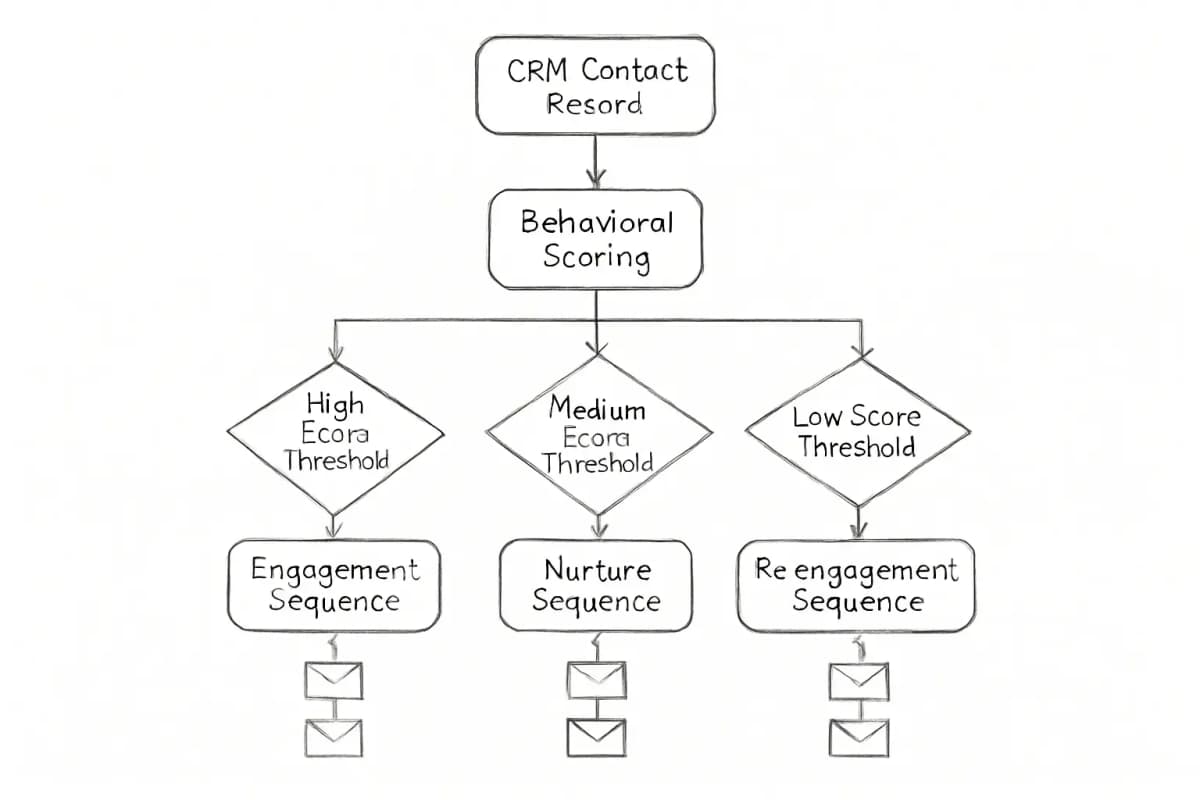

A vertical flowchart showing CRM contact record triggering automated email sequences. Start with a CRM contact record at the top. Arrow flows down to a behavioral scoring evaluation box that checks against multiple thresholds (high score, medium score, low score). Based on score thresholds, three separate email sequence paths branch downward: high-engagement sequence (left), standard nurture sequence (middle), and re-engagement sequence (right). Each path shows 2-3 sequential email steps flowing downward. Use color coding to distinguish the three paths (green for high-engagement, blue for standard, orange for re-engagement). Include connecting arrows and decision diamond shapes at threshold checkpoints.


Common Setup Mistakes to Avoid

Most CRM email automation failures trace back to the same handful of errors:

Focus on the metrics that connect to the job of the email. Open rate is directionally useful, but click rate, clicks per unique open, bounce rate, unsubscribe rate, and conversion data are often more actionable. If ecommerce tracking or CRM outcomes are available, those business metrics should usually carry more weight than opens alone.

The key numbers to track at the CRM integration level:

  • Pipeline contribution: The dollar value of opportunities created directly by marketing automation workflows
  • MQL-to-SQL conversion rate: Are the leads you are scoring actually converting to sales-qualified status?
  • Revenue per recipient: Compare automated workflow performance against broadcast sends
  • Email engagement by lifecycle stage: Which segments are moving through the funnel?

Organizations with connected CRM and marketing systems have a clearer view of how email contributes to revenue. Without that connection, you are optimizing for opens and clicks rather than closed deals.

Most organizations complete CRM and email alignment within 4 to 12 weeks, depending on system complexity. Initial setup covering data auditing, integration requirements, and field mapping takes 4 to 6 weeks. Plan for testing and training time before going fully live.

For a full measurement framework, the email marketing analytics best practices guide covers the reporting structure that makes attribution reliable.


A vertical flowchart showing CRM contact record triggering automated email sequences. Start with a CRM contact record at the top. Arrow flows down to a behavioral scoring evaluation box that checks against multiple thresholds (high score, medium score, low score). Based on score thresholds, three separate email sequence paths branch downward: high-engagement sequence (left), standard nurture sequence (middle), and re-engagement sequence (right). Each path shows 2-3 sequential email steps flowing downward. Use color coding to distinguish the three paths (green for high-engagement, blue for standard, orange for re-engagement). Include connecting arrows and decision diamond shapes at threshold checkpoints.


Common Setup Mistakes to Avoid

Most CRM email automation failures trace back to the same handful of errors:

  • Skipping field mapping validation. When systems use different field names or field types for the same information, mapping errors occur. Invest time in documenting exactly which CRM fields map to which email platform fields, and audit these mappings quarterly as systems are updated.
  • Using one-way sync only. A one-way sync looks clean in a product screenshot. In practice, it breaks fast. Stale lead status means marketing keeps nurturing someone sales already qualified. Missed intent signals mean a rep never sees that a prospect clicked pricing links.
  • Launching too much automation at once. Start with a simple integration between your CRM and email platform, then gradually add more sophisticated automation and workflows.
  • Ignoring deliverability. Email reputation deteriorates when poor data management causes duplicate sends, invalid addresses, or excessive unsubscribes. Ensure your CRM-to-email sync includes validation that removes suppressed addresses and invalid email formats before sending.
  • Skipping field mapping validation. When systems use different field names or field types for the same information, mapping errors occur. Invest time in documenting exactly which CRM fields map to which email platform fields, and audit these mappings quarterly as systems are updated.
  • Using one-way sync only. A one-way sync looks clean in a product screenshot. In practice, it breaks fast. Stale lead status means marketing keeps nurturing someone sales already qualified. Missed intent signals mean a rep never sees that a prospect clicked pricing links.
  • Launching too much automation at once. Start with a simple integration between your CRM and email platform, then gradually add more sophisticated automation and workflows.
  • Ignoring deliverability. Email reputation deteriorates when poor data management causes duplicate sends, invalid addresses, or excessive unsubscribes. Ensure your CRM-to-email sync includes validation that removes suppressed addresses and invalid email formats before sending.

Frequently Asked Questions

What is the difference between a CRM and an email marketing platform?

A CRM is what businesses use to manage contacts, deals, and customer relationships. When email marketing is built into that same platform, sales and marketing teams can manage outreach, track engagement, and monitor pipeline activity from a single source of truth. Standalone email platforms handle campaign sending but lack the deal and pipeline data that makes automated sequences truly context-aware.

How long does it take to set up CRM email marketing automation?

Most organizations complete alignment within 4 to 12 weeks, depending on the complexity of the system. Initial setup covers auditing data, identifying integration requirements, and mapping fields, which takes 4 to 6 weeks. Testing and training take 2 to 4 weeks. Going live and optimization takes another 2 to 4 weeks.

What automation workflows should I build first?

Start with the highest-engagement, lowest-complexity workflows. Create automated sequences based on customer behavior, such as welcome emails for new subscribers or re-engagement emails for inactive contacts. A welcome series introduces new subscribers to your brand, abandoned cart reminders prompt customers who left items in their cart, and re-engagement emails target subscribers who have not engaged with recent emails.

How do I know if my CRM and email integration is actually working?

A working integration should be automatically syncing contact information from form submissions to the CRM, creating email sequences that trigger based on CRM fields like lead source or opportunity stage, logging all email opens and clicks back to customer records for a complete interaction history, and establishing automated lead scoring that combines both CRM activity and email engagement. If unsubscribes and bounces are not flowing back to your CRM, your integration is incomplete.


No comments yet. Be the first!

Leave a comment

Comments are reviewed before publishing.


Frequently Asked Questions

What is the difference between a CRM and an email marketing platform?

A CRM is what businesses use to manage contacts, deals, and customer relationships. When email marketing is built into that same platform, sales and marketing teams can manage outreach, track engagement, and monitor pipeline activity from a single source of truth. Standalone email platforms handle campaign sending but lack the deal and pipeline data that makes automated sequences truly context-aware.

How long does it take to set up CRM email marketing automation?

Most organizations complete alignment within 4 to 12 weeks, depending on the complexity of the system. Initial setup covers auditing data, identifying integration requirements, and mapping fields, which takes 4 to 6 weeks. Testing and training take 2 to 4 weeks. Going live and optimization takes another 2 to 4 weeks.

What automation workflows should I build first?

Start with the highest-engagement, lowest-complexity workflows. Create automated sequences based on customer behavior, such as welcome emails for new subscribers or re-engagement emails for inactive contacts. A welcome series introduces new subscribers to your brand, abandoned cart reminders prompt customers who left items in their cart, and re-engagement emails target subscribers who have not engaged with recent emails.

How do I know if my CRM and email integration is actually working?

A working integration should be automatically syncing contact information from form submissions to the CRM, creating email sequences that trigger based on CRM fields like lead source or opportunity stage, logging all email opens and clicks back to customer records for a complete interaction history, and establishing automated lead scoring that combines both CRM activity and email engagement. If unsubscribes and bounces are not flowing back to your CRM, your integration is incomplete.

No comments yet. Be the first!

Leave a comment

Comments are reviewed before publishing.

More from

Related posts

Illustration for successful ai-driven email marketing examples
Email Marketing StrategyJul 11, 2026 14 min

Successful AI-Driven Email Marketing Examples

Real brands use AI to boost open rates, personalization, and ROI. See proven examples and tactics that work in email marketing today.

More from

Related posts

Illustration for successful ai-driven email marketing examples
Email Marketing StrategyJul 11, 2026 14 min

Successful AI-Driven Email Marketing Examples

Real brands use AI to boost open rates, personalization, and ROI. See proven examples and tactics that work in email marketing today.

M
Marcus Webb
M
Marcus Webb
Illustration for how to leverage ai in your email marketing
Email Marketing StrategyJul 11, 2026 10 min

How to Leverage AI in Your Email Marketing

Use AI to personalize emails, predict behavior, and boost ROI. Learn practical tactics to implement AI in your email strategy today.

JJames Chen
Illustration for how to leverage ai in your email marketing
Email Marketing StrategyJul 11, 2026 10 min

How to Leverage AI in Your Email Marketing

Use AI to personalize emails, predict behavior, and boost ROI. Learn practical tactics to implement AI in your email strategy today.

JJames Chen
Illustration for ai email marketing personalization techniques
Email Marketing StrategyJul 11, 2026 12 min

AI Email Marketing Personalization Techniques

Learn 7 proven AI personalization techniques to increase open rates and conversions. Discover how leading marketers use machine learning to segment audiences.

PPriya Kapoor
Illustration for ai email marketing personalization techniques
Email Marketing StrategyJul 11, 2026 12 min

AI Email Marketing Personalization Techniques

Learn 7 proven AI personalization techniques to increase open rates and conversions. Discover how leading marketers use machine learning to segment audiences.

PPriya Kapoor