Most businesses send email campaigns manually, one blast at a time. Marketing automation email examples show a different path: automated messages triggered by real subscriber behavior consistently outperform batch-and-blast sends across every meaningful metric. In 2024, automated emails drove 37% of all email-generated sales despite accounting for just 2% of total email volume. That ratio alone is the clearest argument for building automation workflows into your email strategy.
This guide covers the specific marketing automation email examples that drive the highest results, with the data behind each one and the mechanics that make them work.
Key Takeaways
- In a test across 17 billion emails, automated emails scored 84% higher open rates, a 2,270% increase in conversion rates, and a 341% increase in click rates compared to standard campaigns.
- Automated emails drive 37% of all email-generated sales despite making up only 2% of email volume.
- Welcome emails achieve an average open rate of 83.6%, making them one of the highest-performing automated email types.
- Companies that excel at lead nurturing generate 50% more sales-ready leads at 33% lower cost, and nurtured leads tend to have a purchase value 47% higher than non-nurtured leads.
- Back-in-stock emails deliver the highest conversion rate (6.46%) among specific automation types, while birthday messages produce an average order value more than 4x higher than average.
Why Marketing Automation Email Examples Matter
The gap between automated and manual email performance is not marginal. It is structural.
Email marketing automation is a technology that sends targeted email messages to subscribers automatically based on predefined triggers, behaviors, or schedules. Instead of manually sending each campaign, the system responds to customer actions without human intervention. When someone abandons their cart, joins your list, or downloads a resource, the right email gets sent immediately without manual effort.
On average, automations achieve a 42.1% open rate, a 5.4% click rate, and a 1.9% conversion rate. One in three people who click on an automated message makes a purchase.
82% of marketers use automation to create triggered emails that result in 8 times more opens and greater earnings than typical bulk emails. The best tactics for automation are mapping the customer experience (53%) and the use of personalized messages (51%).
The following sections break down the marketing automation email examples that produce the strongest results, categorized by workflow type and use case.
1. Welcome Email Sequences
A welcome email is the first automated touchpoint after someone joins your list. It is also your highest-leverage moment.
Welcome emails achieve an average open rate of 83.6%, making them one of the highest-performing automated email types. That open rate far exceeds any typical promotional campaign.
A well-staged sequence of welcome messages allows you to make a good first impression, introduce your brand, highlight key offerings, and encourage further actions.
What a strong welcome sequence includes:
- Email 1 (sent immediately): Confirm the subscription, deliver any promised lead magnet, and set expectations for what subscribers will receive.
- Email 2 (Day 2-3): Share your brand story or core value proposition with a specific proof point.
- Email 3 (Day 5-7): Highlight a popular product, resource, or feature with a direct call to action.
Nearly half of all people who click on a welcome email make a purchase, which is one of the highest click-to-purchase rates of any automated email type.
For B2B companies, the welcome email sequence serves a slightly different purpose: it positions your expertise, introduces useful content, and begins building the trust that longer sales cycles require. Check out our guide to welcome email sequence best practices for a full breakdown of how to structure each email in the series.
2. Abandoned Cart Email Campaigns
Abandoned cart emails are the single highest-revenue automation for ecommerce businesses. The intent signal is as strong as it gets: someone added your product to their cart and left.
Abandoned cart emails achieve an average open rate of 50.5%, a click rate of 6.25%, and a conversion rate of 3.33%, with top-performing brands reaching conversion rates of 7.69%.
Instead of sending just a single email, a series of emails works much better for abandoned cart recovery. A typical abandoned cart flow is structured as: Email 1, a cart reminder sent a few hours after cart abandonment; Email 2, a follow-up sent a few days later; and Email 3, a promotional discount sent a few days after the second email.
Email marketing expert Chase Dimond notes that "having multiple abandoned cart emails results in 69% more orders than a single abandoned cart email."
What the best abandoned cart emails do well:
- Focus on three key elements: showcase the abandoned product, remind customers of the item's value, and create a clear, compelling call to action. Include social proof, highlight key product benefits, and make returning to cart as frictionless as possible.
- Introduce a free shipping offer toward the end of the abandonment automation. "Shipping cost is a very common reason customers leave before completing their purchase," with a one-time free shipping offer acting as an effective nudge to place a first order.
- Send the first reminder 2 to 4 hours after abandonment, and keep it simple so it feels organic and friendly. If customers do not engage, consider sending another reminder 24 to 48 hours after that.
3. Post-Purchase and Transactional Sequences
Post-purchase automation is frequently overlooked, but it sits at a critical moment in the customer relationship. The transaction just happened, trust is at its peak, and the door is open for upsells, reviews, and retention.
Transactional emails have 8x higher opens and clicks compared to regular marketing emails.
The customer relationship does not end at purchase. Follow-up campaigns ensure satisfaction, encourage reviews, and identify upsell opportunities. Effective post-purchase automation includes sending delivery confirmations and usage tips, checking satisfaction and offering support before problems arise, requesting reviews at appropriate timing, and suggesting complementary purchases based on what they actually bought.
A post-purchase sequence might look like this:
- Order confirmation (immediate): Confirm purchase details and expected delivery.
- Shipping update (when dispatched): Tracking information with a brand-consistent message.
- Onboarding tips (2-3 days post-delivery): Usage guides, how-to content, or setup instructions.
- Review request (7-14 days post-delivery): Timed when the customer has had genuine experience with the product.
- Cross-sell (14-30 days): Product recommendations based on the purchase.
4. Lead Nurturing and Drip Campaigns (B2B)
For B2B teams, marketing automation email examples look different from ecommerce workflows. Sales cycles are longer, buying committees are larger, and trust takes more time to build.
A 2025 B2B industry report shows that 72% of B2B organizations are already using email marketing automation to nurture leads, support sales follow-ups, and keep customers engaged.
Research by Mailercloud shows that triggered emails have 70.5% higher open rates over time-based drip sequences. This underlines a critical distinction: the best B2B automations are behavior-driven, not calendar-driven.
Lead nurturing workflows are multi-touch sequences designed to guide prospects through your sales funnel with educational content, social proof, and strategic offers.
A behavior-based B2B nurture sequence:
- Trigger: Prospect downloads a guide or registers for a webinar.
- Email 1 (immediate): Deliver the resource with a relevant follow-up question or insight.
- Email 2 (Day 3-5): Send a related case study or social proof piece.
- Email 3 (Day 7-10): Offer a soft conversion event, such as a demo or consultation.
- Branch logic: If the prospect clicks pricing content, route them to sales immediately.
Effective automated email sequences answer the next buying question rather than promoting offerings. The ideal sequence moves from educational content explaining the root issue, to proof-oriented case studies, followed by soft conversion offers, and exits once the prospect reflects high-intent behavior.
For SaaS-specific nurture workflows, see our full guide on SaaS email marketing strategy.
5. Re-Engagement and Win-Back Emails
Every list develops inactive subscribers over time. Left unaddressed, they hurt your sender reputation and waste budget. Re-engagement automation addresses this systematically.
When a potential customer or subscriber begins to stray and become inactive, you can use automated email marketing to bring them back into the fold and close the sale.
According to Bouncer's 2025 analysis, re-engaged prospects reflect 10% higher average order values than average customers.
An effective re-engagement sequence:
- Email 1 (trigger: 60-90 days of inactivity): A direct, low-pressure message acknowledging their absence and highlighting what they have missed.
- Email 2 (7 days later): A strong incentive, such as a discount or exclusive content.
- Email 3 (7 days after Email 2): A final decision email. Make it clear this is their last chance to stay subscribed, or they will be removed.
Time re-engagement emails 30 to 90 days after inactivity, depending on your product lifecycle.
For subscribers who never respond, removing them from your active list actually improves overall deliverability for the rest of your audience. This connects directly to the importance of email list segmentation strategies as a foundation for high-performance automation.
6. Birthday and Anniversary Emails
These are among the simplest automation workflows to set up and among the most consistently effective.
Birthday messages produce an average order value more than 4x higher than average, at $744.37.
Birthday emails are a feel-good, high-converting automation that reward your customers and strengthen brand loyalty. A well-timed gift, coupon, or discount turns a nice gesture into repeat revenue.
Sending customers a discount for their birthday or join date anniversary works because birthday emails are a type of personalized email marketing campaign. They are a great way to build customer loyalty, stand out in a crowded inbox, and keep your brand top of mind.
Best practices:
- Send 3 to 5 days before the birthday so subscribers have time to act on any offer.
- Keep the email focused: one offer, one CTA.
- Extend the flow with a follow-up email before the offer expires. Urgency drives clicks.
7. Back-in-Stock and Browse Abandonment Emails
These two automation types are underused relative to their performance.
Back-in-stock emails notify subscribers when a product they previously viewed or wishlisted becomes available again. Back-in-stock emails deliver the highest conversion rate of any automation type at 6.46%. The intent is already established; the automation simply closes the gap.
Browse abandonment emails target people who visited product pages but never added anything to their cart. If you gain permission to email someone while they browse your site, you can follow up with a browse abandonment message. These are perfect for people who checked out a few products but never added any to their cart. The best browse abandonment emails include specific item references for a personalized experience, trigger within a few days of the visit, and share social proof in case the person is unsure about you.
Both email types work because they are grounded in demonstrated interest, not assumed interest. 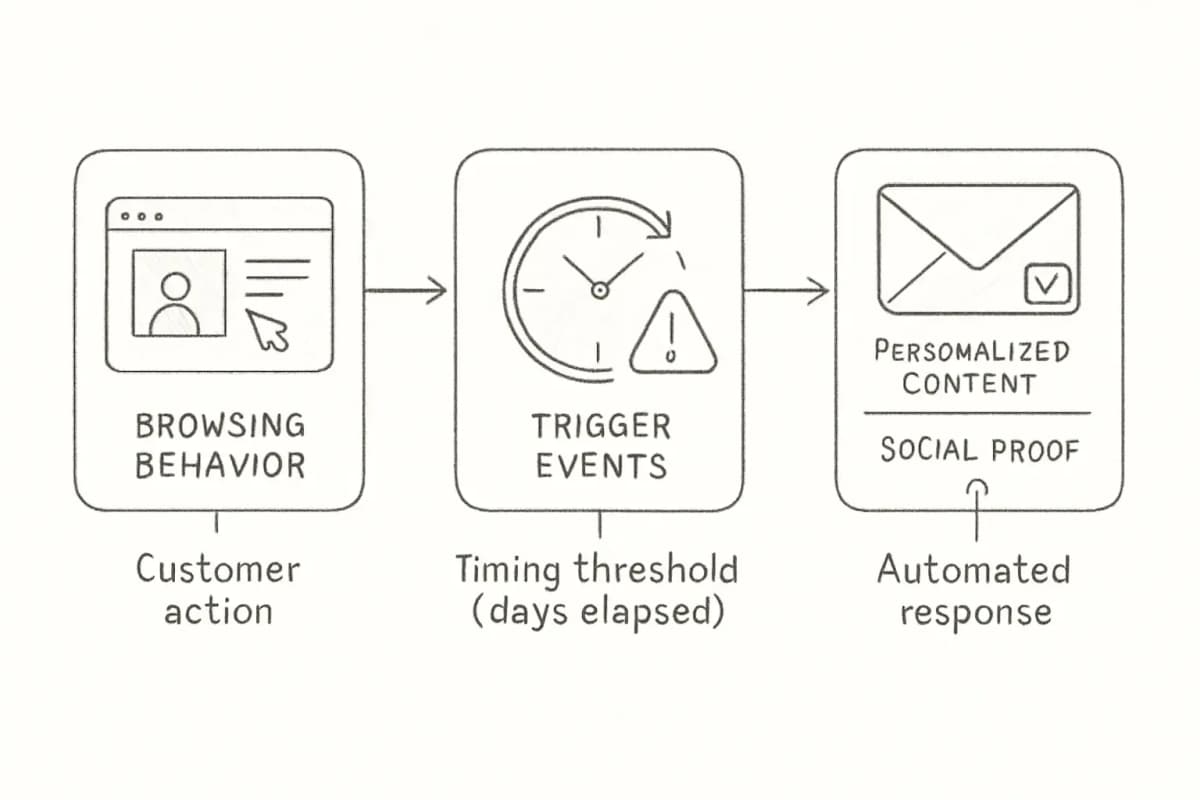
8. Onboarding Sequences for SaaS and Service Businesses
Onboarding emails reduce churn by helping new customers get value from your product or service faster.
Onboarding emails are key to reducing churn and encouraging customer loyalty. You can trigger onboarding emails after a customer signs up or makes a purchase. The onboarding series should give them tips on how to get started with your products or services, guiding customers right from the beginning of their journey.
Effective onboarding sequences help new customers get value fast: a welcome email confirms the purchase and sets expectations, setup guidance provides step-by-step instructions and links to documentation, feature highlight emails drip educational content over the first 30 to 60 days, and automated check-in emails from customer success surface issues early.
A clear and effective onboarding process is key for tech and SaaS companies. It ensures customers can use your product successfully while reducing churn.
To track how these sequences are performing and where contacts drop off, pair them with solid analytics. Our guide to email marketing analytics best practices covers what to measure and how.
How to Measure Automation Performance
Marketing automation email examples only improve when you measure them properly.
The core metrics to track per workflow:
- Open rate: Tells you whether your subject line and sender name are earning attention.
- Click-through rate: Indicates whether the email body is compelling and the CTA is clear.
- Conversion rate: The clearest signal of whether the automation is doing its job.
- Revenue per recipient (RPR): Especially important for ecommerce automations. Cart abandonment automations generate a $3.65 average RPR, with top performers achieving $28.89 per recipient.
Review automation performance monthly, implement quarterly improvements, and conduct annual strategic overhauls based on customer behavior changes.
A/B test one variable at a time: subject lines, send timing, incentive type, or CTA placement. Systematic A/B testing of subject lines, send times, content variations, and personalization depth requires a minimum of 1,000 contacts per variant for statistical significance.
Frequently Asked Questions
What is the best marketing automation email example for ecommerce?
For ecommerce brands, if you had to choose just one automated email sequence to run forever, the abandoned cart email campaign would be your best bet. It is not just speculation. Across welcome series, win-back, promotional emails, birthday emails, and more, the abandoned cart campaign consistently proves itself as the biggest revenue driver, because these customers are already deep in the buying journey and require little nurturing before converting.
How many emails should an automated sequence have?
There is no universal number. For welcome sequences, three to five emails over two weeks is a common structure. For abandoned cart flows, a three-email sequence outperforms single sends. According to Omnisend, merchants who sent just one cart abandonment email got 14.76 orders, while those who used the three-email strategy achieved 24.94 orders in total. For B2B lead nurture, sequences can run for 30 to 90 days, with exit logic based on behavior rather than a fixed endpoint.
What triggers should I use for marketing automation emails?
The main trigger types are: drip campaigns, which are time-based sequences delivering content at predetermined intervals; triggered campaigns, which are instant responses to specific user actions like sign-ups, purchases, or downloads; and behavioral campaigns, which respond to user behavior patterns such as browsing specific product categories or spending time on particular pages. Behavior-based triggers consistently outperform time-based ones.
How does email personalization improve automation results?
Behavior-based personalization using purchase history data boosts click-through rate by up to 39%. Companies using AI-driven email strategies see up to 41% more revenue than those using traditional batch-and-blast sends. The closer your automated emails match what a subscriber has already shown interest in, the more likely they are to convert. See our full breakdown of email personalization techniques that boost conversions for tactical examples.