Automated emails drove 37% of all email-generated sales in 2024, despite making up just 2% of total email volume. That single statistic explains why businesses that have not completed a proper email marketing automation setup are leaving the most efficient portion of their revenue entirely on the table. This guide walks you through every step of that setup, from choosing the right platform to building workflows that run while you sleep.
Key Takeaways
- Automated emails drove 37% of all email-generated sales in 2024, representing only 2% of total sends.
- Automated emails drove 37% of all ecommerce email revenue in 2024 despite representing just 2% of email volume.
- Personalized emails boost open rates by 29%, increase click-through rates by 41%, and drive six times more transactions.
- Gmail and Yahoo's bulk sender requirements, which began rolling out in 2024 and tightened through 2025 and 2026, made authentication, one-click unsubscribe, and a low spam complaint rate non-negotiable.
- A successful email marketing automation setup is built in layers: deliverability first, lifecycle automations second, then ongoing optimization.
What Email Marketing Automation Actually Is
Email marketing automation is a strategic approach that uses software to create, deploy, and manage email campaigns automatically. This technology enables businesses to send targeted, timely, and personalized email messages to their audience, triggered by specific actions or behaviors. Once the system is set up and the criteria are defined, emails are sent out automatically without the need for manual intervention.
The distinction between automation and standard campaigns matters. Automation focuses specifically on email campaign workflows, offering deep email-specific features and streamlined implementation, while broader marketing automation platforms manage multiple channels but may be more complex to deploy.
The business case is straightforward. On average, email marketing delivers a return of between $36 and $42 for every $1 spent, the highest ROI of any digital marketing channel. For context, paid search returns $2 per $1, social advertising $2.80, and display ads $1.35.
Step 1: Choose the Right Platform for Your Business
Selecting an email marketing automation platform goes far beyond choosing where marketers will send emails. The right tool becomes the backbone of lifecycle marketing, powering personalized workflows and driving revenue. Email marketing automation platforms help businesses send targeted, personalized emails at scale by automating workflows, segmenting audiences, and integrating with CRM and ecommerce tools.
When evaluating platforms, prioritize these capabilities:
- Visual workflow builder: Look for visual workflow builders, assess how intuitive they are, and determine how detailed you can make the automation.
- Segmentation and personalization: Email marketing gets the best results when you target campaigns and make them personal. Segmentation tools split contacts according to contact information and behavior, helping you send timely, relevant content to the right people and improve engagement and conversions.
- CRM integration: CRM integration enables unified customer profiles and accurate segmentation. For non-technical marketers, integrations with the CRM provide easy access to data sources that make email marketing effective.
- Deliverability infrastructure: Deliverability is a deal-breaker, and the right email marketing automation tool can get emails through spam filters. Look for automatic DKIM/SPF/DMARC prompts, built-in permission management, bounce handling, and spam testing.
- Scalability: No matter if you're sending to 500 people or 500,000, the tool should grow with you. That means flexible pricing, features that expand as your needs evolve, and the ability to plug into your broader tech stack.
For ecommerce brands, Klaviyo or Omnisend typically provide the strongest revenue-driving capabilities. HubSpot offers unified data and marketing alignment, while ActiveCampaign provides advanced workflow flexibility. For a deeper comparison, see our Email Marketing Automation CRM Setup Guide.
Step 2: Fix Your Deliverability Foundation Before Building Anything
This step comes before workflows, not after. In 2026, deliverability is strategy. Inbox providers reward senders they trust and quietly punish senders they don't. Most of the deliverability work is small, technical, and unglamorous, and it has more impact on revenue than any subject line ever will.
The non-negotiables for technical setup:
- SPF, DKIM, and DMARC records: Email authentication builds trust with inbox providers like Gmail and Outlook by protecting you from email spoofing and verifying that the email is coming from who it says it is. Without it, your emails are far more likely to land in spam.
- List hygiene: Keep your subscriber lists clean and updated. Remove or suppress bounced emails and users who have unsubscribed. Segment actively by engagement level so you target workflows only to interested people. Cleaning your list regularly improves deliverability and engagement.
- Sending frequency: Sending frequency directly affects deliverability. Too much and complaint rates rise, engagement falls, and inbox providers throttle you. Too little and you lose mindshare. A practical default is to start with 1 to 2 marketing emails per week to your engaged segment, less to less-engaged segments, and let the data adjust from there.
A solid rule of thumb: once bounce rate creeps above 5%, your deliverability is at risk. Most teams don't check until it's already a problem.
Step 3: Segment Your Audience Before Building Workflows
Automation without segmentation is just faster spam. Brands that segment score 14.31% more open rates and 101% more click-through rates compared to non-segmented ones.
Most email segmentation strategies fall into four categories: demographic, behavioral, lifecycle stage, and abandoned cart. You're not limited to these, as any data tied to a specific email address is fair game, but they're the foundation most marketers build on.
Start simple. Start with three segments, get them right, and add complexity only when the data tells you to. Three segments: engaged vs. cold, customers vs. leads, and one behavioral trigger like cart abandonment or content interest.
The key advantage of dynamic segmentation is that segment membership triggers automated workflows and personalized content delivery. When someone moves from "prospect" to "customer," they are automatically enrolled in the appropriate welcome series while being removed from sales nurture campaigns.
For more detail on building effective segments, read our guide on Email List Segmentation Strategies That Boost ROI by 760%.
Step 4: Map and Build Your Core Automation Workflows
Creating an effective email marketing workflow involves careful planning and execution. Begin by determining what you want to achieve with the workflow, such as increasing trial-to-paid conversions, reducing churn rate, or boosting event registrations. Every workflow should have a clear purpose and measurable outcome.
Determine which actions or dates will start the workflow. Common triggers include form submissions such as newsletter signups or ebook downloads, ecommerce events like order placements or cart abandonments, or time-based events like birthdays, anniversaries, or inactivity periods.
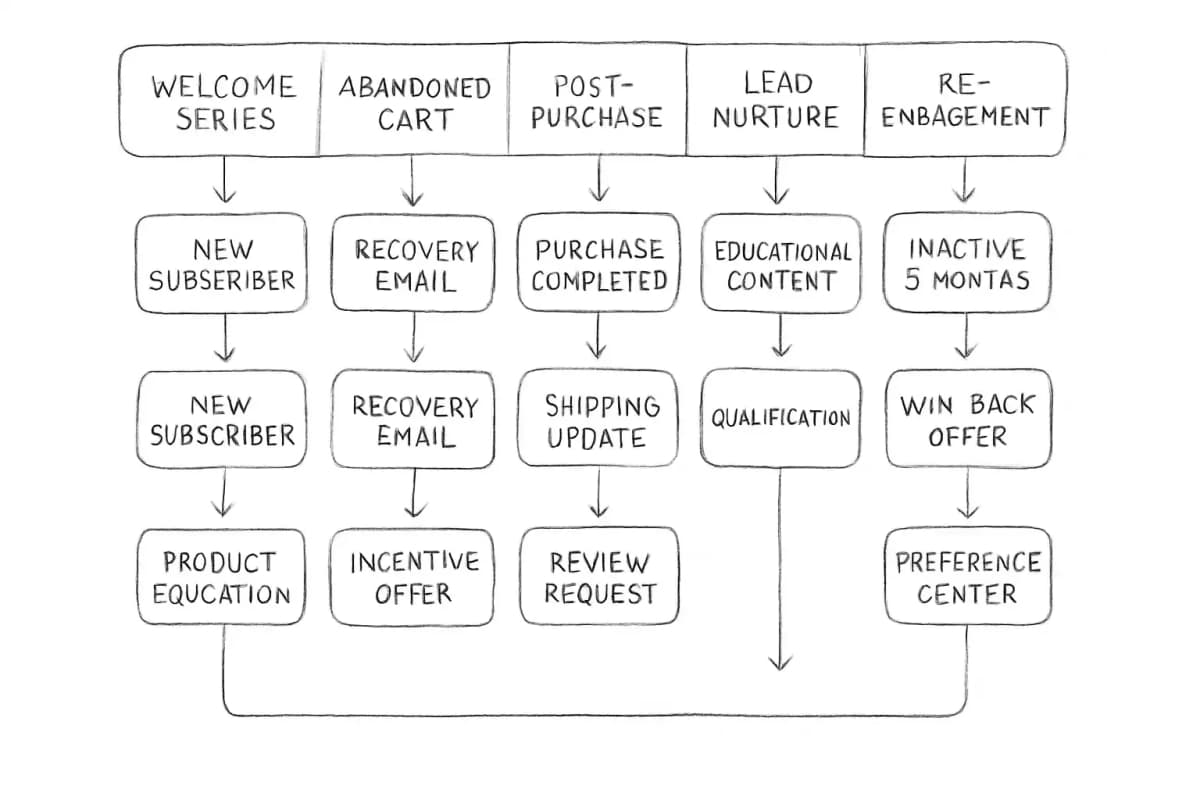
The five workflows to build first, in order of revenue impact:
- Welcome series: Welcome emails achieve an 83.6% open rate in ecommerce, the highest of any automated email type. Use this window to set expectations and drive a first purchase. See our Welcome Email Sequence Best Practices: 7 Proven Strategies for a full framework.
- Abandoned cart recovery: Abandoned cart emails achieve an average CTR of 23.33%, the single highest-performing email type by click engagement across all automation types.
- Post-purchase flow: Abandoned cart and post-purchase flows remain the strongest revenue drivers. Use them to confirm, upsell, and collect reviews.
- Lead nurture sequence: Multi-touch nurture sequences dramatically outperform single-send outreach. Map each email to a specific stage of the buyer journey.
- Re-engagement flow: Time it right: usually 30 to 90 days after inactivity, depending on your product lifecycle. A good rule of thumb is to remove a user if 3 months go by without them opening your email. But before removing unengaged users, consider an automated campaign that asks recipients if they would prefer to receive email at a different cadence.
Step 5: Write and Design Emails That Perform Inside Workflows
Automation only works if the emails in the workflow are worth opening. Once you have decided on a logic for your workflow, it is time to create content and design emails for each step. Every email in your workflow should have a clear purpose and move the recipient toward your overall goal. Start with compelling subject lines to drive opens, use straightforward, engaging copy to maintain interest, and make CTAs action-driven and easy to spot.
Personalization is key in making your emails stand out. Go beyond using the recipient's name; tailor the content based on their interests, past interactions, and behavior. Use data from your CRM and website analytics to create emails that resonate personally with each recipient. Incorporate dynamic content in your emails, which changes based on the recipient's data, including product recommendations based on past purchases or content tailored to the recipient's location.
Also keep mobile rendering front of mind. In 2025, 55% of email opens occurred on mobile devices, reinforcing the critical importance of mobile-first email design and rendering.
For more on personalization inside automated sequences, see our guide on Email Personalization Techniques That Boost Conversions 47%.
Step 6: Test, Measure, and Improve Your Automation Setup
Once you launch your automated email workflow, a set-it-and-forget-it strategy is not conducive to a successful campaign. Measure results and conduct tests to see what is working and what is working better. Strive for continuous improvement.
The metrics worth tracking:
- Click-to-conversion rate: Email campaign click-to-conversion rates reached 27.6% in 2024. This shows how well email turns engaged subscribers into paying customers.
- Revenue per email: Measures the direct financial output of each workflow.
- Workflow drop-off rate: Identifies where subscribers disengage inside a sequence.
- Spam complaint rate: Yahoo and Gmail now require spam rates below 0.3% with proper authentication. Cross that threshold consistently and your deliverability craters, not just for that campaign, but for your entire sending domain.
Email marketing automation provides valuable data and insights that help you optimize campaigns over time. Regularly test different elements of your emails, such as subject lines, call-to-action buttons, and email design, to identify what resonates best with your audience. A/B testing is a powerful tool that allows you to compare different versions of your emails and determine which performs better.
Open rates now require an important caveat: Apple Mail Privacy Protection affects roughly 50 to 60% of recorded email opens, automatically downloading tracking pixels before a recipient views the email, which inflates open rate data across the industry. Use open rates as a directional signal, not a precise measurement, and lean on click rate and email-attributed revenue as your primary performance benchmarks.
Common Email Marketing Automation Setup Mistakes to Avoid
Even experienced teams make these errors when building out their email marketing automation setup:
- Over-segmenting too early. Too narrow and your segments are too small to yield meaningful results. Too wide, and they lose relevance. You need to find the right balance for a successful campaign.
- Ignoring suppression lists. Effective suppression list management ensures your messages land in inboxes, not spam folders. Most email platforms will automate this process, but it is crucial to have clear guidelines for manual updates. Prioritize clean and engaged lists to protect your sender reputation.
- Failing to monitor running workflows. Customers sometimes set up long, complex automations involving 25 different emails over 8 months, and then the campaign is not monitored. When people stop engaging and messages continue to be sent, ISPs may start routing those messages to spam, preventing other emails from getting delivered.
- Choosing a platform solely based on entry price. Platforms become expensive as lists scale. Choosing based solely on starting price often leads to costly migrations later.
Frequently Asked Questions
How long does it take to set up email marketing automation?
A basic email marketing automation setup, including platform configuration, domain authentication, a welcome series, and one behavior-based trigger, can be completed in one to two weeks. More advanced setups with full lifecycle workflows, deep CRM integration, and A/B testing infrastructure typically take four to eight weeks. The biggest variable is data readiness. Clean, unified data enables reliable automated segmentation. Before building dynamic segments, you need core contact properties, behavioral events, and engagement signals properly tracked and synchronized across your systems.
What triggers should I use for my first automation workflows?
Common triggers include form submissions such as newsletter signups or ebook downloads, ecommerce events like order placements or cart abandonments, or time-based events like birthdays, anniversaries, or inactivity periods. Start with the highest-intent actions first: new subscriber signups and abandoned cart events typically produce the strongest ROI for new automation programs.
How many emails should a welcome automation include?
A high-performing welcome sequence is the fast lane to your first sale. Instead of sending one generic email, build a 3 to 5 step automated journey that adapts to each subscriber's actions. Space them across the first 7 to 14 days, with the first email sent within minutes of signup while intent is highest.
How do I know if my email automation is working?
Track workflow-level metrics separately from campaign sends. Focus on click-to-conversion rate, revenue per email, and workflow completion rate. Start with total revenue generated and total spend as your baseline ROI figure. From there, track click-to-conversion rates, revenue per email, and the contribution of automated flows separately from campaign sends. Together, these metrics give you a complete picture of your email marketing return on investment. For a broader analytics framework, see our Email Marketing Analytics Best Practices guide.