Automated emails drove 37% of all email-generated sales in 2024, despite making up just 2% of total email volume. That gap between effort and output is exactly what makes email marketing automation tasks worth prioritizing. If you are still sending every campaign by hand, you are leaving a disproportionate share of your revenue on the table.
This guide covers the eight core email automation workflows every business should have running. Each one addresses a specific stage in the customer journey, from the first opt-in to long-term retention. Set them up once, and they keep working without daily input.
Key Takeaways
- Automated emails generate 320% more revenue than non-automated emails.
- Abandoned cart flows drive the highest average revenue per recipient ($3.65) and the highest average placed order rate (3.33%) of all automated flows.
- Welcome emails achieve an impressive average open rate of 83.63% and a click-through rate of 16.60%.
- Automated win-back email sequences reactivate 12-18% of lapsed customers, generating revenue at 5-7x lower cost than acquiring new customers.
- Lead-nurturing emails get 4-10x more responses than generic email blasts, and nurtured leads make purchases up to 23% faster.
What Makes Email Automation Different from Manual Campaigns
At its core, email automation involves the creation and implementation of automated email sequences triggered by specific actions or behaviors of recipients. These workflows are designed to deliver relevant content at optimal times, without the need for constant manual intervention.
The distinction matters because timing and context are what separate useful messages from ignored ones. Email workflow automation sends the right message at the right time to the right subscriber, creating less noise and more value.
Email workflows can be dynamic or linear, and your email campaign strategy will determine which type of workflow, or combination of workflows, to launch. The eight workflows below cover both, from simple linear onboarding sequences to behavior-driven branching flows that adapt to what each subscriber actually does.
Workflow 1: Welcome Series
The welcome series is the highest-leverage starting point for any email automation program. A welcome email sequence is the automated series a brand sends in the first days after someone subscribes, and in 2026 it is the highest-performing flow in email marketing.
According to Omnisend, a series of three welcome emails can generate 90% more orders than a single welcome email. Despite that, most brands still send only one message and stop.
What to include:
- Email 1 (immediate): Confirm the subscription, deliver any lead magnet, and set expectations for what comes next
- Email 2 (day 2-3): Share your brand story and primary value proposition
- Email 3 (day 5-7): Present your core offer with a low-friction call to action
Keep subject lines short and specific. For more on this, see our guide to email subject line best practices that boost open rates by 27%.
For a deeper dive into structuring this flow, read our welcome email sequence best practices.
Workflow 2: Abandoned Cart Recovery
The global average cart abandonment rate is 70.22%, based on Baymard Institute's analysis of 50 studies. That represents an enormous pool of recoverable revenue for any ecommerce business.
Abandoned cart flows drive the highest average revenue per recipient ($3.65) and the highest average conversion rate (3.33%) of all automated flows. Top performers do even better: the top-performing 10% of brands achieve an abandoned cart flow revenue per recipient of $28.89.
Recommended sequence timing:
- Send a follow-up email within the first hour after cart abandonment. This generates the highest engagement of any send time.
- Follow up at 24 hours with a reminder that includes a product image and a clear return path.
- Send a third email at 48-72 hours, optionally including a limited discount or free shipping offer.
Klaviyo analysis revealed that three-email sequences produced $24.9 million in revenue compared to just $3.8 million from single emails, a 6.5x revenue difference.
Workflow 3: Post-Purchase Sequence
The post-purchase sequence is the most underutilized of the core automated flows. Most businesses stop communicating after the order confirmation, missing the window when customer satisfaction is highest and repeat purchase likelihood peaks.
Between 70 and 80 percent of first-time customers never come back without a structured post-purchase flow, while top performers achieve 40-plus percent repeat purchase rates compared to the industry average of 27 percent.
A practical post-purchase flow looks like this:
- Day 0: Order confirmation with tracking details (this email has the highest open rate of any transactional email, at 70-80%)
- Day 3-7: Product education or setup guide
- Day 7-14: Social proof, tips, or usage inspiration
- Day 14-21: Feedback or review request
- Day 21+: Cross-sell, upsell, or replenishment offer
A customer who has already bought from you is easier to re-engage than a brand-new lead. They know your brand, trust the process, and are more likely to buy again when the follow-up feels relevant.
Workflow 4: Lead Nurture Sequence
Not every subscriber is ready to buy immediately. The lead nurture email sequence is a series of automated emails aimed at delivering valuable information to potential customers who are not yet ready to buy but have shown interest. This sequence is particularly valuable for building a connection and guiding potential customers through their buying journey, turning them from interested leads into loyal customers.
The optimal number of emails in a nurture sequence can vary based on your industry, audience, and specific goals. However, a common and effective approach is to start with a sequence of 4 to 8 emails.
Structure each nurture email around a single job:
- Educate: Teach subscribers something genuinely useful related to your product category
- Validate: Use case studies, testimonials, or data to reduce purchase risk
- Address objections: Anticipate the reasons they have not bought yet and answer them directly
- Convert: Present the offer once the groundwork is laid
Behavior-based lifecycle emails triggered by actions such as browsing, purchases, onboarding steps, or inactivity consistently deliver 3 times higher engagement than scheduled broadcast emails.
Pairing this workflow with smart email list segmentation strategies ensures each nurture track stays relevant to the specific subscriber's situation.
Workflow 5: Win-Back and Re-Engagement
Every list has subscribers who have gone quiet. Sending a dedicated win-back sequence before removing them protects both your revenue and your sender reputation.
The average e-commerce store loses 60-70% of first-time buyers within 90 days. Automated win-back email sequences reactivate 12-18% of lapsed customers, generating revenue at 5-7x lower cost than acquiring new customers.
Timing is critical here. Emails sent 30-45 days after the last purchase achieve 2.3x higher conversion than emails sent at 90 or more days.
Win-back sequence structure:
- "We miss you" email with a soft re-introduction
- Value reminder highlighting what they get from staying subscribed
- Incentive escalation (no discount, then 10%, then 15%, or free shipping)
- Final "last chance" notice before list suppression
AI improves win-back performance in three areas: predictive send-time optimization (12% higher open rates), dynamic product recommendations (21% higher click-through rates), and churn prediction (identifying at-risk customers before they lapse).
After the sequence ends, suppress non-responders. Keeping unengaged contacts on your active list degrades deliverability for everyone else.
Workflow 6: Browse Abandonment
Browse abandonment sits between general browsing and cart abandonment. A visitor viewed a product page but did not add anything to their cart. They have shown intent without full commitment.
Personalized lifecycle emails delivering 6 times higher transaction rates in retail and ecommerce make browse abandonment worth setting up, even though many brands skip it entirely.
How to set it up:
- Trigger: Subscriber views a product page two or more times within a session or 24-hour window without adding to cart
- Email 1 (within 1-4 hours): Reference the specific product they viewed, include social proof (ratings, reviews), and a direct link back
- Email 2 (24 hours later): Show related products or a "bestsellers in this category" block
- Optional Email 3 (48 hours): Introduce urgency, such as limited stock or a time-sensitive offer
Keep the messaging light. The subscriber has not signaled purchase intent as strongly as an abandoned cart visitor, so a hard sell often backfires.
Workflow 7: Milestone and Birthday Emails
Milestone emails are automated messages that celebrate significant customer and company milestones. Common triggers include birthdays and customer anniversaries, such as the one year since a customer's first purchase.
These are among the most personal email marketing automation tasks you can set up, and the engagement numbers reflect that. Emails triggered by an anniversary of a date achieve a 58% open rate and an 11% click rate, far higher than the average campaign.
Birthday messages produce an average order value more than 4 times higher than average ($744.37).
What to automate:
- Customer birthday (offer an exclusive discount or bonus in the week surrounding their birthday)
- First purchase anniversary (celebrate the relationship, offer a loyalty reward)
- Activity milestones (100th order, 1-year subscriber anniversary, reaching a loyalty tier)
Milestone emails feel more personal, leading to higher open and click-through rates, and you can enhance them with offers, making them perfect opportunities for cross-selling and upselling. 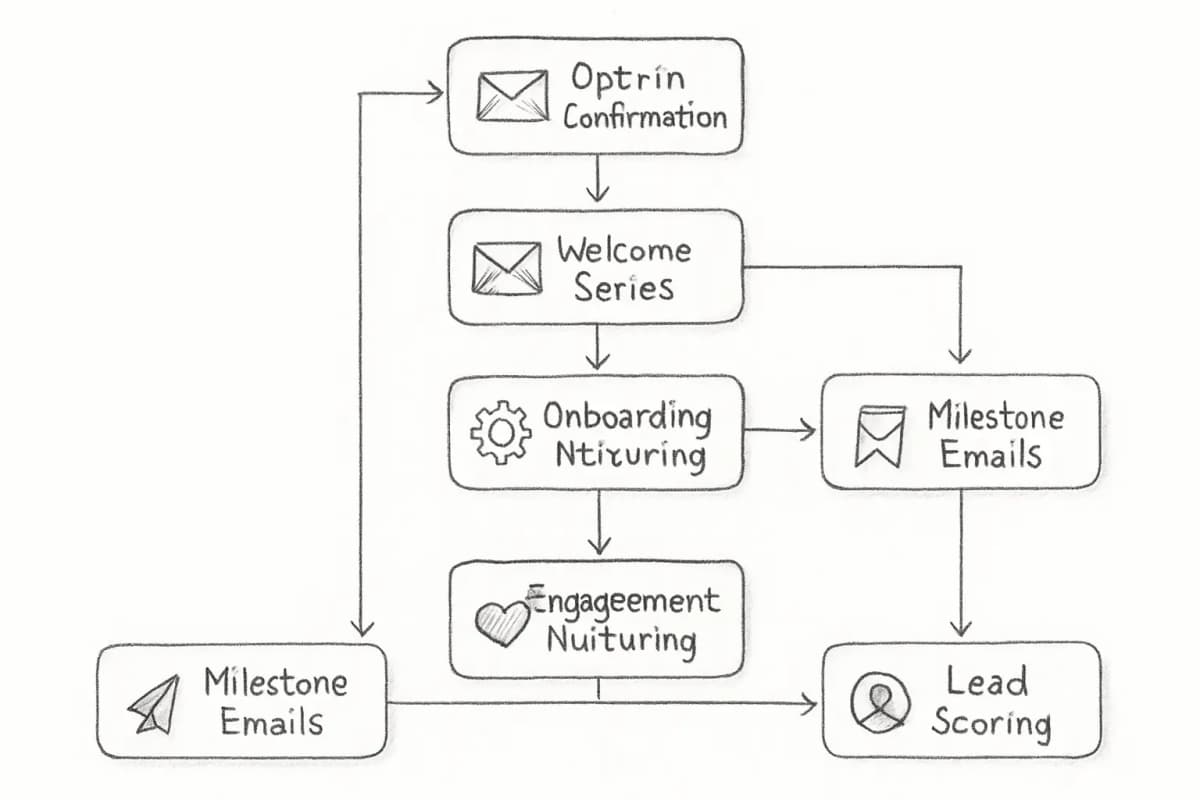
Workflow 8: Lead Scoring and Sales Handoff
Lead scoring is not a standalone campaign. It is the intelligence layer that makes every other email marketing automation task more precise.
Lead scoring is a marketing and sales strategy for evaluating prospects based on a numerical point system. Points are assigned to each lead according to how well they match a target buyer persona and how they interact with the brand. A higher lead score indicates that an individual is further through the buyer's journey.
A B2B software company that implemented lead scoring based on engagement and website behavior saw a 20% increase in sales-qualified leads and a 15% uptick in email-driven revenue.
Actions to score in your automation platform:
- Opens and clicks (weighted lower due to Apple Mail Privacy Protection affecting open tracking)
- Product page visits
- Pricing page or demo page visits (high intent)
- Content downloads
- Webinar or event registrations
- Form submissions
When a lead crosses a threshold score, trigger a sales alert or shift that contact into a high-intent nurture track with more direct conversion messaging. When a lead reaches a certain score or a customer hits a milestone, your automation responds instantly with the right message.
For teams integrating email with their CRM, our email marketing automation CRM setup guide covers the technical steps in detail.
How to Prioritize These Workflows
You do not need all eight running on day one. Start with the fundamentals: welcome sequences, cart abandonment, and post-purchase emails, then progressively add retention, loyalty, and advocacy programs as you build confidence and see results.
A practical build order for most businesses:
- Welcome series (set up before anything else)
- Abandoned cart recovery (highest RPR of any flow)
- Post-purchase sequence (protect first-time buyers from churn)
- Lead nurture sequence (move subscribers toward purchase)
- Win-back and re-engagement (protect list hygiene and recover revenue)
- Browse abandonment (capture mid-funnel intent)
- Milestone and birthday emails (improve retention and LTV)
- Lead scoring and handoff (refine prioritization across all flows)
Lifecycle automation accounts for 87% of automated email revenue across all tracked categories, making lifecycle flows the primary driver of email marketing's commercial contribution. Every workflow you add compounds the value of those already running.
Frequently Asked Questions
What are the most important email marketing automation tasks to set up first?
The three highest-priority email marketing automation tasks are a welcome series, an abandoned cart recovery sequence, and a post-purchase flow. Ecommerce brands that have deployed all four core flows: welcome, abandoned cart, browse abandonment, and post-purchase, see up to 320% more revenue per email compared to brands relying on newsletters alone. Start with those three, measure the results, then add the remaining workflows.
How many emails should be in each automated workflow?
It depends on the workflow. For nurture sequences, a common and effective approach is to start with 4 to 8 emails. For abandoned cart flows, a three-email sequence consistently outperforms single sends. For post-purchase, the most effective sequences run 6 to 8 emails over 30 to 60 days, with each email serving a specific job. Match sequence length to how long it realistically takes your customer to make a decision or form a habit.
Which email automation platform should I use?
Popular tools for email workflow automation include ActiveCampaign, HubSpot, Klaviyo, Brevo, and Mailchimp. The right choice depends on your business model. Klaviyo is widely preferred for ecommerce due to its deep store integrations. HubSpot and ActiveCampaign serve B2B teams with CRM-native scoring well. Effective email workflow automation depends on choosing the right platform, with key features like workflow builders, segmentation, and analytics.
How do I know if my automation workflows are performing well?
Track revenue per recipient (RPR), click-through rate, conversion rate, and unsubscribe rate for each flow. Compare against benchmarks: Klaviyo's analysis found that automated flows generate up to 30 times more revenue per recipient than standard campaigns ($3.65 average revenue per recipient for abandoned cart flows versus $0.11 for campaigns). If a flow is underperforming, audit the trigger logic, subject lines, timing, and copy before adding or removing emails. For a full breakdown of what to measure, see our email marketing analytics best practices guide.