Email marketing automation is one of the highest-leverage activities you can set up for your business. Done right, it runs 24/7, converts leads while you sleep, and consistently outperforms manual campaigns on every metric that matters. This guide walks you through each step, from choosing the right platform to building your first workflows and measuring what works.
Key Takeaways
- Automated emails drive 37% of all email-generated sales despite making up only 2% of email volume.
- Automated email flows, including abandoned cart and post-purchase messages, generate up to 30 times more revenue per recipient compared to standard email campaigns.
- Companies using email marketing automation to nurture leads experience a 451% increase in qualified prospects.
- Successful automation is built on four elements: clear goals, precise segmentation, behavior-based triggers, and regular testing.
- Start with 3 to 4 foundational workflows before adding complexity. Measurement must come before expansion.
What Email Marketing Automation Actually Is
Email marketing automation is a system that sends targeted emails to subscribers based on specific triggers, conditions, or time delays, without manual intervention for each send. It works by using triggers (like sign-ups or purchases) to send a sequence of emails as a workflow, with automated emails sent at optimized time intervals, ensuring timely communication without manual effort.
The core difference between automation and a manual campaign is timing and relevance. Instead of blasting the same message to your entire list, email automation lets you deliver the right message to the right person at the exact right moment in their customer journey.
Common triggers include:
- Sign-up (someone joins your email list), purchase (a customer completes a transaction), engagement (a subscriber clicks a link or interacts with previous emails), and cart abandonment (a user adds products to their cart but leaves without buying).
Step 1: Define Your Goals Before You Build Anything
The most common automation mistake is building workflows before knowing what you want them to accomplish. Setting up email marketing automation starts with purpose. Without a clear goal, even the most polished workflows can feel like noise. Your objectives shape every message, trigger, and call to action.
Common automation goals include:
- Lead nurturing: Keep prospects warm with relevant content until they are ready to buy.
- Onboarding: Help new customers understand your product or service quickly.
- Re-engagement: Win back inactive contacts with timely incentives or updates.
- Abandoned cart recovery: Recapture lost sales with a well-timed follow-up sequence.
Be specific. If your goal is "convert more leads," define how many emails that takes, what information the prospect needs at each step, and what the final call to action should be.
Step 2: Choose the Right Automation Platform
Your platform shapes what is technically possible with your automation. With hundreds of platforms on the market, choosing the right one depends on your business type, technical requirements, and budget.
Here is how the major platforms compare in 2025 to 2026:
- HubSpot: Best for CRM-first teams. Automation, email, and pipeline in one platform, though it is the highest cost at scale.
- ActiveCampaign: Deepest automation logic for B2B and SaaS. Strong on behavioral branching, lead scoring, and lifecycle workflows.
- Klaviyo: A data-driven email and SMS platform built primarily for ecommerce brands. Its software is deeply integrated into the Shopify ecosystem and treats every contact interaction as a potential data point for smarter targeting, including segments based on purchase behavior, browse history, and predicted customer lifetime value.
- Brevo (formerly Sendinblue): Most cost-effective for high-volume senders, with email, SMS, and WhatsApp natively built in.
- Mailchimp: A solid email marketing tool with an intuitive interface and a wide range of templates that make it easy to get started quickly. Segmentation and automation features cover the basics well.
For ecommerce brands, Klaviyo is the stronger fit. For B2B, SaaS, and complex lifecycle workflows, ActiveCampaign or HubSpot tend to win. For lean teams with simple needs, Mailchimp or Brevo gets you started without a steep learning curve.
Also consider connecting your chosen platform directly to your CRM. See our Email Marketing Automation CRM Setup Guide for a detailed walkthrough on keeping your contact data synchronized.
Step 3: Segment Your List Before Building Workflows
Sending the same automated sequence to everyone on your list wastes your effort and erodes engagement. Segmenting makes your automated email campaigns more personal and relevant. Even simple groups can increase engagement by 20 to 30%.
Segment your list based on:
- Behavioral data: Pages visited, links clicked, past purchases, or product views.
- Demographic data: Industry, job title, company size, or geographic location.
- Lifecycle stage: New subscriber, active buyer, lapsed customer, or VIP.
- Engagement level: Highly engaged, occasionally active, or unresponsive for 60 or more days.
Behavior-triggered automated email campaigns can get up to 3 times higher open and click rates than normal emails. They are effective because the emails are relevant and timely.
For a deeper look at how to structure your segments for maximum return, read our guide on email list segmentation strategies that boost ROI.
Step 4: Map Your Automation Workflows
Once your goals and segments are clear, map out the specific workflows you want to run. A workflow is a sequence of emails triggered by a specific action, with defined delays and conditional branches.
Creating flows to cover the basics (a welcome series, an abandoned cart email, and a thank-you email) is a starting point. Flipping those flows into a real email automation strategy requires asking what should happen at every stage. Should customers sign up, receive an offer, get a follow-up, then a cross-sell after their thank-you email? That series covers more of their lifecycle.
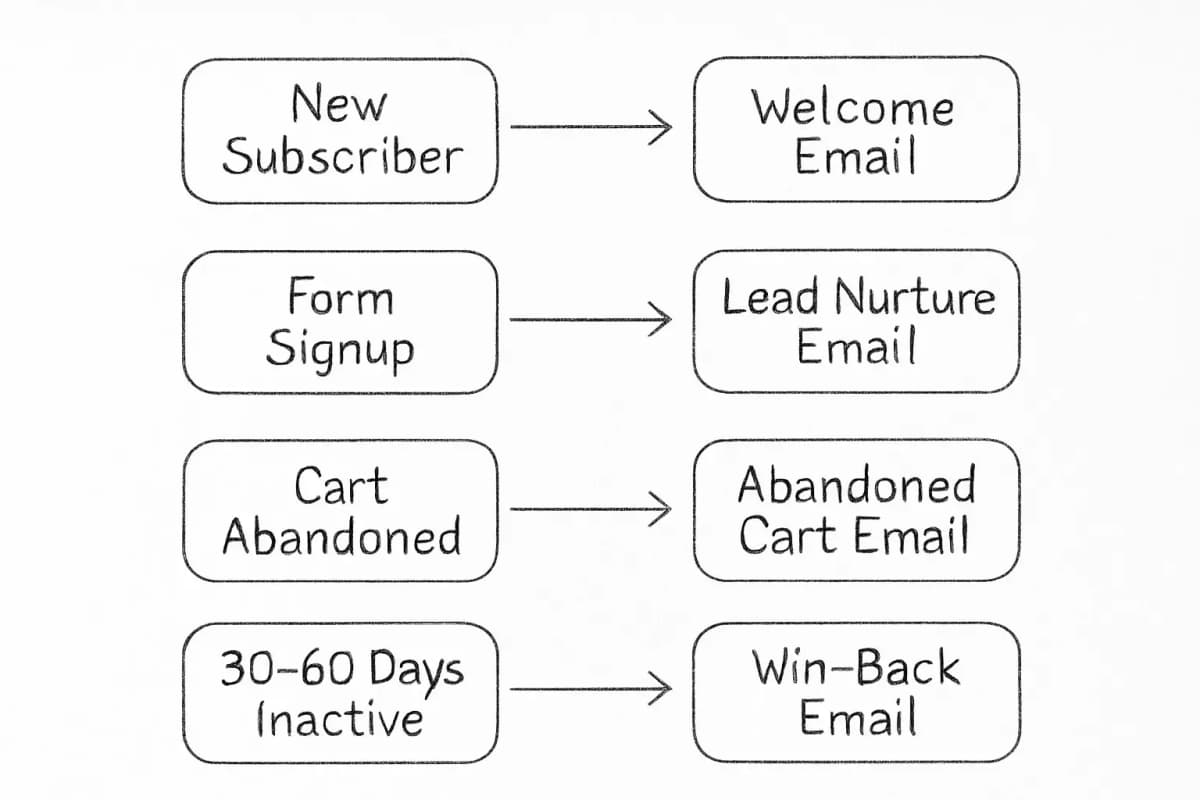
The four automations every business should build first:
- Welcome sequence: Triggered when someone subscribes. Introduce your brand, deliver on any opt-in promise, and set expectations for future emails. See our welcome email sequence best practices for proven structures. Welcome emails achieve an average open rate of 83.6%, making them one of the highest-performing automated email types.
- Lead nurture sequence: A multi-email series that builds trust and moves prospects toward a decision. Time-based nurture sequences guide prospects through educational journeys with predetermined timing. A well-designed welcome series orients new subscribers to your value proposition, while educational sequences build authority through progressive learning. These structured journeys maintain consistent engagement over extended buying cycles.
- Abandoned cart sequence: Abandoned cart emails recover 3 to 5% of lost sales on average, with an average open rate of 50.5%, a click rate of 6.25%, and a conversion rate of 3.33%. A three-email sequence (immediate reminder, value reinforcement, and a final urgency email) typically outperforms a single send.
- Re-engagement sequence: Triggered when a subscriber has been inactive for 30 to 60 days. Customer retention is cheaper than acquisition, and re-engaging existing customers is one of the most cost-effective ways to reduce churn. 60 to 70% of lost customers can be recovered through automated win-back email campaigns.
Step 5: Write and Configure Each Email in the Sequence
Each email in a workflow needs to stand on its own while connecting naturally to what comes before and after it.
Content principles for automated emails:
- Lead with the single most relevant piece of value for that subscriber's stage.
- Keep the subject line clear and specific. Personalized subject lines can increase open rates by 20 to 26%. For more on this, check our guide on email subject line best practices that boost open rates.
- Use one clear call to action per email. Multiple competing CTAs reduce clicks.
- 55% of email opens occur on mobile devices, reinforcing the critical importance of mobile-first email design. Every template you use should render cleanly on small screens.
Once content is written, configure each step inside your platform. Configure each step of your mapped automation workflows within your email platform, setting conditions and order. Then, thoroughly test the sequence by sending email previews to yourself and colleagues. Check that all links work, images load correctly, personalization tokens populate properly, and that the timing of emails aligns with your plan.
Step 6: Protect Deliverability Before You Launch
A well-built automation workflow only works if the emails actually reach inboxes. Deliverability is not an afterthought.
Email authentication was a primary focus in 2024 as businesses sought to protect their brand reputation. Implementing protocols such as SPF, DKIM, and DMARC can help verify the authenticity of emails and reduce the risk of phishing and spoofing.
You can also set up DMARC (Domain-based Message Authentication, Reporting and Conformance), which tells email providers what to do when messages fail SPF or DKIM. It also gives you reports about your sending activity. DMARC is essential if you send more than 5,000 emails at a time to Gmail or Yahoo inboxes. Even if you do not send at this volume, adding this record to your domain can help build a deeper picture of trust.
Other deliverability steps to take before activating any automation:
- Remove invalid and inactive addresses from your list.
- Roughly 7% of emails now land in spam, directly reducing ROI. Monitor your spam complaint rate and keep it below 0.1%.
- Warm up your sending domain if you are migrating to a new platform.
- Set sending frequency based on your audience's demonstrated tolerance, not an arbitrary schedule.
Step 7: Test, Measure, and Iterate
Launching your automation is the beginning, not the end. The work is not over once you have set up your email marketing automation. Monitor key email marketing metrics to ensure your automated emails are performing well: click-through rate (how many clicked on your links or CTAs), conversion rate (how many completed the desired action), and unsubscribes (if you see too many, your content might be irrelevant or overbearing).
A/B testing inside your automation is where meaningful performance gains happen. Test one element at a time. Multiple changes muddy results and prevent clear insights. Choose high-impact elements first because subject lines and CTAs typically deliver the quickest wins.
Schedule and activate tests, ensuring both versions run in parallel for a valid time frame (typically 3 to 7 days for email). After each test, document what you changed, what the result was, and what you will test next.
Top ecommerce marketing agencies take a lifecycle approach to email automations with an average of 5.3 flows per client. 45% of the client revenue they generate comes from automations connected by a strategy, not running in isolation.
For a broader view of the metrics that matter most, see our guide on email marketing analytics best practices.
Frequently Asked Questions
How long does it take to set up email marketing automation?
A basic setup with three to four workflows (welcome series, nurture sequence, abandoned cart, and re-engagement) typically takes one to two weeks when starting from scratch. This includes platform configuration, list import, workflow mapping, copywriting, and pre-launch testing. More complex setups with conditional branching, CRM integration, and dynamic content take longer.
What is the best platform for email marketing automation?
There is no single best platform. The right choice depends on your business model, automation needs, and integrations. Ecommerce brands often prefer Klaviyo, while B2B teams may benefit more from HubSpot. Smaller teams with simpler needs do well starting with Mailchimp or Brevo.
How many automated emails should be in a sequence?
It depends on the goal and the audience's position in the buying cycle. A welcome series typically runs three to five emails over one to two weeks. A lead nurture sequence for a longer sales cycle may span six to ten emails over four to eight weeks. Many marketers try to build a 15-step, multi-branch automation on day one. Build your foundational 3 to 4 automations first, measure their performance, then expand. Complexity without measurement is chaos.
How do I measure whether my automation is working?
Focus on metrics that connect directly to revenue: conversion rate, revenue per email sent, and customer lifetime value attributed to automated flows. Open rate is a useful directional signal but increasingly unreliable due to Apple Mail Privacy Protection. Use open rates as a directional signal, not a precise measurement, and lean on click rate and email-attributed revenue as your primary performance benchmarks.