Sending one campaign to the wrong segment, shipping a broken link to 50,000 subscribers, or letting a personalization token fail at the worst possible moment: these are the scenarios a solid email marketing QA checklist is built to prevent. And they happen more than most marketers admit.
In one study, 52% of marketers reported making between two and five email marketing mistakes in a single year, which shows these aren't rare edge cases. They're routine failures that erode trust, damage deliverability, and waste budget on every campaign.
This checklist gives you 18 specific tests to run before every send, organized by category so nothing slips through.
Key Takeaways
- The average email deliverability rate across major ESPs is 83.1%, meaning nearly 1 in 6 emails never reaches the inbox. A QA process directly protects your inbox placement.
- A strong QA process protects your brand, improves deliverability, and ensures that every email you send reflects the standard your customers expect.
- Mobile devices account for 55% of all email opens globally, making mobile rendering checks non-negotiable for every campaign.
- Gmail and Yahoo made authentication mandatory for bulk senders sending 5,000 or more messages per day in February 2024, raising the technical bar for every marketing team.
- Broken personalization tokens, missing unsubscribe links, and untested CTAs are among the most common and preventable pre-send errors.
1. Strategy and Goal Checks (Tests 1-3)
Before you review a single line of copy, confirm the campaign has a clear strategic foundation.
Test 1: Campaign Goal Is Defined
Every email campaign should have a purpose, and articulating exactly why you're sending this email and what you hope to gain is a critical first step in your email workflow. If you cannot state the goal in one sentence, the email is not ready to send.
Test 2: Audience and Segmentation Match
Confirm the segment logic matches the campaign objective. Make sure that your segmentation conditions are on par with your agenda. There's nothing worse than sending an introductory email to those who have already received your offer.
For a deeper look at how segmentation affects ROI, see our guide on email list segmentation strategies.
Test 3: Send Time Is Correct
Check the scheduled date, time, and time zone against your intended audience. A campaign scheduled for 9 AM Eastern that fires at 9 AM UTC reaches your US subscribers at 4 AM. Verify this in your ESP before moving forward.
2. Subject Line and Preheader Checks (Tests 4-6)
The subject line and preheader together determine whether your email gets opened. They are worth their own dedicated pass.
Test 4: Subject Line Length and Content
Emails with shorter subject lines are more likely to be opened, and the average subject line contains 44 characters. Check that your subject line renders completely on mobile. An iPhone 16 displays roughly 41 characters in portrait mode, so front-load your key message in the first 40 characters to cover all iPhone models.
Also check: no spam-trigger words, no all-caps, and a clear match between what the subject promises and what the email delivers.
For proven subject line techniques, see our post on email subject line best practices that boost open rates.
Test 5: Preheader Text Is Intentional
An email preheader is a short snippet of text that appears at the beginning of an email and is visible in the inbox preview. It provides additional context or information about the email and is visible in many email clients before the recipient opens it. If you leave the preheader blank, your ESP will pull in the first text from the email body, which is often an unsubscribe link or an image alt-text placeholder. Write something deliberate.
Test 6: From Name and Reply-To Are Correct
Confirm the "From" name reflects your brand, and that the reply-to address is monitored. Unclear sender identity hurts trust and deliverability.
3. Content and Copy Checks (Tests 7-9)
Test 7: Proofread the Entire Email
Read every line from top to bottom, including the footer. Check for typos, grammatical errors, missing words, and inconsistent formatting. When you open an email you sent to your list and see something glaringly wrong, like a misspelled company name in the subject line, it's one of those please-tell-me-this-isn't-happening moments.
Paste the copy into a tool like Grammarly or Hemingway for a secondary pass, then re-read it manually. Do not rely on a single tool.
Test 8: Personalization Tokens and Fallbacks
Test every merge tag with real contact data. Personalized emails deliver 29% higher open rates and 41% higher click-through rates than generic messages, but these placeholders are only as good as the data behind them.
Check each token:
- Does it pull the correct field?
- Does the fallback value display correctly when the field is empty?
- An email that reads "Hi [blank], loved your work at [company they left 2 years ago]" is worse than no personalization at all.
Test 9: Images Have Alt Text and Correct Dimensions
Many email clients block images by default. Every image needs meaningful alt text so the email still communicates when images do not load. Also confirm image dimensions match your template and that file sizes are not bloated. Reducing asset weight supports faster message display.
4. Link and CTA Checks (Tests 10-12)
Test 10: Every Link Works
Click every link in the email: primary CTA, secondary links, social icons, logo link, and footer links. Ensuring every link you've included in the message works is a key checklist step. Broken links lead to frustrated recipients who are less likely to complete the actions you want, and including broken links can negatively impact your brand.
Test 11: UTM Parameters Are Present and Correct
Confirm that tracking parameters are appended to every campaign URL. Verify the utm_source, utm_medium, utm_campaign, and any other parameters are accurate and consistent. A missing UTM tag means you cannot attribute traffic or conversions to this campaign in your analytics platform. For a deeper look at tracking your email results, see our guide to email marketing analytics best practices.
Test 12: Unsubscribe Link Is Functional
The CAN-SPAM Act mandates a clear and conspicuous unsubscribe link in every commercial email, and Canada's CASL demands a functional unsubscribe mechanism processed within ten business days. Click the unsubscribe link in your test email and confirm it resolves to a working page. The CAN-SPAM Act gives senders 10 business days to stop sending commercial email to a requestor's address once an opt-out is received. A broken unsubscribe link is both a legal and reputational risk.
5. Rendering and Device Checks (Tests 13-15)
Test 13: Send a Test Email to Real Inboxes
Send to real email accounts across Gmail, Outlook, and Apple Mail before any wider distribution. The way Gmail, Outlook, Yahoo Mail, and Apple Mail display HTML emails varies because they all have different levels of support for CSS and other factors. Certain devices and operating systems may cause inconsistencies too. That is why previewing emails in different clients and live devices is an important part of any email QA checklist.
Test 14: Mobile Rendering
42.3% of users delete emails not optimized for mobile, which makes this one of the highest-impact checks on the list. Open your test email on at least one iOS and one Android device. Check:
- Single-column layout on small screens
- CTA buttons are large enough to tap (at least 44px tall)
- Text is readable without zooming
- Images scale correctly
Tools like Litmus and Email on Acid let you preview across 100+ clients and devices without manual testing on each one.
Test 15: Dark Mode Rendering
Checking how the email looks in dark mode is a step that is frequently missed. Dark mode can invert colors, hide white text, and make light logos disappear. Test your email in dark mode on both iOS Mail and Gmail to confirm readability.
6. Deliverability and Authentication Checks (Tests 16-17)
Test 16: Authentication Records Are in Place
Email authentication (SPF, DKIM, DMARC) proves to ISPs that you are authorized to send from your domain. Many marketing teams either do not implement these protocols or configure them incorrectly, leaving their emails unauthenticated.
Run a spam test using a tool like Mail Tester or check your authentication records directly. Low open rates, missing SPF/DKIM/DMARC records, and spam complaint rates above 0.3% quickly reduce inbox placement.
Also confirm:
- If bounce rate exceeds 2% or complaint rate exceeds 0.1%, investigate immediately.
- Your sending domain is not on any major blacklists (use MXToolbox to check).
Test 17: List Hygiene Is Current
Email databases decay at a rate of 22% per year. People change jobs, abandon addresses, and unsubscribe. Before a major send, confirm you have removed hard bounces from previous campaigns, suppressed known unsubscribes, and excluded any contacts who have not engaged in an extended period.
7. Compliance and Final Approval Checks (Test 18)
Test 18: Legal and Compliance Sign-Off
Before sending, verify all regulatory requirements are met for every region your list covers. The four major frameworks brands encounter are CAN-SPAM (US), GDPR (EU), CASL (Canada), and CCPA/CPRA (California). The universal best practices that keep you safe across all regions include: clear opt-in language, logged consent records, a visible one-click unsubscribe in every email, a physical address in your footer, and a clean process for data deletion requests.
Check the following in every email:
- Physical mailing address in the footer
- Working unsubscribe link (see Test 12)
- Accurate "From" header and sender identification
- No deceptive subject lines
GDPR can fine up to €20 million or 4% of global annual turnover. The FTC's maximum civil penalty for CAN-SPAM violations increased to $53,088 per email effective January 2025. These are not abstract risks.
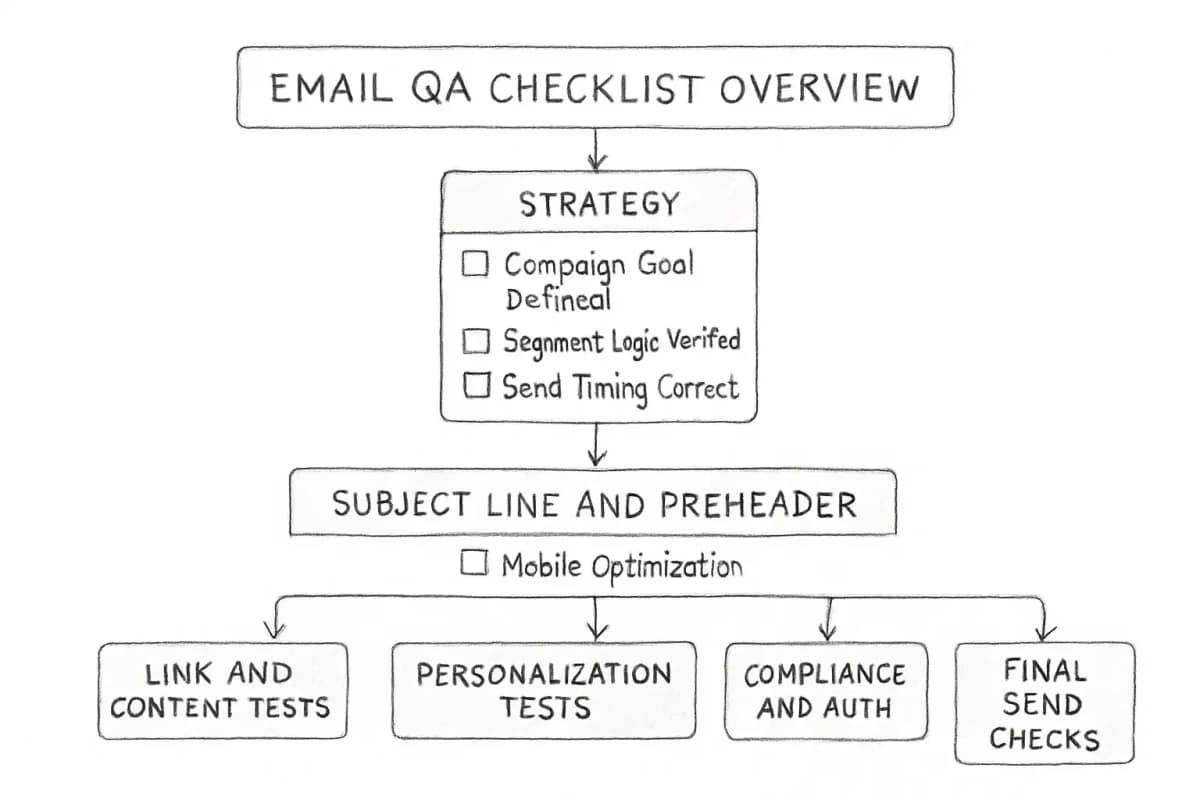
Quick Reference: The 18-Test Email QA Checklist
Strategy (1-3)
- Campaign goal is clearly defined
- Segment logic matches the campaign objective
- Send date, time, and time zone are correct
Subject Line and Preheader (4-6)
- Subject line length is optimized for mobile truncation
- Preheader text is intentional and visible
- "From" name and reply-to are correct
Content and Copy (7-9)
- Email has been proofread end-to-end
- All personalization tokens have fallbacks and are tested
- Images have alt text and correct dimensions
Links and CTAs (10-12)
- Every link has been clicked and confirmed working
- UTM parameters are present and accurate
- Unsubscribe link is functional
Rendering and Devices (13-15)
- Test email sent to Gmail, Outlook, and Apple Mail
- Mobile layout tested on iOS and Android
- Dark mode rendering verified
Deliverability and Authentication (16-17)
- SPF, DKIM, and DMARC are configured and passing
- List is cleaned and unsubscribes are suppressed
Compliance (18)
- Legal requirements met for all recipient regions
Frequently Asked Questions
How long does an email QA checklist take to complete?
Budget 30 uninterrupted minutes for thorough QA. Assuming this will take only a few minutes is a common cause of mistakes, because rushing leads to cutting corners on things like UTMs, image hyperlinks, and mobile views. Give yourself a realistic amount of time to do the job thoroughly. For complex campaigns with heavy personalization or dynamic content, allow longer.
Does every email need all 18 tests?
The core tests, particularly links, unsubscribe functionality, mobile rendering, and authentication, apply to every send. For simpler plain-text emails, some rendering checks can be abbreviated. For highly personalized or automated sequences, tests 8 and 17 deserve extra attention. Email QA is especially important in lifecycle marketing, where automated flows run long term and small errors can affect thousands of customers. A consistent QA process ensures your journeys perform without friction.
What tools can help with email QA?
With a tool like Litmus, you can see exactly how your email appears in over 100 email clients and devices, instantly. Email on Acid offers similar rendering previews along with accessibility checks. For spam and authentication testing, Mail Tester and MXToolbox cover the technical layer. Your ESP's built-in preview and test-send features are a reasonable starting point, but they do not replace multi-client rendering tools for important campaigns.
What is the most commonly missed QA check?
Certain checks are frequently missed during campaign preparation, and including these checks in a defined testing process helps reduce avoidable issues. Based on practitioner accounts, the most missed checks are UTM parameter verification, dark mode rendering, and personalization token fallback values. These are low-visibility issues that only surface after the email has reached inboxes.
How often should the QA checklist itself be reviewed?
Review your checklist quarterly, or whenever your ESP, list management tools, or compliance requirements change. Email testing is most effective when it is part of the campaign workflow rather than a final step, and this approach supports ongoing refinement across campaigns.