
Your subscriber count is not your reach. It never has been. Most marketers treat list size as the headline metric and quietly ignore the gap between how many people are subscribed and how many are actually engaging with each campaign. Knowing how to calculate total reach for email marketing closes that gap and gives you a number you can actually act on.
Total reach is a layered metric. Calculating it means stacking each metric on top of the other: subscriber count, deliverability, open rates, and click-through rate. Each layer filters your audience further, and the result is a much smaller but far more meaningful number than your raw list size suggests.
Key Takeaways
- Total email reach is not your subscriber count. It is the number of people who actually received, opened, or clicked your emails in a given campaign.
- The average email deliverability rate across major ESPs is 83.1%, meaning 16.9% of all emails never reach the intended inbox, and 10.5% end up in spam folders.
- Email list decay reached 23% in 2025, meaning nearly one in four contacts on an untended list becomes unreachable within a year.
- Segmented email campaigns receive 14.31% better open rates and 101% more clicks than non-segmented ones, which directly expands your effective reach without adding a single new subscriber.
- Subject lines, sender authentication, and list hygiene are the three levers with the most direct impact on total reach.
What "Total Reach" Actually Means in Email Marketing
Marketing reach refers to the number of unique individuals exposed to your message. It is not the number of views or clicks (those are impressions). Reach focuses on how many people see your content, not how many times it is seen.
In email marketing, this definition gets more precise. Calculating total reach goes beyond tracking list size. It is about understanding how many people are truly engaging with your emails and taking steps to improve that engagement. While some marketers stop at subscriber count, total reach requires factoring in delivery rates, open rates, and click-through rates.
Three levels of reach matter here:
- Delivered reach: the number of subscribers who actually received the email in their inbox
- Opened reach: the subset who opened it
- Clicked reach: the subset who clicked at least one link
Each level tells a different story. For most business purposes, opened reach and clicked reach are the most actionable.
The Total Reach Formula, Step by Step
Here is how to calculate total reach for email marketing at each level.
Step 1: Start with your deliverable list
Your list size is the ceiling, not the floor. The first step is identifying how many people are subscribed. While that number serves as the foundation, it is rarely the final answer. Subscribing does not guarantee that someone is receiving, opening, or engaging with your emails.
Step 2: Apply your deliverability rate
Delivered Reach = Total Subscribers x Deliverability Rate
If you send 10,000 emails and 9,600 are delivered, your deliverability rate is 96%. That means 96% of your subscriber base had the opportunity to see your email.
The industry benchmark here is sobering. According to Validity's 2024 Email Deliverability Benchmark, roughly one in six emails never reaches the inbox, keeping the global inbox placement average around 84%. A deliverability rate above 89% is considered good; above 95% is excellent; below 80% is poor.
Step 3: Apply your open rate
Opened Reach = Delivered Emails x Open Rate
Open rates show how many recipients opened your email out of those who received it. The formula is: Open Rate = (Emails Opened / Emails Delivered) x 100.
In 2025, overall open rates averaged approximately 37.3% across industries. That number is skewed upward by Apple Mail Privacy Protection, which auto-loads tracking pixels, so click-based data tends to be more reliable for engagement measurement.
Step 4: Apply your click-through rate
Clicked Reach = Delivered Emails x CTR
Average click-through rates across industries hovered near 2.44% in 2025. Clicked reach represents the people who took a deliberate action. For direct response campaigns, this is often the most useful reach number to track.
Full worked example
Say you have 10,000 subscribers, an 84% deliverability rate, a 30% open rate, and a 2.5% CTR:
- Delivered Reach: 10,000 x 0.84 = 8,400 emails delivered
- Opened Reach: 8,400 x 0.30 = 2,520 people who opened
- Clicked Reach: 8,400 x 0.025 = 210 people who clicked
While your initial list size might suggest a larger audience, your actual reach is smaller but more meaningful. These are the people who truly engage with your brand and are most likely to convert.
Why Your Deliverability Rate Eats Into Reach More Than You Think
Deliverability is the most underestimated lever in total reach. Marketers invest heavily in subject lines and design, then send into an inbox placement rate that quietly destroys a significant portion of that work.
According to EmailToolTester, 16.9% of all emails never reach the mailbox because of deliverability issues. To address this, authenticate your sending domain with SPF, DKIM, and DMARC. Since February 2024, Google and Yahoo have required all bulk senders to have these in place, and Microsoft followed with equivalent rules in May 2025.
Beyond authentication, keep two thresholds in check:
- Keep your spam complaint rate below 0.1% and your bounce rate under 2%.
- Low reply or open rates, missing SPF/DKIM/DMARC records, and spam complaint rates above 0.3% quickly reduce inbox placement.
For a deeper look at the analytics behind these metrics, see our guide to email marketing analytics best practices.
List Decay: The Silent Killer of Email Reach
Even a perfectly authenticated sending domain cannot reach contacts who no longer exist. ZeroBounce's 2026 data shows email list decay reached 23% in 2025, down from 28% in 2024. That means nearly one in four addresses on an unmaintained list is degraded within 12 months.
B2B email lists decay at an average rate of 2.1% per month, compounding to roughly 22.5 to 30% annually. A 10,000-contact list from last January may already have 2,250 to 3,000 invalid addresses today.
Email list decay leads to high bounce rates, lower engagement, poor deliverability, and a damaged sender reputation. This can affect email marketing ROI and reduce overall campaign effectiveness.
The fix is proactive list hygiene, not quarterly purges. Practical steps:
- Remove hard bounces immediately after each send.
- Run a re-engagement campaign for contacts inactive for 90 or more days.
- Use double opt-in to ensure new subscribers are valid at the point of signup.
- Clean lists at least quarterly if you send weekly or more frequently.
How Segmentation Multiplies Your Effective Reach
Growing your subscriber count is one way to increase total reach. Improving how much of your existing list actually engages is faster, cheaper, and often more impactful.
Segmented email campaigns drive 30% more opens and 50% more click-throughs than unsegmented ones. That means segmentation does not just improve deliverability quality signals, it directly expands both your opened and clicked reach without acquiring a single new subscriber.
Segmented email campaigns show higher average open rates (+14%), unique open rates (+11%), and click rates (+101%) than non-segmented campaigns. They also produce lower average bounce rates (-5%), abuse report rates (-4%), and unsubscribe rates (-9%).
Marketers using advanced segmentation see a 760% increase in revenue, according to Campaign Monitor data.
For practical segmentation frameworks, see our detailed guide on email list segmentation strategies that boost ROI by 760%. 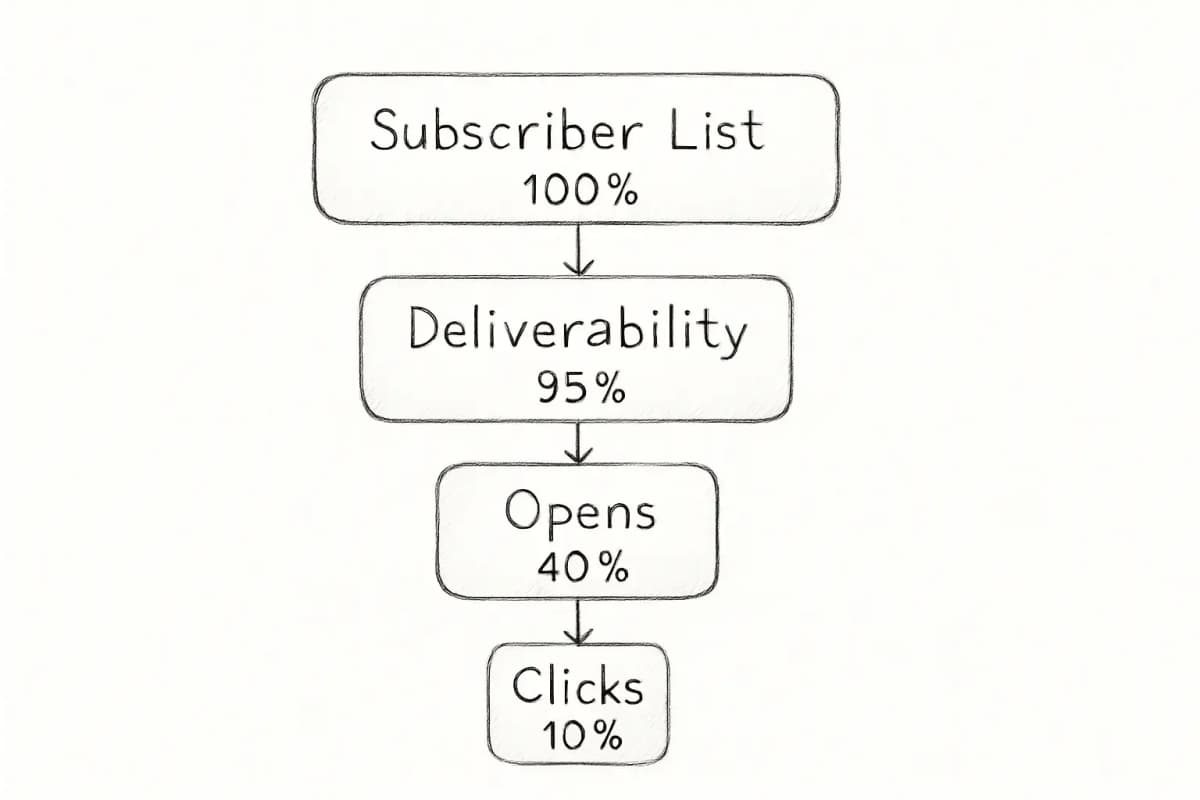
The Role of Subject Lines in Expanding Opened Reach
Once an email is delivered, the subject line determines whether opened reach climbs or stalls. 47% of recipients open emails based solely on the subject line, while 69% report emails as spam for the same reason. That single line of text controls a significant share of your total opened reach.
Personalized email subject lines can increase open rates by 26%. Given that opened reach = delivered emails x open rate, a 26% lift in open rate translates directly to a 26% lift in opened reach, with no change in list size or deliverability.
Tested, data-driven subject line practices have a measurable return. For specific tactics, the guide on email subject line best practices that boost open rates by 27% provides a structured framework.
Tracking Reach Across a Campaign Series
Single-campaign reach numbers tell you one data point. Series-level reach tells you how your entire program is performing across time.
Unlike click-through rate, which gauges performance on a single email message, click reach rate shows you what unique percentage of your list clicked on at least one of a series of email messages.
For example, if you sent three emails and your unique click-through rates were 3.1%, 2.7%, and 2.8%, you would want to know whether each of those people only clicked on one of the three messages (meaning 8.6% of your list clicked on at least one), or whether the same 3.1% clicked all three. The truth usually lies somewhere between these extremes, and de-duplicating clickers across sends is the only way to measure it accurately.
To calculate series-level click reach:
- Export unique clickers from each send in the series.
- Combine those lists and remove duplicates.
- Divide the deduplicated clicker count by total eligible recipients.
- Multiply by 100 for a percentage.
Looking at reach for a single campaign is useful, but tracking engagement trends over time provides a more accurate sense of how your email marketing efforts are performing. Metrics like average open rates, average CTR, and how these numbers fluctuate across campaigns reveal what is working and where you are losing traction.
Benchmarks to Evaluate Your Reach Numbers
Use these current benchmarks to assess whether your reach calculation is above or below typical performance:
| Metric | Average | Good | Excellent |
|---|---|---|---|
| Inbox placement rate | 83.1% | 89%+ | 95%+ |
| Open rate (2025) | 37.3% | 40%+ | 50%+ |
| Click-through rate | 2.44% | 3%+ | 5%+ |
| Annual list decay | 23% | Under 20% | Under 15% |
| Bounce rate | 1.39% | Under 1% | Under 0.5% |