
Shopify email marketing is one of the highest-ROI channels available to ecommerce merchants, and setting it up correctly from the start makes a real difference to what you earn from every send. For every dollar spent on email marketing, Shopify stores can return up to $42, making it the highest-ROI channel in ecommerce, powered by the combination of automation and personalization. This guide covers exactly how to use Shopify email marketing: from initial setup and pricing to automation, segmentation, deliverability, and knowing when to upgrade.
Key Takeaways
- Shopify Email (now called Shopify Messaging) includes 10,000 free emails per month on every paid plan, with additional emails priced at $1 per 1,000 sent.
- Automated email flows are the engine of email ROI, generating 29 to 38% of total email revenue from just 2 to 5% of total send volume.
- Since early 2024, Gmail and Yahoo have required spam rates below 0.3%, but you should aim for 0.1% to protect your sender reputation.
- Segmented emails achieve 4.2 to 6.8% CTR, while non-segmented broadcast emails average only 1.8 to 2.4%.
- Shopify's native email tool works well for basic campaigns to a small list, but most stores outgrow it when they need conditional flows, advanced segmentation, SMS, A/B testing, or detailed revenue attribution, typically between 1,000 and 5,000 subscribers.
What Is Shopify Email (Shopify Messaging)?
Shopify has a built-in email marketing solution called Shopify Messaging, which lets you create, send, and track email campaigns directly from your Shopify admin panel. While convenient and reasonably priced, it offers more basic functionality compared to dedicated email marketing apps.
Your logo, products, and store colors are automatically applied to email templates. You can add dynamic product sections to display best sellers and recently added products, and use Shopify's AI assistant, Sidekick, to generate on-brand copy. You can even add express checkout buttons directly inside emails.
The tool is best understood as a starting point, not a ceiling. It removes the friction of connecting a third-party ESP when you're early-stage, but it has clear limitations that matter as your list grows.
How to Set Up Shopify Email Marketing (Step by Step)
Before you can start sending campaigns, you need a paid Shopify plan. If you're on a free trial, you won't have access to Shopify Messaging's sending capabilities. You'll also need to install the app separately from the App Store and set up proper domain authentication before sending any messages.
Here's how to get started:
- Install the app. Search for "Shopify Email" in the App Store and click Install. The app may appear under the name "Shopify Messaging."
- Authenticate your domain. Set up SPF, DKIM, and DMARC records for your sending domain. Stores with DKIM, SPF, and DMARC authentication see 10 to 15% higher inbox placement rates.
- Create your first campaign. From your Shopify admin, you can create, customize, and schedule email marketing campaigns to promote sales, highlight new products, or inform customers of new stock arrivals. Each campaign can be styled to match your brand's color scheme, font, and logo.
- Choose a template and select your audience. You can send your email marketing campaign to all of your email subscribers or to specific customer segments.
- Write your subject line and preview text. These appear in customer inboxes and are the first things that determine whether subscribers open your email, so make them count. For guidance on writing subject lines that perform, see Email Subject Line Best Practices That Boost Open Rates by 27%.
- Send a test email. After creating your campaign, send a test email to preview how it displays in inboxes. You can send to up to five email addresses at once.
- Schedule or send immediately. Use the Planner view on the Shopify Email overview page to organize campaigns and view recommendations, including a weekly calendar that shows draft, scheduled, and sent campaigns.
Shopify Email Pricing: What You Actually Pay
Every calendar month, Shopify Email provides 10,000 free emails. After you use up your free allowance, the tool operates on a pay-as-you-go basis, meaning you only pay for the additional emails you send.
The first 10,000 emails each month are free. Subsequent emails cost $1 per 1,000 sent.
Abandoned checkout automations are always free and do not count toward the monthly 10,000-email limit. That's a meaningful advantage for stores with high cart abandonment rates.
Shopify counts emails per recipient, not per campaign. If you send one promotional email to 800 subscribers, that counts as 800 emails, not one.
One important consideration: Shopify Email's volume-based pricing can become expensive if you send frequent automations or multiple campaigns monthly. It's best suited to stores just starting out with targeted, occasional sends. For heavy automation and frequent promotions, subscriber-based pricing from a dedicated platform often offers better value.
The Automations That Drive Most of Your Email Revenue
Setting up automations is where Shopify email marketing earns its keep. In 2024, automated emails accounted for 37% of all email-generated sales despite comprising only 2% of total email volume. What matters is their timing; your email should reach the customer within minutes of the relevant action.
Welcome Series
Creating automated email campaigns works hand in hand with developing your email list. Experts recommend setting up a welcome automation before you even start collecting email addresses.
Welcome emails perform exceptionally well, with average open rates of 80%. A three-email welcome series generates significantly more revenue than a single welcome message. For proven approaches, see Welcome Email Sequence Best Practices: 7 Proven Strategies.
Abandoned Cart Recovery
According to the Baymard Institute, the average cart abandonment rate is 69%. Recovering even a fraction of those carts is meaningful revenue.
Because abandoned cart emails target people with active purchase intent, they are more likely to convert than cold outreach campaigns. Research from Omnisend shows that abandoned cart emails are among the top three automations, driving 87% of all automated orders.
Timing matters. Emails sent within the first hour achieve a 45% open rate and a 15% CTR. Emails sent after 48 hours see open rates drop to 25 to 30% and CTR fall to 5 to 8%.
To set this up in Shopify: navigate to Marketing, then Automations from your Shopify admin, click "View templates," and select the "Recover abandoned cart" automation template from the available options.
Post-Purchase Flows
Post-purchase emails include transactional campaigns like order and shipping confirmations, product review requests, and repeat purchase discounts. Setting up these campaigns is essential to keep customers updated about their orders and move them closer to retention.
Only 34% of Shopify stores have post-purchase upsell flows active, which means this is an underused opportunity for most merchants. 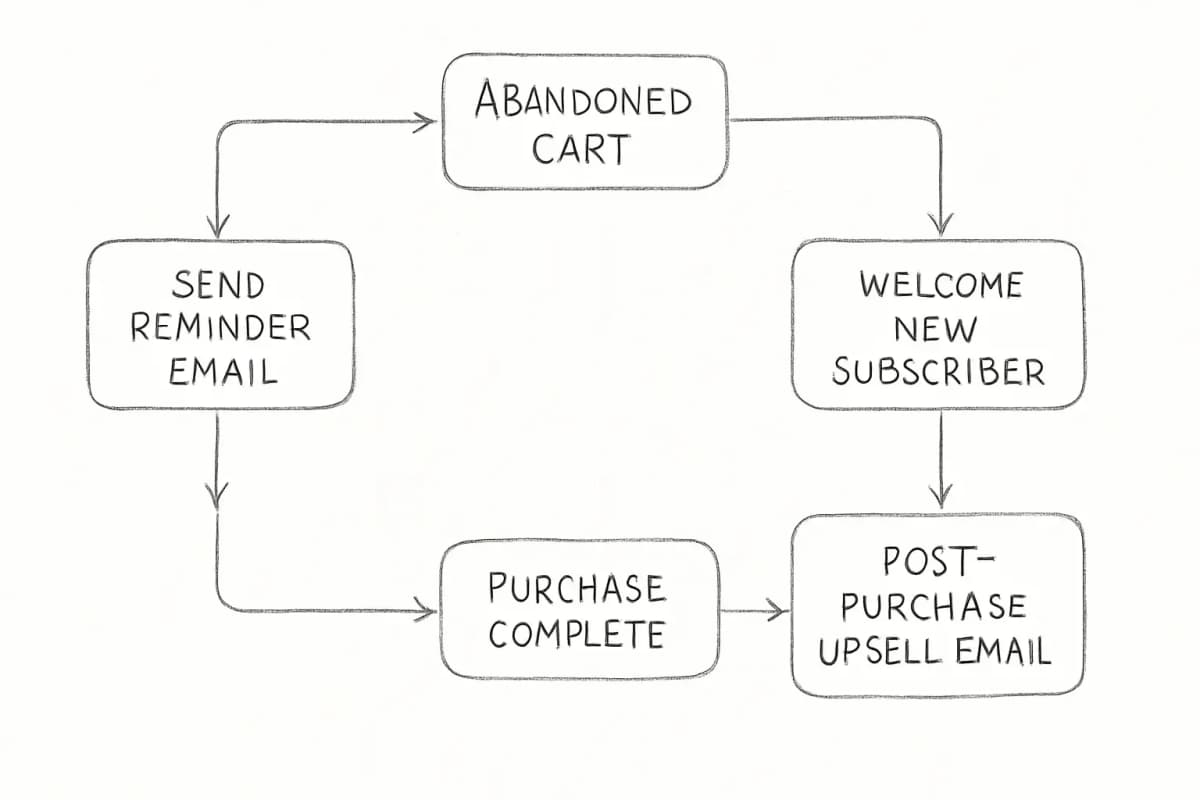
Segmentation: The Difference Between Revenue and Noise
Sending the same email to your entire list is the fastest way to depress engagement and damage deliverability. Email segmentation means dividing your subscribers into smaller, more specific groups based on their behavior or traits, such as what they bought, how often they shop, or where they live, allowing you to say the right thing to the right person at the right time.
Shopify's segmentation is dynamic: new customers who match a segment's criteria are automatically included in that segment. For example, if you create a segment of subscribers who have never purchased, any new non-buyer who subscribes is automatically added.
Practical segments to create immediately:
- Purchased vs. non-purchased subscribers. Shopify Messaging lets you segment based on purchase data. When speaking to people who've already purchased, focus on product education and sale reminders. For those who haven't bought yet, focus on building a brand relationship.
- High-value customers. Match your messaging to how much a customer typically spends. High-AOV customers respond to premium bundles and early access offers, while low-AOV customers respond better to value framing and free shipping thresholds.
- Engagement-based segments. Start by creating a segment of your most engaged readers and omit anyone who hasn't opened an email in the past three months. Emailing unengaged subscribers hurts your sender reputation without producing revenue.
The results of doing this well are significant. For a deeper look, read Email List Segmentation Strategies That Boost ROI by 760%.
Deliverability: Getting Emails Into the Inbox
Email deliverability measures how often your marketing emails arrive in subscribers' inboxes versus their spam folders. High deliverability means more eyes on your messages and larger sample sizes, improving the accuracy of metrics like conversions and engagement.
Key actions to protect your deliverability:
- Keep bounce rates low. A high bounce rate of more than 2% can decrease email deliverability. Remove any email addresses that trigger a hard bounce and investigate soft bounces.
- Watch your spam complaint rate. Since early 2024, Gmail and Yahoo have required spam rates below 0.3%, but you should aim for 0.1% to be safe.
- Remove bot-generated subscribers. Bot-generated subscribers are email addresses added by automated software, not real customers. Sending to them lowers engagement, increases bounces and spam complaints, and raises send costs. Activate hCaptcha on your store to prevent bots from subscribing.
- Warm up your sender reputation. When you start using Shopify Messaging, you need to establish a strong sender reputation with Internet Service Providers. Build trust by sending warm-up emails to your most engaged contacts first.
Maintaining list hygiene is not optional. One Shopify merchant reported a 50% drop in unsubscribe rates and a 20% improvement in campaign ROI after implementing quarterly data audits and regular segment refreshes.
Metrics to Track and What They Mean
Key benchmarks for Shopify email marketing include: average open rate of 38.2%, average click-through rate of 3.1%, average conversion rate from email of 4.2%, and revenue per email of $0.08 to $0.12 for campaigns versus $0.15 to $0.35 for automated flows.
A few things to keep in mind when interpreting your numbers:
- Open rates are inflated. Apple Mail Privacy Protection inflates open rates by 8 to 12 percentage points, so focus on click-through rate as a more reliable engagement metric.
- Revenue per email (RPE) is your most actionable metric. Abandoned cart emails have the highest RPE at $0.45 to $1.20 per email sent, making them the single most valuable automated email for ecommerce.
- Send timing matters. For Shopify stores, Tuesday and Thursday at 10am local time consistently produce the highest open and click rates.
- Email should drive a significant share of total revenue. Email marketing should generate 25 to 35% of total revenue for a well-optimized Shopify store. The median is 28%. Stores below 20% are under-leveraging their email list.
For a complete breakdown of how to measure and act on your email data, see Email Marketing Analytics Best Practices.
When to Upgrade Beyond Shopify's Native Tool
Shopify's built-in email tool handles the basics well. But it has real limitations. It doesn't offer A/B testing, multi-channel workflows, or dedicated support. Advanced segmentation options for targeted emails are also lacking.
Shopify Messaging is excellent when you're just starting out. You'll want to upgrade to a dedicated platform when you start needing advanced automation workflows, multi-channel marketing, deeper customer segmentation, and better revenue reporting.
The most commonly recommended alternatives for growing Shopify stores are Klaviyo, Omnisend, and Brevo. Klaviyo is a major player in the Shopify app store, offering email campaigns, personalized automated flows, CRM, SMS, and push notifications. Omnisend's pre-built automation templates for abandoned cart, welcome series, and post-purchase flows come ready to activate with tested copy and timing, and you can have a full automation stack running within an hour of installation.
Frequently Asked Questions
Is Shopify Email free?
Every month, you can send up to 10,000 manual or automated emails for free. After that, you pay $1 per 1,000 additional emails. Shopify Messaging is available on all paid Shopify plans with no monthly commitments.
What automations should I set up first on Shopify?
87% of automated orders stem from abandoned carts, welcome messages, and browse-abandonment emails. Set up these three flows before anything else. An abandoned cart sequence, a welcome series, and a post-purchase flow cover the majority of automated revenue opportunities for most Shopify stores.
How do I improve my email open rates on Shopify?
Focus on list hygiene, segmentation, and subject line quality. Create a segment of your most engaged readers and omit anyone who hasn't opened an email in the past three months. Then test subject lines with specific, benefit-driven language rather than generic promotional phrases. You can also track timing and send on the days and times your audience is most active.
When should I switch from Shopify Email to a third-party platform?
Shopify Email works well for basic campaigns to a small list. You'll outgrow it when you need conditional flows, advanced segmentation, SMS, A/B testing, or detailed revenue attribution. Most stores hit that point between 1,000 and 5,000 subscribers. When you reach that stage, platforms like Klaviyo or Omnisend give you the tools to grow your email channel into a primary revenue driver.