
Nearly 63% of marketers now use AI tools in their email marketing efforts, yet most teams still run manual workflows that cap both their output and their results. If you want to close that gap, AI for email marketing automation is where the leverage is. This guide covers exactly how to set it up: which tools to use, how to build your first automated workflows, and which AI features to prioritize before you waste time (and budget) on the wrong ones.
Key Takeaways
- Automated emails generate 320% more revenue than manual campaigns despite representing just 2% of send volume.
- AI can save marketers up to 30% of their time by automating email design, content creation, and scheduling.
- Send-time optimization can lift open rates 20 to 30%; personalized subject lines add another 15 to 20%; and personalized body copy lifts click-through rates 10 to 15%.
- 95% of marketers who use AI or automation say their marketing strategy was more effective as a result.
- AI in email marketing uses machine learning to personalize content, optimize send times, and segment audiences. Predictive AI draws on historical data, while generative AI creates new content at speed and scale, and the two work together to automate, optimize, and personalize the entire process.
What AI for Email Marketing Automation Actually Does
Before building anything, understand what modern AI actually handles in an email program. AI in email marketing means using machine learning, predictive modeling, and generative tools to automate, personalize, and improve your campaigns.
The main ways AI shows up in email marketing today are content generation (drafts, subject lines, CTAs, copy variations), personalization (tailoring content to individual behavior and preferences), and reporting and insights (surfacing patterns and opportunities a human team might miss or take time to find).
Basic automation, which involves triggered workflows based on simple rules, represents only the first generation. The next level involves AI agents that can analyze complex behavioral signals, predict user needs, and dynamically personalize content for micro-segments or even individual recipients in real time.
The practical result: AI compresses the early stages of production significantly. Copy that used to take half a day to draft can be started in minutes. Instead of staring at a blank page, AI gets you a workable first draft faster, letting your team focus on editing and refinement.
Step 1: Audit Your Data Before You Touch Any AI Tool
Before you touch any software, start with a clean email list. Remove bounced addresses, duplicates, and anyone who has not engaged in the last 12 months. AI agents make decisions based on your data, and if that data is messy, the agent's decisions will be too.
Then connect your data sources. Your email platform should be linked to your website analytics, CRM, or e-commerce platform. This gives the AI behavioral data to work with, not just email addresses.
Finally, set a concrete goal before you configure anything. Having a specific campaign goal matters. "Send more emails" is not a goal. Something like "recover 15% of abandoned carts through automated follow-up" or "increase repeat purchases from existing customers by 20% this quarter" gives the AI a target to optimize toward.
Also define your brand voice guidelines. Most AI platforms let you train the model on your voice and tone. Having 5 to 10 examples of emails you have sent before (ones you liked) makes this setup faster and more accurate.
Step 2: Choose the Right AI Email Marketing Platform
The AI email marketing landscape splits into three tiers. Platform AI (Mailchimp, HubSpot, ActiveCampaign, Klaviyo, Brevo, Omnisend) adds intelligence to traditional email marketing with better subject lines, smarter send times, and behavior-based automation. Specialist AI (Instantly, Jasper, Lavender) excels at one dimension such as cold outreach volume, copywriting quality, or email coaching.
Here is how the major platforms stack up for different use cases:
- Klaviyo: Focuses its AI on ecommerce-specific personalization, using purchase and browsing data to drive targeted email and SMS campaigns. For online stores, particularly those on Shopify, Klaviyo's AI specializes in predicting what customers will buy next and when. Key AI features include AI-driven segmentation based on ecommerce behavior, Flows AI that builds automation flows from goal descriptions, smart send-time optimization, and predictive analytics that calculate customer lifetime value, churn risk, and next order date.
- HubSpot: HubSpot's AI content assistant generates email copy, subject lines, and CTAs from a brief prompt. Its AI-powered lead scoring automatically ranks contacts by likelihood to convert. For B2B teams, HubSpot's AI combines contact scoring with company-level signals to identify the best time to reach specific accounts.
- ActiveCampaign: Excellent for ecommerce brands needing granular personalization and predictive analytics, and blends email automation with lightweight CRM functionality, making it popular for mid-sized B2B teams that need robust workflows.
- Brevo: Offers the most generous free tier of any email marketing platform and keeps pricing low at scale. Its AI features are more basic compared to HubSpot or Klaviyo, but for small businesses watching every dollar, the value proposition is hard to beat.
One practical approach: start with the AI features inside the marketing automation platform you already use. This is already available to you, so it doesn't require any new logins, integration work, or data migration.
Step 3: Build Your First AI-Powered Automation Workflows
AI-powered email campaigns fall into a few core categories. Pick one to start with. Do not try to build all of them at once.
Start with common workflows such as a welcome series, abandoned cart reminders, and post-purchase follow-ups. As you become more comfortable with automation, you can create more complex workflows.
Here are the four highest-impact workflows to prioritize:
- Welcome sequence: Triggered when someone joins your list, usually 3 to 5 emails over the first two weeks. The AI personalizes content based on how the subscriber signed up, which form, which page, and what offer attracted them. For best practices on structuring this sequence, see our guide on Welcome Email Sequence Best Practices.
- Abandoned cart recovery: Test AI-optimized timing for your abandoned cart sequence. Instead of a fixed delay schedule, a platform like Klaviyo's AI adjusts send timing based on each customer's browsing velocity and purchase history. Customers who typically make quick decisions get follow-ups within 30 minutes; deliberate buyers get a 48-hour grace period.
- Re-engagement campaigns: Target inactive subscribers with personalized emails to re-engage them and bring them back to your website or app. AI identifies which subscribers are worth re-engaging versus which should be removed from your list to protect sender reputation.
- Post-purchase follow-ups: Send thank-you emails and product recommendations to customers after a purchase, enhancing their post-purchase experience and encouraging repeat business.
Step 4: Use AI for Content Generation and Subject Lines
Generative AI can assist in drafting email subject lines, body copy, and calls to action, saving time and ensuring content is optimized for recipient engagement.
When generating content with AI, the process on most platforms follows a consistent pattern: select your campaign type and provide a brief description of the goal, input or confirm your brand voice settings, then review the AI-generated content. The agent will typically produce a full email with subject line, preview text, body copy, and a call to action.
One rule that applies regardless of platform: human review is non-negotiable. Generative AI produces off-brand, inaccurate, or tone-inappropriate outputs with sufficient frequency that every production send requires human review.
To keep AI-generated copy on brand: before anything goes live, check AI-generated copy against your brand voice, your audience, and the specific campaign context. Read it out loud. If it sounds like it could have come from any of your competitors, rewrite it until it doesn't.
For a deeper look at subject line strategy, see Email Subject Line Best Practices That Boost Open Rates by 27%.
Step 5: Activate Predictive Send-Time Optimization
Instead of relying on broad send windows or gut instinct, AI-powered email campaigns analyze real user behavior to determine when individual subscribers are most likely to open, click, and act. The result is smarter timing and better engagement. Predictive send-time optimization uses data patterns to decide not just what to send, but when to send it.
AI analyzes past open rates to predict the optimal send time for each individual subscriber, not just the list as a whole. It generates subject line variations, tests them automatically, and shifts volume toward winners in real time.
The results are measurable. Puma used AI-powered send-time optimization to deliver emails based on individual timing preferences and saw a 5 to 10% lift in open rates. For specialized tools, Seventh Sense analyzes each contact's historical email engagement patterns and sends to that specific person at their individually optimal time. It integrates with HubSpot and Marketo, with an average reported improvement of 15 to 35% higher open rates.
Step 6: Apply AI-Driven Segmentation
AI can help with email segmentation by automatically identifying granular customer segments based on complex data patterns, allowing marketers to target specific groups with highly relevant messages.
Sifting through an endless stream of data to organize customers into relevant groups can eat up valuable time and energy. With the right platform consolidating all customer data into a single customer view, marketers can leverage AI to efficiently identify key segments like lapsing customers, most loyal buyers, and new subscribers in seconds.
AI-powered email software can automatically adjust email content, images, and product recommendations in real time based on individual customer data. This includes dynamic content blocks that change based on customer journey stage, location, browsing history, and purchase patterns.
Segmentation directly affects revenue. Segmented email campaigns generate 30% more opens and 50% more click-throughs, according to HubSpot's 2025 State of Marketing Report. And 78% of marketers say segmentation is their most effective tactic. For a full breakdown of segmentation strategy, see our guide on Email List Segmentation Strategies That Boost ROI by 760%. 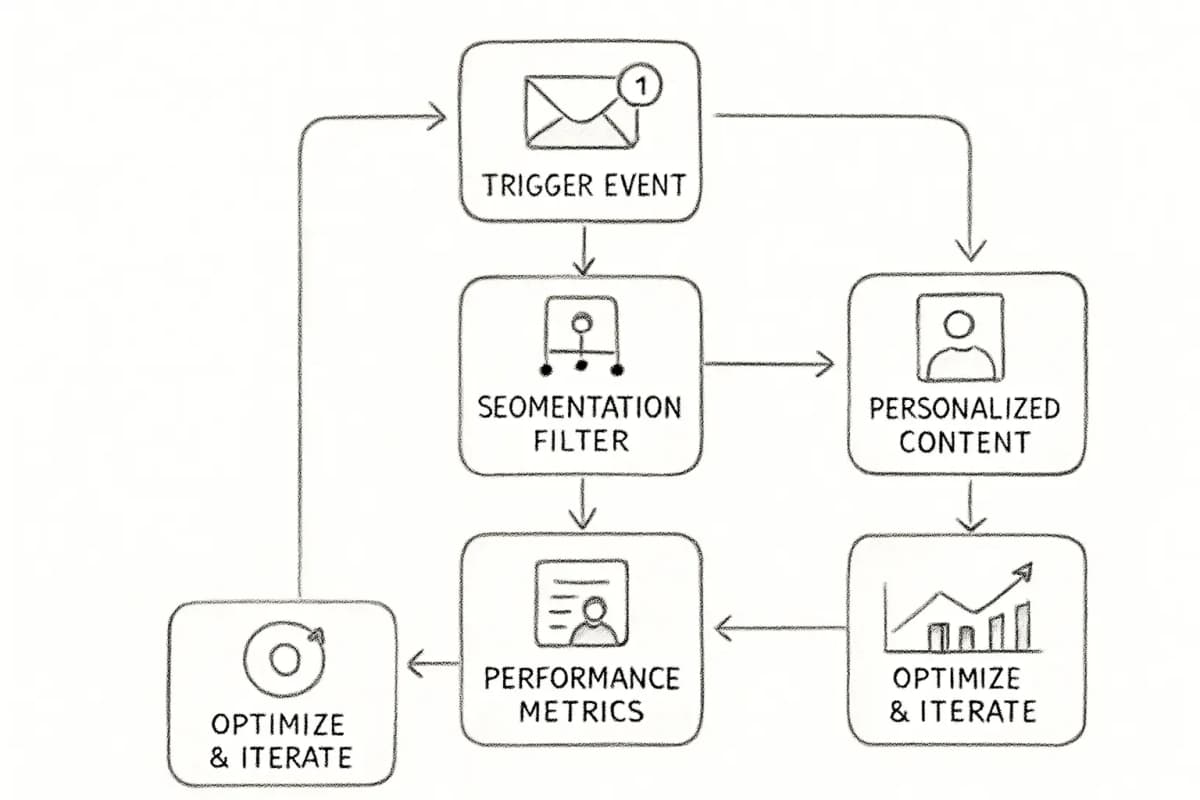
Step 7: Measure, Test, and Iterate
Regularly monitor the performance of your email marketing campaigns and use the insights to optimize your strategy. Pay attention to key metrics such as open rates, click-through rates, conversion rates, and unsubscribe rates. Use A/B testing to experiment with different subject lines, content, and calls to action to determine what works best for your audience.
When you do A/B email testing, don't test multiple things at once. It's important to make sure you have a control group. Leading AI email marketing platforms have tools to automate this process so you can test continuously.
For deliverability, watch these thresholds closely: check bounce rate (target below 2%), spam complaint rate (target below 0.1%), unsubscribe rate (target below 0.5%), and inbox placement rate using seed list testing.
Employ a system for analytics, iteration, and retargeting. This system should connect your email performance to web and app conversions as well as commerce and sales data to optimize business impact. This is a key requirement to look for in your AI email marketing software.
Common Mistakes to Avoid
- Skipping data cleanup first. AI amplifies whatever patterns exist in your data. Bad data produces bad automation decisions.
- Launching too many workflows at once. Start with one, measure it fully, then expand.
- Publishing AI content without review. Do not publish AI-generated content without reading it first. Look for tone accuracy (does it sound like your brand?), factual correctness, and anything that feels generic or off-putting.
- Ignoring deliverability. You can write the perfect email with the perfect subject line, send it to the perfect segment at the perfect time, and none of it matters if the message never reaches the inbox. Average email deliverability in 2024 was tested at around 83%, which means roughly 17% of emails never reached their intended destination.
- Treating AI as a set-and-forget tool. Best practices include starting with clear goals, ensuring data quality, iterating based on AI-driven insights, and maintaining human oversight to ensure brand consistency and compliance.
Frequently Asked Questions
What is AI for email marketing automation?
Artificial intelligence in email marketing refers to the application of advanced algorithms and machine learning techniques to automate and optimize various aspects of email campaigns. From analyzing user behavior to predicting preferences, AI-driven email marketing goes beyond simple segmentation and delivers highly targeted content that resonates with individual recipients.
How long does it take to set up AI email automation?
Start with the AI features inside the marketing automation platform you already use. This is already available to you, so it doesn't require any new logins, integration work, or data migration. This is the best place to start, with the lowest lift, and it will give you plenty of opportunity to experiment. A basic welcome sequence or abandoned cart workflow can typically be configured in a single day once your data is connected.
Which AI email marketing platform is best for ecommerce?
If you run an e-commerce store, Klaviyo or Omnisend will serve you best. Klaviyo is designed for ecommerce with deep store data. The AI is built around purchase behavior, predicting what customers will buy and when, then tying every campaign back to actual revenue, so its value scales with how much store data you feed it.
Does AI email automation work for small businesses?
Yes. Any business sending regular email campaigns can benefit from AI-driven personalization, automation, and optimization capabilities. Businesses using AI in email campaigns report an average ROI increase of 21%. Small businesses can start with lower-cost platforms like Brevo or Mailchimp, which offer accessible AI features without enterprise-level pricing, then scale as their list and revenue grow.