Automated marketing email drove 37% of all email-generated sales in 2024, despite representing just 2% of total email volume. That single data point defines the opportunity this guide covers. If your team is still sending most emails manually, or has set up a few automations and left them untouched, you are almost certainly leaving significant revenue on the table.
This guide covers what automated marketing email actually is, how to set it up correctly, which workflows to prioritize, and how to measure the ROI that makes it worth the investment.
Key Takeaways
- Automated email flows, including abandoned cart and post-purchase messages, generate up to 30 times more revenue per recipient compared to standard email campaigns.
- Behavior-triggered emails have 70% higher open rates and 152% higher CTR compared to standard campaigns.
- On average, email marketing delivers a return of between $36 and $42 for every $1 spent, outperforming paid search ($2), social advertising ($2.80), and display ads ($1.35).
- 5.31% of automated email workflows lead to a click, compared to 1.47% of non-automated campaigns.
- The biggest gains in email marketing come from automation, personalization, deliverability discipline, and realistic attribution, not from sending more emails.
What Is Automated Marketing Email?
Automated marketing email is the practice of sending pre-built, trigger-based email sequences to subscribers without manual intervention for each send. Email marketing automation works by using triggers, such as sign-ups or purchases, to send a sequence of emails as a workflow. Automated emails are sent at optimized time intervals, ensuring timely communication without manual effort.
This is fundamentally different from a one-off broadcast campaign. Unlike traditional email campaigns, which require manual scheduling and sending, automated emails run in the background, ensuring that each recipient gets the right message at the right time.
The practical impact is substantial. 49% of sales and marketing professionals listed "time savings of repetitive tasks" as one of the top three advantages of automation, and 49% listed improved efficiency and ROI as another advantage.
How to Set Up an Automated Marketing Email Program
Setting up email automation does not need to be complex. The core steps are consistent regardless of platform.
Step 1: Define Your Goal and Choose a Platform
Before you create an automated email sequence, you need to know what you want to achieve. Different automation workflows serve different purposes, so having a clear goal will help you design the right emails.
Platform selection follows from your goal. Here is a practical breakdown of the leading options in 2025 and 2026:
- Klaviyo: A data-driven email and SMS platform built primarily for ecommerce brands. Its software is deeply integrated into the Shopify ecosystem and treats every contact interaction as a potential data point for smarter targeting.
- ActiveCampaign: A marketing automation platform that blends email marketing with advanced automation and CRM functionalities. It excels at providing prebuilt automation workflows that help businesses nurture leads, re-engage inactive customers, and drive conversions with minimal effort.
- Mailchimp: A solid email marketing tool with an intuitive interface and a wide range of templates that make it easy to get started quickly. The segmentation and automation features cover the basics well. However, teams needing sophisticated conditional branching, goal tracking, or multi-step behavioral workflows will find the platform restrictive compared to ActiveCampaign or Klaviyo.
- MailerLite: An easy-to-use solution that focuses on simplicity while still offering powerful features. With a drag-and-drop editor, over 150 email templates, and advanced automation options, it is a strong fit for businesses wanting a user-friendly platform with solid engagement results.
For deeper guidance on CRM integration alongside automation, see our Email Marketing Automation CRM Setup Guide.
Step 2: Segment Your Audience Before Building Flows
Automation is only as good as the segmentation behind it. Effective automation depends on delivering relevant content to the right people. Not everyone on your list is the same or at the same stage of the buyer's journey, so sending the same content to everyone dilutes its impact.
Segment by lifecycle stage, purchase history, engagement level, and behavior. Segmented campaigns can boost open rates by 14% and click rates by 28% compared to non-segmented campaigns.
Step 3: Map Your Triggers
Email automation triggers are what set things in motion. They are the events that make the email marketing automation kick off, like a new sign-up, a purchase, or a cart abandonment.
Build your trigger logic around real subscriber behavior. A subscriber who browses a product category is a different audience than one who adds to cart. Treat them differently in your flows.
Step 4: Write and Build the Emails
Keep each email in a sequence focused on a single action. High-converting emails consistently use a single, clear call-to-action rather than multiple competing CTAs, a mobile-first design, and a scannable layout that guides the reader's eye.
Step 5: Set Timing and Launch
Timing is everything in email automation. Send messages too soon and you might annoy subscribers; wait too long and you risk losing momentum. Spacing your emails strategically builds trust and keeps your audience engaged.
Most modern platforms can deliver each email at the time a specific subscriber is most likely to open it, with a typical lift of 10 to 20% on open rates.
The 5 Automated Workflows That Drive the Most Revenue
Not all automation is equal. These five workflows produce the strongest returns for most businesses and should be built before anything else.
1. Welcome Series
The welcome series is the highest-leverage automation in any email program. New subscribers are the most engaged they will ever be, and your first emails get more attention than anything you send later.
Welcome emails have an impressive 50% open rate and a nearly 30% click-through rate. Compared to regular newsletters, they are 86% more effective.
For detailed structure guidance, our Welcome Email Sequence Best Practices: 7 Proven Strategies walks through sequencing and timing.
2. Abandoned Cart Recovery
Abandoned cart emails achieve an average CTR of 23.33%, the single highest-performing email type by click engagement across all automation types.
Adding an item to a cart is a stronger signal of buying intent than almost any other behavior. A well-built cart recovery sequence typically recovers 10 to 20% of carts that would otherwise be lost.
Timing matters significantly here. Once 24 hours pass after an abandonment, intent drops sharply. If your first cart email fires at 6 or 12 hours, moving it to 45 minutes is the single highest-ROI change you can make.
3. Post-Purchase Follow-Up
Set up a welcome email series to onboard new subscribers, create post-purchase follow-ups to encourage repeat business, and use cart abandonment emails to recover lost sales. Post-purchase emails serve double duty: they confirm the purchase and create the conditions for a second sale through cross-sell recommendations, review requests, or loyalty program enrollment.
4. Browse Abandonment
Browse abandonment automation targets visitors who viewed products without adding them to cart. Set triggers 2 to 4 hours after browsing with personalized product recommendations and social proof elements. This is the underused middle ground between an anonymous visit and a full cart abandonment.
5. Win-Back (Re-Engagement)
Customer retention is cheaper than acquisition, and re-engaging existing customers is one of the most cost-effective ways to reduce churn. 60 to 70% of lost customers can be recovered through automated win-back email campaigns.
Best Practices for Automated Marketing Email
Following automation setup fundamentals will separate high-performing programs from ones that quietly degrade over time.
Personalize Based on Behavior
Behavior-based personalization using purchase history data boosts CTR by up to 39%, and companies using AI-driven email strategies see up to 41% more revenue than those using traditional batch-and-blast sends.
Personalization in automated marketing email goes beyond using a first name. It means showing the right product, the right offer, and the right content based on what a subscriber has actually done. For a deeper look at what works, see our guide on 7 Email Personalization Techniques That Boost Conversions 47%.
Protect Deliverability
It does not matter how good your email is if it lands in spam. Deliverability comes down to authentication protocols (SPF, DKIM, DMARC), sender reputation, and list hygiene. Regularly remove unengaged contacts, never purchase lists, and monitor bounce rates.
The average deliverability rate sits at 85% in 2024, heavily influenced by authentication protocols. Brands that implement proper authentication see deliverability rates above 90%.
Use Strong Subject Lines
Subject lines determine whether any of the automation work pays off. Use merge tags to personalize subject lines with each recipient's name or location. Personalized emails may increase open rates for most users and work well when combined with marketing automation in transactional emails such as birthday deals, post-purchase follow-ups, or promotional emails.
Never Set and Forget
Review, test, and optimize your workflows regularly to improve engagement, deliverability, and long-term revenue. Avoid common mistakes like static lists, poor timing, and "set-it-and-forget-it" automations that quietly reduce performance over time.
Check your automation flows regularly. These often get built once and left alone, which means they can quietly go stale. Look for drop-off points where subscribers stop engaging or unsubscribe, and update anything that no longer reflects your current messaging or offers.
Measuring ROI from Automated Marketing Email
Measuring the return on your automated marketing email program requires tracking the right metrics at each layer of the funnel.
Open rate, click-through rate, conversion rate, and unsubscribe rate each tell a different part of the story. Open rate measures the effectiveness of your subject line and send timing. Click-through rate reflects how compelling your content and CTA are. Conversion rate connects email activity to actual business outcomes. Track all of them, but lean your decisions toward the metrics that tie most directly to revenue.
For ROI calculation, track revenue attributable to each flow separately. Email marketing ROI typically ranges from 10:1 to 36:1 for most organizations, with top-performing programs exceeding 50:1.
Automated workflows generate 30 times higher returns compared to one-off email campaigns. That gap means the ROI on time invested in automation setup compounds significantly over time, as flows continue running without additional labor cost. 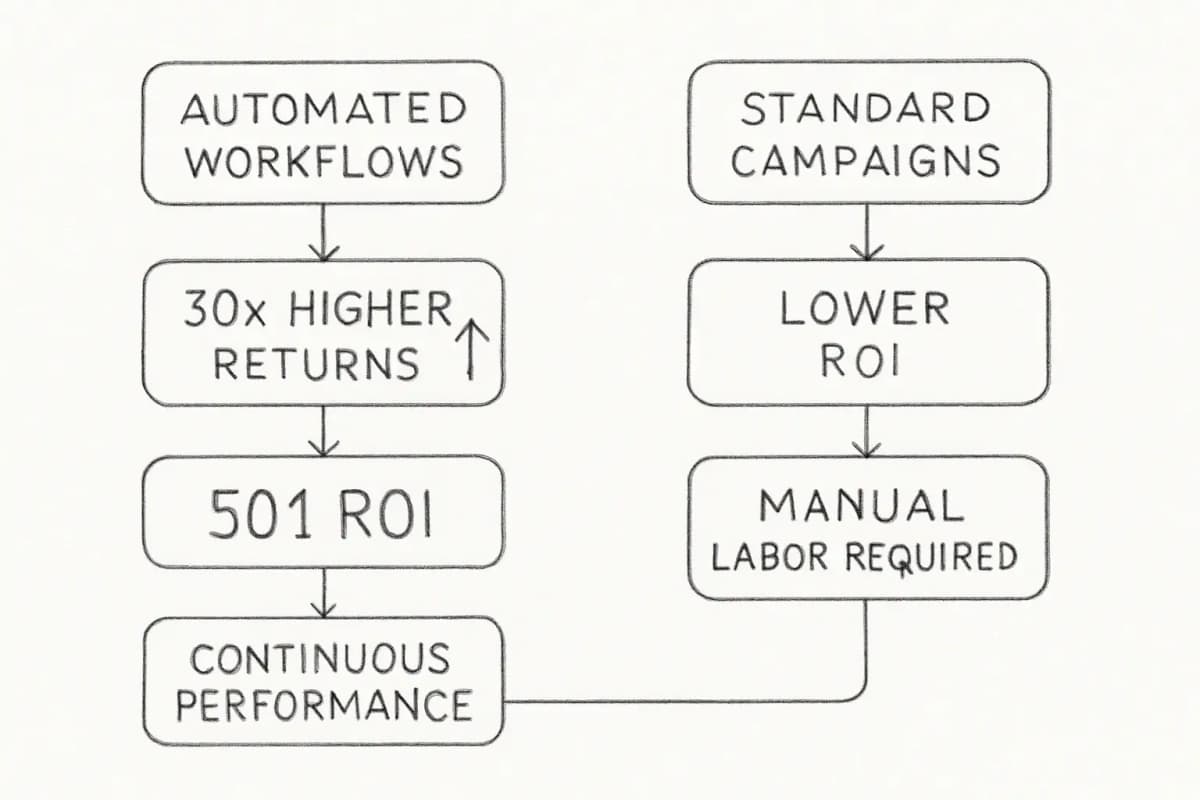
Industry benchmarks also differ materially between automation types. In automotive, standard campaigns return $0.16 per recipient while automations return $5.47 on average. Looking at specific automation types, back-in-stock emails delivered the highest conversion rate at 6.46%, while birthday messages produced an average order value more than 4 times higher than average.
For a broader look at the analytics framework that supports this kind of measurement, our Email Marketing Analytics Best Practices guide covers attribution models and reporting setups in detail.
Choosing the Right Automated Email Platform for Your Business
Platform choice shapes what automation is actually possible. The right fit depends on your business model, list size, and technical resources.
For 2025 to 2026, HubSpot is best for CRM-first teams needing automation, email, and pipeline in one platform, though it carries the highest cost at scale. ActiveCampaign offers the deepest automation logic for B2B and SaaS, with strong behavioral branching, lead scoring, and lifecycle workflows.
Brevo (formerly Sendinblue) is the most cost-effective for high-volume senders and combines email, SMS, and WhatsApp natively, though it is weaker on CRM depth. GetResponse is the best choice for teams that also need webinar and conversion funnel tools alongside email automation. Klaviyo is the strongest option for ecommerce behavioral segmentation and predictive analytics.
Klaviyo's ecommerce segmentation engine processes over 350 behavioral attributes per contact, including purchase history, product category affinity, RFM score, and predicted next order date.
ActiveCampaign edges out Klaviyo on CRM depth and B2B-style lead scoring, making it the stronger choice for high-AOV brands with complex sales cycles.
Frequently Asked Questions
What is the difference between automated marketing email and a regular email campaign?
A regular email campaign is manually scheduled and sent to a list at a specific point in time. An email automation workflow is a series of emails that are sent automatically based on defined triggers, conditions, and actions. When a certain event occurs, such as a user signing up, making a purchase, or clicking a link, the system sends one or more emails without manual intervention. The key distinction is that automated emails respond to real subscriber behavior, while broadcast campaigns are sent on a fixed schedule regardless of what the recipient has done.
How much ROI can I expect from email automation?
Automated workflows generate 30 times higher returns compared to one-off email campaigns. However, ROI varies significantly by industry and workflow type. Email marketing ROI typically ranges from 10:1 to 36:1 for most organizations, with top-performing programs exceeding 50:1. The largest gains usually come from welcome series, cart abandonment flows, and post-purchase sequences, which are consistently the highest-converting automation types across industries.
How many automated workflows do I need to start?
At minimum, most businesses should have a welcome sequence, an abandoned cart or inquiry follow-up, and a re-engagement flow for lapsed subscribers. These automations run continuously in the background and, when set up correctly, generate results long after the initial build is done. If you are still sending every email manually, this is likely your single biggest efficiency opportunity.
What makes an automated email flow stop performing over time?
Several factors cause automation decay. Every email you send to a dead address or a disengaged subscriber hurts your sender reputation. Enough of that, and your automations start landing in spam folders even for the people who genuinely want to hear from you. Beyond list hygiene, content and offers can go stale if flows are never updated. Reviewing your automation performance every 90 days and refreshing the content of low-performing sequences is the most direct way to recover degraded performance.