
Email marketing automation is the practice of sending targeted, personalized emails automatically based on predefined triggers, subscriber behavior, or time-based schedules, without manually intervening in each send. Unlike broadcast emails sent to entire lists, automated campaigns deliver the right message to the right person at precisely the right moment.
The distinction matters because of what it produces. Automated emails generate 320% more revenue than non-automated emails. And yet, 73% of businesses still struggle to implement effective automated campaigns that actually drive results. That gap between knowing the definition and understanding the core concepts is exactly what this article closes.
Key Takeaways
- Email marketing automation definition: A system that sends targeted emails automatically when subscribers meet predefined conditions, with no manual send required per recipient.
- Email is the channel that relies most on marketing automation, with 58% of surveyed professionals choosing it over content and social media management.
- Automation accounts for just 2% of email sends but drives 30% of email revenue, earning 16 times more per send than one-off campaigns.
- The core components of any automation system are triggers, workflow logic, segmentation, dynamic content, and performance analytics.
- Getting started requires picking two or three high-impact workflows (welcome, abandoned cart, re-engagement) before expanding.
What Email Marketing Automation Actually Means
A precise email marketing automation definition starts with how the system works mechanically. Email automation is the use of software to send emails automatically based on predefined triggers, schedules, or user behavior. Instead of manually sending every email, you build a system with a set of rules that react to what your subscribers do or don't do.
Manual email marketing means crafting and sending individual campaigns to static lists, while automation creates workflows that respond to subscriber actions in real time. When someone signs up for a newsletter, abandons a cart, or clicks a specific link, the system recognizes that behavior and initiates the appropriate response.
The result is something manual sending structurally cannot achieve. This approach maintains personalization at scale; each subscriber receives relevant content based on their unique journey, not a one-size-fits-all blast.
This is why automated emails drove 37% of all ecommerce email revenue in 2024 despite representing just 2% of email volume.
The Five Core Components of an Automation System
Understanding the email marketing automation definition fully means knowing the technical pieces that make it work. Every effective system contains five interconnected components.
1. Triggers
Triggers are the conditions that initiate automated email sends, using "if this, then that" logic to power every workflow. Understanding the different trigger types helps you design workflows that respond to subscriber behavior in the most effective way. Behavioral triggers fire when subscribers take specific actions like submitting a form, clicking a link, making a purchase, or downloading content. Time-based triggers operate on schedules, such as sending the third email in a welcome series three days after signup or delivering birthday emails on the right date.
2. Workflow Logic
The best workflows also have branches. If a customer clicks a link about product A, they skip product B emails and go deeper on product A. This branching logic, often called conditional logic, is what separates a true automation system from a basic autoresponder.
3. Segmentation
Automated email segmentation is the process of using dynamic rules and real-time data to organize your email contacts into targeted groups automatically. Unlike traditional static lists that require constant manual updates, automated segmentation continuously adjusts audience membership based on changing customer behaviors, preferences, and lifecycle stages.
Advanced segmentation pays off significantly. See our email list segmentation strategies that boost ROI by 760% for a detailed breakdown of how to build these segments.
4. Personalization and Dynamic Content
Email automation eliminates repetitive tasks like segmenting audiences, sending follow-ups, optimizing send times, inserting dynamic content, and even monitoring deliverability. These are incredibly vital marketing tasks, but they're extremely time-consuming to do manually. Automation allows you to set the segmentation rules, and these will be executed on autopilot until the day you decide to change the rules.
5. Analytics and Optimization
The automation landscape has dramatically evolved. Modern platforms now integrate artificial intelligence, predictive analytics, and cross-channel data to create sophisticated customer journey maps that adapt in real time. This feedback loop, where performance data informs future sends, is what makes automation compound in value over time.
How Triggered Emails Work
Triggered emails, which are also known as behavioral or transactional emails, are automated messages sent to subscribers when specific conditions are met.
The timing advantage is significant. Customer intent has a short shelf life. The browse abandonment email that lands two hours after someone left your site performs very differently from one that lands two days later. Triggered email works because it respects that window. It shows up when the signal is still warm, with something relevant to say.
The three most commercially valuable behaviour triggers in B2B email are: pricing page visit, demo request abandonment, and repeated resource download, each indicating a different level of purchase intent that warrants a specific automated response.
For e-commerce, the numbers behind triggered emails are just as clear. Abandoned cart email campaigns have an open rate of 50.50%, according to a 2024 email marketing report from Klaviyo. Businesses also earn an average of $3.45 in revenue per abandoned cart email recipient.
The Most Important Automation Workflows
Knowing the email marketing automation definition is only the start. You need to know which workflows to build first.
Welcome Series
Welcome emails achieve an 83.6% open rate in ecommerce, the highest of any automated email type. In 2024, automated welcome emails in ecommerce had an average conversion rate of nearly 3%.
A welcome series is the single best place to start with automation. A welcome series introduces new subscribers to your brand. A good welcome series usually includes 4-7 emails, with the first few spaced a few days apart so engagement stays high in week one. For a deeper guide on structure, see our welcome email sequence best practices.
Abandoned Cart Recovery
In 2025, 70.19% of ecommerce customers abandoned their shopping carts. That lost revenue is recoverable. Merchants who sent just one cart abandonment email got 14.76 orders, while those who used the three email strategy achieved 24.94 orders in total.
Abandoned cart drips recover shoppers who added items but didn't check out. Most run 2-4 emails: the first within a few hours of abandonment, the rest over the next 2-3 days, usually a reminder, then social proof, then an incentive if needed.
Re-engagement (Win-Back) Campaigns
Win-back automations, also known as re-engagement campaigns, are emails you send to inactive subscribers. How you define "inactive" depends on your brand. Perhaps they haven't opened or clicked an email in the past 30, 60, or 90 days. Or maybe they haven't bought from you in a while.
Post-Purchase Sequences
Post-purchase drip campaigns are sent after a customer makes a purchase. These types of drip campaigns help strengthen customer relationships and support upselling, cross-selling, and review requests, all on autopilot.
Lead Nurture Sequences
A drip campaign is a series of pre-written emails sent automatically in a set sequence, triggered by a schedule or a subscriber's actions, to nurture leads and customers over time. For B2B teams, these sequences are the primary mechanism for moving prospects from awareness to purchase-ready.
Automation vs. Manual Email Campaigns: The Real Difference
Traditional email marketing sends one message to your entire list at a single point in time. Drip campaigns deliver a sequence of automated emails triggered by behavior, timing, or lifecycle stage. Instead of blasting the same content to everyone, drip campaigns adapt to where each contact is in their buyer journey. Someone who just subscribed receives educational content, while someone who abandoned a cart receives a reminder. This behavioral, automated approach drives higher engagement and more predictable revenue because it aligns messaging with intent.
The operational case is equally strong. 69% of marketers indicated they adopted marketing automation because it reduces manual work and improves campaign execution speed, per 2024 survey findings. And companies that automate their marketing see a 12% reduction in overhead costs, while marketing automation is responsible for a 14.5% increase in sales productivity.
For teams building out a full strategy around automation, our email marketing automation CRM setup guide covers how to connect your tools effectively.
How AI Is Changing Email Marketing Automation
The definition of email marketing automation is expanding. The stable consistency and better targeting of email marketing could rely on artificial intelligence.
AI capabilities now include predictive send time optimization, automated content generation for subject lines and email copy, dynamic segmentation using real-time behavioral analysis, and performance prediction before campaigns are sent.
The revenue impact of AI-driven personalization within automation is measurable. Brands using AI-driven personalization report up to 42% higher revenue, with click-through rates exceeding 13%. This alone can lift ROI by nearly 20%.
Your CRM feeds behavioral data into your email platform, which fires off personalized campaigns. Those, in turn, update the lead scores in real time, all without human intervention. This is what a mature automation system looks like in practice. 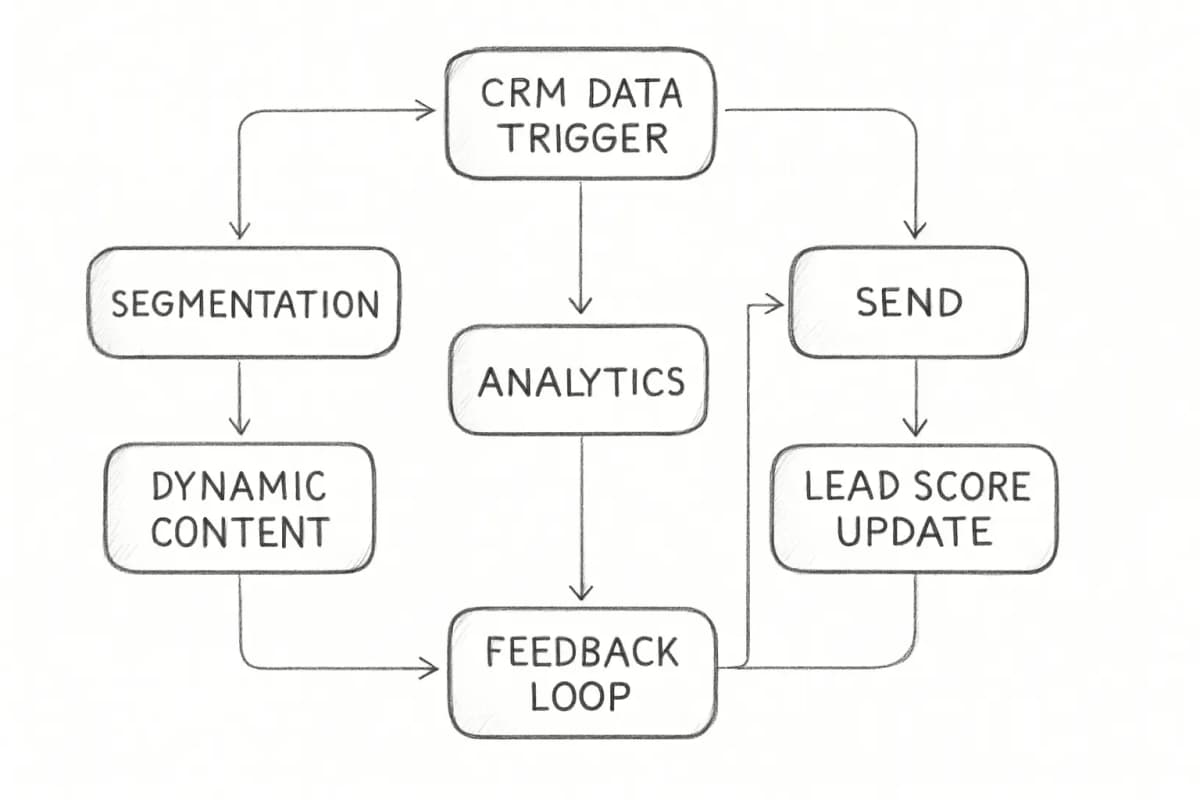
The ROI Case for Email Marketing Automation
The financial argument for automation is direct. On average, email marketing delivers a return of between $36 and $42 for every $1 spent, the highest ROI of any digital marketing channel. For context, paid search returns $2 per $1, social advertising $2.80, and display ads $1.35.
Automation amplifies those numbers further. Each automated email earned $2.87 per send, versus $0.18 per send for campaigns, about 16 times more.
For smaller organizations, the gains are equally clear. Small businesses see a 25% increase in marketing ROI when they start using automation. And the adoption trend confirms that teams are catching on: approximately 76% of businesses currently utilize some form of marketing automation technology as part of their strategy in 2024, reflecting widespread adoption across various sectors.
Frequently Asked Questions
What is the simplest email marketing automation definition?
Email marketing automation is the practice of sending targeted emails automatically based on triggers, behaviors, or schedules. It does not require manual intervention for each send. These systems use predefined rules and subscriber data to deliver the right message at the right time.
How is email automation different from bulk email blasts?
Bulk email blasts send one message to your entire list at the same time, regardless of where each subscriber is in their journey. Automated campaigns deliver the right message to the right person at precisely the right moment, based on what that subscriber has actually done. The practical result is a significant difference in engagement and revenue.
What types of emails are best suited to automation?
Welcome series, abandoned cart recovery, post-purchase sequences, re-engagement and win-back flows, and lead-nurture campaigns are the most common. Each targets a specific point in the customer lifecycle and responds to a specific behavior or time interval.
Do you need technical skills to set up email marketing automation?
Not anymore. Automation is surprisingly easy with professional email marketing software. It is just an "if, then" process. If the person adds something to the shopping cart and leaves the site before completing the sale, then the system will send an email. Most modern platforms provide visual workflow builders and pre-built templates that require no coding.
How does automation affect email deliverability?
There is a deliverability benefit to triggered email that doesn't get talked about enough. Because triggered flows fire in response to a recent customer action, a site visit, a product view, a cart add, the people receiving them are active and engaged. Higher engagement signals to inbox providers that your emails are wanted, which generally supports better inbox placement.