Email marketing runs on a simple rule: the right message, to the right person, at the right time. Doing that manually at any real scale is impossible. That is why learning how to automate email marketing is one of the highest-leverage skills a marketer or business owner can build.
Automated emails generate 320% more revenue than non-automated emails, yet most businesses are still running their programs the same way they did five years ago.
This guide walks through the full setup process, from choosing email marketing automation tools to building your first workflows and measuring what works.
Key Takeaways
- In 2024, automated emails drove 37% of all email-generated sales despite accounting for just 2% of email volume.
- As of early 2024, email was the channel that relied most on marketing automation, with 58% of professionals choosing it over content and social media management.
- 91% of marketers say that marketing automation helps them achieve their objectives.
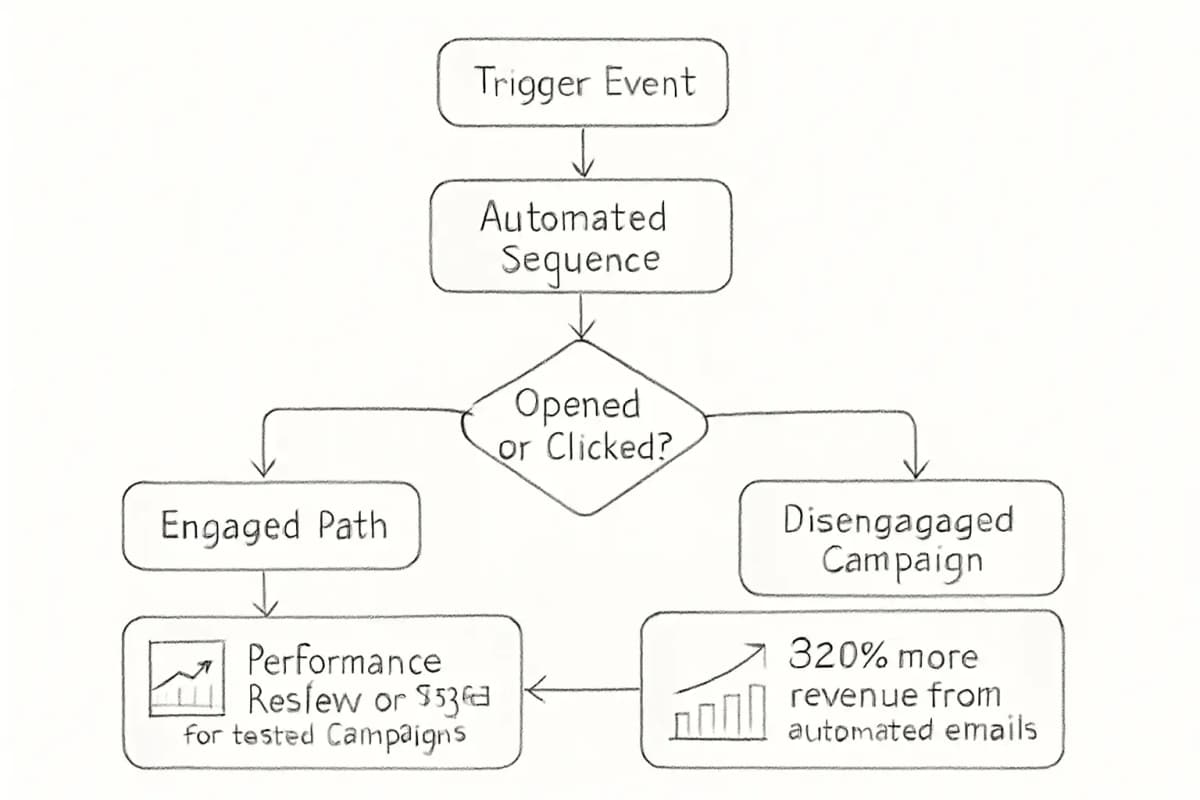
- Automation works through behavior-based triggers: a subscriber takes an action, and your platform sends a relevant, pre-built email sequence in response.
- The setup process follows a clear order: define goals, clean your list, segment your audience, choose a platform, build workflows, and measure results.
What Email Marketing Automation Actually Means
Email marketing automation is not just a scheduled newsletter.
It is the practice of sending triggered, behavior-based emails to subscribers based on specific actions they take, or do not take.
Think of it as setting up a series of "if-this-then-that" rules for your email communications. These automated sequences run continuously once set up, handling everything from basic transactional emails to complex multi-step campaigns.
The practical benefit is scale without extra headcount.
Automated workflows work the same for 100 subscribers or 100,000. You do not need to hire more people just because your list grows. A single workflow template can serve an unlimited audience.
Step 1: Define Your Goals Before You Build Anything
The most common mistake businesses make when setting up marketing automation email marketing is skipping strategy.
They see a feature in their email platform and turn it on without a clear purpose.
Every automation you build should answer one question: what outcome does this produce?
Common automation goals include:
- Converting free trial signups to paid customers
- Recovering abandoned carts
- Nurturing leads from first contact to purchase
- Re-engaging subscribers who have gone cold
- Onboarding new customers to reduce churn
To measure the success of your automated workflows, it is important to set goals for each workflow. Determine what actions or outcomes you want to achieve and set corresponding goals. This lets you track the progress and effectiveness of your automated emails.
Once your goals are documented, map the customer journey.
To automate your email campaign workflows, you need to map out your ideal customer journey. It is an essential step that helps you understand all the touchpoints your subscribers have with your brand.
Step 2: Clean and Segment Your List
Automation cannot fix a broken list. Sending automated sequences to stale, unengaged, or invalid addresses damages your sender reputation and reduces deliverability for every email you send.
Maintaining a clean email list is crucial for deliverability and engagement. The people you send marketing emails to need to be willing recipients. You always need to provide a way to unsubscribe, and if someone does click unsubscribe or becomes inactive, you must take action. Combing your lists for spam or undeliverable email addresses on a regular basis is the best way to maintain good email hygiene.
Once your list is clean, segment it. Segmentation determines which workflows a subscriber enters.
Segmentation allows you to send tailored messages to different groups within your audience based on their unique characteristics and behaviors. For instance, you might create segments for new subscribers who need to learn more about your products, active users who engage frequently, and past customers who have not purchased in a while.
For a deeper look at how to build high-performing segments, see our guide on Email List Segmentation Strategies That Boost ROI by 760%.
Step 3: Choose the Right Email Marketing Automation Tools
The platform you choose defines what you can build. There is no single best tool; the right choice depends on your business type, list size, and technical resources.
Here is a practical breakdown of the leading email marketing automation tools:
For beginners and small businesses:
Entry-level platforms like Mailchimp, MailerLite, Brevo, and ConvertKit require zero technical skills. Expect to create your first campaign within 30 minutes using drag-and-drop editors and pre-built templates.
For ecommerce:
Klaviyo is a data-driven email marketing software that is flexible and tailored specifically for ecommerce businesses. It offers integrations with platforms like Shopify and Magento to help you use real-time customer behavior and purchase data for highly personalized campaigns.
For complex automation and B2B:
ActiveCampaign is a marketing automation powerhouse that blends email marketing with advanced automation and CRM functionalities. It excels in providing prebuilt automation workflows that help businesses nurture leads, re-engage inactive customers, and drive conversions with minimal effort. With segmentation tools, machine learning insights, and multi-channel automation, it is an excellent choice for businesses looking to improve customer journey efficiency.
For businesses already using a CRM:
HubSpot is a powerful email marketing platform integrated within its all-in-one CRM, which lets businesses create personalized and data-driven campaigns. It offers advanced automation, in-depth analytics, and easy integration with sales and customer service tools.
When evaluating tools, factor in more than the monthly price.
The entry price is only part of the equation. Factor in team training, migration, and potential add-ons such as SMS or customer data platforms. Scalable solutions are those that remain cost-effective even as your subscriber base and automation complexity grow.
Step 4: Build Your Core Automation Workflows
Start with the workflows that produce the most impact.
For somebody just getting started with automation, just start somewhere. Instead of coming up with an elaborate map of workflows and campaigns from the beginning, launch one or two automations and see how they perform.
Here are the four workflows every business should have:
Welcome Series
Welcome emails receive 4x the open rate and 5x the click-through rate of a standard email campaign. When someone signs up to your newsletter or downloads your content, your business is top of their mind, making it the perfect time to start engaging with them.
Send the first email immediately after signup. Follow it with emails that introduce your brand, communicate your core value, and guide the subscriber toward their first meaningful action. For detailed guidance, read our article on Welcome Email Sequence Best Practices: 7 Proven Strategies.
Abandoned Cart Recovery
An abandoned cart workflow triggers when an online shopper adds items to their cart but does not complete checkout. Since nearly 70% of carts are abandoned, a timely email can recapture a significant amount of lost revenue.
A 3-email sequence sent 1 hour, 24 hours, and 72 hours after abandonment recovers 10 to 15% of abandoned carts.
The first email should be a simple, friendly reminder. The second can add social proof. The third can introduce a limited-time incentive.
Lead Nurturing Sequence
Lead nurturing workflows aim to move leads down the funnel by delivering targeted content and offers. The trigger is usually a mid-funnel action, such as downloading an eBook, signing up for a webinar, or abandoning a product comparison page.
Nurtured leads make 47% larger purchases than non-nurtured leads, making automation a critical component of effective marketing. By addressing pain points and guiding leads with valuable content, you increase the likelihood of turning them into loyal customers.
Re-engagement Campaign
Re-engagement emails are designed to win back users who have not opened, clicked, or purchased in a while. Whether you are prompting a dormant subscriber or checking in with a past customer, these campaigns help reignite interest and keep your email list healthy.
If subscribers remain unresponsive after two or three re-engagement emails, remove them from your active list. Keeping disengaged contacts hurts deliverability across your entire program.
Step 5: Write Emails That Do Not Sound Automated
The content inside your workflows matters as much as the logic behind them.
Automated emails should not sound automated. Write in a conversational tone. Use natural language. Avoid corporate jargon and robotic phrasing.
Using "no reply" in your emails prevents recipients from being able to respond or opt out of future emails. Instead, consider using a real first name as your sender's name. This personal touch makes your automated emails feel more human and keeps you compliant with email regulations.
Personalization goes beyond using a subscriber's first name.
Hyper-personalization takes personalization to the next level by leveraging dynamic content. Use dynamic emails that automatically adapt to each recipient's preferences, behavior, or past interactions. Customize your email content based on real-time data, such as recent purchases, browsing history, or location.
For a structured approach to personalization, see our article on 7 Email Personalization Techniques That Boost Conversions 47%.
Subject lines are where your automation either earns the open or loses it. Strong subject lines are specific, relevant to the trigger, and matched to the subscriber's current intent. For more on what works, read our guide on Email Subject Line Best Practices That Boost Open Rates by 27%.
Step 6: Measure Performance and Optimize
Email marketing automation provides valuable data and insights that can help you optimize your campaigns over time. Regularly test different elements of your emails, such as subject lines, call-to-action buttons, and email design, to identify what resonates.
The metrics that matter most depend on your workflow type:
- Open rate: Indicates subject line and sender name performance
- Click-through rate: Shows whether your content and CTA match subscriber intent
- Conversion rate: The actual business outcome (purchase, signup, download)
- Unsubscribe rate: A signal of relevance and send frequency
Brands that regularly A/B test their emails achieve 83% higher ROI than those that never test. Companies that never test report average ROI of 2,300%, while those that often test achieve 4,200%.
Review your automation performance monthly. Adjust send timing, subject lines, and email copy based on real data, not assumptions.
Common Mistakes to Avoid
Even well-intentioned automation can damage subscriber relationships if set up carelessly. Watch for these issues:
- Skipping list hygiene: Sending to invalid or disengaged contacts degrades deliverability for every workflow you run
- Over-automating:
Not every email should be automated. Strategic broadcast emails still have a place in a healthy email program.
- Ignoring mobile:
50% of people will delete an email if it is not optimized for mobile.
Test every automated template across devices before activating a workflow
- Building complexity before proving the basics: Start with a welcome series and one behavior-based flow. Expand once you have data showing those work
Frequently Asked Questions
What is the difference between email marketing and email marketing automation?
Standard email marketing typically means manually creating and sending campaigns to your list. Email marketing automation uses software to trigger and send emails based on subscriber behavior or predefined rules, such as signing up, making a purchase, or abandoning a cart. The automated approach scales without manual intervention and delivers more relevant messages at the moment they matter most.
Which email marketing automation tools are best for small businesses?
New to email marketing? Begin with Mailchimp or MailerLite's free plans. You can launch your first welcome series using pre-built templates within an hour.
As your needs grow, platforms like ActiveCampaign (for B2B or complex journeys) and Klaviyo (for ecommerce) offer deeper automation capabilities.
How many automated emails should I send in a sequence?
The ideal number of emails in a flow depends on your industry, your users' behavior, and how finely you have segmented your audience. An ecommerce abandonment series might only need three well-timed messages, while a B2B SaaS lead nurture sequence might benefit from a longer series that gradually builds trust. The key is to test different lengths and monitor engagement metrics to see what resonates with each segment.
Does email automation hurt deliverability?
It can, if done poorly. Sending automated sequences to unengaged or invalid contacts increases spam complaints and bounce rates, which damage your sender reputation. The fix is regular list cleaning, double opt-in signup forms, and suppressing contacts who do not engage after a re-engagement sequence.
Deliverability testing increases returns by 39% by ensuring emails avoid spam folders and reach intended destinations.
How long does it take to set up email marketing automation?
Entry-level platforms require zero technical skills and allow you to create your first campaign within 30 minutes using drag-and-drop editors and pre-built templates.
More advanced platforms like ActiveCampaign or Klaviyo require a steeper learning curve, but the core workflows outlined in this guide can typically be live within a week for most business types.