
Email
Email

A modern blog built with Payload CMS, Next.js, and shadcn/ui.

RSS FeedSitemap

Explore

  • Blog
  • News
  • Statistics
  • Authors

Categories

  • Hiring & Team Building
  • Email Campaign Strategy
  • Email Design & Templates
  • Email Compliance & Legal
  • Email Deliverability & Best Practices
  • Career Development
  • Email Strategy for Finance & Professional Services
  • Email Marketing Metrics

Latest articles

  • How to Hire an Email Marketing SpecialistJul 22, 2026
  • Email Marketing Campaigns Template: Ready-to-UseJul 22, 2026
  • Canva Email Marketing Templates: Design Fast, Convert MoreJul 22, 2026
  • Email Marketing Templates for FranchisesJul 22, 2026

Popular topics

  • #Specialist Skills
  • #Team Building
  • #Templates
  • #Canva
  • #Advanced Strategies
  • #multi-location businesses
  • #Marketing Regulations
  • #Lead Follow-Up
  • #iCloud Email
  • #Marketing Management
  • #Product Launch
  • #Electrician Marketing
  • #statistics
  • #Budget-Friendly
  • #Free Resources
  • #Miami businesses

Stay in the loop

Join 2,000+ readers. Unsubscribe anytime.

Subscribe
Email

© 2026 Email. All rights reserved.

SitemapRSS
HomeBlogEmail Marketing ToolsNetSuite Email Marketing: Integration Guide
Email Marketing Tools

NetSuite Email Marketing: Integration Guide

Learn how to leverage NetSuite for email marketing campaigns. Connect your CRM data, automate workflows, and boost ROI with native integrations.

S

Sarah Mitchell

April 23, 2026

13 min read
Share:
#CRM Integration#marketing automation#NetSuite#Email Workflows
Illustration for netsuite email marketing

Stay in the loop

Get the latest posts delivered straight to your inbox. No spam, unsubscribe anytime.

NetSuite's built-in email marketing tools give you something most standalone platforms cannot: a direct connection between your marketing campaigns and the financial, order, and customer data already living inside your ERP. That connection is either the best argument for using NetSuite email marketing natively, or the starting point for deciding when to bring in a specialist tool. This guide covers both paths in practical detail.

Key Takeaways

  • NetSuite's native email marketing covers database management, segmentation, email personalization, and SPAM-compliant auto-unsubscribe capabilities end to end.
  • NetSuite automatically tracks ROI, lead sources, and responses for email campaigns, making attribution straightforward for teams already running the platform.
  • On average, businesses make about $36 for every $1 they spend on email marketing, which makes getting the integration right a high-leverage activity.
  • Mailchimp doesn't offer a native NetSuite integration, and the same applies to most major email service providers, so third-party connectors or iPaaS middleware are the standard path to a full-featured stack.
  • Properly configuring DKIM and SPF authentication inside NetSuite is non-negotiable for inbox placement and sender reputation.

What NetSuite Email Marketing Actually Includes

NetSuite is not a dedicated email marketing platform. It is a cloud ERP that ships with a CRM module, and that CRM module includes campaign management tools. Understanding the scope prevents false expectations.

NetSuite combines all the tools you need to manage your marketing efforts in one integrated system. You can manage leads generated through custom online lead capture forms and imported lists, create custom templates for marketing emails, and schedule and manage campaigns across multiple channels.

The platform lets you automate the execution of marketing campaigns across multiple channels, including website, email, events, and social media. Crucially, marketing automation capabilities are part of NetSuite CRM, which is included with the NetSuite platform.

What this means in practice: if your team already uses NetSuite, you have email campaign tools available without adding a new subscription. The trade-off is that those tools lack the advanced visual editors, pre-built automation templates, and deep behavioral tracking that dedicated email platforms provide.

Campaign management allows you to create marketing campaigns that are based on solid data rather than hunches. With access to a wide range of information about your customers, including demographics, response patterns, purchase trends, and support history, you can optimize your campaigns to deliver the best results.

CRMSDK tags enable you to include information that is personalized to each recipient, giving you basic merge-tag personalization for names, company details, and other CRM fields.


How to Set Up a Campaign in NetSuite

Getting a campaign live from scratch follows a clear sequence. Skipping any step typically causes campaigns to fail silently or send to the wrong audience.

1. Enable the feature

Enable email marketing campaigns in NetSuite at Setup > Company > Enable Features. Navigate to the CRM tab and enable Marketing Automation. You can also enable "Capture Email Replies" if you want any email responses to your campaigns automatically tracked in NetSuite.

2. Build your target group

The first step to any NetSuite email campaign is to have a group of leads, prospects, or customers to which you want to target your message. Groups can be created and maintained at Lists > Relationships > Groups. You have the choice of creating a static or a dynamic list depending on your need for constancy and flexibility. A static group is comprised of specific members which may or may not share character traits. A dynamic group changes its membership based on the search criteria you input.

Dynamic groups are the more useful option for ongoing campaigns because they update automatically as records in NetSuite change.

3. Create a marketing template

Next, set up the marketing template. This is the actual document which NetSuite will send to your group. It can be an HTML file you deposit in your File Cabinet or it can be a Rich Text email for simpler, informational emails.

4. Build the campaign record

Once you approve the look and feel of your template, create the NetSuite marketing campaign. This is the command center of your campaign and allows you to track the basic names, dates, costs, and activities involved. On the Email Events subtab, choose your target group and template, then choose your subject line. Selecting a status of 'Execute' means that NetSuite will send the email blast to that target group on the date and time you specify.

5. Track performance

After saving the campaign, you can track statistics on the Statistics subtab. Basic information like emails sent and opened can help you track your campaign's success. NetSuite offers a range of standard marketing reports, including Campaign ROI and Campaign Response. You can customize reports to fit your business needs.

For a deeper look at interpreting campaign metrics, see our guide on email marketing analytics best practices.


Deliverability: DKIM, SPF, and Sender Reputation

Deliverability is where many NetSuite email marketing setups fail. Sending from the platform without proper authentication almost guarantees inbox placement problems.

Best practice includes the use of industry-standard email authentication through DomainKeys Identified Mail (DKIM) and campaign email domains. It also means keeping your recipient lists up to date with people who have chosen to get your emails.

NetSuite offers the ability to configure DKIM, which is essentially a digital signature within the code of your email that can be read by internet service providers to help identify spam and improve the deliverability of your messages.

To configure it: navigate to Setup > Company > Email > Email Preferences, go to the Email Domains (DKIM) subtab, enter your branded domain or subdomain in the Domain Name field, click Verify DNS Entry to start the verification process, and once added, send a test message to a DKIM reflector address to confirm the setup.

Mail service providers can alert NetSuite when a recipient marks a campaign email as spam by using the Complaint Feedback Loop feature. NetSuite immediately modifies the recipient's global subscription status to Confirmed Opt-Out. Because the unsubscribed recipient is no longer receiving email marketing, the complaint rate per domain is kept to a minimum. ISPs are more likely to get your messages to your consumers' inboxes if you have a low complaint rate.

NetSuite can automatically scan your campaigns for hard-bounced email addresses and create an up-to-date list to help with the clean-up of your system.

Protecting your sender domain with DKIM and SPF is particularly important because the average deliverability rate sits at 85% in 2024, heavily influenced by authentication protocols like DMARC, SPF, and DKIM. Brands that implement proper authentication see deliverability rates above 90%, while those without proper setup struggle with inbox placement.


Segmentation and Personalization Inside NetSuite

NetSuite's segmentation draws on ERP data that most standalone tools cannot access natively, which is its main structural advantage.

Segment data to deliver personalized marketing campaigns based on demographics, purchase trends, response patterns, and support histories. This means a sales team can target customers who purchased a specific product line in the last 90 days, or re-engage leads who opened previous campaigns but never converted, using filters built from live CRM data.

NetSuite can initiate automatic email sequences that provide useful instructions, tailored recommendations, or unique pricing, making drip campaigns and lead nurturing viable without external tools.

NetSuite's lead scoring capabilities enable marketers to understand better which leads are likely to convert into customers based on their past interactions with the brand. Sales teams can then use this information to prioritize leads and target those most likely interested in the company's products or services.

The data advantage is real, but the execution tools are basic compared to dedicated platforms. Segmented campaigns achieve 14% higher open rates and 28% better click rates compared to generic sends. Advanced segmentation and personalization can boost revenue by up to 760%, which is the potential sitting inside your NetSuite CRM data if you build the right segments.

For strategies on getting more from your contact data, read our guide on email list segmentation strategies that boost ROI by 760%.


Third-Party Integrations: When to Go Beyond Native Tools

NetSuite's native email features serve many mid-market teams well, but dedicated platforms add capabilities that matter at scale: advanced automation flows, drag-and-drop editors, A/B testing, SMS, behavioral triggers, and predictive analytics.

The key challenge is that Mailchimp doesn't offer a native NetSuite integration. Like other email marketing platforms, MailChimp does not natively integrate with NetSuite, meaning manual uploads are necessary without a third-party connector. Fortunately, many connectors exist, including Celigo Integrator and Cazoomi SyncApps.

Common integration paths:

  • Klaviyo + NetSuite: Klaviyo excels at integration with most major CRM platforms including Salesforce, NetSuite, HubSpot, and many more. This means businesses can effortlessly sync their lists, ensuring that their segmentation efforts are always informed by the latest data. If your marketing team needs granular control, advanced segmentation, or behavior-based flows, Klaviyo offers more depth, especially when paired with SuiteCommerce.
  • Mailchimp + NetSuite: Syncing data between the two platforms allows companies to create targeted email campaigns based on customer behavior and purchase history, improving engagement and marketing efficiency. Third-party connectors handle the sync.
  • HubSpot + NetSuite: HubSpot is a well-known market leader for marketing automation, especially for B2B. An extremely robust and versatile platform, HubSpot effectively owns the mid-market B2B space.
  • iPaaS platforms: Third-party middleware and iPaaS solutions like Celigo, Boomi AtomSphere, MuleSoft Anypoint, and Workato sit between NetSuite and other apps to orchestrate data flows without heavy coding.

Which approach fits your situation:

ScenarioRecommended path
Basic campaigns, no extra budgetNetSuite native
E-commerce with behavioral triggersKlaviyo + NetSuite connector
B2B nurture sequencesHubSpot + iPaaS
High volume, custom logicREST API or RESTlet integration
Simple sync, low technical resourcesCeligo or Cazoomi SuiteApps

API and Technical Integration Options

For teams with development resources, connecting an external email platform directly to NetSuite via API gives you the most control over data flows and sync behavior.

NetSuite has accumulated several API approaches over the years, each with different strengths. For most new projects, the path is clear. The REST API is modern, well-documented, and handles the majority of use cases. Start there unless you have a specific reason not to.

The three main options:

  1. REST API (SuiteTalk): The REST API is useful for simple data operations. The SOAP API handles more complex tasks. For syncing contact and subscriber data in real time, REST is the cleaner choice.
  2. RESTlets (SuiteScript): A RESTlet is a script installed on a NetSuite account that runs when an external application calls it. Once a user has deployed a RESTlet's script to an account, NetSuite provides its URL. Users can call that URL from an integration to run the RESTlet's logic, which can return data in the form of plain text or JSON. RESTlets are well suited to complex data transformations before data reaches your email platform.
  3. iPaaS middleware: For complex integration scenarios involving multiple systems, high volumes, and non-technical teams managing the flows, consider an iPaaS platform like Celigo or n8n. The development overhead is lower, and you get monitoring, error handling, and retry logic out of the box.

Marketing automation integration helps resolve data silos by creating bidirectional data flows that allow real-time information sharing across an entire stack. This makes it possible to deliver personalized campaigns at scale, improve operational efficiency, and provide predictable customer journeys across multiple touchpoints.


Measuring Campaign ROI Inside NetSuite

One of the strongest arguments for keeping campaigns inside NetSuite, or tightly integrating an external tool back into it, is the closed-loop reporting between marketing activity and revenue.

NetSuite lets you analyze campaign statistics and ROI from the start of a marketing campaign to the final order transaction. That link between a specific email campaign and a specific closed sale is difficult to replicate when marketing and ERP data live in separate systems.

Key performance indicators (KPIs) provide immediate updates on your campaigns when you first log in to your NetSuite account. You can view your data in real time as orders are received, or as campaign email is viewed.

CRM integration, campaign tracking, and tagging built into marketing automation enable firms to attribute closed business to the campaigns that generated the opportunities, thereby achieving ROI.

Each lead is assigned a lead source that indicates which campaign generated the lead. You should keep this lead source information to tie revenue to campaigns.

For teams using external platforms, the same logic applies: build the integration so that revenue data flows back from NetSuite into your email platform's reporting, or forward campaign engagement data from your ESP into NetSuite so sales teams can see it on contact records.

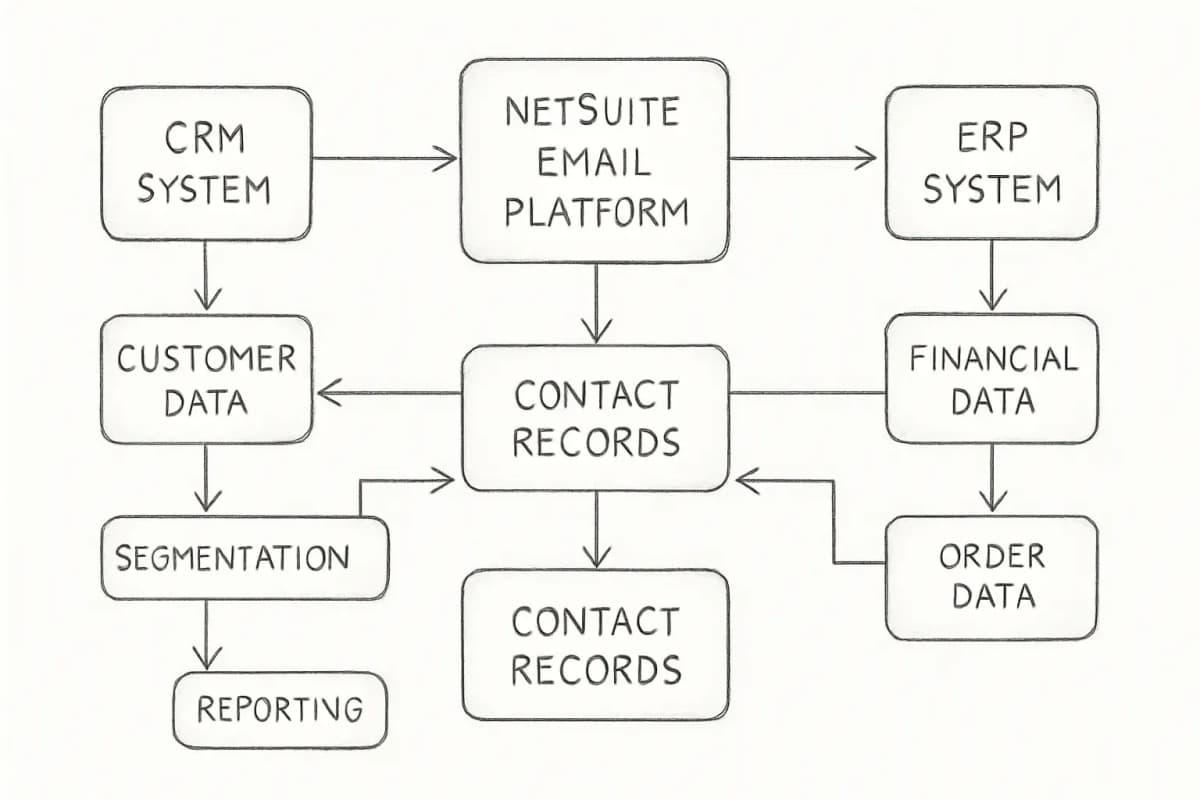
For more on building a strategy around measurable outcomes, see our email marketing strategy template for 2025. NetSuite email marketing integration architecture diagram showing three interconnected systems: CRM on the left, NetSuite email platform in the center, and ERP on the right. Bidirectional arrows illustrate data flows between systems: customer data and segmentation flowing from CRM to email platform, campaign engagement metrics and reporting flowing back from email platform to CRM, and financial and order data flowing from ERP to email platform for personalization and targeting. Include labels for each system and clearly show how contact records, campaign data, and reporting metrics move between components.

Practical Checklist Before Your First Campaign

Before you send anything from NetSuite, confirm each item:

  • DKIM is configured at Setup > Company > Email Preferences > Domain Keys and verified
  • SPF record includes include:mailsenders.netsuite.com with your DNS provider
  • Default From and Reply-To addresses are set in Marketing Preferences
  • Subscription categories are configured so recipients can manage preferences
  • All contacts in your target group have opted in; email marketing is only available to clients who haven't unsubscribed from your campaigns, and customers can automatically unsubscribe by clicking the unsubscribe link included in every email you send
  • Dynamic groups are tested against live data before scheduling the send
  • A test send has been reviewed for rendering across major email clients
  • Campaign ROI and lead source fields are populated so attribution tracking works

Frequently Asked Questions

Does NetSuite have built-in email marketing tools?

Yes. NetSuite manages end-to-end email marketing campaigns with database management, segmentation, email personalization, and SPAM-compliant auto-unsubscribe capabilities. These tools are part of NetSuite CRM, which is included with the standard NetSuite platform subscription.

Can I integrate Klaviyo or Mailchimp with NetSuite?

Yes, but neither platform offers a direct native integration with NetSuite. Third-party SuiteApps like Anchor Group and SyncApps (by Cazoomi) exist in the NetSuite marketplace, built by integration vendors who identified market demand and created connectors to fill the gap. For Klaviyo specifically, API-driven integrations are the most robust option, particularly for e-commerce businesses on SuiteCommerce.

How do I improve email deliverability from NetSuite?

To improve and optimize the overall deliverability of your campaign emails, invite recipients to opt-in, set up an email domain, set up DKIM, and only send campaign emails to recipients that have responded. You should also configure a DMARC record alongside SPF and DKIM so that receiving mail servers can authenticate your messages properly.

When should I use native NetSuite email marketing versus a dedicated platform?

Native NetSuite email marketing works well for teams who want closed-loop revenue attribution, already use NetSuite CRM as their system of record, and run moderately sized campaigns without complex automation needs. A dedicated platform is worth the integration effort when you need advanced behavioral triggers, visual automation builders, A/B testing, or SMS alongside email. If your marketing team needs granular control, advanced segmentation, or behavior-based flows, Klaviyo offers more depth, while HubSpot fits B2B teams with longer sales cycles. The right choice depends on your campaign complexity, team size, and whether the integration cost is justified by the volume and sophistication of your campaigns.


No comments yet. Be the first!

Leave a comment

Comments are reviewed before publishing.

More from

Related posts

Illustration for companies with best email marketing templates
Email Marketing ToolsJul 22, 2026 10 min

Best Email Marketing Template Companies in 2024

Discover top companies offering professional email marketing templates. Compare features, ease of use, and pricing to find the best fit for your campaigns.

MMarcus Webb
Illustration for top ai email marketing platforms to consider
Email Marketing ToolsJul 21, 2026 11 min

Top AI Email Marketing Platforms to Consider

Discover the best AI email marketing platforms that automate content, optimize send times, and boost ROI. Compare features and find your fit.

MMarcus Webb
Illustration for leading email marketing platforms with automation
Email Marketing ToolsJul 21, 2026 11 min

Leading Email Marketing Platforms With Automation

Compare top email marketing platforms with automation. Find the best tool for your business with detailed features, pricing, and performance data.

SSarah Mitchell
HomeBlogEmail Marketing ToolsNetSuite Email Marketing: Integration Guide
Email Marketing Tools

NetSuite Email Marketing: Integration Guide

Learn how to leverage NetSuite for email marketing campaigns. Connect your CRM data, automate workflows, and boost ROI with native integrations.

S

Sarah Mitchell

April 23, 2026

13 min read
Share:
#CRM Integration#marketing automation#NetSuite#Email Workflows
Illustration for netsuite email marketing

Stay in the loop

Get the latest posts delivered straight to your inbox. No spam, unsubscribe anytime.

NetSuite's built-in email marketing tools give you something most standalone platforms cannot: a direct connection between your marketing campaigns and the financial, order, and customer data already living inside your ERP. That connection is either the best argument for using NetSuite email marketing natively, or the starting point for deciding when to bring in a specialist tool. This guide covers both paths in practical detail.

Key Takeaways

  • NetSuite's native email marketing covers database management, segmentation, email personalization, and SPAM-compliant auto-unsubscribe capabilities end to end.
  • NetSuite automatically tracks ROI, lead sources, and responses for email campaigns, making attribution straightforward for teams already running the platform.
  • On average, businesses make about $36 for every $1 they spend on email marketing, which makes getting the integration right a high-leverage activity.
  • Mailchimp doesn't offer a native NetSuite integration, and the same applies to most major email service providers, so third-party connectors or iPaaS middleware are the standard path to a full-featured stack.
  • Properly configuring DKIM and SPF authentication inside NetSuite is non-negotiable for inbox placement and sender reputation.

What NetSuite Email Marketing Actually Includes

NetSuite is not a dedicated email marketing platform. It is a cloud ERP that ships with a CRM module, and that CRM module includes campaign management tools. Understanding the scope prevents false expectations.

NetSuite combines all the tools you need to manage your marketing efforts in one integrated system. You can manage leads generated through custom online lead capture forms and imported lists, create custom templates for marketing emails, and schedule and manage campaigns across multiple channels.

The platform lets you automate the execution of marketing campaigns across multiple channels, including website, email, events, and social media. Crucially, marketing automation capabilities are part of NetSuite CRM, which is included with the NetSuite platform.

What this means in practice: if your team already uses NetSuite, you have email campaign tools available without adding a new subscription. The trade-off is that those tools lack the advanced visual editors, pre-built automation templates, and deep behavioral tracking that dedicated email platforms provide.

Campaign management allows you to create marketing campaigns that are based on solid data rather than hunches. With access to a wide range of information about your customers, including demographics, response patterns, purchase trends, and support history, you can optimize your campaigns to deliver the best results.

CRMSDK tags enable you to include information that is personalized to each recipient, giving you basic merge-tag personalization for names, company details, and other CRM fields.


How to Set Up a Campaign in NetSuite

Getting a campaign live from scratch follows a clear sequence. Skipping any step typically causes campaigns to fail silently or send to the wrong audience.

1. Enable the feature

Enable email marketing campaigns in NetSuite at Setup > Company > Enable Features. Navigate to the CRM tab and enable Marketing Automation. You can also enable "Capture Email Replies" if you want any email responses to your campaigns automatically tracked in NetSuite.

2. Build your target group

The first step to any NetSuite email campaign is to have a group of leads, prospects, or customers to which you want to target your message. Groups can be created and maintained at Lists > Relationships > Groups. You have the choice of creating a static or a dynamic list depending on your need for constancy and flexibility. A static group is comprised of specific members which may or may not share character traits. A dynamic group changes its membership based on the search criteria you input.

Dynamic groups are the more useful option for ongoing campaigns because they update automatically as records in NetSuite change.

3. Create a marketing template

Next, set up the marketing template. This is the actual document which NetSuite will send to your group. It can be an HTML file you deposit in your File Cabinet or it can be a Rich Text email for simpler, informational emails.

4. Build the campaign record

Once you approve the look and feel of your template, create the NetSuite marketing campaign. This is the command center of your campaign and allows you to track the basic names, dates, costs, and activities involved. On the Email Events subtab, choose your target group and template, then choose your subject line. Selecting a status of 'Execute' means that NetSuite will send the email blast to that target group on the date and time you specify.

5. Track performance

After saving the campaign, you can track statistics on the Statistics subtab. Basic information like emails sent and opened can help you track your campaign's success. NetSuite offers a range of standard marketing reports, including Campaign ROI and Campaign Response. You can customize reports to fit your business needs.

For a deeper look at interpreting campaign metrics, see our guide on email marketing analytics best practices.


Deliverability: DKIM, SPF, and Sender Reputation

Deliverability is where many NetSuite email marketing setups fail. Sending from the platform without proper authentication almost guarantees inbox placement problems.

Best practice includes the use of industry-standard email authentication through DomainKeys Identified Mail (DKIM) and campaign email domains. It also means keeping your recipient lists up to date with people who have chosen to get your emails.

NetSuite offers the ability to configure DKIM, which is essentially a digital signature within the code of your email that can be read by internet service providers to help identify spam and improve the deliverability of your messages.

To configure it: navigate to Setup > Company > Email > Email Preferences, go to the Email Domains (DKIM) subtab, enter your branded domain or subdomain in the Domain Name field, click Verify DNS Entry to start the verification process, and once added, send a test message to a DKIM reflector address to confirm the setup.

Mail service providers can alert NetSuite when a recipient marks a campaign email as spam by using the Complaint Feedback Loop feature. NetSuite immediately modifies the recipient's global subscription status to Confirmed Opt-Out. Because the unsubscribed recipient is no longer receiving email marketing, the complaint rate per domain is kept to a minimum. ISPs are more likely to get your messages to your consumers' inboxes if you have a low complaint rate.

NetSuite can automatically scan your campaigns for hard-bounced email addresses and create an up-to-date list to help with the clean-up of your system.

Protecting your sender domain with DKIM and SPF is particularly important because the average deliverability rate sits at 85% in 2024, heavily influenced by authentication protocols like DMARC, SPF, and DKIM. Brands that implement proper authentication see deliverability rates above 90%, while those without proper setup struggle with inbox placement.


Segmentation and Personalization Inside NetSuite

NetSuite's segmentation draws on ERP data that most standalone tools cannot access natively, which is its main structural advantage.

Segment data to deliver personalized marketing campaigns based on demographics, purchase trends, response patterns, and support histories. This means a sales team can target customers who purchased a specific product line in the last 90 days, or re-engage leads who opened previous campaigns but never converted, using filters built from live CRM data.

NetSuite can initiate automatic email sequences that provide useful instructions, tailored recommendations, or unique pricing, making drip campaigns and lead nurturing viable without external tools.

NetSuite's lead scoring capabilities enable marketers to understand better which leads are likely to convert into customers based on their past interactions with the brand. Sales teams can then use this information to prioritize leads and target those most likely interested in the company's products or services.

The data advantage is real, but the execution tools are basic compared to dedicated platforms. Segmented campaigns achieve 14% higher open rates and 28% better click rates compared to generic sends. Advanced segmentation and personalization can boost revenue by up to 760%, which is the potential sitting inside your NetSuite CRM data if you build the right segments.

For strategies on getting more from your contact data, read our guide on email list segmentation strategies that boost ROI by 760%.


Third-Party Integrations: When to Go Beyond Native Tools

NetSuite's native email features serve many mid-market teams well, but dedicated platforms add capabilities that matter at scale: advanced automation flows, drag-and-drop editors, A/B testing, SMS, behavioral triggers, and predictive analytics.

The key challenge is that Mailchimp doesn't offer a native NetSuite integration. Like other email marketing platforms, MailChimp does not natively integrate with NetSuite, meaning manual uploads are necessary without a third-party connector. Fortunately, many connectors exist, including Celigo Integrator and Cazoomi SyncApps.

Common integration paths:

  • Klaviyo + NetSuite: Klaviyo excels at integration with most major CRM platforms including Salesforce, NetSuite, HubSpot, and many more. This means businesses can effortlessly sync their lists, ensuring that their segmentation efforts are always informed by the latest data. If your marketing team needs granular control, advanced segmentation, or behavior-based flows, Klaviyo offers more depth, especially when paired with SuiteCommerce.
  • Mailchimp + NetSuite: Syncing data between the two platforms allows companies to create targeted email campaigns based on customer behavior and purchase history, improving engagement and marketing efficiency. Third-party connectors handle the sync.
  • HubSpot + NetSuite: HubSpot is a well-known market leader for marketing automation, especially for B2B. An extremely robust and versatile platform, HubSpot effectively owns the mid-market B2B space.
  • iPaaS platforms: Third-party middleware and iPaaS solutions like Celigo, Boomi AtomSphere, MuleSoft Anypoint, and Workato sit between NetSuite and other apps to orchestrate data flows without heavy coding.

Which approach fits your situation:

ScenarioRecommended path
Basic campaigns, no extra budgetNetSuite native
E-commerce with behavioral triggersKlaviyo + NetSuite connector
B2B nurture sequencesHubSpot + iPaaS
High volume, custom logicREST API or RESTlet integration
Simple sync, low technical resourcesCeligo or Cazoomi SuiteApps

API and Technical Integration Options

For teams with development resources, connecting an external email platform directly to NetSuite via API gives you the most control over data flows and sync behavior.

NetSuite has accumulated several API approaches over the years, each with different strengths. For most new projects, the path is clear. The REST API is modern, well-documented, and handles the majority of use cases. Start there unless you have a specific reason not to.

The three main options:

  1. REST API (SuiteTalk): The REST API is useful for simple data operations. The SOAP API handles more complex tasks. For syncing contact and subscriber data in real time, REST is the cleaner choice.
  2. RESTlets (SuiteScript): A RESTlet is a script installed on a NetSuite account that runs when an external application calls it. Once a user has deployed a RESTlet's script to an account, NetSuite provides its URL. Users can call that URL from an integration to run the RESTlet's logic, which can return data in the form of plain text or JSON. RESTlets are well suited to complex data transformations before data reaches your email platform.
  3. iPaaS middleware: For complex integration scenarios involving multiple systems, high volumes, and non-technical teams managing the flows, consider an iPaaS platform like Celigo or n8n. The development overhead is lower, and you get monitoring, error handling, and retry logic out of the box.

Marketing automation integration helps resolve data silos by creating bidirectional data flows that allow real-time information sharing across an entire stack. This makes it possible to deliver personalized campaigns at scale, improve operational efficiency, and provide predictable customer journeys across multiple touchpoints.


Measuring Campaign ROI Inside NetSuite

One of the strongest arguments for keeping campaigns inside NetSuite, or tightly integrating an external tool back into it, is the closed-loop reporting between marketing activity and revenue.

NetSuite lets you analyze campaign statistics and ROI from the start of a marketing campaign to the final order transaction. That link between a specific email campaign and a specific closed sale is difficult to replicate when marketing and ERP data live in separate systems.

Key performance indicators (KPIs) provide immediate updates on your campaigns when you first log in to your NetSuite account. You can view your data in real time as orders are received, or as campaign email is viewed.

CRM integration, campaign tracking, and tagging built into marketing automation enable firms to attribute closed business to the campaigns that generated the opportunities, thereby achieving ROI.

Each lead is assigned a lead source that indicates which campaign generated the lead. You should keep this lead source information to tie revenue to campaigns.

For teams using external platforms, the same logic applies: build the integration so that revenue data flows back from NetSuite into your email platform's reporting, or forward campaign engagement data from your ESP into NetSuite so sales teams can see it on contact records.

For more on building a strategy around measurable outcomes, see our email marketing strategy template for 2025. NetSuite email marketing integration architecture diagram showing three interconnected systems: CRM on the left, NetSuite email platform in the center, and ERP on the right. Bidirectional arrows illustrate data flows between systems: customer data and segmentation flowing from CRM to email platform, campaign engagement metrics and reporting flowing back from email platform to CRM, and financial and order data flowing from ERP to email platform for personalization and targeting. Include labels for each system and clearly show how contact records, campaign data, and reporting metrics move between components.


Practical Checklist Before Your First Campaign

Before you send anything from NetSuite, confirm each item:

  • DKIM is configured at Setup > Company > Email Preferences > Domain Keys and verified
  • SPF record includes include:mailsenders.netsuite.com with your DNS provider
  • Default From and Reply-To addresses are set in Marketing Preferences
  • Subscription categories are configured so recipients can manage preferences
  • All contacts in your target group have opted in; email marketing is only available to clients who haven't unsubscribed from your campaigns, and customers can automatically unsubscribe by clicking the unsubscribe link included in every email you send
  • Dynamic groups are tested against live data before scheduling the send
  • A test send has been reviewed for rendering across major email clients
  • Campaign ROI and lead source fields are populated so attribution tracking works

Frequently Asked Questions

Does NetSuite have built-in email marketing tools?

Yes. NetSuite manages end-to-end email marketing campaigns with database management, segmentation, email personalization, and SPAM-compliant auto-unsubscribe capabilities. These tools are part of NetSuite CRM, which is included with the standard NetSuite platform subscription.

Can I integrate Klaviyo or Mailchimp with NetSuite?

Yes, but neither platform offers a direct native integration with NetSuite. Third-party SuiteApps like Anchor Group and SyncApps (by Cazoomi) exist in the NetSuite marketplace, built by integration vendors who identified market demand and created connectors to fill the gap. For Klaviyo specifically, API-driven integrations are the most robust option, particularly for e-commerce businesses on SuiteCommerce.

How do I improve email deliverability from NetSuite?

To improve and optimize the overall deliverability of your campaign emails, invite recipients to opt-in, set up an email domain, set up DKIM, and only send campaign emails to recipients that have responded. You should also configure a DMARC record alongside SPF and DKIM so that receiving mail servers can authenticate your messages properly.

When should I use native NetSuite email marketing versus a dedicated platform?

Native NetSuite email marketing works well for teams who want closed-loop revenue attribution, already use NetSuite CRM as their system of record, and run moderately sized campaigns without complex automation needs. A dedicated platform is worth the integration effort when you need advanced behavioral triggers, visual automation builders, A/B testing, or SMS alongside email. If your marketing team needs granular control, advanced segmentation, or behavior-based flows, Klaviyo offers more depth, while HubSpot fits B2B teams with longer sales cycles. The right choice depends on your campaign complexity, team size, and whether the integration cost is justified by the volume and sophistication of your campaigns.

No comments yet. Be the first!

Leave a comment

Comments are reviewed before publishing.

More from

Related posts

Illustration for companies with best email marketing templates
Email Marketing ToolsJul 22, 2026 10 min

Best Email Marketing Template Companies in 2024

Discover top companies offering professional email marketing templates. Compare features, ease of use, and pricing to find the best fit for your campaigns.

MMarcus Webb
Illustration for top ai email marketing platforms to consider
Email Marketing ToolsJul 21, 2026 11 min

Top AI Email Marketing Platforms to Consider

Discover the best AI email marketing platforms that automate content, optimize send times, and boost ROI. Compare features and find your fit.

MMarcus Webb
Illustration for leading email marketing platforms with automation
Email Marketing ToolsJul 21, 2026 11 min

Leading Email Marketing Platforms With Automation

Compare top email marketing platforms with automation. Find the best tool for your business with detailed features, pricing, and performance data.

SSarah Mitchell