Email marketing is one of the few channels where the numbers consistently back up the hype. For every $1 spent on email, businesses see an average return of $36, an ROI of 3,600%. And yet, many business owners and marketers set up a list, send a few campaigns, and then wonder why results fall flat. The difference between campaigns that generate revenue and campaigns that get ignored almost always comes down to the fundamentals. This beginner email marketing guide covers exactly those fundamentals: the right platform, a clean list, strong content, solid deliverability, and the metrics that actually matter.
Key Takeaways
- 87% of marketing leaders say email marketing is critical to the success of their company.
- Automated email sequences generate 320% more revenue than non-automated emails.
- Welcome emails achieve an average open rate of 83.63% and a click-through rate of 16.60%.
- Segmenting your email list can lead to up to a 760% increase in email revenue.
- Fully authenticated senders (SPF, DKIM, DMARC) are 2.7 times more likely to reach the inbox than unauthenticated ones.
Why Email Marketing Still Outperforms Every Other Channel
Before investing in setup, it helps to understand why this channel deserves your attention.
Over 4.48 billion people use email globally, and that number is projected to reach 4.85 billion by 2027. About 93% of people use their email every day, and 58% of users say email is the first thing they check online in the morning. That is not a channel that is fading.
From a pure performance standpoint, 44% of marketing professionals say email is their most effective marketing channel, outperforming social media and paid search, which are tied at 16% each. 52% of consumers made a purchase directly from an email they received, making it the most effective channel for driving sales, beating social media posts by 13% and social media ads by 11%.
The advantage for beginners is especially meaningful. Unlike paid ads, there is no bidding war. Unlike social media, you own your list. No algorithm change can wipe out your reach overnight.
Step 1: Choose the Right Email Marketing Platform
Picking the wrong tool creates friction at every step. The right platform depends on your business model, not just the price.
Here is a practical breakdown:
- Mailchimp: Offers a robust free plan for up to 500 contacts and a drag-and-drop email builder that is one of the most user-friendly in the industry. Best for small businesses and beginners who want to start without a steep learning curve.
- Klaviyo: Serves different users than Mailchimp. It is specifically designed for ecommerce and includes features like abandoned cart emails, product suggestions, and order confirmations. The free plan covers up to 250 contacts, with paid plans starting at around $20/month.
- Kit (ConvertKit): A streamlined platform designed for content creators, bloggers, and digital product sellers, with an intuitive interface that addresses many usability challenges.
- MailerLite: Continues to thrive thanks to its clean interface, affordability, and growing feature set. It strikes a balance between simplicity and capability, making it excellent for beginners or smaller teams that need powerful tools without complexity.
- ActiveCampaign: Known for its advanced automation capabilities, ActiveCampaign bridges the gap between email marketing and CRM, making it an excellent choice for businesses that need sophisticated lead scoring and multi-channel marketing in one platform.
Entry-level platforms like Mailchimp, MailerLite, Brevo, and ConvertKit require zero technical skills. You can create your first campaign within 30 minutes using drag-and-drop editors and pre-built templates.
Step 2: Build a List You Actually Own
Your email list is an asset, but only if it is clean and permission-based from the start.
Never purchase or rent an email list. Email is different from most forms of communication. Unlike TV commercials or social media ads, users opt-in to your emails. Bought lists generate spam complaints, damage your sender reputation, and can get your account shut down.
The right approach to list building combines several tactics:
- Lead magnets: A lead magnet is a free, high-value resource you offer in exchange for an email address. The key is to provide something so useful that visitors feel they are getting a fantastic deal, immediately solving a problem and establishing your brand as a helpful authority. Checklists, templates, and short guides tend to perform best.
- Opt-in forms on high-traffic pages: Place them where intent is already high, such as your blog, pricing page, or checkout flow.
- Webinars and virtual events: Webinars are fantastic list-building tools because they offer high value and direct engagement. Someone willing to set aside 30 to 60 minutes to learn from you is a highly qualified lead.
Once subscribers join, use double opt-in. This extra step, where a new subscriber clicks to confirm their subscription, ensures you are building a list of real, engaged subscribers and helps prevent spam complaints.
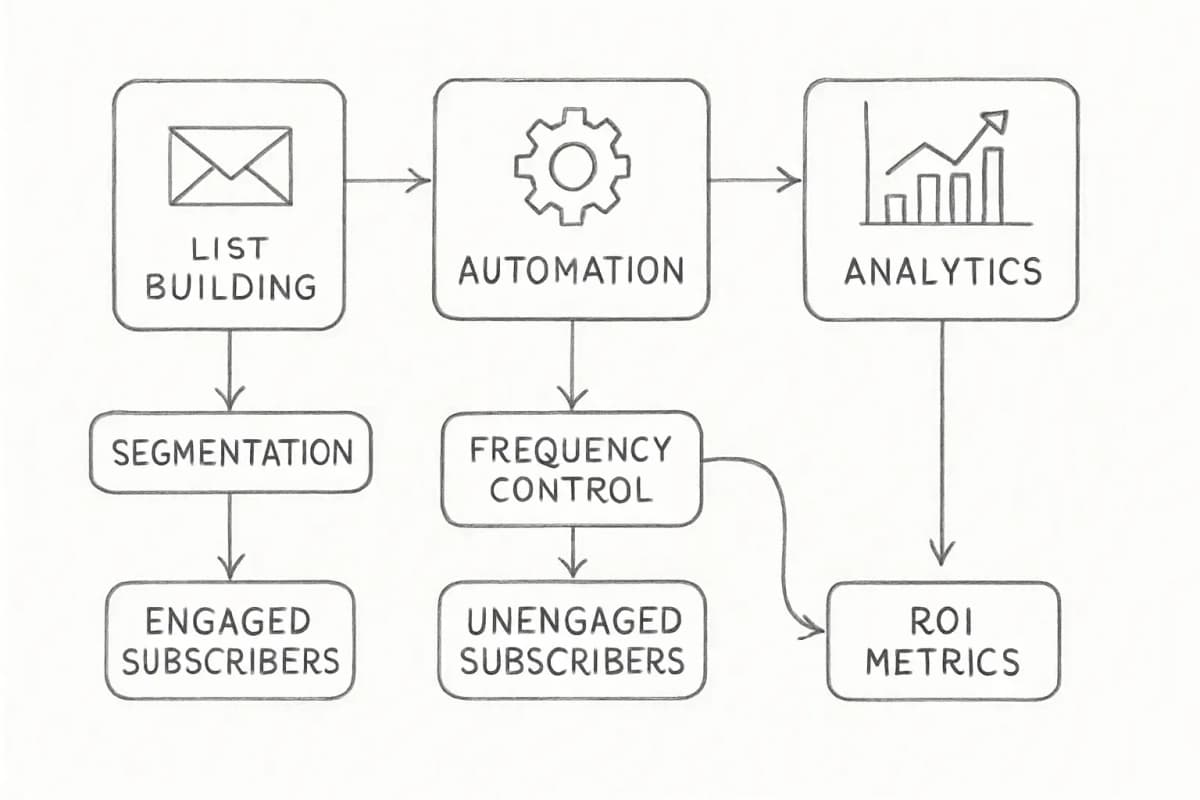
Also maintain your list regularly. Remove inactive subscribers after 6 to 12 months of no engagement. Regular list cleaning protects your sender reputation and improves deliverability.
For a deeper look at tools that help you grow your subscriber base, see 8 Lead Gathering Tools for Email Lists.
Step 3: Set Up Your First Automated Sequences
Automation is where most beginners leave money on the table.
Automated email sequences generate 320% more revenue than non-automated emails while achieving dramatically higher engagement across all metrics. That gap exists because automated emails arrive at the moment of highest intent, right when someone subscribes, abandons a cart, or completes a purchase.
Your first automation to build is a welcome sequence. Welcome emails achieve an impressive average open rate of 83.63% and a click-through rate of 16.60%, with a click-to-open rate of 19.85%, making them one of the highest-performing email types. That level of engagement drops quickly over time, so capturing it immediately matters.
Research indicates that successful welcome sequences typically contain 4 to 8 emails over 30 to 45 days. Welcome sequences often perform best with 4 to 6 emails.
Beyond welcome emails, the other automated sequences worth setting up early include:
- Post-purchase follow-up: Thank the buyer, set expectations, and cross-sell.
- Re-engagement: Target subscribers who haven't opened in 90 days.
- Abandoned cart (ecommerce): Abandoned cart emails achieve an average open rate of 50.5%, a click rate of 6.25%, and a conversion rate of 3.33%, with top-performing brands reaching 7.69%.
For step-by-step guidance on welcome email strategy, read our Welcome Email Sequence Best Practices.
Step 4: Write Emails People Actually Open and Read
No automation or list size matters if your emails get deleted on sight.
Two elements control whether someone opens your email: the subject line and the sender name. Your subject line carries most of the weight. Your subject line is one of the most important elements of your email, as it is the first thing recipients see. If it is not compelling or relevant, recipients may delete the message without ever opening it.
A few subject line principles that work:
- Keep it under 50 characters so it does not get cut off on mobile.
- Ask a question or create a specific information gap.
- Avoid spam trigger words like "free," "guarantee," and "act now."
- Test two versions (A/B test) every time.
Once the email is open, your job is to deliver what the subject line promised, then give one clear next step. Multi-purpose emails with five different calls to action consistently underperform focused emails with one.
Personalization raises the ceiling significantly. Personalized emails deliver 29% higher open rates and 41% higher click-through rates compared to generic messages.
For subject line strategies with data behind them, see our guide to Email Subject Line Best Practices That Boost Open Rates by 27%.
Step 5: Understand Email Deliverability Before You Hit Send
You can write a great email. If it lands in spam, no one reads it.
1 in 6 marketing emails never reach the inbox, getting filtered to spam or blocked outright. Most of these failures trace back to three things: missing authentication, poor list hygiene, or aggressive sending behavior.
Authentication is non-negotiable. SPF, DKIM, and DMARC are DNS-based protocols that tell mailbox providers which servers are allowed to send email for your domain, prove that messages weren't tampered with, and define what to do when checks fail. As of 2024, all senders need to have email authentication protocols in place if they want to reach people using major services like Gmail, Yahoo Mail, and Outlook.
Companies properly implementing DMARC see a 10 to 20% improvement in inbox placement rates, directly impacting campaign performance.
Here is what to set up from day one:
SPF: Authorizes your email service provider to send on your domain's behalf.DKIM: Adds a digital signature that proves the email was not tampered with in transit.DMARC: Start with a monitoring policy (p=none), analyze the reports, and gradually enforce stricter rules as you go.
Beyond authentication, keep these deliverability habits:
- Keep bounce rate under 2% to maintain sender reputation.
- Never spam your list. 96% of recipients have unsubscribed because emails were sent too frequently.
- Send consistently. Starting with a warm-up schedule before sending to your full list protects your sender score.
Step 6: Track the Metrics That Tell You What Is Actually Working
Most beginners track open rate and stop there. That is a partial picture, especially now.
Apple's Mail Privacy Protection automatically preloads email content and images for Apple Mail users, even if they never actually open the email. Since Apple Mail accounts for 46% of email clients, this change has significantly skewed open rate data upward. Email marketers now prioritize click-through rates, click-to-open rates, and conversion metrics when evaluating campaign performance.
The metrics that give you a cleaner signal:
| Metric | What it measures | 2025 benchmark |
|---|---|---|
| Click-through rate (CTR) | % of recipients who click a link | 2.09% (all industries) |
| Click-to-open rate (CTOR) | % of openers who click | 6.81% |
| Unsubscribe rate | % who opt out | 0.22% |
| Bounce rate | % of undelivered emails | 2.33% average across all industries |
Brands that A/B test every email see email marketing ROIs that are 37% higher than those that never include A/B tests. Use that as your default operating procedure from the start.
For a fuller breakdown of what to track and how to act on it, see our Email Marketing Analytics Best Practices.
Step 7: Segment Your List as Soon as Possible
Sending the same email to everyone on your list is the fastest way to burn engagement.
Segmented campaigns achieve 14% higher open rates and 28% better click rates compared to generic sends. Advanced segmentation can boost revenue by up to 760%, making it one of the highest-impact optimization tactics available.
Basic segments to start with:
- Engagement level: Separate active openers from inactive subscribers.
- Acquisition source: Subscribers from organic search behave differently than those from paid ads.
- Purchase history (ecommerce): First-time buyers vs. repeat customers vs. high spenders.
- Geographic location: Time zones affect when your emails land.
You do not need dozens of segments at the start. Even splitting your list into engaged and unengaged subscribers, and sending different frequency or content to each, will move your metrics.
For detailed tactics, read Email List Segmentation Strategies That Boost ROI by 760%.
Frequently Asked Questions
How long does it take to see results from email marketing?
Most businesses see measurable results within 30 to 90 days of consistent sending. Welcome sequences and automated flows start generating data immediately. Broadcast campaigns take longer to optimize because you need enough sends to identify patterns. The key is consistency: trust and relevance in content are more effective than quick-win tactics.
What is a good open rate for email marketing?
Based on an analysis of over 3.6 million campaigns, a good open rate is around 43.46%. Open rates by industry ranged from 30.1% to 55.71%, so what counts as "good" depends significantly on your sector. Focus more on click-through rate and conversions as the true indicators of whether your content is working.
How often should I send marketing emails?
33% of marketers send weekly emails and 26% send multiple times per month. There is no universal answer, but weekly tends to balance visibility with unsubscribe risk well for most audiences. Frequency matters: too many or irrelevant emails drive unsubscribes. Start with one email per week and test whether increasing or decreasing frequency moves your engagement up or down.
Do I need technical knowledge to set up email marketing?
No. Entry-level platforms like Mailchimp, MailerLite, Brevo, and ConvertKit require zero technical skills. You can create your first campaign within 30 minutes using drag-and-drop editors and pre-built templates. The one technical piece worth understanding early is email authentication (SPF, DKIM, DMARC), which most platforms walk you through during setup. Getting that right from the start protects your deliverability before it becomes a problem.