
Your marketing emails compete against hundreds of other messages in an overcrowded inbox every single day. The design of your template determines whether subscribers read, click, or delete within the first three seconds. Getting marketing email templates design right is not a creative exercise. It is a conversion discipline.
Email marketing generates $36 to $40 in ROI for every dollar spent, a return no other channel matches. But most of that value leaks from templates that ignore mobile behavior, bury the call to action, or load too slowly to hold attention. This guide covers every structural and visual decision that affects whether your template drives results or gets ignored.
Key Takeaways
- Mobile-responsive design delivers 15% higher click rates, making it one of the highest-ROI template optimizations available.
- Emails with a single CTA generate 371% more clicks than multi-CTA emails.
- Personalized emails achieve 29% higher open rates and 41% higher click-through rates than non-personalized messages.
- The industry-standard width for email templates is 600 to 700 pixels, with 600px being the safest choice for cross-client compatibility.
- 99.9% of emails analyzed in the Email Markup Consortium's Accessibility Report contained "Critical" or "Serious" accessibility issues, representing a significant opportunity for brands willing to fix them.
Why Template Design Directly Affects Revenue
Email design is more than creating visually appealing layouts. It plays a critical role in user engagement, readability, and conversion rates. A well-structured email ensures recipients can quickly grasp the message and take desired actions, while poorly designed emails lead to low open rates, high bounce rates, and lost conversion opportunities.
Around 376.5 billion emails were sent and received worldwide every day in 2025. Yet many of these emails remain unread or unopened. They get marked as spam, deleted, or completely ignored. That is why a well-designed email is essential to drive engagement and conversions.
The template is not decoration. It is infrastructure. Every layout choice either reinforces your message or dilutes it.
1. Start with the Right Dimensions
Before touching colors or copy, set the technical foundation correctly.
The industry-standard width for email templates is 600 to 700 pixels. Most email clients, including Gmail and Outlook, display content well within this range, and it ensures compatibility with smaller screens without excessive horizontal scrolling.
There is no strict height limit, but aim for 1200 to 2000 pixels for the entire email. The above-the-fold area (first 300 to 500 pixels) should grab attention with key content or a call to action. Prioritize critical information in the top 300 pixels.
For font sizing, keep your email width within 600px for proper display, and choose a base font size between 16 to 18px for body text and 22 to 26px for headers.
Accessibility guidelines from the Americans with Disabilities Act (ADA) require that font sizes be a minimum of 14 points. It is also good practice to make text resizable so readers can adjust it to a comfortable size.
2. Design for Mobile First
Mobile-first is not a trend. It is the baseline expectation for marketing email templates design in 2025.
Mobile devices now account for 55% of all email opens globally. Designing for desktop and then scaling down produces broken experiences on the device your subscribers actually use.
Mobile-responsive does not mean mobile-first. Many ESPs offer "responsive" templates that simply shrink desktop designs to fit smaller screens. The problem: shrinking a three-column layout designed for a 27-inch monitor creates terrible mobile experiences.
When it comes to mobile-friendly design, single-column layouts are your best friend. Unlike multi-column designs, which can feel cramped on smaller screens, single-column layouts stack content vertically, making emails clean, easy to scan, and effective across all devices.
Additional mobile specifications to follow:
- Use minimum 14 to 16px fonts and 44x44px touch targets.
- To optimize subject lines for Android and iPhone users, stick to 30 to 40 characters.
- Aim for a text-to-image ratio of 60:40, ensuring images take up a maximum of 40% of your email content.
Responsive templates increase clicks by 5 to 15%, but using Inbox Preview tools before sending increases clicks by 13 to 24%. Test both dimensions before every send.
3. Build a Clear Visual Hierarchy
Visual hierarchy is the difference between a subscriber who reads and one who scrolls past. Every element in your template should guide the eye from the header to the CTA without friction.
Good email template design features a mobile-first responsive layout, clear visual hierarchy, consistent branding, readable fonts (16px minimum), strategically placed CTAs, optimized images, and fast loading times. The design should guide readers naturally from headline to action.
Practical rules for visual hierarchy:
- Use one dominant message per email. Avoid cramming your email with too much information. Instead, focus on delivering one core message per email.
- Minimalism and a focus on micro-interactions keep the focus on the most important parts of the message without sacrificing style or engagement.
- Break large walls of text into smaller, digestible chunks that people can easily scan. Add white space, bullet points, and short paragraphs to give breathing room to your content.
The header area deserves particular attention. Emails with key information and CTAs placed at the top had a 25% higher click-through rate. Recipients were more likely to notice and engage with prominently placed elements. 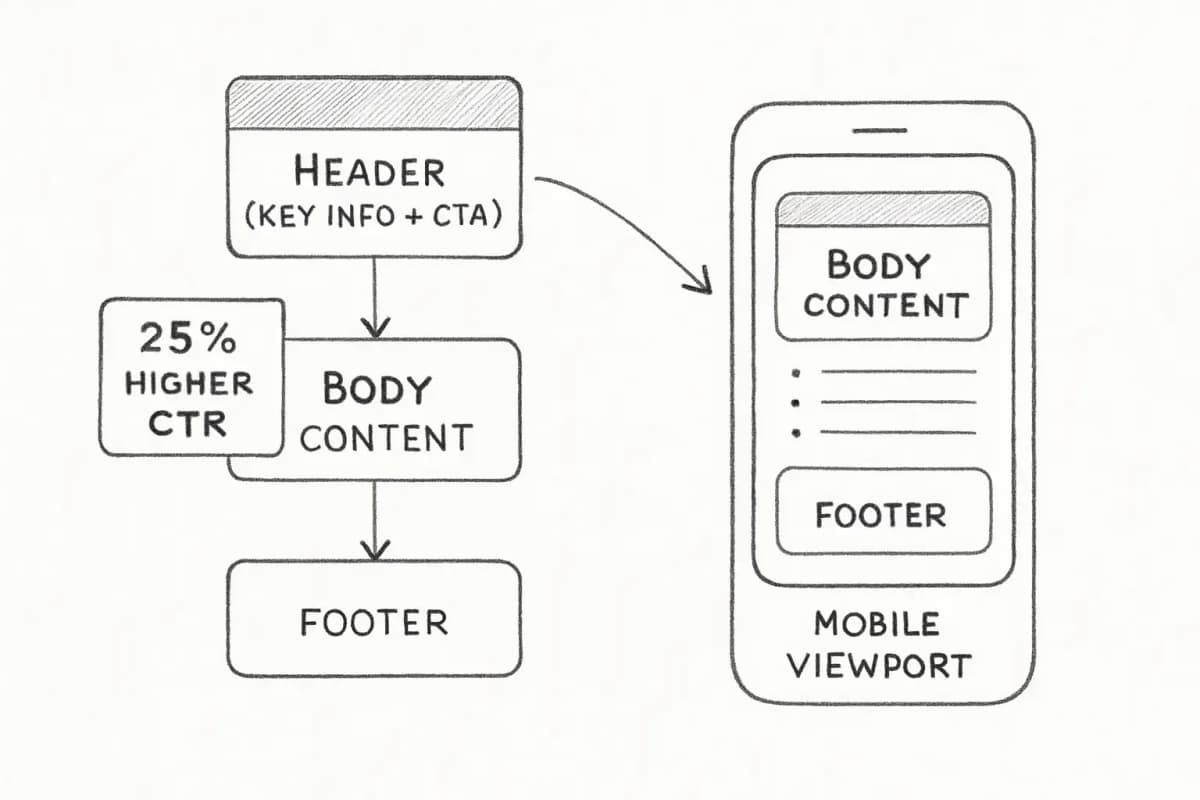
4. Design CTAs That Get Clicked
Your call-to-action button is the only element that directly generates revenue. Everything else in the template supports it.
Emails with a single CTA generate 371% more clicks and 1,617% more sales than multi-CTA emails. That number alone should end any debate about stacking multiple links and buttons into one send.
For CTA button design specifics:
- A high-converting CTA button uses benefit-first copy, visual contrast (4.5:1 for WCAG 2.1 AA), strategic placement, and supports mobile-friendly taps (minimum 44 by 44 pixels).
- Your CTA button is the most critical part of the email and it needs to stand out. Use bold, contrasting colors and large buttons. Include concise, action-oriented text like "Shop Now" or "Download Guide." Ensure CTA buttons are accessible for screen readers and labeled with clear text.
- Personalized CTAs can deliver 202% higher conversion rates than generic versions.
When testing button color, change one variable at a time. If you are testing CTA button colors, keep the copy and placement the same so you know exactly what made the difference.
For more on driving clicks and conversions, see our guide on Email Personalization Techniques That Boost Conversions 47%.
5. Personalize at the Template Level
Personalization is not a subject line trick. It is a template architecture decision. Dynamic content blocks, behavior-triggered layouts, and segment-specific visuals are all design choices.
Template-level personalization yields 27% higher click rates. This improvement applies across product recommendations, offers, and content modules tailored to subscriber segments. Beyond clicks, personalized promotional templates drive 11% higher open rates.
There is a shift away from sending generic, one-to-many emails. Personalization is trending. Email design best practices favor sending one-to-one emails tailored to customer behavior.
Practical personalization you can build into your templates:
- Dynamic product recommendation blocks based on purchase or browse history
- Conditional content sections that show different offers by segment
- Subject line personalization using the recipient's name, location, or past purchase data boosts open rates by 26%.
- Location-based imagery or offer sections
Personalized subject lines boost email open rates by up to 20 to 29%. These gains compound when the template body also delivers personalized content after the open.
Pair your template personalization work with a solid segmentation strategy. Our article on Email List Segmentation Strategies That Boost ROI by 760% covers the audience structure that makes dynamic templates worth building.
6. Build for Accessibility and Dark Mode
99.9% of emails analyzed in the Email Markup Consortium's Accessibility Report contained "Critical" or "Serious" accessibility issues. This is both a problem and an opportunity. Fixing it expands your addressable audience and improves deliverability.
The European Accessibility Act (EAA) of 2025 expands digital accessibility standards. Failing to meet these standards can result in legal issues, but more importantly, it excludes people who rely on accessible digital experiences.
The ROD Group estimates that people with disabilities (28.7% of adults in the U.S.) control over $1 trillion in annual disposable income. Inaccessible templates are leaving real revenue behind.
Core accessibility requirements for marketing email templates design:
- Use descriptive ALT text for images, semantic HTML, and proper heading structures. Ensure sufficient color contrast for readability. Avoid using color alone to convey meaning, as some recipients may be colorblind.
- Set an appropriate line height on text to make it easier to read. A line height 1.5 times your font size is recommended.
- One or two-column layouts are preferred, as they are easier to read on multiple devices.
For dark mode specifically: More users are shifting to dark mode settings, and emails that do not accommodate this trend can appear broken or hard to read. Use transparent images and dark mode-friendly colors to display correctly across light and dark themes. Avoid pure black backgrounds as dark grays are easier on the eyes and more polished.
In 2025, accessibility best practices include the use of alternative text on images, greater focus on color contrast, and increased adoption of semantic HTML in email design.
7. Use Branding Consistently Across Every Template
Template consistency is how subscribers recognize your email before they read a word. Templates are a great foundation for effective email design, and an opportunity for your brand image to shine through. Recommend changing anything that is not consistent with your brand image. Upload your brand assets and save them in a brand library to stick to the same design elements like color scheme, fonts, headings, and footers.
Conclude with a comprehensive email footer containing legal disclaimers, contact information, and social links. A well-crafted footer builds brand authenticity, preventing spam assumptions and preserving brand reputation.
A modular design system makes this practical at scale. Follow email design best practices that make your work easier, like modular design systems, and create centralized brand guidelines for consistent color palettes and design elements.
If you are managing templates at scale across platforms, our resource on Marketing Cloud Email Templates: Build Better Campaigns covers modular template architecture in depth.
8. Test Before Every Send
Litmus data shows just 47% use rendering checks to test emails across mobile and other platforms. This gap means over half of brands send emails without knowing how they appear on subscribers' devices.
Testing is not optional when your template renders differently across Gmail, Apple Mail, and Outlook. Test across iOS Mail (56.32% market share) and Gmail (30.57%) at a minimum.
What to test in your marketing email templates design:
- Rendering checks: Preview across major email clients using tools like Litmus or Email on Acid
- Mobile preview: Check single-column layout, button tap targets, and font scaling on actual devices
- A/B tests: Subject lines, CTA button copy, image placement, and personalization blocks
- Dark mode: Confirm transparency settings and contrast ratios hold up
- Plain text version: Create a plain text format for devices and email clients that do not read images to avoid compromising email quality.
Use A/B tests to determine which version of your email template is more effective at generating engagement and revenue. To get clear results, focus on testing only one element at a time.
For a complete pre-send process, our Email Marketing Campaign Checklist: 12 Steps covers every quality control step before you hit send.
Frequently Asked Questions
What is the best width for a marketing email template?
The industry-standard width for email templates is 600 to 700 pixels. Most email clients display content well within this range, and it ensures compatibility with smaller screens without horizontal scrolling. Wider designs may get clipped or distorted in some clients. Sticking to 600px is the safest, universally compatible choice.
How many CTAs should a marketing email template have?
One. Emails with a single CTA generate 371% more clicks and 1,617% more sales than multi-CTA emails. If you need to include secondary links, make them visually subordinate to the primary button and never compete with it for attention.
Does a responsive email template really improve conversions?
Yes, significantly. Using responsive design techniques, one brand saw a conversion rate increase of 394% over their promotional email. At a baseline level, responsive design improvements show immediate 15% increases in click rates. The gains multiply when combined with preview testing and mobile-first layout decisions.
How do I make my email template accessible?
Most best practices for improving accessibility in email marketing also improve the email experience for everyone. These include using a responsive design so your emails are easy to read on mobile devices, picking a readable font size, adding alt text to make images comprehensible for screen reader users, and picking contrasting background colors to make your text stand out clearly. Start with those four and you will address the majority of common issues without a complete template rebuild.