
Most businesses that switch to a proper email marketing automation solution see results within the first month. Email automations deliver 30 times more revenue per recipient than one-off promotional campaigns, with the average return per recipient for campaigns sitting at $0.11 while automated flows earn $1.94 per recipient. That gap is not a rounding error. It reflects a fundamental difference in how triggered, behavior-based communication performs versus batch-and-blast sending.
If your team is still building campaigns manually, you are not just wasting time. You are leaving revenue on the table, every single day.
Key Takeaways
- In 2024, automated emails drove 37% of all email-generated sales despite accounting for just 2% of email volume.
- Marketing teams that use automation can reduce their campaign production time by up to 40%.
- On average, email marketing delivers a return of between $36 and $42 for every $1 spent, the highest ROI of any digital marketing channel.
- Automation enables 77% higher conversion rates through improved targeting, timely follow-up, and personalized messaging.
- Companies see an average return of $5.44 for every $1 invested in marketing automation within the first three years, a 544% ROI.
What Email Marketing Automation Actually Is
Email marketing automation is the process of using software to automate repetitive tasks in your email campaigns, allowing you to send messages to subscribers based on their behavior and preferences, ultimately saving time and increasing efficiency.
The distinction from traditional email marketing is critical. Unlike traditional email marketing software, which focuses on manual list sends, automation platforms deliver continuous, context-aware communication powered by workflows and integrations.
In practice, that means emails go out when a subscriber takes a specific action: signing up, browsing a product page, abandoning a cart, or going quiet for 60 days. The message is relevant because it responds to what that person actually did, not what you guessed they might want.
The biggest benefit automation offers modern businesses is the ability to pre-arrange an email workflow that caters to customers based on real-time triggers, specific behaviors, and timelines. Time savings matter, but behavioral relevance is what actually moves the revenue needle.
The Real Cost of Not Automating
Manual email marketing is not just slow. It creates a ceiling on what your team can produce and how well you can personalize at scale.
Production speed has improved rapidly due to AI: 76% of marketing teams now produce and send a marketing email within 3 days, compared to 2024 when 62% of teams took two weeks or more for a single email.
That improvement comes directly from automation and AI tooling. Teams that still rely on manual processes are competing at a structural disadvantage.
The financial case is just as clear. Efficiency gains translate directly to cost reduction, with automation delivering 25 to 30% decreases in operational expenses from reduced manual labor, improved process consistency, and eliminated redundancy. Overhead specifically decreases by 12.2% on average when automation is implemented effectively.
Marketing automation software can lead to a 14.5% increase in sales productivity. Fewer manual tasks means your team redirects effort toward strategy, creative, and analysis rather than scheduling and copy-pasting.
The Core Automation Workflows Worth Building First
Not all automated workflows deliver equal results. Abandoned cart, welcome, and browse abandonment emails make up 87% of all orders from automations. Start there before building anything complex.
Here are the highest-impact email automation workflows, organized by priority:
1. Welcome sequences Welcome email automation introduces new subscribers to your brand over several touchpoints. Set triggers for immediate delivery after signup, followed by educational content at 3-day intervals. A well-built welcome email sequence can also function as your primary onboarding tool for SaaS products and service businesses.
2. Abandoned cart recovery Abandoned cart email automation targets customers who leave items in their shopping cart. Configure triggers for 1 hour, 24 hours, and 1 week after abandonment. The first send should land while purchase intent is still active.
3. Post-purchase flows The post-purchase email playbook takes order confirmation into a multi-touch retention program, sequencing confirmation, shipping, delivery, review request, and replenishment into one engineered customer journey.
4. Lead nurturing sequences Companies that excel at lead nurturing generate 50% more sales-ready leads at 33% lower cost per lead, while nurtured leads make 47% larger purchases than non-nurtured leads.
5. Re-engagement campaigns Re-engagement workflows serve as your final opportunity to revive inactive subscribers before list removal, attempting to rekindle relationships with inactive contacts who haven't engaged for an extended period. These campaigns help maintain list hygiene by automating marketing tasks that would otherwise take hours of manual labor.
Personalization and Segmentation: Where Automation Earns Its ROI
Automation at its most basic level saves time. At its best, it enables personalization that would be physically impossible to deliver manually.
Segmented campaigns generate 760% more revenue than non-segmented campaigns, and automated emails deliver 4x better conversion rates than other email types. Those two figures together explain why pairing automation with smart email list segmentation strategies is one of the highest-leverage moves in email marketing.
Personalized emails have a significant impact on key performance metrics, boosting open rates by 29%, increasing click-through rates by 41%, and driving six times more transactions.
Emails with personalized subject lines have a 26% higher open rate than generic ones. Combined with behavioral triggers and dynamic content, an email marketing automation solution can deliver a personalized experience at the scale of thousands of subscribers without increasing team size. 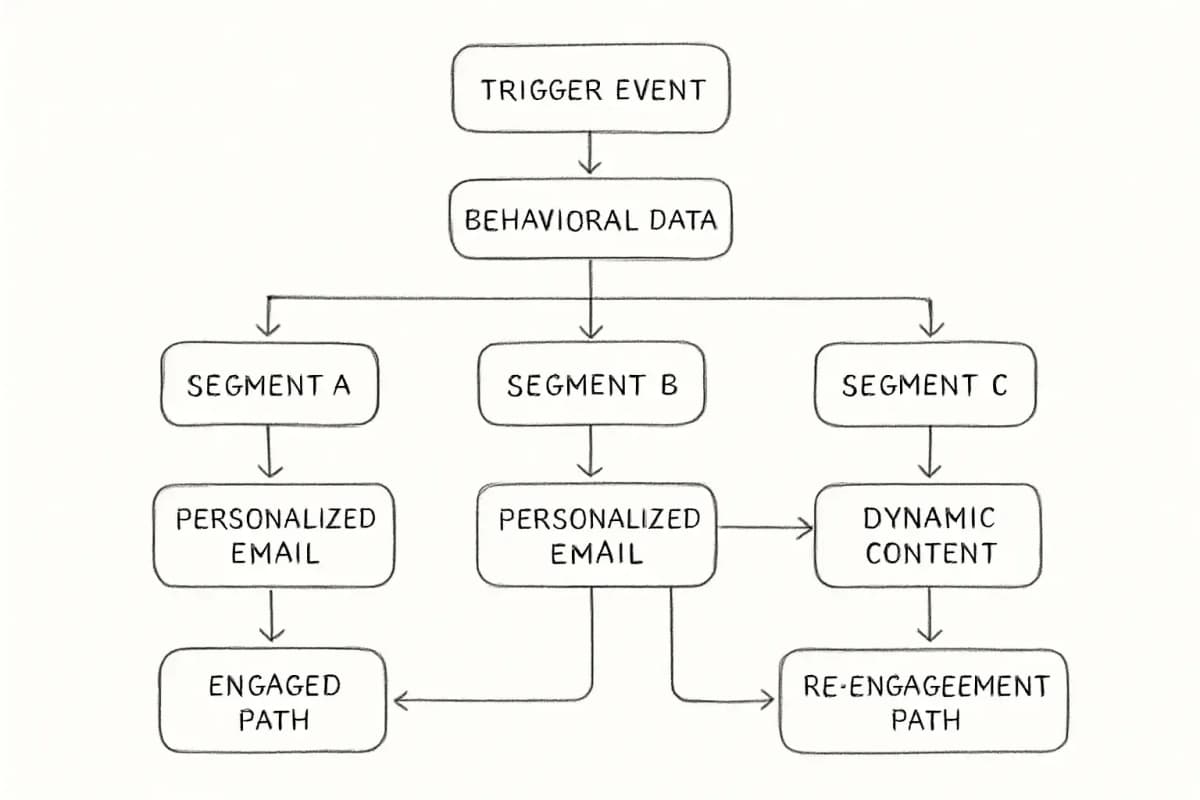
Personalized email campaigns are responsible for 75% of email revenue. That stat alone makes segmentation and personalization non-negotiable features in any platform you evaluate.
How to Choose the Right Email Marketing Automation Solution
Selecting an email marketing automation platform goes far beyond choosing where marketers will send emails. The right tool becomes the backbone of lifecycle marketing, powering personalized workflows and driving revenue. Email marketing automation platforms help businesses send targeted, personalized emails at scale by automating workflows, segmenting audiences, and integrating with CRM and ecommerce tools.
Today's marketing teams need platforms that offer predictive analytics, journey-based targeting, drag-and-drop journey builders and behavioral triggers, unified customer data for accurate segmentation, AI-powered content and optimization features, strong deliverability and compliance safeguards, and transparent pricing and easy migration support.
When evaluating platforms, prioritize these factors:
- Automation depth: Two platforms can both claim "automation" while delivering wildly different experiences. One might offer simple drip sequences while another orchestrates multi-step behavioral journeys across email, SMS, and web.
- CRM integration: CRM integration enables unified customer profiles and accurate segmentation. Platforms that require constant manual data syncing between your CRM and email tool create errors and slow you down.
- Deliverability infrastructure: If an email lands in the spam box, the chances that the recipient reads it dramatically decrease. Deliverability is a deal-breaker, and the right email marketing automation tool can get an email through spam filters.
- Scalability: Choose the platform that supports your future state, not just current needs. If your marketing strategy will evolve quickly, prioritize flexibility and automation over simplicity.
- Integrations: 52% of marketers say integrations are important when choosing marketing automation software.
For teams building more advanced CRM-connected workflows, our email marketing automation CRM setup guide walks through the technical configuration in detail.
Well-known platforms worth evaluating include:
- ActiveCampaign: A marketing automation powerhouse that blends email marketing with advanced automation and CRM functionalities. It excels in providing prebuilt automation workflows that help businesses nurture leads, re-engage inactive customers, and drive conversions with minimal effort.
- Klaviyo: Best for ecommerce brands. A data-driven email marketing software that is flexible and tailored specifically for ecommerce businesses. It offers integrations with platforms like Shopify and Magento to help you use real-time customer behavior and purchase data for highly personalized campaigns.
- Brevo: Its marketing automation tools are very impressive. It supports website tracking so you can trigger automated sequences from website visits.
- HubSpot: For B2B and inbound-focused teams, suited to those seeking integrated CRM, automation, and analytics.
The Role of AI in Modern Email Automation
AI is changing what automation can do, not just how fast it does it.
Companies using AI-driven email strategies see up to 41% more revenue than those using traditional batch-and-blast sends. The gap between AI-enabled programs and manual campaigns will only widen as these tools become more sophisticated.
AI is embedded in the way marketers work every day. From personalizing emails to predicting churn, AI is transforming automation into something more dynamic: a system that reacts in real time to customer behavior. For marketers, that means moving beyond batch-and-blast campaigns to deliver always-on engagement that feels personal at scale.
Broader AI tool studies report a 40% reduction in time spent on emails among users of AI assistants. That time compounds across a year of campaign production.
If you want to go deeper on this topic, the article on how to leverage AI in your email marketing covers practical implementation steps your team can start with this week.
Measuring Automation Performance
You cannot improve what you do not measure. Every automation workflow needs baseline metrics set before launch and a regular review cadence after.
Brands that regularly A/B test their emails achieve 83% higher ROI than those that never test. Companies that never test report average ROI of 2,300%, while those that often test achieve 4,200%.
Track these metrics for each active workflow:
- Open rate: Signals whether your subject line and sender name are working. Engagement metrics for automated emails significantly outperform manual campaigns, with 48.57% average open rates across industries.
- Click-through rate (CTR): Indicates content relevance and CTA strength.
- Conversion rate: The revenue-linked metric that matters most.
- Revenue per recipient: The top 10% of email workflows generate $16.96 in revenue per recipient, while average email flows generate $1.94. If you know your RPR, you know exactly where to invest in optimization.
For more structured guidance on interpreting these numbers, the email marketing analytics best practices guide covers attribution models and performance benchmarks in detail.
Deliverability testing increases returns by 39% by ensuring emails avoid spam folders and reach intended destinations. Testing email appearance across devices adds 18% ROI uplift.
Getting Started: A Practical Approach
Begin with small, high-impact workflows like welcome emails or cart reminders and track results before expanding across your funnel. Most teams that try to automate everything at once end up with half-built workflows that nobody maintains.
A structured launch sequence looks like this:
- Audit your current manual email sends. Identify which ones fire on a predictable trigger (new signup, purchase, inactivity).
- Build and launch a welcome sequence first. It is the highest open-rate automation type and sets subscriber expectations immediately.
- Add an abandoned cart flow if you run ecommerce. This single workflow typically delivers the fastest revenue impact.
- Layer in post-purchase and re-engagement flows once the first two are stable and measured.
- Use your platform's analytics to identify the workflow with the lowest conversion rate and test one variable at a time.
Time savings might sound like a modest win, but across dozens of campaigns the hours quickly add up. According to SAP Engagement Cloud research, marketers are reclaiming more than two hours every time they run a campaign. That is time teams can reinvest into higher-value work such as refining segmentation, testing creative, or experimenting with new channels.
Frequently Asked Questions
What is an email marketing automation solution?
Email marketing automation is the process of using software to automate repetitive tasks in your email campaigns, allowing you to send messages to subscribers based on their behavior and preferences. A full solution typically includes behavioral triggers, segmentation tools, workflow builders, A/B testing, and analytics.
How much does email marketing automation improve ROI?
Email automations deliver 30 times more revenue per recipient than one-off promotional campaigns. The average return per recipient for campaigns sits at $0.11, while automated flows earn $1.94 per recipient. Overall, companies see an average return of $5.44 for every $1 invested in marketing automation within the first three years, and most businesses recover their initial investment in under six months.
Which email marketing automation workflows should I build first?
Abandoned cart, welcome, and browse abandonment emails make up 87% of all orders from automations. Start with a welcome sequence and abandoned cart flow before building anything more complex. Both have pre-built templates in most platforms and deliver measurable results quickly.
How do I choose between email automation platforms?
Evaluate platforms based on feature depth (what the platform can actually do beyond basic campaign sending), how the platform stands out against the competition, and pricing and long-term value (how costs scale as your contact database and marketing needs grow). Run a free trial before committing, and test the workflow builder with a real use case from your business.